




















“Apply to the 10 newest remote React roles, using my profile.”
Apply to roles with your own AI agent
AI browser automation for job hunting (free on Mac)
AI browser automation for job hunting used to mean paying for a SaaS or fragile extension. Now your own agent — Claude Code or Codex — can find roles, fill approved fields, and return a reviewable application list with ego(lite) for free.
Download for Mac(yes, free)
Where ego(lite) users have been hired.
How it works, step by step
We’ll use LinkedIn as the example of AI browser automation for job hunting. The same steps work on any board your agent can open — you just change which roles you ask for.
1
Download ego(lite)
A Chromium browser you use daily. One click imports your Chrome logins, so the agent applies as you.
2
Tell your AI agents what to apply to
Type /ego-browser and just say which roles — in any language your agent understands.Which roles should it apply to?
/ego-browser Find the 10 newest remote React roles on LinkedIn and prepare applications using my profile
3
Get the results back
Get a log of what it applied to — or have it draft each one for you to review before it submits.
Works across the job boards you can access
Point your agent at a board you are authorized to use and say which roles to search or apply to. The workflow is similar, but each board's forms, login checks, and rules still apply.
Indeed
“Apply to marketing roles in NYC posted this week with my resume.”
Greenhouse
“Fill and submit this Greenhouse application from my profile.”
Lever
“Complete this Lever application using my saved answers.”
Workday
“Walk the Workday flow and fill every step from my resume.”
Glassdoor
“Apply to senior PM roles I haven't applied to yet.”
Ashby
“Submit the Ashby application with a cover letter tailored to the role.”
Any board you're logged into
“If you can apply there, name it and let it run.”
A reliable auto-apply workflow stays supervised
The useful part of job-application automation is removing repeated typing while keeping decisions, account access, and truthfulness with you. Use these guardrails when you scout roles, fill an ATS form, or prepare a submission.
Accuracy starts with a review checklist
Before Submit is the control point: compare the role and company, confirm the selected resume, read every answer, and check work authorization and salary fields. Require the agent to pause on missing or ambiguous information so a fast run never turns an assumption into a claim.
Use only the sessions and accounts you own
Import an authorized browser profile and keep account state isolated in its own Space. The agent can reuse a signed-in session, but you remain responsible for MFA, CAPTCHA, identity checks, and any re-authentication that the job board requests.
Expect ATS forms to change
Greenhouse, Lever, Workday, and other ATS flows can add conditional fields or change labels without notice. Ask the agent to describe each unfamiliar field, verify required attachments, and update your answer bank after a reviewed run instead of relying on brittle selectors or an old template.
Scout first and export a source-linked list
A scouting pass can collect titles, employers, locations, URLs, and fit notes into Markdown or CSV before any application is opened. Paste approved rows into a Google Sheet in your own browser only after checking the sheet, sharing settings, and duplicate history.
Filter for fit, not volume
Define seniority, location, employment type, visa constraints, salary range, required skills, and exclusions up front. Log why each posting was included or skipped so you can tune relevance without encouraging a batch of low-quality submissions.
Keep resume tailoring truthful and ATS-friendly
The agent may reorder and rephrase facts you supplied, and it can produce a plain-text version with conventional headings for ATS parsing. Review every edit and reject invented credentials, dates, employers, metrics, or responsibilities; tailored wording must remain evidence you can defend in an interview.
Assume recruiter expectations differ
Some teams welcome AI-assisted drafting, while others ask applicants not to use it. Follow the employer's instructions, keep each application specific to the role, and disclose assistance when requested; a human-reviewed submission is more defensible than an identical mass blast.
Stop on limits, suspicious listings, or controls
Rate limits, CAPTCHAs, identity checks, timed assessments, and unverifiable job listings are boundaries, not obstacles to route around. Stop the Space, verify the employer and destination URL, and leave the item as needs review while you follow the platform's terms and applicable privacy rules.
What you get back
Send a bounded job-hunting run. Come back to a reviewable result.
Hand it your resume and criteria, then choose whether it should scout openings, prepare applications, or pause for your review. A completion notice points you to the source-linked results; the visible Space remains available while it works.
Terminal — 100×30
╭─ Claude Code v2.1.197 ───────────────────────────────────────────────────────╮
│ │ │
│ Welcome back! │ Tips for getting started │
│ │ Run /init to create a CLAUD… │
│ │ Note: You have launched cla… │
│ │ ──────────────────────────── │
│ │ What's new │
│ │ Bare `/color` (no args) now… │
│ │ `/mcp` now shows the tool c… │
│ Fable 5 · API Usage Billing │ `--plugin-dir` now accepts … │
│ │ /changelog for more │
╰──────────────────────────────────────────────────────────────────────────────╯
Using Fable 5 (from .claude/settings.json) · /model to change
/help for help, /status for your current setup
cwd: ~/work/ego
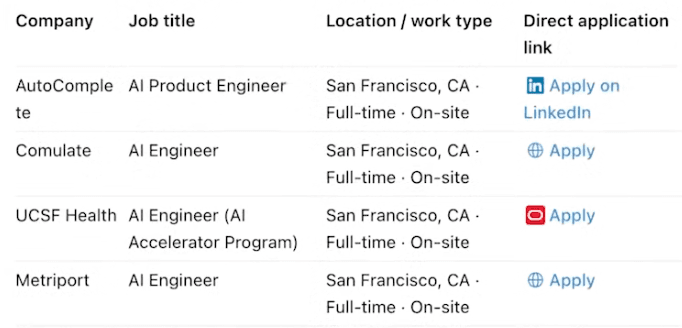
>/ego-browser Search LinkedIn for AI Software Engineer roles in San Francisco and pull 10 companies with confirmed-open application links
●Bash(
ego-browser nodejs <<'EOF'
await openOrReuseTab('https://www.linkedin.com/jobs/', { wait: true })
cliLog(`jobs page ready — ${(await pageInfo()).url}`)
EOF
)
⎿ Run ego-browser to search LinkedIn and vet each listing
⎿Output:
[t=1.4s] opened linkedin.com/jobs — AI Software Engineer · San Francisco
[t=48s] filtered out senior titles and stale postings — 23 candidates left
[t=3m02s] opened each listing, confirmed still accepting — 10 verified
Done — 10 companies actively hiring, each with a direct application link:
| Company | Job title | Location / work type | Direct application link |
|---|---|---|---|
| AutoComplete | AI Product Engineer | San Francisco, CA · Full-time · On-site | Apply on LinkedIn |
| Comulate | AI Engineer | San Francisco, CA · Full-time · On-site | Apply |
| UCSF Health | AI Engineer (AI Accelerator Program) | San Francisco, CA · Full-time · On-site | Apply |
| Metriport | AI Engineer | San Francisco, CA · Full-time · On-site | Apply |
─── 3m 40s · ↑ 9.2k tokens · ego-browser runtime ───
 ego(lite)Task complete — 10 open roles found, links ready
The follow-up costs one more line: “Now apply to all 10 with my profile.”
- 1 ask
- 10 confirmed-open roles
- $0 — just your agent’s tokens
No scripts. No extensions. No per-application fees.
Auto-applying usually means signing up for a service per board, installing an extension that breaks, or wiring up your own script — and paying to keep it alive. You skip the entire stack.
The usual way
Stitch together an auto-apply tool for every board
- A different auto-apply SaaS or browser extension per board, each with its own login and dashboard
- A monthly subscription, or credits per application
- Or roll your own: npm install puppeteer-core and a Node project to maintain
- Hand-write DOM selectors for each form (input, data-testid) that break when the board’s UI changes
- Code the navigation, pagination, and form-filling yourself
- Fight logins that don’t carry over, CAPTCHAs, and a flow that’s different at every company
Hours of setup · $$$ / month
ego(lite)
Open your agent and ask
- Nothing to install — no Node project, no Puppeteer, no extension
- Runs on the browser you already use, already signed into LinkedIn and Indeed
- Reads the form’s structure, not fragile selectors, so a UI change won’t break it
- Just tell it which roles and from your own profile — in any language your agent understands
- Free — you only spend your agent’s tokens
- Just the AI agent and browser you already use every day — no per-board tools to hunt and compare, and no chores to babysit
Minutes · $0 + your agent’s tokens
What ego(lite) won’t do
Built to apply on your behalf, with your own profile, on accounts you already have access to.
What ego(lite) can do
Apply on your behalf, with your access.
- Find roles and fill out applications on boards you use
- Tailor your resume and cover letter wording to each role
- Track what you’ve applied to and skip duplicates
- Draft applications for you to review before submitting
- Run the same search-and-apply on a schedule
What we don’t recommend
The red lines, stated plainly.
- Fabricate qualifications, degrees, or work history
- Mass-blast low-relevance roles or spam recruiters
- Bypass CAPTCHAs, identity checks, or timed assessments
- Impersonate someone else or use accounts that aren’t yours
Related job application resources

Stop paying a stack of SaaS tools. Give your AI agent ego(lite) and it’ll handle any web automation for you.
FAQ
Do I need a special account or a job-board API key?
No. You bring an AI agent you already use — Claude Code, Codex, or Cursor — and ego(lite) is the browser it drives. The agent applies on your own logged-in session, so there's no job-board API to apply for, no API keys, and no third-party auto-apply service in the loop.
How does AI browser automation help with job hunting?
An AI browser agent can search the job boards you already use, filter roles against your criteria, collect direct application links, and fill repetitive fields from an answer bank. In ego(lite), the work runs in a visible browser on your Mac, so you can inspect the posting and review the completed application before anything is submitted.
Can it automatically submit every job application for me?
It can prepare and submit a bounded set of applications when you explicitly ask it to, but the safer workflow pauses before each submission for your review. Set a small daily cap, stop on unfamiliar questions or verification screens, and never treat the page as a promise of unlimited or unattended applications.
What does the job-hunting automation return?
The agent can return a source-linked job list or application log with the role, company, location, job URL, status, and check time. That record lets you review what was found, submitted, skipped, or blocked instead of losing track of applications in a browser tab.
How much does it cost versus an auto-apply SaaS or extension?
ego(lite) is a free download. Instead of a monthly subscription or per-application credits, you only spend your own agent's tokens — and a single application usually costs just a few, since the agent works from a compressed snapshot of the page rather than raw HTML. There's no third-party service to pay or depend on.
Which job boards can it apply on?
LinkedIn, Indeed, Greenhouse, Lever, Workday, Glassdoor, Ashby, and other boards whose visible application flow your agent can open. The workflow is similar across them, but each board's forms, login checks, access, and rules still determine what can be completed.
Will it lie on my applications or hurt my chances?
No. It applies with your real profile and your own answers, and it tailors the wording of your resume and cover letter to each role — it doesn't fabricate qualifications, degrees, or work history. If you'd rather check first, tell it to draft each application for your review before it submits.
Will applying get my account banned or bypass anything?
ego(lite) runs on your real, logged-in session and behaves like you applying yourself. It doesn't defeat CAPTCHAs, evade identity checks, or get through timed assessments, and it doesn't mass-blast recruiters. We can't promise any platform's rules won't change, so stay within each platform's terms and use it the way you'd apply by hand.
Is my data safe, and is ego(lite) free?
Your browsing data stays on your own computer — ego(lite) doesn't upload your history, cookies, sessions, or resume. It's free on macOS today, with Windows and Linux on the roadmap. If you connect an external agent or model provider, that provider has its own data policy.
How do I keep AI-filled applications accurate before submitting?
Give the agent a written answer bank, require it to stop on anything it cannot answer, and review the complete form before every submission. A good workflow checks the role, company, location, resume version, screening answers, and work-authorization response as one checklist; it never treats a plausible-sounding generated answer as permission to submit.
Can it keep my job-board login and browser session?
Yes. ego(lite) drives a browser context you already own and are signed into, so the agent can reuse that session without receiving your password. Import only the profile you authorize, keep separate Spaces for separate accounts, and take over whenever a login, MFA, CAPTCHA, or identity check appears.
Will it handle dynamic ATS forms such as Greenhouse, Lever, or Workday?
It can work through visible fields and steps on ATS forms that your session can open, including forms that reveal questions dynamically. ATS layouts change frequently, so treat every run as supervised maintenance: stop when a field is unclear, verify attachments and required fields, and update your answer bank when a company adds a new question.
Can it collect jobs and export them to Google Sheets?
The agent can scout boards, deduplicate listings, and return a CSV or Markdown table with the title, company, URL, location, and status. You can then ask it to open an approved Google Sheet in your own signed-in browser and paste the rows, but review permissions and the columns before writing; the page does not promise a native Sheets integration or unattended syncing.
How does it avoid applying to irrelevant jobs?
Put hard filters and explicit exclusions in the prompt, then require a role-by-role fit check before any form is opened. Titles, seniority, location, employment type, visa requirements, salary range, and duplicate history should be recorded in the log so you can see why a posting was included or skipped instead of optimizing for application count.
Can it tailor an ATS-friendly resume without making things up?
It can reorder and rephrase facts you supplied to match a role's terminology, while preserving your real dates, employers, skills, and outcomes. Tell it to flag missing evidence, keep a plain-text ATS-safe copy, and show every proposed change for approval; it must not add a degree, certification, metric, or job responsibility you did not provide.
How do recruiters generally view AI-assisted applications?
Recruiter reactions vary by company and role, so automation is not a substitute for relevance or a thoughtful application. Keep the submission truthful and specific, avoid identical mass-blasts, follow each employer's instructions, and disclose AI assistance when a form or recruiter asks; human review is what keeps the application attributable to you.
What should I do about ATS limits, fake jobs, and compliance?
Treat rate limits, suspicious listings, blocked pages, and verification screens as stop signals. Do not bypass controls or submit to a posting you cannot verify; cross-check the employer and destination URL, respect the job board's terms and privacy rules, keep a conservative cap, and leave anything uncertain in the needs-review state.