




























ego (lite) 只是一款浏览器;ego 才是你跨设备的个人 Agent。
加入候补名单
ego lite 对比 Browserbase

最好用的 Browserbase 替代品

Browserbase is a cloud browser platform: your code spins up remote sessions over REST, drives them over CDP, and pays by the browser minute.

ego lite is a Browserbase alternative for your own agent work: real Chromium on your Mac, already signed into your accounts, controlled by your coding agent via /ego-browser. No session to create, no meter, finishing whole tasks 3 to 4x faster than Browserbase.

开发者用户来自
GoogleAmazonShopifyTikTokHarvardStanfordUSCUCLA

为什么 ego lite 比 Browserbase 更好

A Browserbase session is a fresh remote browser on someone else's servers. ego lite starts from your imported Chrome profile on your machine. Run /ego-browser in Claude Code, Codex, or Cursor.

真实任务中快 3 到 4 倍

Before your agent touches a page, you wait for a cloud session to spin up, and the meter starts immediately. Browser time bills by the minute with a one-minute minimum, so a twenty-second check still costs a full minute.

Run /ego-browser and your coding agent controls ego lite on your machine. Every page arrives as a Snapshot: a compressed accessibility tree with stable @N refs it can act on instantly, finishing whole tasks 3 to 4x faster than Browserbase.

Time to finish a task, shorter is better
81.8 sego lite
282.9 sagent browser
Data source - Task: scrape the main posts from the X account from the last 7 days

并行多任务,执行更快

How many Browserbase sessions you can run at once depends on your plan: 3 on the free tier, 25 on Developer, 100 on Startup. Go past that and work waits in a queue. To watch a run, you open Live View in a dashboard tab.

In ego lite there's no cap on how many Spaces you open inside the same browser: each one runs its own task at the same time, controlled by a coding agent via /ego-browser on its own imported Chrome profile. None of them ever steals the tab you're using, and you can watch or take over any Space anytime.

不再反复来回 消耗更少 Token

Drive Browserbase with Stagehand and a simple checkout flow turns into a chain of model calls, each one waiting on a page read over the network before the next click.

Run /ego-browser and your coding agent batches several actions in a few lines of JavaScript per turn to control ego lite. Stacked with Snapshot input, the same task completes on far fewer tokens overall.

Claude Code · ego lite
>/ego-browser Add the first product to the cart, then check checkout loads
Bash(
ego-browser nodejs <<'EOF' await openOrReuseTab('localhost:3000') await click('.product-card') await click('.add-to-cart') await click('a[href="/checkout"]') cliLog('checkout loaded') EOF
)
Output:
[t=4480ms] checkout loaded
Done. Both steps work.
─── 1 tool call · 1.1k tokens ───
Stagehand · env: "BROWSERBASE"
>$ npx tsx run_task.ts const stagehand = new Stagehand({ env: "BROWSERBASE" }) await stagehand.init()
await page.goto("http://localhost:3000")
// page = stagehand.context.pages()[0]
navigated: http://localhost:3000
live view: https://www.browserbase.com/sessions/4f1c…
1.6k tokens sent so far
await stagehand.act("click the first product card")
// LLM call #1 · model: gpt-5.6-sol · cacheStatus: "MISS"
→ { success: true, message: "Action completed successfully",
actions: [{ selector: "/html/body/div[2]/main/div[1]/a",
method: "click", arguments: [] }] }
3.8k tokens sent so far
await stagehand.act("click add to cart")
// LLM call #2 · model: gpt-5.6-sol · cacheStatus: "MISS"
→ { success: true, message: "Action completed successfully",
actions: [{ selector: "/html/body/div[2]/main/button[1]",
method: "click", arguments: [] }] }
5.9k tokens sent so far
await stagehand.observe("find the checkout link")
// LLM call #3 · model: gpt-5.6-sol
→ [{ selector: "/html/body/nav/a[href='/checkout']",
description: "Checkout link", method: "click", arguments: [] }]
8.0k tokens sent so far
await stagehand.act(action)
// no LLM: Action from observe()
→ { success: true, message: "Action completed successfully",
actions: [{ method: "click", arguments: [] }] }
navigated: /checkout
9.1k tokens sent so far
await stagehand.extract("is the payment form present?", z.object({ present: z.boolean() }))
// LLM call #4 · model: gpt-5.6-sol
→ { present: true }
11.4k tokens sent so far
await stagehand.extract("list the payment fields", z.object({ fields: z.array(z.string()) }))
// LLM call #5 · model: gpt-5.6-sol
→ { fields: ["card", "expiry", "cvc", "zip"] }
13.6k tokens sent so far
─── 7 model calls · 13.6k tokens ───
同样的任务,同样的模型。 左边:ego lite 里一次打包的 JavaScript 调用,总共 1.1k tokens。 右边:Stagehand 驱动远程 Browserbase 会话,7 次调用,token 涨到 13.6k。

同一个 Chrome,为 Agent 而生

Browserbase sessions start with a fresh profile unless you turn on persistence, and Browserbase's own docs say two-step verification and magic links usually need a human in the loop.

Built on Chromium, ego lite imports your entire Chrome setup in one click. When your coding agent runs /ego-browser, it controls ego lite with your real sessions already in place, so it doesn't stall on SSO, 2FA, or captchas on accounts you already have.

ego lite 的 Chrome 浏览器配置文件导入:一键设置,保留所有登录状态

ego lite 对比 Browserbase

ego lite 与 Browserbase 的功能对比。
功能ego liteBrowserbase
浏览器跑在哪里在你的 Mac 本机,作为日常浏览器Browserbase cloud only; no self-hosted option
已登录的网站(SSO、2FA)One-click Chrome profile import; coding agent controls ego lite with real sessions via /ego-browserFresh user data by default; docs say 2FA and magic links need a human in the loop
AI Agent 如何连接在 Claude Code、Codex 或 Cursor 里运行 /ego-browser。没有 SDK,没有 API key先用 REST 创建会话,再经 CDP 用 Stagehand、Playwright、Puppeteer 或 Selenium 接入
每个任务的 Token 消耗Lower: Snapshot input plus batched JavaScript, measured per taskStagehand: a model call per act/observe/extract; plain Playwright/Puppeteer/Selenium scripts: none
价格免费,无订阅,无账号Free tier, then $20/mo Developer / $99/mo Startup / custom Scale, plus overage
什么被计量什么都不用。浏览器已经在你机器上Browser minutes and proxy MB, with one-minute and one-MB minima per session
并行任务Unlimited Spaces in one browser, bounded by your machinePlan caps: 3 free, 25 Developer, 100 Startup, 250+ Scale
流量带着谁的信誉Your network and your logged-in browserShared cloud IP ranges
你的数据去哪Stays on your machinePages transit Browserbase; recording is on by default unless you opt out
可复用技能(即将上线)将成功的运行过程提炼为可复用技能;Agent 重复执行复杂任务时最高可快 5 倍(限量测试中)没有内置的同类功能
生产级浏览器集群与合规不能。只是一位开发者的机器和账号Yes: SOC 2 Type II, HIPAA BAA, DPA, SAML SSO, four data regions
最近更新 2026年7月30日

让切换无缝衔接

Keep Browserbase for your product's cloud fleet. Move your own logged-in browser work to ego lite in a few minutes.

  1. 下载 ego (lite)

    下载 ego lite,一键导入你的 Chrome 浏览器配置文件,登录状态、Cookie 和扩展程序全部一起带过来。

  2. 用 /ego-browser 运行你的第一个任务

    粘贴到你的 Agent 里

    /ego-browser 打开 ego.app 加入等候名单

    Paste one sentence into Claude Code, Codex, or Cursor and hit enter. No session to create, no API key, no SDK.

  3. 看它开始工作
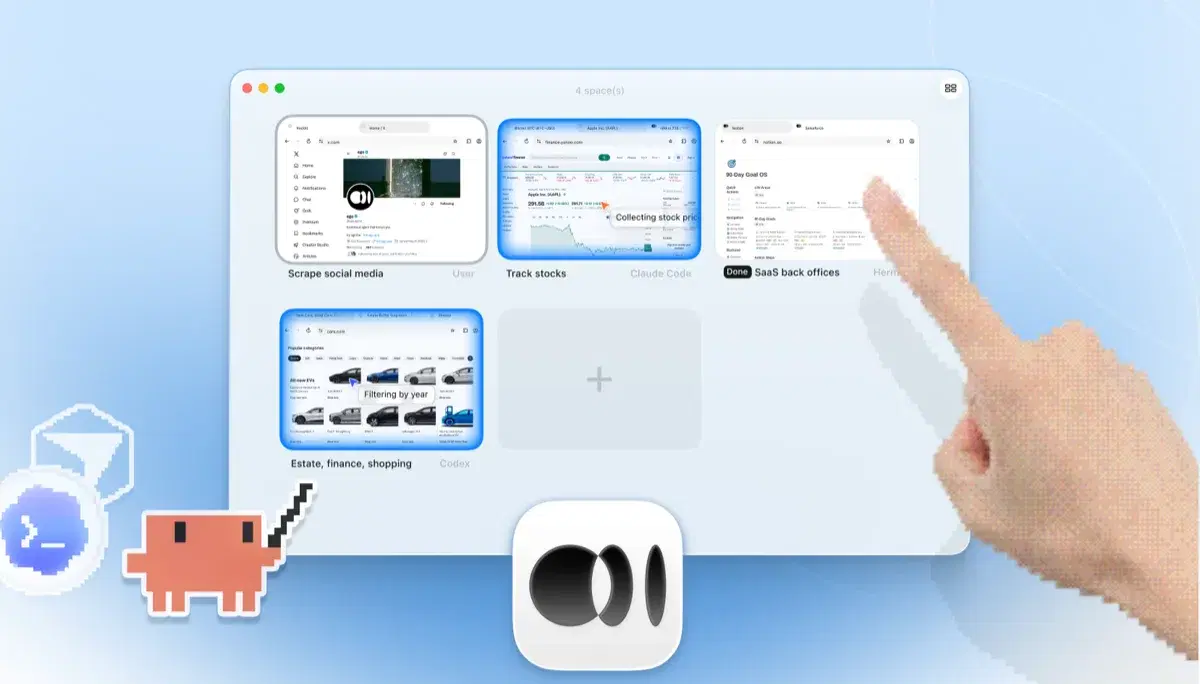
    ego lite 的 Space 概览,四个浏览器任务并排运行:Claude Code 在 Yahoo Finance 上追踪苹果股价,Codex 在 cars.com 上按年份筛选车型,Hermes 在完成一项 SaaS 后台任务,一位用户在抓取 X 上的数据,还有一只手正在点击 + 打开另一个 Space

    The task runs in its own Space, so your tabs stay untouched. Watch live or take over anytime. Results land back in your agent's CLI.

Keep Browserbase for high concurrency, unattended runs, and anonymous targets that need proxies and captcha solving.

各工具的适用场景

以下情况选择 ego (lite)

  • Your tasks touch logged-in sites: dashboards, admin panels, anything behind SSO or 2FA.
  • You want a free local loop with no session create step and no browser minutes to bill.
  • Pages and credentials should stay on your machine, not transit a cloud provider.
  • You want parallel Spaces you can watch or take over from Claude Code, Codex, or Cursor.

以下情况选择 Browserbase

  • You need real cloud concurrency (100+ browsers). ego lite is one machine.
  • Work must keep running when your laptop is closed.
  • You're hitting anonymous targets at volume and want managed proxies, stealth, and captcha solving.
  • You need SOC 2, HIPAA, SAML, and session recording because your product runs browsers for customers.

为你的 Agent 配备真实浏览器

免费使用,运行在你的 Mac 上,一键导入 Chrome 浏览器配置文件。支持 Claude Code、Codex、Cursor,以及任何能写代码的 CLI Agent。

还在权衡?看看 Browserbase 和同赛道其他工具怎么比。

常见问题

Browserbase is a cloud browser platform with docs and SDKs on GitHub. You create sessions over REST, drive them over CDP with Playwright, Puppeteer, Selenium, or Stagehand, and pay for browser time plus proxy bandwidth. It handles the ops layer most teams would rather not build: proxies, stealth, captcha solving, session recording, and compliance. For products that need browsers at volume for their own users, it is the reference choice among browserbase competitors. It is cloud-only; there is no self-hosted option.

For your own logged-in browser work, yes: free, local, already signed in, driven via /ego-browser. For production cloud fleets that need 100+ concurrent browsers, managed proxies, captcha solving, and compliance paperwork, Browserbase is still the right category.

Browserbase bills browser minutes and proxy bandwidth: a free tier, then Developer at $20/mo, Startup at $99/mo, and custom Scale plans, plus overage. ego lite is free. The browser is already on your machine, so there is nothing to meter.

Not by default. Sessions start with fresh user data unless you persist a context and sign in by hand through Live View. Browserbase's docs say two-step verification and magic links usually need a human in the loop. ego lite imports your Chrome profile once locally, and every task starts signed in.

Browserbase publishes product docs and open SDKs on GitHub, including Stagehand. That repo is the usual landing point for browserbase github searches. ego lite is separate: a Chromium browser on your Mac, controlled through the MIT ego-browser shell, not a cloud session API.

They sit at different layers. Browser Use is a Python agent framework that decides what to do. Browserbase is the cloud browser infrastructure those agents often run on. ego lite is neither: run /ego-browser and your coding agent controls ego lite locally, with no session API and no per-minute billing.

operator.browserbase is Browserbase's operator-style surface for driving cloud browser sessions from an agent. ego lite is not a hosted operator. It is local Chromium your coding agent controls with /ego-browser, already signed into your accounts.

Among browserbase competitors, the usual names are cloud browser platforms like Browserless, Steel, and hosted Playwright or Puppeteer fleets, plus agent stacks that bundle their own remote browsers. ego lite is a different category: a Chromium browser on your Mac for your own agent work, not a fleet you operate for customers.

Yes, but not directly from /ego-browser. You create a Browserbase session over REST, attach over CDP, and drive it with Stagehand, Playwright, Puppeteer, or Selenium from a script your agent runs. That path fits cloud automation. For logged-in work inside your own accounts, ego lite is simpler: run /ego-browser in Claude Code, Codex, or Cursor with no session create step.

Shared cloud IP ranges carry shared reputation, so some sites treat traffic as automated even when you mean well. Proxies and stealth help on anonymous targets. With ego lite, traffic comes from your own network and logged-in browser.

No. Browserbase's FAQ says there is no self-hosted option. ego lite runs entirely on your Mac. Free on macOS 12+, no account required.