




























ego (lite) 只是一款浏览器;ego 才是你跨设备的个人 Agent。
加入候补名单
ego lite 对比 Claude Chrome 扩展程序

最佳 Claude Chrome 扩展程序替代方案

Claude Chrome extension is the plugin that lets Claude control Chrome: clicking, filling forms, navigating your signed-in browser. It only works when you run Claude Code's desktop app; run Claude Code from a terminal and there's nowhere to install it. ego lite doesn't care how you run your agent: /ego-browser works the same from a terminal or a desktop app, giving Claude its own Space in a separate browser with your real logins.

开发者用户来自
GoogleAmazonShopifyTikTokHarvardStanfordUSCUCLA

为什么 ego lite 比 Claude Chrome 扩展程序更好

If you're running Claude Code from the terminal and searched for a way to give it Chrome, the honest answer is that Anthropic's plugin isn't reachable that way. It only installs through Claude Code's desktop app. ego lite is: run /ego-browser inside Claude Code, terminal or desktop, and the agent gets a browser of its own.

The agent never fights you for your browser again

Because every task gets its own Space (a separate workspace inside the same browser), you can watch it, stop it, or step in, and the agent never touches the tab you're using. Several tasks can run in parallel, all visible at once.

Claude Chrome extension works differently: it acts inside the Chrome window you're already using, in your live session, one task at a time, so that window isn't really yours again until the task finishes. Because the agent is acting inside your live, logged-in session, Anthropic's own testing found prompt-injection attacks succeeded up to 23.6% of the time without extra safety mitigations.

Faster on both tasks, measured against Claude Chrome extension

Claude Chrome extension works through one tool call at a time (one click, one keystroke, one read), and the model has to reason between each step. On two real tasks, that adds up: ranking OpenAI's X posts took Claude Chrome extension 5 minutes 30 seconds, and the Expedia flight-booking task took about 8 minutes.

ego lite reads the page as a compressed Snapshot and batches several actions into a few lines of JavaScript in a single turn, instead of one tool call at a time. On the same two tasks, ego lite finished in 87 seconds and 166 seconds: 3.79x faster and roughly 2.9x faster.

Time to finish the same tasks, shorter is better
Task 1: Rank OpenAI's X posts from the last 7 days
87 sego (lite)
330 sClaude Chrome extension
Task 2: Expedia: search, filter, and fill a flight booking
166 sego (lite)
480 sClaude Chrome extension

Run several tasks at once, in any agent you pick

Claude Chrome extension needs a paid Claude plan, and it can only handle one task at a time, in the window you're using.

ego lite is free, runs several tasks at once in separate Spaces, and works with Claude Code, Codex, Cursor, Gemini CLI, or any code-writing CLI agent, so switching agents doesn't mean changing your browser setup.

Works from Claude Code's terminal: the plugin doesn't

Claude Chrome extension only works when Claude Code runs as a desktop app. If you run Claude Code from a terminal instead, there's no menu, setting, or install path that reaches it. Browser control simply isn't available that way.

ego lite works the same either way: run /ego-browser inside Claude Code, whether it's running in a terminal or as a desktop app, and the agent gets a real browser of its own.

ego lite Chrome profile import: the same setup whether Claude Code runs in a terminal or as a desktop app

ego lite 对比 Claude Chrome 扩展程序

Feature comparison between ego lite and Claude Chrome extension.
功能ego liteClaude Chrome extension
Agent 在哪里工作In its own Space: a separate workspace, never your tabs在你当前正在使用的 Chrome 窗口和标签页里
任务运行时你能否继续工作Yes: agents run in parallel Spaces, you browse in yoursNot really: it's acting in the browser you're in, one task at a time
支持的 AgentClaude Code、Codex、Cursor、Gemini CLI,以及任何会写代码的 CLI Agent仅限 Claude
已登录的网站(SSO、2FA)Yes: one-click Chrome profile import brings cookies and sessionsYes: it runs inside your already-signed-in Chrome
提示词注入暴露面Agent 在独立、可见的 Space 中操作,你可随时旁观或叫停Agent 在你的实时会话中操作;Anthropic 的分类器能降低攻击成功率,但官方提醒并非万无一失
Extension reliabilityN/A: no extension to crash or disconnectReal user reports of Chrome crashing on use; Anthropic's own docs note responses are probabilistic and may misinterpret instructions
Agent 如何在页面上操作Snapshot input plus batched JavaScript: several actions per turn通过扩展程序像用户一样逐步点击和输入
Speed on a real task87s vs Claude's 5:30 on the same X-research task; 166s vs Claude's ~8 min on the same Expedia flight taskReasons and calls a tool for every click and keystroke: slower on both real tasks tested
可复用技能(即将上线)将成功的运行过程提炼为可复用技能;Agent 重复执行复杂任务时最高可快 5 倍(限量测试中)没有内置的同类功能
价格免费,无需订阅Beta on paid Claude plans, desktop app required
Works from Claude Code's terminalYes: /ego-browser works the same in a terminal or a desktop appNo: only installs and runs inside Claude Code's desktop app
支持平台macOS(基于 Chromium 的浏览器)任意桌面操作系统上的 Chrome
最近更新 2026年8月04日

让切换无缝衔接

You don't have to uninstall anything. If what you want is Claude doing browser work (not just chatting about the page), the switch takes minutes.

  1. 下载 ego (lite)

    下载 ego lite,一键导入你的 Chrome 浏览器配置文件。登录状态、Cookie 和扩展程序都会一并带入,Agent 不会卡在 SSO 或验证码上。

  2. 用 /ego-browser 运行你的第一个任务

    粘贴到你的 Agent 里

    /ego-browser Open ego.app and join the waitlist

    在 Claude Code 里运行 /ego-browser。无需安装扩展程序,无需 MCP 服务器,也不用写任何配置文件。

  3. 看它开始工作
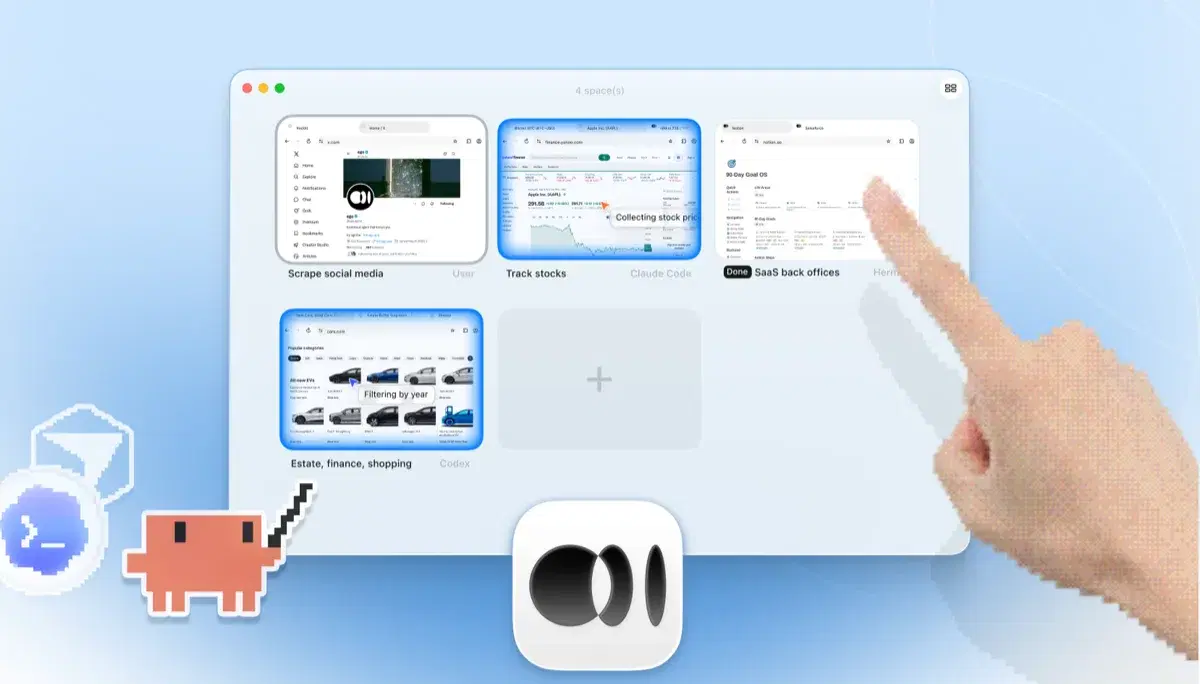
    ego lite 的 Space 概览,四个浏览器任务并排运行:Claude Code 在 Yahoo Finance 上追踪苹果股价,Codex 在 cars.com 上按年份筛选车型,Hermes 在完成一项 SaaS 后台任务,一位用户在抓取 X 上的数据,还有一只手正在点击 + 打开另一个 Space

    Give Claude a real multi-step task (the kind you'd hesitate to run in your own tabs) and watch it work in its own Space while you keep browsing.

Keep the Claude Chrome extension if you like it for summarizing and Q&A on the page you're reading. ego lite replaces the take-actions-in-my-browser part, not the chat.

各工具的适用场景

以下情况选择 ego (lite)

  • You run Claude Code from a terminal, where the plugin has no install path at all. Run /ego-browser and the agent gets a browser regardless.
  • 任务是多步骤且需要登录的,你更希望它们在独立的 Space 里跑,而不是在你正忙着的标签页里。
  • You want several tasks in parallel Spaces while you keep browsing. The extension works one task at a time in your window.
  • 你想要免费且不绑定 Agent:浏览器这一侧不需要付费 Claude 套餐,换了 Agent 同一套设置照样能用。

何时选择 Claude Chrome 扩展程序

  • You're already running Claude Code's desktop app, and its built-in Chrome plugin is right there, with no extra install.
  • You're a claude.ai user who wants light automation (a form filled, a page acted on) without installing any dev tooling.
  • You don't use a CLI coding agent at all. ego lite assumes one; the extension only needs Claude's desktop app and a paid plan.
  • 你想要 Anthropic 官方、经过安全测试的路径,内置其公开的提示词注入防护。

为你的 Agent 配备真实浏览器

免费使用,运行在你的 Mac 上,一键导入 Chrome 浏览器配置文件。支持 Claude Code、Codex、Cursor,以及任何能写代码的 CLI Agent。

Still weighing your options? See how Claude Chrome extension compares with the other tools in the same space.

常见问题

Claude Chrome extension is Anthropic's official way to give Claude control of Chrome (clicking, filling forms, navigating) using your signed-in browser. It's built into Claude Code's desktop app: enable it there and Claude reaches Chrome directly as part of a session. The terminal (CLI) version of Claude Code has no equivalent install path; the plugin simply isn't available from there. It launched as a research preview in August 2025, and Anthropic's public safety work on it has been unusually serious. If you're already running Claude Code's desktop app, it's a well-built way to hand off browser tasks.

As of mid-2026 it's in beta on paid Claude plans. For Claude Code specifically, it only works inside the desktop app; there's no way to reach it from a terminal session. It started in August 2025 as a research preview limited to 1,000 Max-plan users while Anthropic worked on prompt-injection defenses, then rolled out more broadly. There's no free tier.

No. It only works inside Claude Code's desktop app. If you run Claude Code from a terminal, there's no menu or install path to reach it: browser control for Claude Code is a desktop-only feature. ego lite doesn't make that distinction: install ego lite and run /ego-browser inside Claude Code, terminal or desktop app, and the agent gets Snapshot access to pages and executes JavaScript in the browser directly. No extension or MCP configuration involved.

If your goal is an agent that does browser work (research, form filling, testing, back-office tasks), yes. ego lite runs those tasks in parallel Spaces with your real logins, works with Claude Code (terminal or desktop) and other agents, and is free. If your goal is chatting with the page you're currently reading inside claude.ai's experience, the extension is built for that and ego lite isn't trying to replace it.

没有任何 agent browser 能免疫,凡是宣称能免疫的页面都不该信。Anthropic 公开的浏览器使用测试说明了这件事为什么重要:页面上的隐藏指令可以诱导 Agent,防护手段能降低但无法消除风险。ego lite 的结构性差异在于:Agent 在自己的 Space 里操作,而不是在你正活跃使用的标签页和会话里;一切在可见界面中进行,你随时可以旁观或接管。

ego lite itself is free with no subscription. You bring your own agent, so Claude Code still needs whatever plan or API access you already use it with. The browser side never charges you.

Yes. One-click Chrome profile import brings your real logins, cookies, sessions, and extensions into ego lite, so agents don't get stuck on captcha, 2FA, or SSO. That's the same signed-in advantage the extension gets from running in your Chrome, just without the agent operating in your active window.