The short answer, before anything else: three routes get Claude Code past a login wall, and the steadiest is giving the agent a browser that is already signed in. Storage state injection covers CI and test accounts; extension takeover covers occasional supervised tasks. On every route, passwords should never pass through the agent.
ego (lite) is that first route as a product: a free browser built for sharing your logged-in browser state with AI agents. Import from Chrome once, every site you've signed into stays signed in, and the agent works in its own Space with your window untouched, credentials never typed by anyone.
The task was "pull this week's numbers from the analytics dashboard." Claude Code opened a browser, navigated perfectly, and delivered a beautiful summary of the login page.
Every browser route's default is the same: a fresh profile, signed in to nothing. Your dashboards, portals, and internal tools all live on the other side of that wall.
Why does Claude Code get stuck at login screens?
Because authentication lives in browser state, and automation browsers start stateless on purpose. Cookies, localStorage tokens, and session identifiers are what make you "logged in"; a Playwright MCP profile or an agent-browser session has none of yours, by design, since isolation is a feature for testing.
The naive fix (tell the agent your password and let it type) fails twice: your credentials enter the model's context and transcript, and modern auth (2FA, device checks, SSO redirects, CAPTCHA-gated logins) breaks scripted sign-in anyway. The real routes all share one idea instead: authentication happens once, by a human, and the agent uses the resulting state.
Auth is state; give the agent state, not secrets.
The three routes at a glance, before the details:
| Route | Credential exposure | Persistence | Best for |
|---|---|---|---|
| Reuse a signed-in browser | None; logins happened before the agent existed | As long as your real sessions last | Daily tasks on your own accounts |
| Storage state injection | A secret file to guard | Until the site expires the session | CI and test accounts, headless runs |
| Extension takeover | None, but full-profile blast radius | Your browser's own sessions | Occasional supervised tasks |
Route 1: Reuse a browser that's already signed in
Principle: the agent operates in a real browser where you completed every login normally, so sessions simply exist. Three implementations, in ascending order of comfort.
Minimal: run Playwright MCP headed, ask Claude to open the login page, sign in manually yourself, and let the session's cookies persist for the rest of the run (a pattern Simon Willison documents); it works but resets when the browser closes.
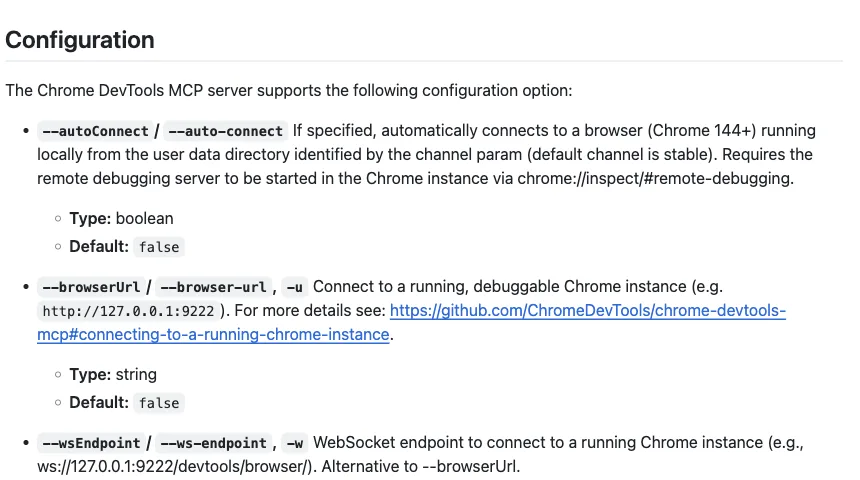
Middle: Chrome DevTools MCP with auto-connect (Chrome 144+) attaches the agent to your actual signed-in Chrome after a permission dialog, with the trade that it's your window being driven.
Full: ego (lite), a free browser built for sharing your logged-in browser state with AI agents: import from Chrome once, and every site you've signed into stays signed in, with the agent working in its own Space (isolated tabs, your window untouched) and driving through the ego-browser skill.
Risk profile: strongest of the three routes, because no credentials are ever typed, stored, or scripted; the exposure is scoped to what the agent can do inside sessions you granted, which is why per-task scoping (route it to the site the task needs, nothing more) is the discipline that matters here.
It's also the route that survives contact with real auth stacks, because nothing about it looks like automation to the site: the session is simply a session.
Route 2: Inject storage state
Principle: log in once, save the browser's storage (cookies plus localStorage) to a file, and load that file into fresh automation browsers. Playwright's storage state tooling makes this a two-call pattern:
// once, after a manual login in a headed browser
await context.storageState({ path: 'auth.json' })

// every future run
const context = await browser.newContext({ storageState: 'auth.json' })
This is the CI route: headless-friendly, repeatable, no human at runtime. Its costs are maintenance-shaped: sessions expire on the site's schedule and the file goes stale; some sites bind sessions to device fingerprints and reject transplanted state; and auth.json is now a credential-equivalent secret you must store like one (never in the repo, never in the agent's context).
Use it for test accounts and staging systems; think twice before bottling your personal accounts this way, since route 1 does that job without creating a secret file at all. And rotate deliberately: a stale auth.json that half-works produces the most confusing failure mode in this whole topic, an agent that's logged in on one subdomain and anonymous on the next.
Route 3: Extension takeover
Principle: an extension puts the agent inside the browser you're already using, sessions included. Claude for Chrome is the official version (beta on paid Claude plans, attached to Claude Code via claude --chrome, with site-level permissions and confirmations); Browser MCP is the free community version (extension plus MCP server, using "your existing browser profile, keeping you logged into all your services").
It's the fastest route to a working logged-in task, and the trade is possession: the agent acts in your window, on your whole profile, while you wait or watch. Anthropic's own guidance draws the sensible lines: pre-approve sites, keep confirmations on for irreversible actions, and keep it away from financial transactions and password managers because prompt-injection defenses "aren't foolproof."

Right for occasional supervised tasks; wrong as the daily default, because the window cost compounds and the blast radius is everything you're signed into.
Where should credentials never go?
One rule survives all three routes: passwords and tokens must not pass through the agent. Not in the prompt ("log in with hunter2"), not in scripts the agent writes (they land in transcripts and logs), not in files it reads.
Each route above honors this when done right: route 1's logins happened before the agent existed; route 2's state file is loaded by the runtime, not read into context; route 3's sessions were established by you in your own browser.
How do you handle 2FA and CAPTCHAs?
Don't automate them; hand them off. These challenges exist to require a human, and the sustainable pattern is a control handoff: the agent works until it hits the challenge, the human completes it in the same browser, the agent resumes in the now-authenticated session.
ego (lite) builds this in as a first-class flow: the agent hands the task's Space to you, you complete the login or code entry in that live page, and the agent takes back over with the session intact, no state export, no re-navigation.
And because sessions persist in a real daily browser, the challenge happens once per site rather than once per run, which is the quiet reason route 1 setups feel calm: Chrome-imported sessions mean agents aren't re-triggering the walls fresh profiles hit.
Download ego (lite) for Mac, free, or read all five ways to give Claude Code a browser for the wider map.
FAQ
Can I just give Claude Code my password?
You can; you shouldn't. It lands in the transcript and context permanently, and modern auth breaks scripted logins anyway (2FA, device checks, CAPTCHA gates). Every route in this guide exists so that no credential ever needs to pass through the model.
Does Playwright MCP support logging in at all?
Yes, two supported patterns: run headed and complete the login manually while the session lives (route 1's minimal form), or capture storage state once and reload it per run (route 2). What it doesn't have is your existing sessions; its profile starts clean by design.
What happens when a session expires mid-task?
Route dependent: storage-state setups fail until you re-capture the file; extension and shared-browser setups surface the site's own re-login page, which is a handoff moment: you sign in once in the live page, the agent resumes. In a real daily browser this is rare, since normal sites keep you signed in the way they keep any regular user signed in.