
We used ego (lite) as Claude Code's visible browser for a local UI repair: the Agent saw the rendered bug, changed the code, reloaded the same page, and checked the outcome outside its own summary. We ran that sequence on a local request page on September 28, 2026. The result below is one case, not a success-rate study.
ego (lite) supplied the Chromium TaskSpace that Claude Code inspected in this case. The agent captured the 375 px broken layout, reloaded the page after its CSS edit, and checked the request receipt in that browser; a separate server read confirmed the saved record. This makes the browser useful for a visible local repair, while the one run does not measure reliability or replace a repeatable regression test. The browser choice and its limits are explained below beside the original before and after screenshots.
What did the live browser test reveal?
We gave Claude Code 2.1.276 an isolated request page with three cards. The acceptance task was specific: inspect the page at 375 CSS pixels, capture the broken state, fix only the stylesheet, reopen the page, then choose Design and submit. The fixture delayed its write response by 120 ms, so a click alone could not count as a result. Claude Code used the ego-browser skill and a Chromium TaskSpace for the browser actions.
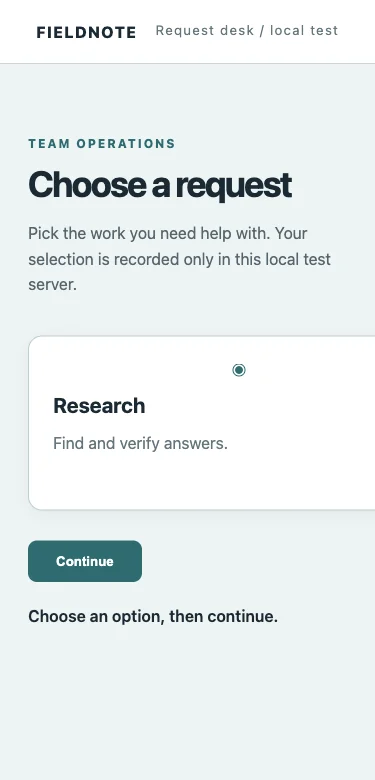
The agent measured document scrollWidth rather than judging the screenshot alone: 1,324 px against a 375 px viewport, leaving 949 px of horizontal overflow. It traced that overflow to the card grid's three fixed 420 px tracks. This was a real rendered defect in our deliberately broken fixture, not a claim about a customer site.
How did Claude Code fix and verify the bug?
The agent changed one CSS rule and kept the HTML and server code untouched. The original and replacement rules were:
.cards { grid-template-columns: repeat(3, 420px); }
/* changed to */
.cards { grid-template-columns: repeat(auto-fit, minmax(260px, 1fr)); }
It then disabled the browser cache, reloaded the same page in the same TaskSpace, and measured the viewport again. The three cards became one 319 px column. The document width matched the 375 px viewport, and no element extended past the right edge. The before and after images are separate mobile viewports, so the text remains readable.
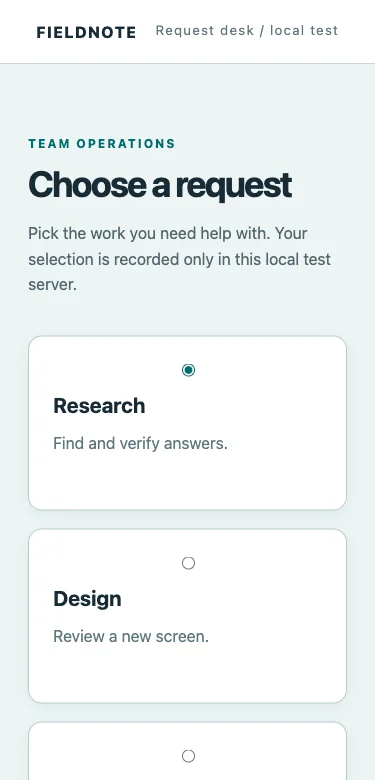
| Observed signal | Before | After |
|---|---|---|
| Document width at 375 px viewport | 1,324 px | 375 px |
| Horizontal overflow | 949 px | 0 px |
| Grid columns | 420 px × 3 | 319 px × 1 |
The agent selected the Design radio button and clicked Continue. The browser status read “Request saved: REQ-001 (Design).” A separate GET to the fixture server returned one persisted record with the same ID and kind. Those two signals answer different questions: the page rendered a success state, and the server actually accepted the write.
Browser: Request saved: REQ-001 (Design)
Server:  [{"id":"REQ-001","kind":"Design", ...}]
What happened when the server rejected the write?
After the Claude Code run, we independently opened the same fixture with a controlled failure flag. The server returned HTTP 503 for a Build request. The page showed “Request failed: controlled write failure,” and a fresh server read still contained only REQ-001. This is an injected failure, not evidence that Claude Code detected or recovered from it.
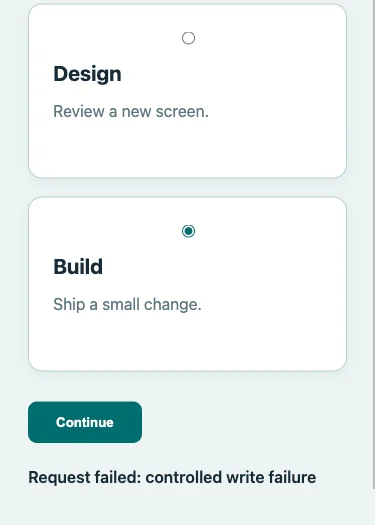
The practical rule is to keep the negative assertion. If a test only waits for a toast or for a button click to finish, a rejected write can look like success. For a real app, use an independent API read, database fixture, or other server-side state that the browser agent cannot fabricate.
What happened on harder browser surfaces?
We ran a separate, preplanned Claude Code task against seven browser conditions in one local fixture: delayed text, duplicate Open labels, an iframe, an open shadow root, a rerendered button, a console error, and a rejected request. All seven expected end states appeared in the raw browser output, and the failed request left the server record count unchanged. This is one exploratory run, not seven independent reliability trials.
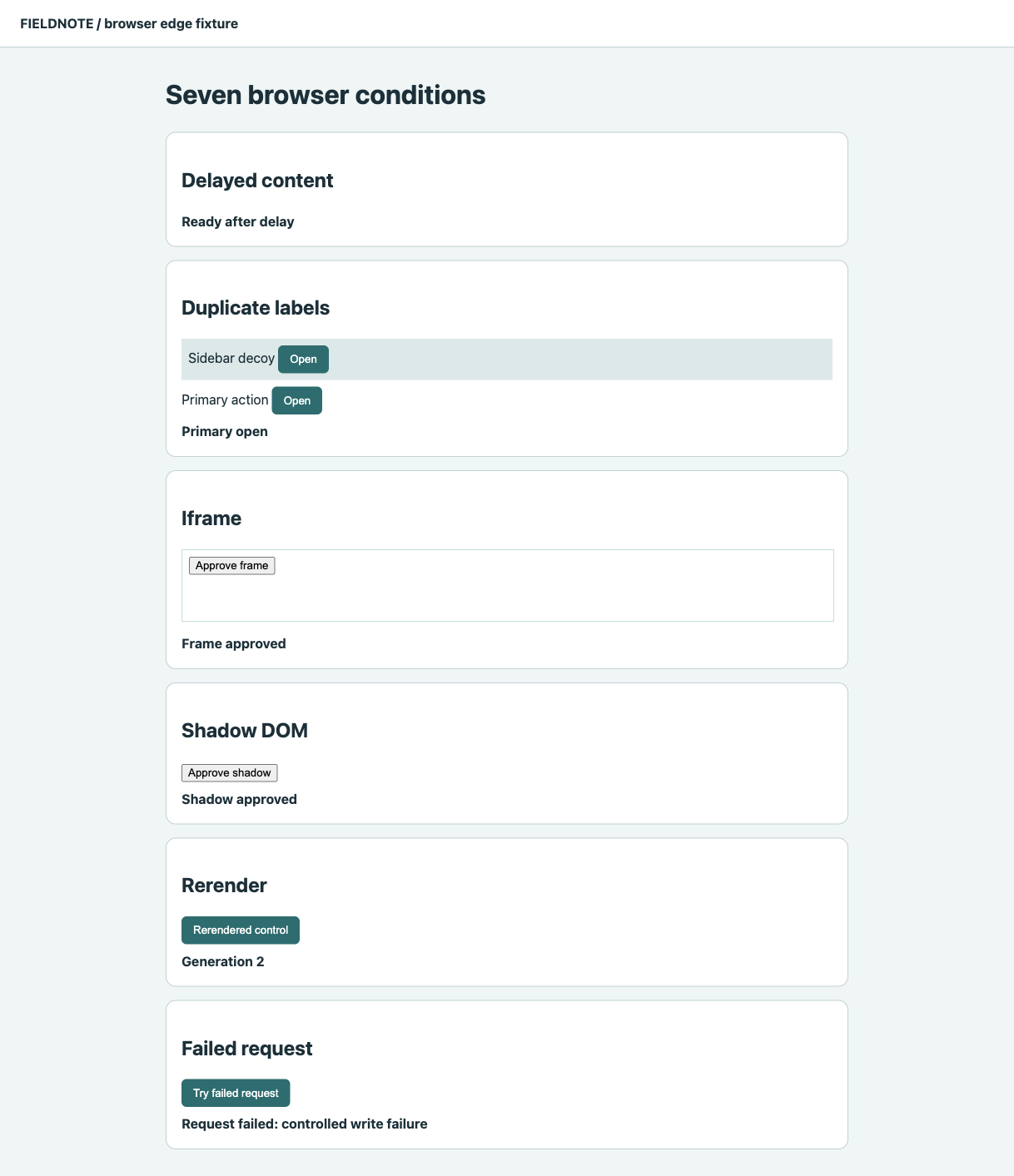
Iframe status: Frame approved
Console event: fixture-console-error: expected diagnostic marker
Failed request: HTTP 503; server rows before 1, after 1
The raw action log also preserved a problem: the first click attempts on five controls returned “Stale ref.” Claude Code inspected a fresh snapshot and retried those actions in the same TaskSpace. The final states passed, but the retries are part of the result. The console marker was captured separately before navigation; a screenshot alone could not prove it. Do not turn these observations into a claim that the workflow will pass reliably on other pages.
How can you reproduce the workflow on your own app?
Start a local server, name one affected route and viewport, and give Claude Code a measurable acceptance rule. Our prompt asked it to read the ego-browser skill, open localhost at 375 px, capture a before image, edit only the stylesheet, reload the same browser space, capture an after image, and submit one request. The exact task mattered more than a broad “test my app” instruction.
Open http://127.0.0.1:48220/ at 375 CSS px.
Capture the overflow before changing code.
Edit only the stylesheet, then reload the same browser page.
Report document scrollWidth and clientWidth.
Select Design, click Continue, and report the visible receipt.
Do not claim success without a fresh browser observation.
Add an external check for your app's real outcome. In our case that was GET /api/requests, which had to contain the receipt ID and Design kind. Keep the browser screenshot, command output, CSS diff, and server result together. If an assertion fails, preserve the failure instead of prompting the agent to retry until it turns green.
Which browser should Claude Code use?
Anthropic now documents an official Claude Code with Chrome route for local web app testing. Its documentation describes form validation, visual checks, console debugging, and authenticated pages. It requires a compatible Chromium browser, the Claude in Chrome extension, and an eligible direct Anthropic plan. We did not run that route here, so this case cannot rank it against any alternative.
For this case, ego (lite) supplied the agent-controlled Chromium TaskSpace. That let Claude Code capture the mobile page, reload after editing, and use the same browser context for the receipt check. The useful product choice is a browser the agent can actually inspect, with screenshots and DOM measurements you can audit. This case does not test ego (lite)'s logged-in session behavior; see the separate login guide for that question.
Paste into your agent
Set up ego lite for me: https://github.com/citrolabs/ego-lite Read `skills/ego-browser/references/install.md` and follow the steps to install ego lite.
For repeatable release gates, use a test runner with explicit assertions and CI integration. Playwright's official documentation covers that role. A browser agent can investigate a new visual failure and help write a regression test, while the suite owns the repeatable gate. The tool routes themselves are compared in our browser connection guide.
What does this one case not prove?
The repair case and the edge task were each run once on small, local, unauthenticated fixtures. They show observed browser-and-code behavior, including retries and independently checked server state. They do not establish a success rate, mean time, token advantage, or any winner among browser tools. Login expiry, production traffic, other Claude versions, and repeated trials remain untested. Those need separate plans and samples before making reliability claims.
The noninteractive CLI run used permissions bypass only inside this isolated fixture. On a real repository, keep the normal permission review and restrict the agent's edit scope. The raw transcript, local fixture, before and after images, server event, and independent validation are retained for editorial QA; the article reports only claims that those records support.
FAQ
Can Claude Code test a local website without writing a Playwright test?
Yes. In our one local case, Claude Code used ego-browser to open a page, inspect the rendered layout, edit CSS, reload, and click a form control. That does not replace a repeatable test for the fixed bug.
Is a before-and-after screenshot enough to prove a fix?
A screenshot proves the visible state at one viewport. We also checked document width and the server-side write because the task included layout and persistence. Choose assertions that match the user-visible and backend outcome of your own task.
Does this result apply to logged-in staging or CI?
No. We used a local unauthenticated fixture and an interactive browser. Authenticated staging and CI need their own setup, permissions, failure cases, and independent measurements.