The best Browser Harness alternative

Browser Harness is an agent loop you run and tune. ego(lite) is a browser your existing coding agent can operate. ego(lite) completed 93.5% of tasks perfectly in our published benchmark of 31 live-site browser automation jobs, the highest perfect-completion rate measured.

ego(lite) vs Browser Harness

Feature comparison between ego(lite) and Browser Harness.
Featureego(lite)Browser Harness
Who supplies the modelYour coding agent (Claude Code, Codex, Cursor)You, bring an LLM API key and pay per token
SetupInstall the app, run /ego-browser in your agentPython project, pip install, model config, task code
Logged-in sites (SSO, 2FA)One-click Chrome profile import, signed in by defaultLaunched Chromium; profile reuse is manual, with caveats
How actions executeSeveral actions batched per turn in JavaScriptAgent loop calls the model every step
Token cost per taskLower: Snapshot input plus batched actions, measured per taskHigher: every step re-sends page state through the model
Browser automation on live sites (31 tasks, same model)93.5% perfect, $1.75 per completed task, 6m 38s average77.4% perfect, $3.14 per completed task, 10m 15s average
Parallel tasksSpaces isolate tasks inside one visible browserExperimental; multiple agent instances, or the paid cloud
Doubles as your daily browserYes, you browse in your Space, agents work in theirsNo, an automation library and hosted browsers
Reusable skills (coming soon)Distills successful runs into reusable skills for repeat tasks (limited beta)No built-in equivalent
PriceFree, no subscriptionOpen source free; cloud and LLM usage are paid

Last updated Oct 22, 2026

Trusted by developers from

  • Vercel
  • OpenAI
  • Anthropic
  • SpaceX
  • Google
  • Microsoft
  • DJI
  • DeepSeek
  • Kimi
  • TikTok
  • MiniMax
  • SAP
  • ZARA
  • eBay
  • Cisco
  • Trip.com
  • LINE
  • NHN
  • Hyundai Motor

Browser automation benchmark: ego(lite) vs Browser Harness

This benchmark scores agent browsing on the open web, not in a sandbox: 31 multi-step jobs on live sites, many behind login walls. ego(lite) and Browser Harness ran the identical set, local against local.

agent: pi · model: ChatGPT 5.6 Sol · thinking: max · 31 tasks

  1. ego(lite)93.5%
  2. Browser Harness77.4%

Task completion rate

Every tool got the same 31 tasks: multi-step jobs on live websites, many behind login walls. A task counts only when every requirement is met. No partial credit. Tasks like: scout an anniversary dinner across Yelp and OpenTable, pull a week of post analytics from a logged-in X account, assemble retail market data across government data sites.

agent: pi · model: ChatGPT 5.6 Sol · thinking: max · 31 tasks

  1. ego(lite)
    93.5%
  2. Browser Harness
    77.4%

Cost per completed task

Failed runs still bill you. This divides total model spend by tasks actually completed, so it prices what a result really costs. Lower is better.

agent: pi · model: ChatGPT 5.6 Sol · thinking: max · 31 tasks

  1. ego(lite)
    $1.75
  2. Browser Harness
    $3.14

Efficiency score

Rubric points earned per thousand model turns: how much finished work each model call buys. Higher is better.

agent: pi · model: ChatGPT 5.6 Sol · thinking: max · 31 tasks

  1. ego(lite)
    6.16
  2. Browser Harness
    3.43

Average task time

Average wall-clock time per task across all 31. ego(lite) finished tasks 55% faster than Browser Harness.

agent: pi · model: ChatGPT 5.6 Sol · thinking: max · 31 tasks

  1. ego(lite)
    6m 38s
  2. Browser Harness
    10m 15s

Real-World Bench is an open-source benchmark: 31 complex real-world browser automation tasks on live websites, every tool driven by the same pi agent with the same model (gpt-5.6-sol, thinking effort max) and graded by the same judge against per-task rubrics. Every score covers all 31 tasks, with no per-task cherry-picking.

Why ego(lite) is better than Browser Harness

Browser Harness asks you to own the loop, model configuration, and runtime. ego(lite) keeps those decisions in the coding agent already in your workflow and gives it a full local browser for search, research, extraction, forms, testing, and other web work. Browser Use's hosted product remains the option for remote execution.

93.5% of tasks done perfectly. No other tool tops 78%

Browser Harness's agent loop calls the LLM at every step: read the page, decide the next batch of actions, wait, repeat. It turned in the most careful runs of any competitor on those 31 jobs, and paid for the care in round trips: a model call at every step, each one re-sending page state just to plan the next few clicks.In ego(lite), every page reaches your agent as a compressed Snapshot it can act on immediately, several actions per JavaScript turn, no separate model loop deciding a step at a time. The result on the same 31 tasks: 93.5% perfect to Browser Harness's 77.4%, 55% faster on average task time, and 44% less model spend per completed task.

Time to finish a task, shorter is better

  1. ego(lite)
    398 s
  2. browser harness
    615 s

Data source - Task: finish an average live-site job

Parallel multitasking, execute faster

Browser Use's own docs mark parallel Browser Harness runs experimental: developers note agents can conflict when they share resources, and real isolation means standing up a separate browser instance per task yourself.In ego(lite) there's no cap on Spaces: each runs its own task at once, on its own imported Chrome profile. None of them steal your tab, and you can watch or take over any Space anytime.

No more back and forth Cost fewer tokens

Browser Harness's loop calls the model at every step and carries the page state along, and on longer tasks that cost compounds fast enough that users ask the Browser Use maintainers how to avoid burning tokens on a task that runs the same way every time.Your agent in ego(lite) batches several actions in a few lines of JavaScript per turn instead of waiting on a fresh model call to keep going. Stacked with Snapshot input, the same task completes on far fewer tokens overall.

Claude Code · ego(lite)
>/ego-browser Add the first product to the cart, then check checkout loads
●Bash(
ego-browser nodejs <<'EOF' await openOrReuseTab('localhost:3000') await click('.product-card') await click('.add-to-cart') await click('a[href="/checkout"]') cliLog('checkout loaded') EOF
)
⎿Output:
[t=4480ms] checkout loaded
Done. Both steps work.
─── 1 tool call · ↑ 1.1k tokens ───
Browser Harness · agent.run()
>$ python run_task.py 🎯 Task: Add the first product to the cart, then check checkout loads
📍 Step 1:
👍 Eval: Page loaded successfully
🧠 Memory: On demo store homepage, need to find a product
🎯 Next goal: Open first product and add it to cart
📍 Step 1: Ran 3 actions in 2.1s: ✅ 3
↑ 3.4k tokens sent so far
📍 Step 2:
👍 Eval: Product added to cart
🧠 Memory: Item in cart, now check checkout
🎯 Next goal: Navigate to checkout and confirm it loads
📍 Step 2: Ran 2 actions in 1.9s: ✅ 2
↑ 7.1k tokens sent so far
📍 Step 3:
👍 Eval: Checkout page did not load on first click
🧠 Memory: Link required a second click, retrying
🎯 Next goal: Retry the checkout link and wait for the form
📍 Step 3: Ran 1 action in 2.3s: ✅ 1
↑ 10.8k tokens sent so far
📍 Step 4:
👍 Eval: Payment form is present
🧠 Memory: Task complete
🎯 Next goal: done
📍 Step 4: Ran 1 action in 1.4s: ✅ 1
↑ 13.6k tokens sent so far
─── 4 model calls · ↑ 13.6k tokens ───

The same task, the same model. Left: one batched JavaScript call in ego(lite), 1.1k tokens total. Right: Browser Harness's agent loop, a fresh model call per step, tokens climb to 13.6k.

Same Chrome, agent-native

Browser Harness launches its own Chromium over the DevTools protocol, and the Browser Use GitHub issues are full of developers hitting profile-lock errors pointing it at their real Chrome: the --profile flag copies the live profile into a temp directory, and on Windows that copy fails outright while Chrome holds the file locks.Built on Chromium, ego(lite) imports your entire Chrome setup in one click, live, with nothing to close first. Your agents inherit real logins without ever getting stuck.

Make it a seamless transition

If you set up Browser Harness to automate your own browsing (research, form filling, logged-in chores) rather than to ship a product, the switch removes the whole project layer.

1

Download ego(lite)

Download ego(lite) and import your Chrome profile in one click. The logins you were configuring Browser Harness to reach come along automatically.

2

Run your first task with /ego-browser

Run /ego-browser in Claude Code, Codex, or Cursor. No Python environment, no model selection, no API key.

Paste into your agent

/ego-browser Open ego.app and join the waitlist

3

Watch it work

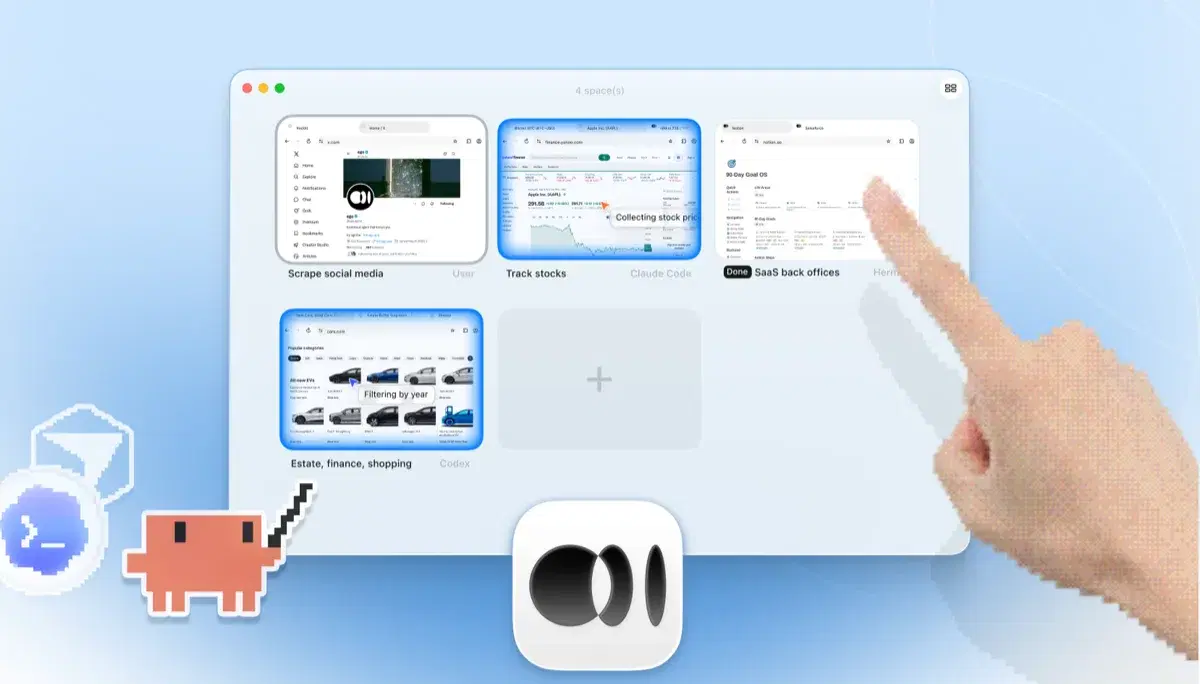
The task runs in its own Space, not a headless Chromium instance you can only guess at from logs. Watch it live or take over anytime, and the result lands back in your agent's CLI.

ego(lite) Spaces overview with four browser tasks running side by side: Claude Code tracking Apple stock on Yahoo Finance, Codex filtering cars by year on cars.com, Hermes finishing a SaaS back-office task, a user scraping X, and a hand tapping + to open another Space

Keep Browser Harness where it belongs: inside Python products and pipelines you're building for others. ego(lite) covers the agent browsing you do yourself.

When to use each tool

Choose ego(lite) when

  • You want an agent doing your own browser work (research, forms, logged-in chores) without building anything in Python.
  • You already run Claude Code, Codex, or Cursor and don't want a second agent loop with its own API-key bill.
  • The tasks need your real logins: one-click profile import beats manual Chromium profile configuration.
  • You want tasks running in parallel Spaces, in a headful browser you can watch or take over.

Choose Browser Harness when

  • You're building a custom automation product or pipeline in Python. Browser Harness is a library designed to be embedded.
  • You want to own the agent loop in your own code: pick the model, shape the prompts, control each step.
  • You need automations deployed to the cloud, running on Browser Use's hosted browsers when your laptop is closed.
  • You're shipping browser automation to others. ego(lite) is an end-user browser, not an SDK.

Compare ego(lite) with other browser automation tools

Side-by-side comparisons with Puppeteer, Playwright MCP, Claude Chrome extension, Browserbase, and 7 more.

FAQ

What is Browser Harness?

Browser Harness is Browser Use's local version. Browser Use is one of the most popular open-source AI browser agent projects: an MIT-licensed Python agent loop that lets an LLM control a browser, launching its own Chromium over the DevTools protocol and deciding actions step by step against the page state. You bring your own model API key and run it on your own machine. Browser Use's paid cloud product runs hosted browser agents with stealth and captcha-solving features, which is a different category from a local browser, so this page compares the harness: local against local. For developers building custom automation products and pipelines in Python, it's a strong, actively developed foundation, and of the five local tools we measured it posted the best completion rate of any competitor.

Is ego(lite) a good Browser Use alternative?

If you want an agent to do browser work for you, yes. ego(lite) plugs your existing coding agent into your real logged-in browser with no Python project and no API-key billing, and across 31 live-site jobs it finished 93.5% of tasks perfectly to Browser Harness's 77.4%, at $1.75 per completed task against $3.14. If you're building a browser-automation product or pipeline in Python, Browser Use is the better fit: it's a library designed to be embedded, and ego(lite) isn't an SDK.

What is the difference between Browser Use and Browser Harness?

Browser Use is the project; Browser Harness is its local version, the open-source Python agent loop you run on your own machine with your own LLM API key. Browser Use also sells a cloud product that runs hosted browser agents on their infrastructure. ego(lite) is a local browser, so the apples-to-apples comparison on this page is against Browser Harness; if you're weighing hosted browser infrastructure, see our Browserbase page instead.

How was the ego(lite) vs Browser Harness benchmark run?

Both tools ran the same 31 complex real-world browser automation tasks on live websites, driven by the same pi agent with the same model (gpt-5.6-sol, thinking effort max) and graded by the same judge against per-task rubrics. Every score covers all 31 tasks, so a bad task still counts against it. ego(lite) finished 93.5% of tasks perfectly at $1.75 per completed task, averaging 6 minutes 38 seconds per task, 55% faster than Browser Harness; Browser Harness finished 77.4% at $3.14, averaging 10 minutes 15 seconds, the best completion rate of any competitor measured. Browser Use's hosted cloud product was not part of the run; the comparison is local against local. The harness, the tasks, the rubrics, and the raw results are open source in the ego-browser-benchmark-framework repository on GitHub, so every number can be audited or reproduced.

Can Browser Use use my Chrome profile?

Browser Harness can, with manual configuration, and it's a common source of friction. The --profile flag copies your live Chrome profile into a temp directory, and on Windows that copy fails outright while Chrome is running and holding file locks, so the workaround is closing Chrome first. Connecting to an already-running Chrome over CDP works too, but Chrome 136 and later blocks CDP on your default profile, so most setups end up on a separate, non-default one. In ego(lite), the real profile is the starting point: one-click import of logins, cookies, sessions, and extensions, shared safely with your own browsing through separate Spaces.

Do I need an LLM API key with ego(lite)?

No. There's no separate model loop to fund. The intelligence comes from the coding agent you already run, whether that's Claude Code, Codex, Cursor, Gemini CLI, or Opencode. ego(lite) itself is free with no subscription.

Browser Use vs Stagehand: what's the difference?

Both are open-source tools for LLM-driven browsing, but Browser Use is a Python agent framework built around an autonomous loop, while Stagehand is Browserbase's TypeScript-first SDK with act/extract/observe primitives for hybrid code-plus-AI automation. Both are code-first: you scaffold a project and supply model access. See our ego(lite) vs Stagehand page for that side of the comparison.

Browserbase vs Browser Use: which do I need?

They solve different layers. Browser Use is the agent framework; Browserbase is cloud browser infrastructure that frameworks run on. Teams often combine an agent library with hosted browsers for production scale, and that's a real win for cloud fleets. ego(lite) sits at neither layer: it's a local, headful browser for the agent work you do on your own machine, with your own accounts.

Why does Browser Use use so many tokens on long tasks?

Browser Harness's agent loop calls the model at every step, and each call carries a fresh serialized snapshot of the page just to plan the next batch of clicks. Users running recurring or long-horizon tasks have asked the maintainers how to cut that cost, since the same task run the same way still pays full model price every time. On those 31 jobs that loop cost $3.14 per completed task, against ego(lite)'s $1.75. ego(lite) reduces the round trips themselves: the agent batches several actions in one JavaScript execution and reads pages as compressed Snapshots, so the savings compound over a whole task.

Is ego(lite) open source like Browser Use?

The ego-browser shell that connects agents to the browser is MIT-licensed open source. The ego(lite) browser itself is a free app for macOS and Windows with no subscription, and it runs on your own computer.

Can Browser Harness run production web scraping reliably?

It can be embedded in a Python pipeline, but production reliability depends on your own retries, fixtures, browser lifecycle, rate limits, and observability. Use a bounded scope, detect login or challenge pages as blocked, and preserve source URLs. ego(lite) is better suited to supervised local work; a hosted browser or official API may be the right choice for a high-volume unattended fleet.

Can a local LLM control a browser without an API key?

Browser Harness still needs an LLM endpoint, even when the model is local. ego(lite) does not add a separate model bill: it connects Claude Code, Codex, Cursor, Gemini CLI, or another agent you already run to a local browser. The model provider or local runtime you choose still controls its own compute and data policy.

What is the safest way to automate logged-in forms?

Use a dedicated test account or staging environment, import only the browser context you authorize, and keep payment, deletion, messages, MFA, and permission changes human-approved. Verify the account and destination before submitting. Neither Browser Harness nor ego(lite) should be treated as an authentication or access-control bypass.

How do I run agent-browser tasks on a schedule?

For recurring work, define an idempotent task, fixture reset, timeout, and evidence schema, then schedule it through your own runner. Browser Harness or agent-browser can run headless in CI or a server; ego(lite) is a visible local browser and is best for supervised runs while your computer is available. Record blocked pages and partial results instead of retrying indefinitely.

Can ego(lite) replace Browser Use when I am shipping an automation product?

No. Browser Use is a Python framework you can embed, configure with your own model, and deploy as part of a product. ego(lite) is an end-user browser for the coding-agent work you do yourself. Use the framework for a customer-facing automation service and ego(lite) for local development, debugging, and authorized interactive tasks.


Give your agent a real browser

Free, runs on your computer, imports your Chrome profile in one click. Works with Claude Code, Codex, Cursor, and any CLI agent that writes code.