ego (lite) is just a browser, ego is your personal agent across devices.
Join waitlist
ego lite vs Playwright MCP

The Best Playwright MCP Alternative

Playwright MCP exposes browser controls as model-facing tools. ego (lite) gives the agent a browser-native workspace.

ego (lite) completed 93.5% of tasks perfectly in our published benchmark of 31 live-site browser automation jobs, the highest perfect-completion rate measured.

Trusted by developers from
GoogleAmazonShopifyTikTokHarvardStanfordUSCUCLA

Browser automation benchmark: ego lite vs Playwright MCP

This is agent-driven browser automation on live websites, not a snapshot-and-click loop on a fixture page. Both tools ran the same 31 multi-step tasks: several pages, several decisions, many behind a login. That is the work that turns one MCP tool call per action into a long, expensive chain. Both ran the identical set, so the bars below compare the same jobs.

agent: pimodel: ChatGPT 5.6 Solthinking: max31 tasks

Task completion rate

How often the agent finished the job. Stuck at login, skipped a step, or returned the wrong result: that task is a fail. Higher is better.

ego lite93.5%31 tasks benchmarked
playwright-cli71.0%31 tasks benchmarked

Cost per completed task

What one finished job costs in model spend. Failures still get billed, so they push this number up. Lower is better.

ego lite$1.75
playwright-cli$4.82

Model turns per task

How many times the model had to look at the page and choose the next action. Extra looks mean extra tokens, extra waiting, and extra places to stall. Lower is better.

ego lite30.3
playwright-cli42.8

Average task time

How long a job took from start to finish, on average, including time spent waiting on the model. Lower is better.

ego lite6m 38s
playwright-cli10m 48s

We ran the same 31 browser automation tasks with the same model and judge. A failed task still counts against it.

We measured Playwright through playwright-cli, not the MCP server. MCP uses the same engine and adds one extra round trip per action.

Check the numbers, or rerun the tasks yourselfThe 31 tasks, grading checklists, and raw results are open source. If a number looks off, open the repo.ego-browser-benchmark-framework

Why ego lite is better than Playwright MCP

The difference is the execution surface. MCP makes the model coordinate a tool call for each step; ego (lite) lets the coding agent operate a full browser, compose actions, and return the result. Use the same setup for search, research, extraction, forms, testing, or any web workflow that needs a real session.

93.5% of tasks done perfectly. No other tool tops 84%.

Playwright MCP re-reads the page through a tool call at every step, the browser sits idle while the model thinks, and every extra round trip is another chance for a long task to fall apart. On those 31 jobs, agent-driven Playwright ends 29% of tasks short of a perfect score.

In ego lite, every page reaches your agent as a Snapshot: a compressed accessibility tree with stable @N refs it can act on instantly, several actions per JavaScript turn. The agent spends its time doing the task, not parsing pages: 93.5% of the same 31 tasks end perfect, at the fastest average task time of the five tools measured.

Time to finish a task, shorter is better
398 sego lite
648 splaywright-cli
Data source - Task: finish an average live-site job

Parallel multitasking, execute faster

One Playwright MCP server drives one browser session, so parallel work means juggling multiple server configs.

In ego lite there's no cap on how many Spaces you open inside the same browser: each one runs its own task at the same time, driven by the same agent or a different one, on its own imported Chrome profile. None of them ever steals the tab you're using, and you can watch or take over any Space anytime.

No more back and forth Cost fewer tokens

Every Playwright MCP action is a separate tool round-trip that re-sends context through the model.

Your agent in ego lite batches several actions in a few lines of JavaScript per turn. Stacked with Snapshot input, the same task completes on far fewer tokens overall.

Claude Code · ego lite
>/ego-browser Add the first product to the cart, then check checkout loads
Bash(
ego-browser nodejs <<'EOF' await openOrReuseTab('localhost:3000') await click('.product-card') await click('.add-to-cart') await click('a[href="/checkout"]') cliLog('checkout loaded') EOF
)
Output:
[t=4480ms] checkout loaded
Done. Both steps work.
─── 1 tool call · 1.1k tokens ───
Claude Code · Playwright MCP
>Add the first product to the cart, then check checkout loads
playwright - browser_navigate (MCP)(url: "localhost:3000")
Page Snapshot
… +224 lines (ctrl+o to expand)
1.6k tokens sent so far
Storefront rendered. Opening the first product.
playwright - browser_click (MCP)(ref: "e18")
Page Snapshot
… +198 lines (ctrl+o to expand)
3.1k tokens sent so far
Product page is up. Now the Add to cart button.
playwright - browser_click (MCP)(ref: "e42")
Page Snapshot
… +205 lines (ctrl+o to expand)
4.9k tokens sent so far
Added. Heading to checkout.
playwright - browser_navigate (MCP)(url: "localhost:3000/checkout")
Page Snapshot
… +231 lines (ctrl+o to expand)
6.8k tokens sent so far
Refs are stale after the navigation. Taking a fresh snapshot.
playwright - browser_snapshot (MCP)
Page Snapshot
… +238 lines (ctrl+o to expand)
9.2k tokens sent so far
Now waiting for the payment form to render.
playwright - browser_wait_for (MCP)(text: "Payment")
Page Snapshot
… +229 lines (ctrl+o to expand)
11.2k tokens sent so far
Confirming the form is actually there.
playwright - browser_evaluate (MCP)(expression: "!!document.querySelector('form#payment')")
Page Snapshot
… +25 lines (ctrl+o to expand)
13.6k tokens sent so far
─── 7 tool calls · 13.6k tokens ───
The same task, the same model. Left: one batched JavaScript call in ego lite, 1.1k tokens total. Right: Playwright MCP, 7 round trips, tokens climb to 13.6k.

Same Chrome, agent-native

The Playwright MCP server launches a blank browser that gets stuck at SSO, 2FA, and captchas.

Built on Chromium, ego lite imports your entire Chrome setup in one click. It works like Chrome, so an agent can start from an authorized session; it does not bypass CAPTCHAs, 2FA, SSO redirects, or any site's access controls. When a challenge appears, pause and let a person complete it or switch to an approved source.

ego lite Chrome profile import: one-click setup with all your logins

ego lite vs Playwright MCP

Feature comparison between ego lite and Playwright MCP.
Featureego litePlaywright MCP
How the agent acts on a pageWrites JavaScript that batches multiple actions per turnOne MCP tool call per action, round-trip through the model each time
Token cost per taskLower: Snapshot input plus batched actions, measured per taskHigher: every step re-sends context through the MCP loop
Browser automation on live sites (31-task suite)93.5% perfect, $1.75 per completed task, 30.3 round trips71% perfect, $4.82 per completed task, 42.8 round trips (measured via playwright-cli)
Reuses your real Chrome loginsYes, one-click Chrome profile import (cookies, sessions, extensions)No. Launches a fresh browser; auth needs manual setup per site
SetupInstall the app, run /ego-browser in your agentAdd Playwright MCP to Claude Code or Codex in each agent's MCP config, then manage the server lifecycle
Parallel task isolationYes, Spaces run tasks side by side in one browserOne session per server; parallelism means multiple server instances
Doubles as your daily browserYes. You browse in your Space, agents work in theirsNo, automation-only browser instance
Reusable skills (coming soon)Distills successful runs into reusable skills for repeat tasks (limited beta)No built-in equivalent
PriceFree, no subscriptionFree, open source
Last updated Aug 30, 2026

Make it a seamless transition

Already have Playwright MCP wired into Claude Code or Codex? Switching takes a few minutes, and you don't have to remove anything.

  1. Download ego (lite)

    Download ego lite and import your Chrome profile in one click. Logins, cookies, and extensions come with it.

  2. Run your first task with /ego-browser

    Paste into your agent

    /ego-browser Open ego.app and check the page for console errors

    Paste one sentence into Claude Code, Codex, or Cursor and hit enter. No MCP server config, no JSON edits, no test script.

  3. Watch it work
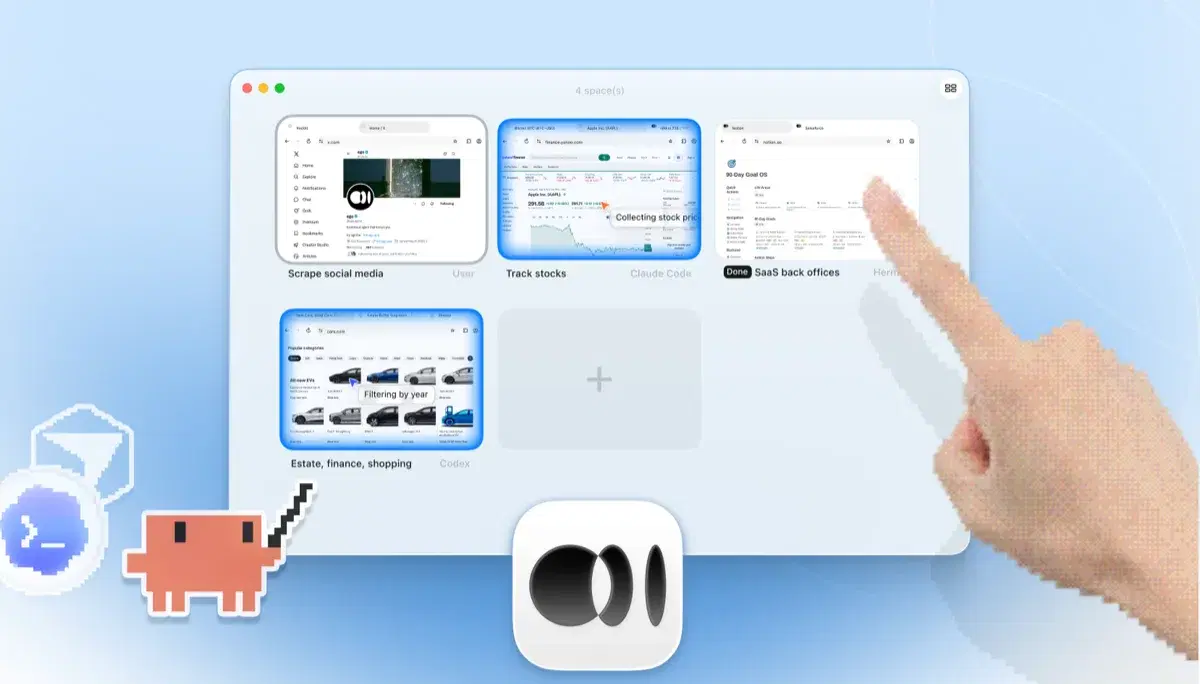
    ego lite Spaces overview with four browser tasks running side by side: Claude Code tracking Apple stock on Yahoo Finance, Codex filtering cars by year on cars.com, Hermes finishing a SaaS back-office task, a user scraping X, and a hand tapping + to open another Space

    The task runs in its own Space, so your tabs stay untouched. The browser window is real: watch live or take over anytime. Results land back in your agent's CLI.

Keep Playwright MCP where its tool protocol fits. ego (lite) gives your agent a broader browser path for search, research, extraction, forms, testing, and other web work, without replacing committed Playwright tests.

When to use each tool

Choose ego (lite) when

  • Your tasks touch logged-in sites: dashboards, back offices, anything behind SSO or 2FA.
  • You want lower per-task token bills. Snapshot input plus batched JavaScript beats one tool call per action.

  • You want tasks running in parallel Spaces while you keep using the same browser.
  • You'd rather skip MCP server configs entirely: install the app, run /ego-browser, done.

Choose Playwright MCP when

  • You're already deep in the MCP ecosystem and want one standard protocol across many tools.
  • Your automation runs headless in CI or on a remote server where a desktop browser isn't available.
  • You need Firefox or WebKit coverage. ego lite is Chromium only.
  • You're generating committed Playwright test code and want the agent speaking the same API.

Give your agent a real browser

Free, runs on your Mac, imports your Chrome profile in one click. Works with Claude Code, Codex, Cursor, and any CLI agent that writes code.

Still weighing your options? See how Playwright MCP compares with the other tools in the same space.

FAQ

Playwright MCP is Microsoft's official MCP server for the Playwright automation framework, published as playwright-mcp (you'll also see it written mcp-playwright or playwright-mcp-server). It exposes browser actions (navigate, click, type, snapshot) as MCP tools, so any MCP-capable agent can operate a browser without writing test scripts. It reads pages as accessibility-tree snapshots rather than screenshots, and ships a Chrome extension, the Playwright MCP bridge, for attaching the server to a tab in your running Chrome. It's the default answer to "how do I give my coding agent a browser": well-maintained, free, and backed by the Playwright team.

Yes, for agent-driven browsing. Playwright MCP is a thin MCP bridge over a fresh Playwright browser; ego lite is a full agent browser: real Chrome profile, parallel Spaces, and batched JavaScript execution that cuts per-task tokens. If your goal is committed, repeatable test scripts in CI, plain Playwright is still the right tool. See our ego lite vs Playwright page for that comparison.

We measured the matchup through playwright-cli, the leaner of Microsoft's two agent interfaces. The MCP server shares the same Playwright engine and adds an MCP tool-call round trip on top of each action. On 31 live-site browser automation tasks, with the same pi agent, the same model (gpt-5.6-sol, thinking effort max), and the same written checklist, ego (lite) finished 93.5% of 31 tasks perfectly on 30.3 model turns at $1.75 per completed task; agent-driven Playwright finished 71.0% across 31 tasks on 42.8 turns at $4.82. The tasks, the checklists, and the raw results are open source in the ego-browser-benchmark-framework repository on GitHub, so every number can be audited or reproduced.

The usual route is to add Playwright MCP to Claude Code with claude mcp add, then keep the Playwright MCP server running. The shorter route: install ego lite and run /ego-browser inside Claude Code. The agent gets Snapshot access to pages and can execute JavaScript in the browser, with no MCP server configuration and no config edits.

Both do. Codex supports MCP servers, so a Playwright MCP Codex setup works, with the same one-tool-call-per-action loop and blank profile. ego lite plugs into Codex the same way it plugs into Claude Code and Cursor: run /ego-browser, and the agent drives your real logged-in browser. Gemini CLI, Opencode, and custom in-house agents work too.

The official Chrome extension bridges the Playwright MCP server to a tab in your running Chrome, so the agent can reuse that tab's login state. It fixes the blank-profile problem for one tab, but the loop is unchanged (one MCP tool call per action) and there's no isolation: the agent works in the same window you're using. ego lite gives the agent your full profile and its own Spaces, so tasks run in parallel without touching your tabs.

Each browser action is a separate MCP tool call, and the model processes the result of every call before making the next one. Long tasks become long chains of round-trips, each carrying context. ego lite reduces the round-trips themselves: the agent batches several actions in one JavaScript execution and reads pages as compressed Snapshots, so the savings compound over a whole task. Across those 31 jobs, agent-driven Playwright averaged 42.8 model round trips per task to ego lite's 30.3, and that gap is most of the cost difference: $4.82 per completed task against $1.75.

Not out of the box, because it launches an isolated browser. You can point it at a persistent profile or a CDP endpoint with manual configuration, but sessions still break on SSO and 2FA. ego lite imports your Chrome profile once, and the agent inherits real login state everywhere.

Yes. ego lite is free with no subscription, and the ego-browser shell is MIT-licensed open source.

Yes, when you import a Chrome profile you are authorized to use. The agent works from the cookies and sessions already present in that profile, so there is no separate OAuth connector to configure for each site. Credentials stay in the browser context and should never be pasted into the agent's prompt; SSO, MFA, and site policies still apply, and a challenge may require your manual approval.

The agent can read a current compressed Snapshot and use JavaScript to inspect permitted DOM or in-page data when the accessible view omits relevant context. That makes the extraction path explicit, but it is not a guarantee that every shadow root, virtualized row, or hidden control is available. Ask it to verify the visible result and stop when the page cannot support the requested evidence.

Yes. ego lite gives each task its own Space inside one browser, so sessions remain isolated while several jobs run side by side. Keep the task owner and source visible, save artifacts before closing a Space, and do not assume that sharing one Playwright MCP context is safe parallelism—tabs, cookies, and stale assumptions can leak between agents.

No. A normal, user-controlled browser may avoid the blank-profile mismatch that causes extra verification, but ego lite does not defeat Cloudflare, CAPTCHA, rate limits, fingerprint checks, or robots and terms restrictions. If a permitted task reaches a challenge, pause, record the status, and let an authorized person decide whether to complete it or use an official API or licensed source.

ego lite can help an authorized agent read public pages or perform a bounded, user-approved workflow in an existing session, subject to each platform's terms and rate limits. It is not a way to evade login or anti-bot controls, bulk-collect private data, or automate likes, follows, messages, or other engagement at scale. Keep review and a human stop point for any account action.