ego (lite) is just a browser, ego is your personal agent across devices.
Join waitlist
ego lite vs Codex browser

The Best Codex browser Alternative

Codex browser is a browser surface inside one assistant. ego (lite) is a standalone Chromium browser Codex can use anywhere.

ego (lite) gives Codex a complete Chromium browser with your authorized context and parallel Spaces. Compact Snapshots and batched actions reduce model turns and token use.

Trusted by developers from
GoogleAmazonShopifyTikTokHarvardStanfordUSCUCLA

Why ego lite is better than Codex browser

The built-in browser is one feature in the Codex product. ego (lite) is a complete browser environment: use it for search, research, extraction, forms, testing, and other web workflows, from Codex desktop or CLI, with imported browser context and parallel Spaces.

Fastest on real tasks

In the Codex CLI there is no browser at all: the skill may appear, then report unavailable, and you verify changes yourself. On desktop, the built-in browser re-reads the page through domSnapshot() at every step, and the panel sits idle while Codex thinks.

Run /ego-browser and Codex controls ego (lite) directly. Every page arrives as a Snapshot with stable @N refs Codex can act on instantly. Across our published benchmark, ego (lite) had the fastest average completion time.

Time to finish a task, shorter is better
81.8 sego lite
282.9 sagent browser
Data source - Task: scrape the main posts from the X account from the last 7 days

Parallel multitasking, execute faster

The CLI cannot run browser tasks in parallel because it has no browser. On desktop, the built-in browser is one panel on one task, and browser work draws from the same usage allowance as your coding work.

In ego lite there's no cap on how many Spaces you open inside the same browser: each one runs its own task at the same time, controlled by Codex or another coding agent via /ego-browser on its own imported Chrome profile. None of them ever steals the tab you're using, and you can watch or take over any Space anytime.

No more back and forth Cost fewer tokens

On desktop, every built-in browser action is its own round trip through the model: domSnapshot(), click, domSnapshot() again. Each result comes back before the next move is chosen, and that spend comes out of the same allowance as your coding work. In the CLI there is no built-in browser, so you never get this loop built in.

Run /ego-browser and Codex batches several actions in a few lines of JavaScript per turn to control ego lite. Stacked with Snapshot input, the same task completes on far fewer tokens overall.

Claude Code · ego lite
>/ego-browser Add the first product to the cart, then check checkout loads
Bash(
ego-browser nodejs <<'EOF' await openOrReuseTab('localhost:3000') await click('.product-card') await click('.add-to-cart') await click('a[href="/checkout"]') cliLog('checkout loaded') EOF
)
Output:
[t=4480ms] checkout loaded
Done. Both steps work.
─── 1 tool call · 1.1k tokens ───
Codex · Built-in browser
>Add the first product to the cart, then check checkout loads
browser.tabs.new() (Built-in browser)
Tab
Tab created (about:blank)
1.6k tokens sent so far
Approve localhost for this site, then navigate.
tab.goto (Built-in browser)("http://localhost:3000")
Result
Navigated to http://localhost:3000
2.8k tokens sent so far
Page is up. Reading the DOM before choosing a target.
tab.playwright.domSnapshot() (Built-in browser)
DOM snapshot
… +187 lines (ctrl+o to expand)
4.6k tokens sent so far
First product card is .product-card. Clicking it.
tab.playwright.locator(".product-card").click() (Built-in browser)
Result
Clicked .product-card
6.3k tokens sent so far
Product page rendered. Snapshot again: prior refs are stale.
tab.playwright.domSnapshot() (Built-in browser)
DOM snapshot
… +203 lines (ctrl+o to expand)
8.4k tokens sent so far
Add to cart is .add-to-cart.
tab.playwright.locator(".add-to-cart").click() (Built-in browser)
Result
Clicked .add-to-cart
10.2k tokens sent so far
Added. Opening checkout, then confirming the form with a snapshot.
tab.playwright.locator("a[href='/checkout']").click() (Built-in browser)
Result
Clicked a[href='/checkout']
tab.playwright.domSnapshot() → payment form present
13.6k tokens sent so far
─── 7 tool calls · 13.6k tokens ───
The same task, the same model. Left: one batched JavaScript call in ego lite, 1.1k tokens total. Right: Codex's built-in browser, 7 round trips, tokens climb to 13.6k.

Same Chrome, agent-native

In the CLI, Codex never sees your Chrome logins because there is no browser. On desktop, the built-in browser uses separate state: OpenAI's help center says it does not use your Chrome profile, cookies, tabs, or extensions. You sign into a second browser by hand, one site at a time.

Built on Chromium, ego lite imports your entire Chrome setup in one click. When Codex runs /ego-browser, it controls ego lite with your real sessions already in place, including the 2FA trust you already have, so it doesn't stall on login walls you passed months ago.

ego lite Chrome profile import: one-click setup with all your logins

ego lite vs Codex browser

Feature comparison between ego lite and Codex browser.
Featureego liteCodex browser
Works in the Codex CLIYes. Run /ego-browser and the coding agent controls ego liteNo. Only the desktop app has a built-in browser
Reuses your real Chrome loginsYes, one-click Chrome profile importNo. Separate browser state, signed in by hand per site
Cross-origin iframes and passkeysSnapshot reaches into cross-origin iframes and shadow DOMOpen issues: cross-origin iframe input unsupported; passkeys incomplete
How the agent acts on a pageCoding agent batches multiple actions in JavaScript per turn via /ego-browserOne tool call per action, result read back each time
Token cost per taskLower: Snapshot plus batched actions, measured per taskHigher: every step carries context back through the model
What the work is billed againstNothing extra. The browser is free and localThe same coding allowance as the rest of your Codex work (5-hour window plus a weekly cap)
Parallel task isolationUnlimited Spaces in one browser, bounded by your machineOne built-in browser panel per session
Doubles as your daily browserYes. You browse in your Space, agents work in theirsNo. A separate panel with separate state
Isolation from your real accountsNo. The coding agent controls ego lite inside your loginsYes, by design: separate state, no path to personal accounts
Reusable skills (coming soon)Distills successful runs into reusable skills for repeat tasks (limited beta)No built-in equivalent for browser tasks
Price and availabilityFree, no subscription. macOS, Chromium onlyIncluded with ChatGPT plans; Computer Use is region-limited
Last updated Aug 30, 2026

Make it a seamless transition

You are not switching away from Codex. Run /ego-browser so Codex controls ego lite, a Chromium browser that already holds your sessions, from the CLI or alongside the built-in browser on desktop.

  1. Download ego (lite)

    Download ego lite and import your Chrome profile in one click. Logins, cookies, and extensions come with it.

  2. Run your first task with /ego-browser

    Paste into your agent

    /ego-browser Open ego.app and join the waitlist

    Run /ego-browser in Codex and paste one sentence. Works in the CLI; no MCP config, no per-site approval step first.

  3. Watch it work
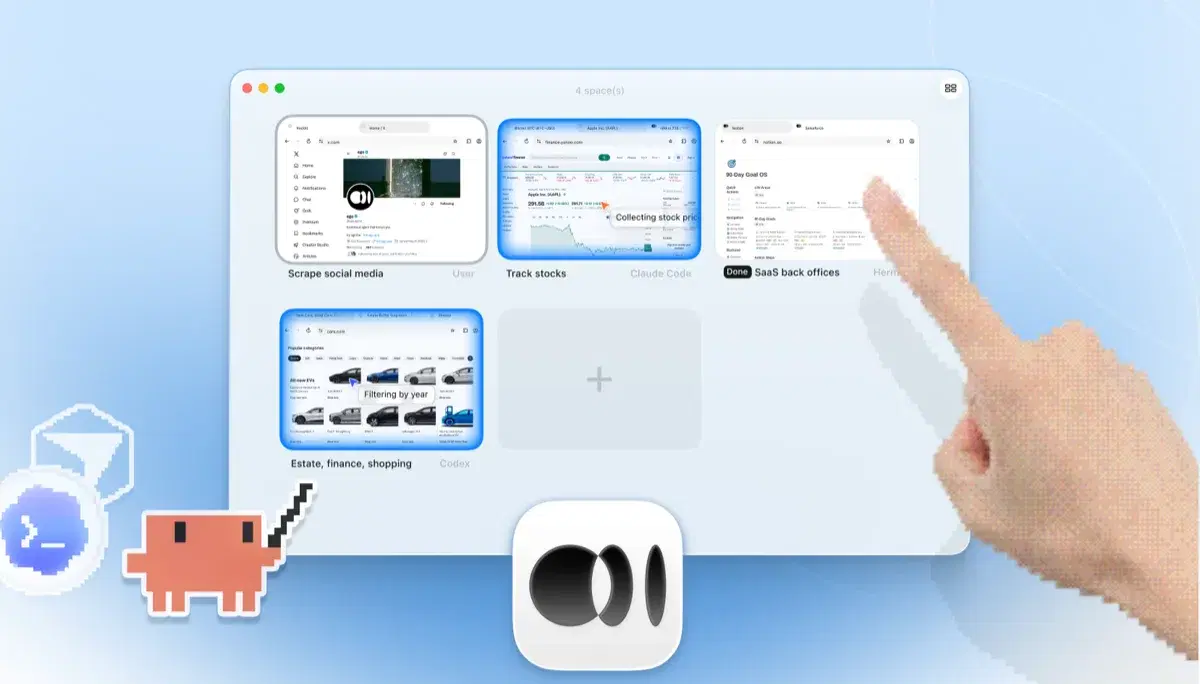
    ego lite Spaces overview with four browser tasks running side by side: Claude Code tracking Apple stock on Yahoo Finance, Codex filtering cars by year on cars.com, Hermes finishing a SaaS back-office task, a user scraping X, and a hand tapping + to open another Space

    The task runs in its own Space, so your tabs stay untouched. Take over anytime. Results land back in the Codex CLI.

Keep the built-in browser on desktop for localhost previews and the annotation loop: select an element, comment, fix exactly that.

When to use each tool

Choose ego (lite) when

  • You want browser work from the Codex CLI, where the built-in browser does not run.
  • Logged-in tasks should start in your real Chrome, not a second browser you authenticate site by site.
  • Even on desktop, whole tasks behind SSO feel slow in the built-in browser's one-panel, one-action loop.
  • You want parallel Spaces without spending Codex allowance on routine clicking in the built-in browser.

Choose Codex browser when

  • You want zero setup: the built-in browser is already in a ChatGPT plan you pay for.
  • You're debugging your own frontend on localhost and want CDP access from inside the agent.
  • You want the annotation loop: select an element, comment, fix exactly that.
  • You want the agent to have no path to your real accounts. Separate state is a deliberate safety tradeoff.

Give your agent a real browser

Free, runs on your Mac, imports your Chrome profile in one click. Works with Claude Code, Codex, Cursor, and any CLI agent that writes code.

Still weighing your options? See how Codex browser compares with the other tools in the same space.

FAQ

Codex browser is OpenAI's built-in browser for Codex, available in the ChatGPT desktop app. It is a local Chromium panel you can watch and take over, with DOM and accessibility-tree reading plus CDP access in Developer mode. For localhost frontend work it is genuinely good, and it is included in ChatGPT plans. It does not use your Chrome profile, and it is not available in the Codex CLI. The Codex Chrome extension is a separate surface covered on its own compare page.

Yes, for both surfaces. In the Codex CLI, ego lite is the Chromium browser Codex lacks. On desktop, it beats the built-in browser on speed, parallelism, tokens, and logins because Codex controls ego lite with batched JavaScript instead of one domSnapshot round trip per click. Keep the built-in browser for localhost previews and the annotation loop.

Codex browser use is OpenAI's built-in browser feature in the ChatGPT desktop app: Codex can open pages, click, and inspect them in a local Chromium panel. The Codex CLI has no browser. Run /ego-browser and Codex controls ego lite, a Chromium browser with your imported Chrome profile, from the CLI and beats the built-in browser on whole logged-in tasks.

OpenAI Codex browser is the built-in Chromium panel in the ChatGPT desktop app. It is local, not cloud, and separate from your Chrome profile. ego lite is not a replacement for Codex itself. It is the Chromium browser Codex controls when you run /ego-browser from the CLI or want your real Chrome sessions on desktop.

In the ChatGPT desktop app, yes, via the built-in browser for codex web browser tasks. In the Codex CLI, no: only web search snippets, no page control. Codex cloud blocks internet by default in the agent phase. Run /ego-browser so Codex controls ego lite, a Chromium browser, from the CLI.

No. The browser skill may still appear, then report unavailable. Run /ego-browser so Codex controls ego lite, a Chromium browser on your Mac, from the same terminal. On desktop, the built-in browser exists but uses separate state and a slower one-action loop; ego lite still wins for logged-in whole tasks.

On desktop, Codex drives its built-in browser panel one action at a time: tab.goto, domSnapshot, locator click. From the CLI, install ego lite, import your Chrome profile, and run /ego-browser so Codex controls ego lite against your real sessions with batched JavaScript instead of seven round trips per task.

Yes, into its own browser state, not your Chrome profile. OpenAI's help center points to the Codex Chrome extension when you need existing cookies or sessions. ego lite imports your profile once, so Codex starts inside the logins and 2FA trust you already have.

No. The built-in browser is an embedded Chromium panel in the desktop app on your machine. ChatGPT's separate cloud browser is a different surface. ego lite is also a local Chromium browser on your Mac: free, no subscription.

Yes. The built-in browser draws on the same coding allowance as the rest of your Codex work. ego lite adds no meter of its own; you only pay model tokens your agent already spends, and batched JavaScript keeps per-task totals lower than the built-in browser's one-action loop.

Playwright MCP works in the CLI but needs MCP config and one tool call per action against a blank profile. ego lite needs no MCP: run /ego-browser against your real Chrome profile from Codex, Claude Code, or Cursor. See ego lite vs Playwright MCP.

No. ego lite is a local Chromium browser that gives a coding agent a controlled web surface; it does not replace Codex's coding runtime, server, model, or repository tools. Choose it when browser work is the bottleneck and keep the Codex runtime you already trust. Its browser process is separate from your everyday tabs and bounded by your Mac's resources.

ego lite does not expose your browser or terminal to the public internet and does not promise a phone-browser control plane. Use an approved, authenticated remote-desktop or SSH/tmux setup for remote access, keep 2FA and device policies enabled, and never paste credentials into a remote agent prompt. Once you are on the authorized machine, Codex can run /ego-browser locally.

ego lite is a macOS Chromium browser, so this comparison does not promise a Windows or Linux build. Codex can run unattended jobs on those platforms only through the platform and browser tooling you have actually deployed, with explicit permissions and stop conditions. For production CI, use a headless framework; for ego lite, keep a visible local session and a human approval gate for sensitive actions.

Do not give an agent unrestricted deletion, purchase, posting, or credential access just to remove prompts. Work in a dedicated repository and Space, define allowed domains and actions, cap navigation and edit steps, save screenshots and diffs, and stop on an unexpected login, destructive command, or missing confirmation. ego lite provides isolation, not permission to skip your organization's review policy.

ego lite's primitive for multi-agent work is the Space: each task gets its own tabs, browser state, and visible status, while you keep your own Space available. It is not marketed as a full Kanban or project-management replacement. Use your existing issue tracker or board for durable assignment and let Spaces provide the live browser workspace for each agent.

No browser can bypass a model provider's rate limits or subscription allowance. You can reduce waste by opening the target URL directly, batching related browser actions in one JavaScript call, returning focused snapshots or screenshots, and stopping after a clear acceptance check. ego lite adds no browser subscription meter, but Codex still consumes the model usage your plan defines.

Yes, for a bounded form workflow you are authorized to perform. Give the agent the field mapping, validation rules, allowed domain, and a stop point before submit; have it verify each value and surface CAPTCHA, MFA, payment, or ambiguous fields for you. Spaces keep parallel forms separate, but they do not make bulk submissions or account actions automatically compliant.

Put the browser workflow in a versioned skill or repository specification with explicit inputs, allowed actions, evidence requirements, and failure stops, then ask Codex to read it before running /ego-browser. Require a final report containing URLs, screenshots or logs, and unresolved items. A skill improves repeatability; it cannot override site permissions, provider limits, or a human approval requirement.