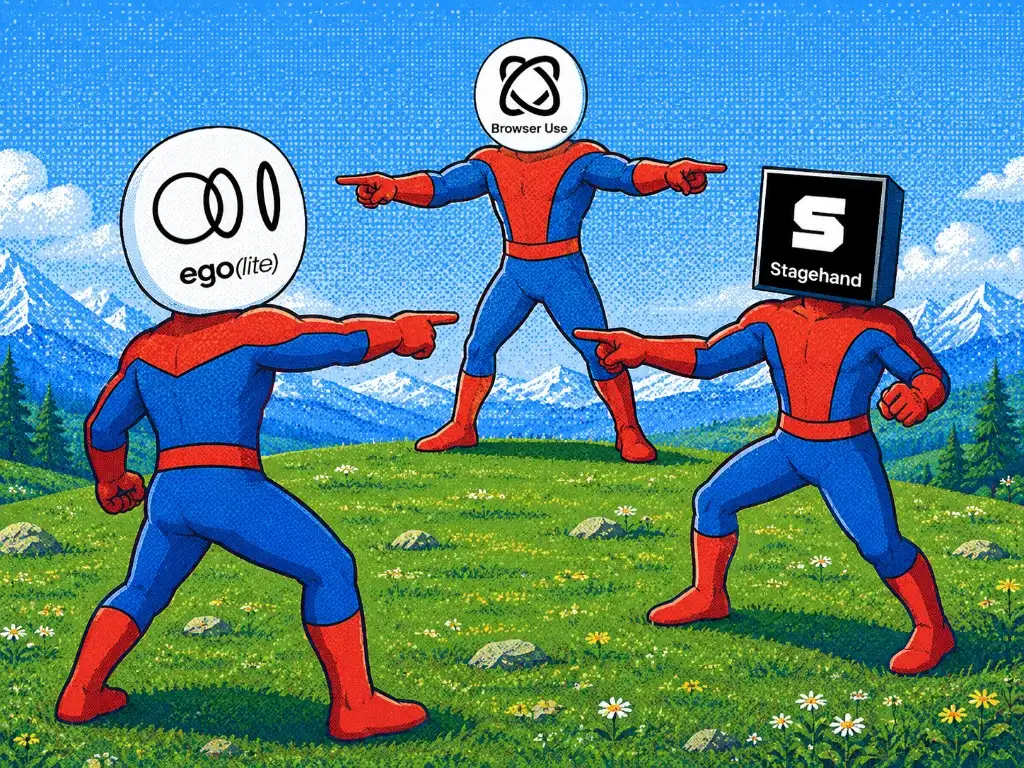
Browser Use or Codex for Chrome?
Choose Browser Use when you are building an agent or automation pipeline and want control over the model, code, browser runtime, and deployment. Choose Codex for Chrome when you already use ChatGPT or Codex and want the shortest route into the Chrome profile that is open on your computer.
The important 2026 correction is that existing Chrome access is not exclusive to the extension. Browser Use's current local tooling can connect to a running Chrome through its daemon and CDP path. The real difference is the operating model: Browser Use exposes Python, a local daemon, CDP, logs, and profile choices; Codex for Chrome provides an OpenAI-owned control surface inside the browser you already use.
This comparison is about the Browser Use product and OpenAI's Chrome extension. It is not a comparison with OpenAI's separate in-app Browser use feature, which keeps browsing inside ChatGPT instead of using your Chrome profile.
What changed with Codex Browser in 2026?
The current OpenAI documentation calls the new product path Browser or the built-in browser, rather than a separate official product named Codex Browser (Browser documentation). It is available in ChatGPT on the web and desktop app, and the desktop experience can let ChatGPT Work or Codex operate that browser with Computer Use. The built-in browser uses a profile separate from your regular browser, so it does not automatically inherit your existing tabs, cookies, saved passwords, extensions, or signed-in sessions (Browser documentation).
The browser extension is the separate route for an existing profile. OpenAI's current Browser documentation lists Chrome, Edge, Brave, Opera, and Vivaldi for that extension path (Browser documentation). That updates the older Chrome-only wording in this article, but it does not turn the built-in Browser into your daily browser: choose the extension when the task must use an existing tab or regular profile, and choose @Browser when a clean, separate profile is the safer boundary.
ChatGPT Work is another boundary, not a synonym for local Codex Browser use. OpenAI describes Work as a browser running on a separate cloud computer with its own cookies and signed-in sessions; it can ask you to authenticate through a secure sign-in form and keep that cloud session for future tasks (Browser documentation). It does not use the browser on your laptop. Browser Use remains a code-level framework that you operate locally or in infrastructure you choose.
The source of truth is OpenAI's current Browser documentation and Computer Use documentation (checked 2026-08-30). Verify the exact browser, plan, workspace, and region availability before treating a path as production-ready.
How does the new Codex Browser compare to Browser Use?
The new Codex Browser is a product, not a framework. It is a built-in browser with a separate profile that does not inherit your existing sessions (Browser documentation). Browser Use is an MIT-licensed Python framework that you operate locally or in your own infrastructure, giving you control over the model, browser runtime, and session boundaries.
Codex offers three distinct surfaces for browser work: Computer Use, the Chrome extension, and the in-app browser (@jxnlco on X). Computer Use is the broadest, letting Codex operate approved apps on macOS and Windows, but it is also usually the slowest because it must visually inspect and click through the interface (@jxnlco on X). The Chrome extension controls an existing profile, while the in-app browser uses a separate profile.
Session handling is the key difference. The new Codex Browser starts clean, so it does not automatically have your logins or cookies. Browser Use can connect to a running Chrome through its daemon and CDP path, but you must explicitly configure that connection. For tasks that need your existing signed-in sessions, the Chrome extension is the Codex path that uses your daily profile.
What happened in our firsthand test?
We have not tested the new Codex Browser product line. This comparison is based on official documentation and user discussions. Our previous firsthand test was with the older Chrome extension, and that test does not cover the new built-in Browser's behavior.
That earlier test was conducted with the Codex Chrome extension, not the new Codex Browser. The new Codex Browser's behavior in similar scenarios is not covered by our test and should be verified by the user against the official Browser documentation.
Browser Use local run
We ran Browser Use in an isolated uvx environment, checked the version, and ran its doctor command. Doctor found Chrome running, the local daemon alive, and one active browser connection. Optional Browser Use Cloud authentication was not configured, but it was not required for the local public-page task. The raw trace excerpt below establishes the Browser Use package, local CLI, daemon state, and resulting page. The image that follows is the result-only frame from that run.
$ uvx --from browser-use==0.13.8 browser-use --doctor
browser-harness doctor
  python            3.11.15
  version           0.1.9 (pypi)
  [ok  ] chrome running
  [ok  ] daemon alive

local run output
{'package': 'browser-use 0.13.8', 'cli': 'browser-harness 0.1.9'}
{'page': {'url': 'https://github.com/browser-use/browser-use/releases/tag/0.13.8',
          'title': 'Release 0.13.8 · browser-use/browser-use'}}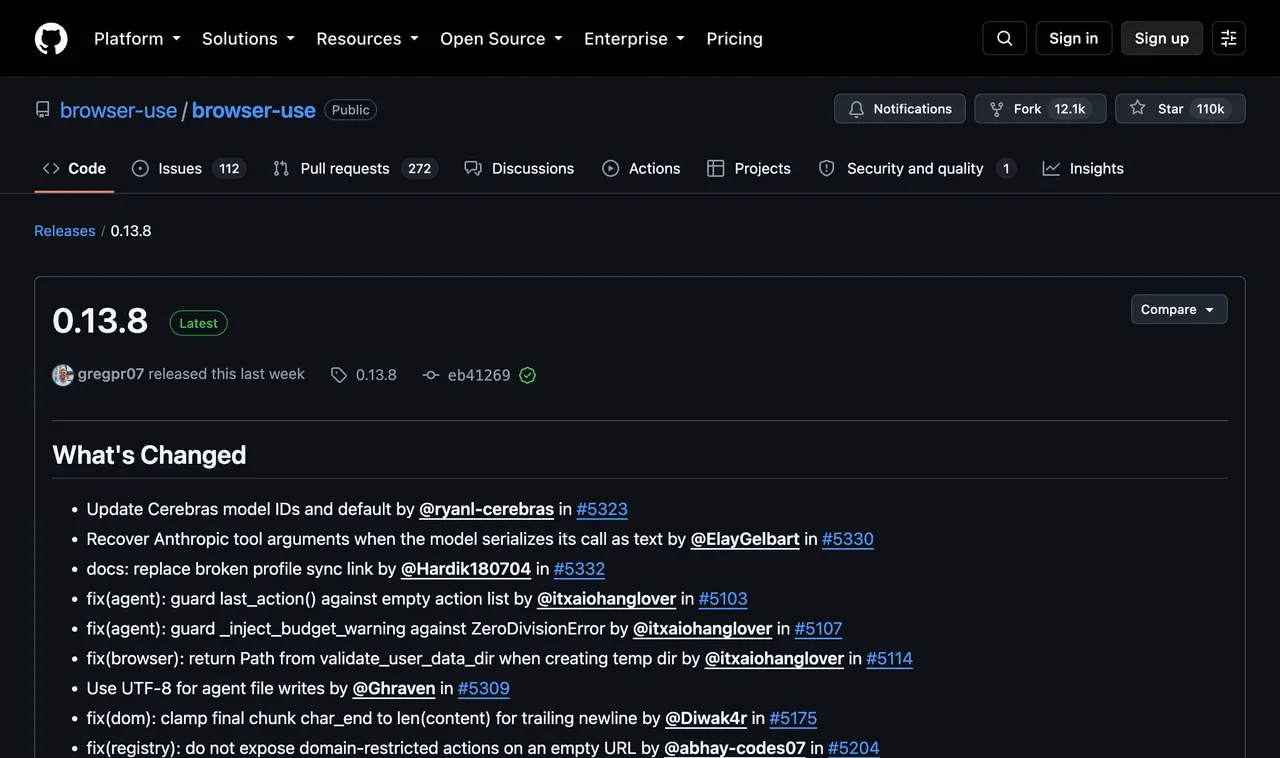
This result supports a narrow but important conclusion: current Browser Use local tooling can attach to a running Chrome through its daemon and CDP path in this environment. It does not prove that every existing login, site, or profile will work without configuration. Browser Use also supports fresh or explicit profile workflows, so you should decide deliberately which session boundary your automation needs.
Codex for Chrome run
The Chrome extension was already connected before this run. It opened the same Browser Use homepage inside the user's Chrome. The establishing frame below keeps the page, Chrome's automation banner, and the ChatGPT side panel together, which is the evidence that matters for this comparison.
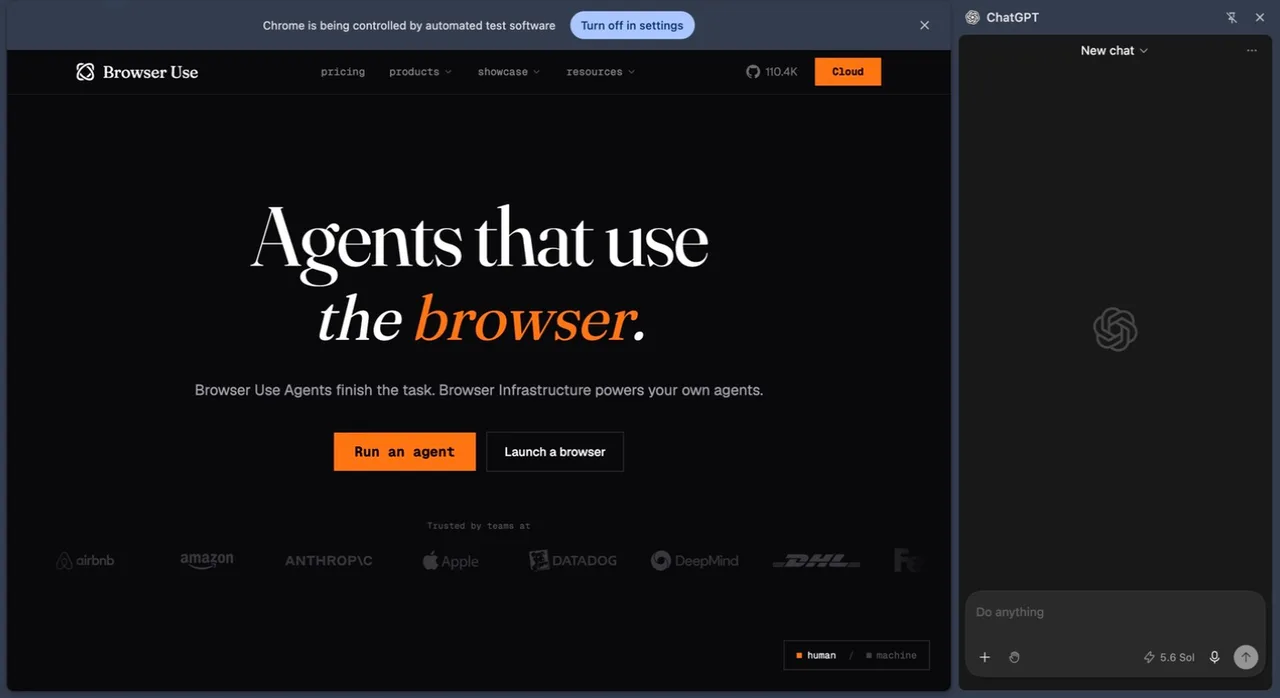
The extension had the shorter operator path in this particular run because it was already installed and connected. A clean setup still requires the ChatGPT desktop plugin, the browser extension, permission approval, and confirmation that the side chat is connected. OpenAI's current Browser documentation lists Chrome, Edge, Brave, Opera, and Vivaldi for this extension route.
How do they compare?
| Decision factor | Browser Use | Codex for Chrome |
|---|---|---|
| Primary role | Framework and runtime for building browser agents and automations. | OpenAI integration that lets ChatGPT or Codex act in Chrome. |
| Agent and model choice | Designed for code-level integration and multiple model providers, subject to the adapters you configure. | Part of the OpenAI product path and controlled from ChatGPT or Codex. |
| Existing Chrome session | Supported through an explicit local Chrome, CDP, or profile path; it connected to the running Chrome in our test. | Core product behavior: it works in the connected Chrome profile, with per-site approvals. |
| Setup surface | Python 3.11+, package or CLI, model credentials when needed, browser daemon, prompts, and application code. | ChatGPT desktop plugin, Chrome extension, browser permissions, and a connected side panel. |
| Isolation and scale | You can provision separate local or cloud browsers and own the concurrency design. | Tasks use Chrome tab groups, but they still run inside the connected Chrome environment. |
| Cost model | MIT-licensed for self-hosting, plus model and infrastructure costs; optional cloud services are separate. | Access and limits depend on the current ChatGPT plan, region, and feature availability. |
For implementation detail, compare Browser Use with a lower-level automation library in our Browser Use vs Playwright guide. For the OpenAI workflow itself, see the Codex browser guide.
Who should choose each one?
Choose Browser Use for a product or pipeline
Browser Use is the better fit when browser work is part of software you own: a research agent, internal operation, extraction pipeline, test harness, or customer-facing feature. You can inspect the agent loop, choose model and browser infrastructure, add validation, and run separate browsers. That control is valuable only if you are prepared to operate and observe it.
Choose Codex for Chrome for a connected personal workflow
Codex for Chrome is the better fit when the work begins in ChatGPT or Codex and should continue in the Chrome you already use. Typical tasks involve the pages and accounts already open in that profile. You accept OpenAI and Chrome as the integration boundary in exchange for a more packaged control surface and site-level approvals.
Do not choose only from a feature checklist. Decide whether the browser task is a reusable system that your team will maintain or an assistant action inside one person's current browser. That ownership question usually settles the comparison faster than star counts or demo speed.
What if you want a separate agent browser?
There is a third workflow: keep a signed-in browser built for agents, but do not make every task share your daily Chrome window. That is the role ego (lite) is designed to fill, with each task running in its own Space.
We tested this path too. ego (lite) 0.4.7.1 created a separate Space and opened the same Browser Use homepage. The frame below shows the named Space, the live agent controls, and the page result together. It also preserves an honest friction point: the app displayed a default-browser and sign-in-maintenance prompt during the run.
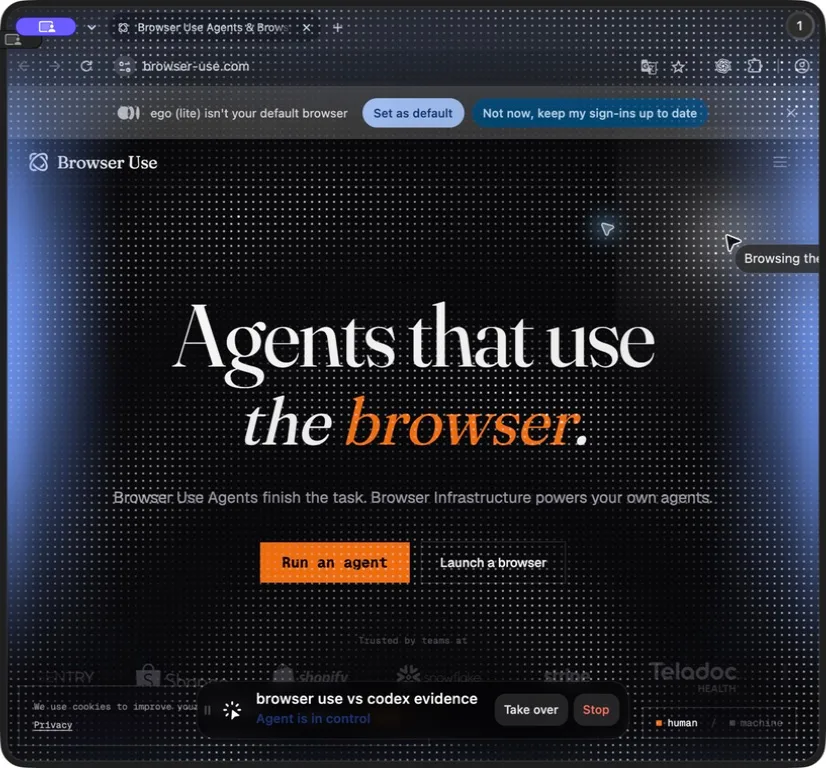
This is the key difference: ego (lite) keeps you free of any single built-in assistant or desktop app, so Claude Code, Codex, Cursor, or Gemini CLI can drive the same browser.
FAQ
Is Codex for Chrome the same as OpenAI Browser use?
No. OpenAI's built-in Browser uses a separate profile and does not automatically use your regular tabs or signed-in sessions. The browser extension controls an existing Chrome, Edge, Brave, Opera, or Vivaldi profile. This article compares both Codex browser paths with the Browser Use framework.
Can Browser Use control my existing Chrome?
Yes, current local Browser Use tooling supports connecting to a running Chrome through a daemon or CDP path, and that connection worked in our test. It is an explicit setup choice, not proof that every profile, login, and website will behave identically. A fresh or dedicated profile remains safer for many automations.
Which one is easier to set up?
Codex's extension had the shorter path in our run because it was already installed and connected. A clean setup still needs the ChatGPT desktop plugin, browser extension, permissions, and side-panel connection. The built-in Browser is installed with the desktop app but starts with a separate profile. Browser Use requires a Python/runtime path and more operator decisions, but those decisions enable deeper product and pipeline integration.
Can Browser Use work with coding agents other than Codex?
Yes. Browser Use is built for code and agent integration rather than one assistant UI. The exact setup depends on the CLI, Python integration, model adapter, or MCP path you choose. Codex for Chrome is an OpenAI integration, so it is not the general browser layer for Claude Code, Cursor, or another vendor's agent.
Which option is safer for signed-in accounts?
Neither is safe merely because it is convenient. Codex for Chrome provides per-site approvals and other product guardrails, but it can act inside a valuable daily profile. Browser Use lets you isolate or narrowly configure the profile, but you must design those boundaries. Read our browser agent security guide before giving either product access to sensitive accounts.
If your decision is specifically about keeping agent work out of your daily Chrome, compare ego (lite) vs Browser Use and ego (lite) vs the Codex Chrome extension. To see how all three connect to existing sessions, continue with our existing-browser connection guide.
How can I automate a website data download without an API?
Use a permitted browser workflow to open the export control, choose a safe download location, and verify the resulting file against the page and expected row count. Chrome DevTools Protocol can expose downloads and network events, while Browser Use or Codex can perform the user-facing steps. Keep the task read-only where possible, never defeat access controls, and do not upload the file to an unapproved service.
What is the easiest way to run Gemini computer use in my browser?
Use Google's current Gemini or Chrome-supported computer-use path documented for your account and region, or connect a compatible agent to a browser you control. Product availability and model names change, so verify the official documentation rather than copying an old prompt. Start on public or staging pages, use a separate profile, and keep purchases, messages, and account changes behind approval.
How should I use Gemini agentic AI for multi-step Chrome automation?
Give the agent a bounded goal, numbered steps, expected results, allowed domains, test data, and a stop condition for sensitive actions. Ask it to report each step as pass, fail, or blocked and preserve the final URL and evidence. Gemini, Browser Use, and Codex differ in integration and control surfaces; none should be allowed to improvise payments, messages, deletion, or access changes.
How do browser agents handle Shadow DOM and contenteditable fields?
First identify the component boundary and use its accessible role, label, or exposed control rather than coordinates. For open Shadow DOM, query through the component's supported interface; for contenteditable, focus it, inspect its current value, enter text, and verify the rendered result and event-driven state. Closed roots or custom editors may require a product-level test hook or a human handoff, not brittle script injection.
Are AI browser agents secure and reliable for price research?
Treat prices as observations that need source, timestamp, variant, seller, currency, and availability context. Use least-privilege sessions, a bounded URL list, and an explicit comparison rubric; verify surprising results against the source before acting. A failed or stale search should be reported as uncertain, not silently replaced with an older or cheaper-looking result.
Which AI browser is best for agentic research and comparison tasks?
Choose a packaged browser when you value quick supervised research, a framework when you need repeatable code and deployment, and a separate agent browser when you need inherited sessions without occupying your daily window. Compare the same sources, evidence requirements, latency, privacy, and failure handling on your workload; a single demo or review cannot establish a universal winner.
Why can simple scraping become expensive in an AI browser?
Each page observation can consume model tokens, screenshots, browser minutes, retries, and human repair time. Estimate cost per completed, verified result and cap the page list before running. Use direct HTML or an official API when it is permitted and sufficient; reserve a visual agent for pages or decisions that genuinely require browser context.
Is the new Codex Browser the same as the old Chrome extension?
No. The new Codex Browser is a built-in browser with a separate profile, while the Chrome extension controls an existing Chrome, Edge, Brave, Opera, or Vivaldi profile (Browser documentation). The extension is the route for using your daily browser with its existing sessions.
Does the new Codex Browser use my existing Chrome profile?
No. The built-in Browser uses a profile separate from your regular browser, so it does not automatically inherit your existing tabs, cookies, saved passwords, extensions, or signed-in sessions (Browser documentation). If you need those sessions, use the Chrome extension instead.
What is the difference between Codex Browser and Codex Computer Use?
Computer Use is the broadest surface, letting Codex operate approved apps on macOS and Windows by working with windows, menus, keyboard input, and the clipboard (@jxnlco on X). The built-in Browser is a separate browser for web tasks. Computer Use is usually slower because it must visually inspect and click through the interface (@jxnlco on X).