What is the best browser automation tool to use with your Claude Opus 5.5? A comparison between five different tools


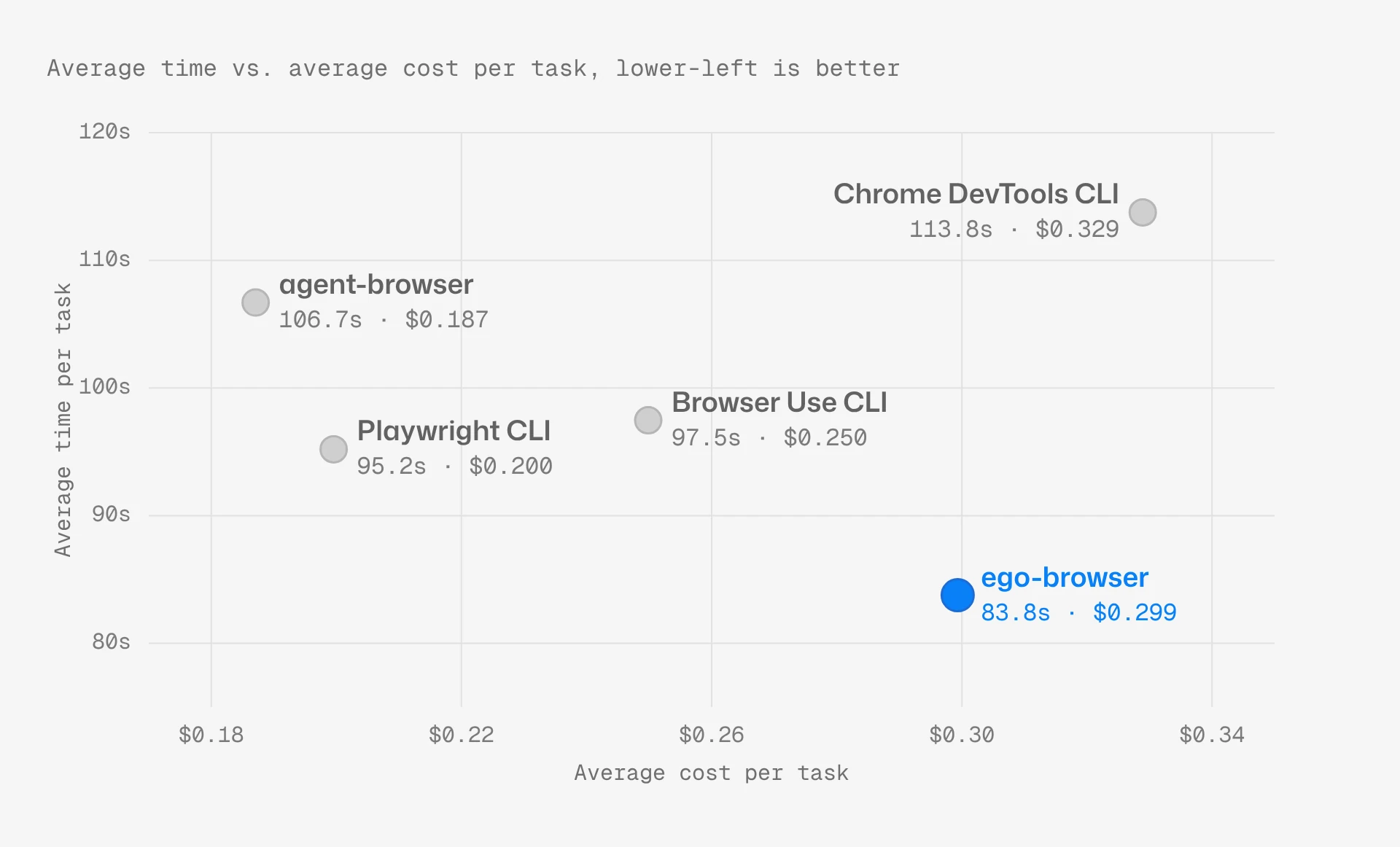
For Claude Code browser use with Claude Opus 5.5, ego-browser is the browser tool we'd pick for UI automation. Reliability doesn't separate the five tools, but speed does. ego-browser, agent-browser, Playwright CLI, Browser Use CLI and Chrome DevTools CLI each finished 40 of 40 attempts across our 20 UI tasks on public practice apps. However, ego-browser averaged 83.8 seconds per task, Playwright CLI 95.2, Browser Use CLI 97.5, agent-browser 106.7 and Chrome DevTools CLI 113.8. Cost doesn't follow speed. agent-browser was the cheapest at $0.187 per task, then Playwright CLI at $0.200, Browser Use CLI at $0.250, ego-browser at $0.299 and Chrome DevTools CLI at $0.329.
| Tool | Success rate | Average time per task | Average cost per task |
|---|---|---|---|
| agent-browser | 100% (40/40) | 106.7 s | $0.187 |
| Browser Use CLI | 100% (40/40) | 97.5 s | $0.250 |
| Chrome DevTools CLI | 100% (40/40) | 113.8 s | $0.329 |
| ego-browser | 100% (40/40) | 83.8 s | $0.299 |
| Playwright CLI | 100% (40/40) | 95.2 s | $0.200 |
Success rate
Opus 5.5 finished 40 of 40 attempts with each of the five tools, 200 of 200 in all. On these UI tasks, the browser tool didn't decide whether the job got done. No attempt with any tool ran out of its 100-step budget.
Opus 5.5 worked with the tools in two styles, and both reached every right answer. With agent-browser, Playwright CLI and Chrome DevTools CLI, it read accessibility snapshots with element references and ran one command per action, often chaining a few in one shell line. With ego-browser and Browser Use CLI, Opus 5.5 wrote short JavaScript or Python programs that ran several actions in a row and printed back only what it needed. The tools differed in how long a task took, which Speed covers, but not in whether it finished.
Editor's note: Pickers, sortable tables, forms and drag and drop all went through with every tool. For UI automation on pages like these with Opus 5.5, we'd choose the tool on speed and cost.
Speed
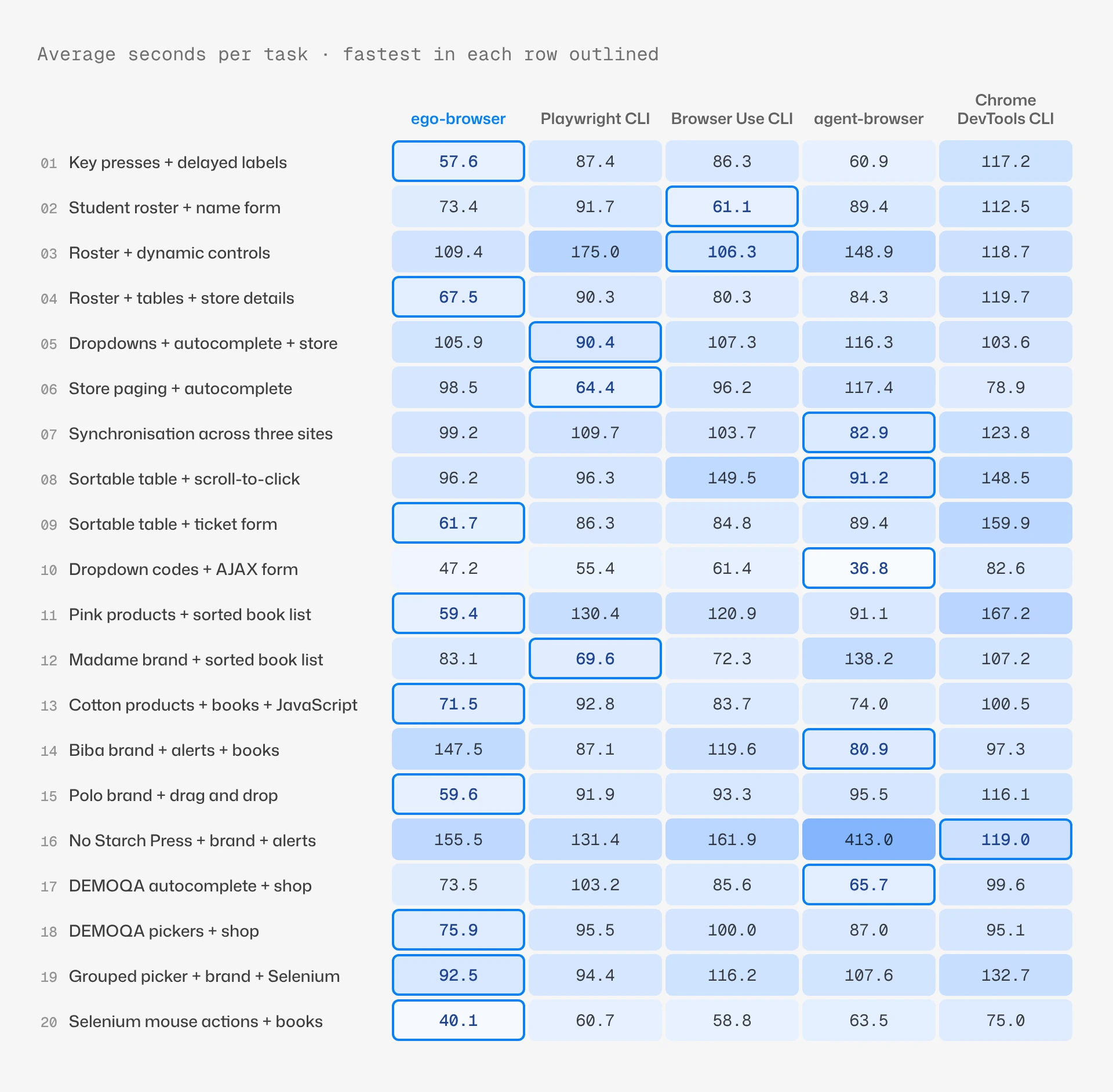
ego-browser was the fastest of the five at 83.8 seconds per task. Playwright CLI was next at 95.2 and Chrome DevTools CLI the slowest at 113.8. ego-browser had the lowest time on 9 of the 20 tasks and was quicker than each other tool on 15 or 16 of them.
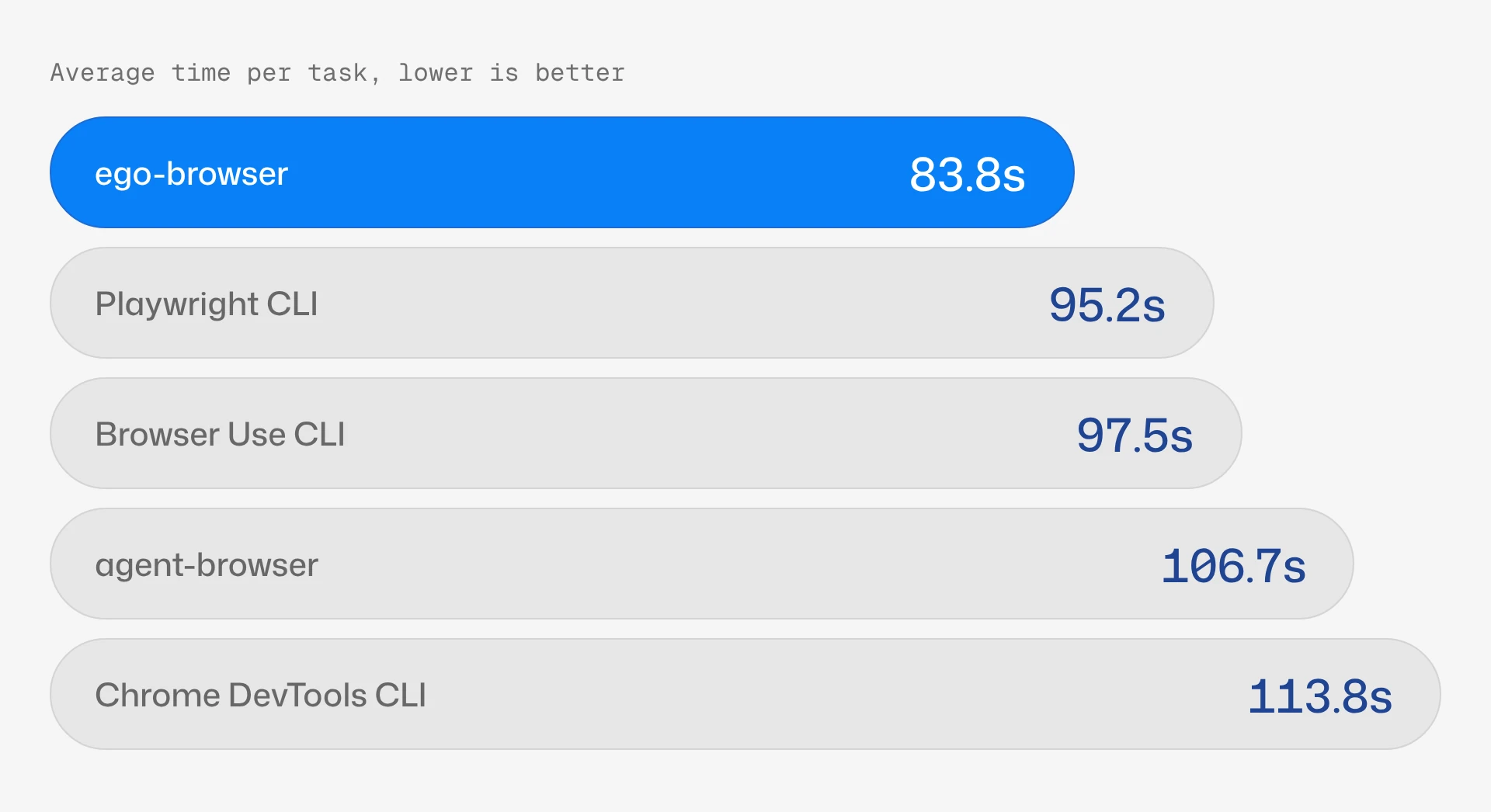
Split each task's time into waiting on Opus 5.5 and running browser commands, and the gap sits on the browser side. Opus 5.5's own time ran from 37.4 to 50.5 seconds per task across the five tools, so the gap isn't in the model. Browser commands took 37.8 seconds with ego-browser against 51.7 to 64.7 with the others. Opus 5.5 also needed fewer browser steps with ego-browser, 9.3 per task against 10.2 to 11.4.
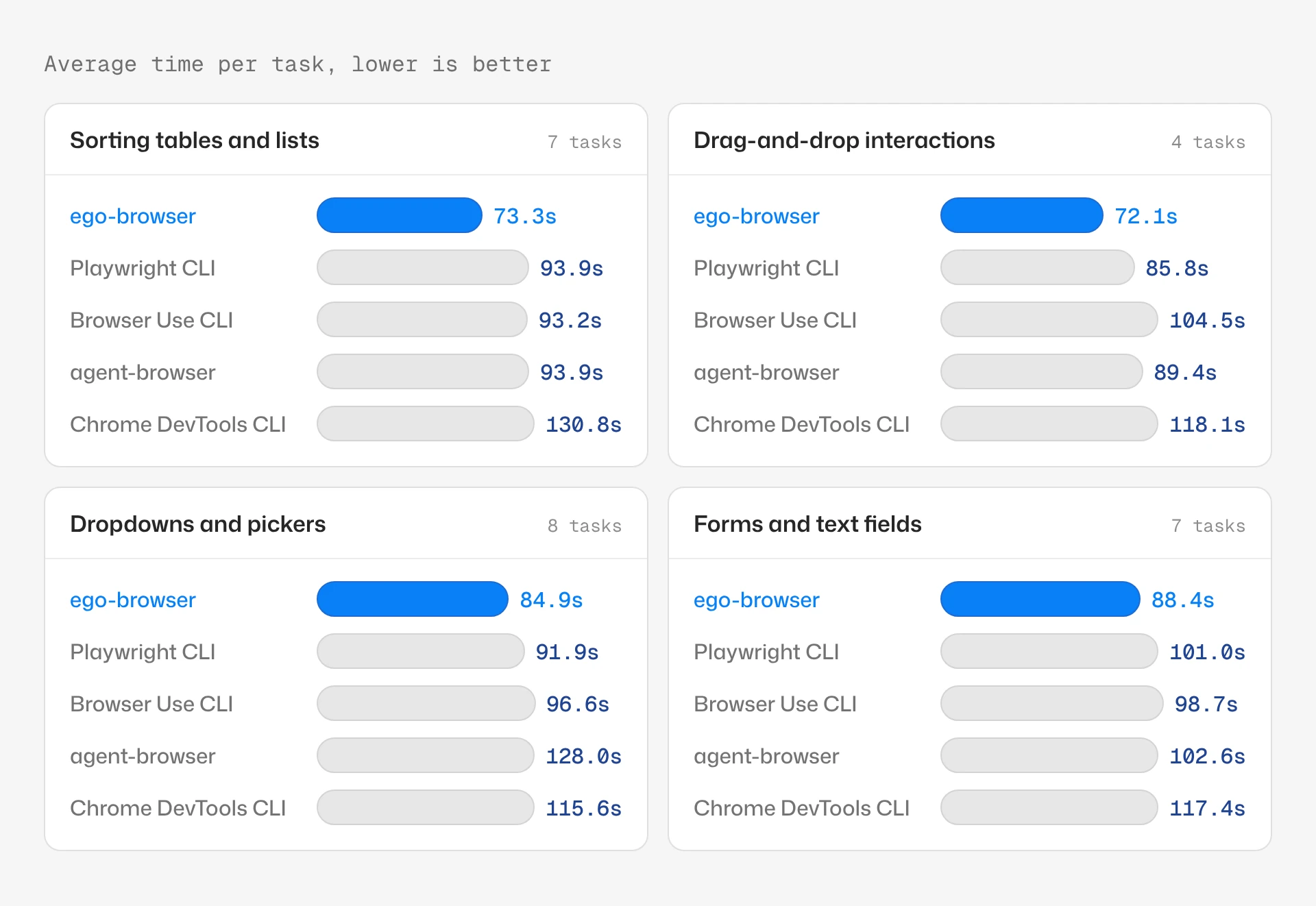
ego-browser had the lowest average time in each of the four types of work below, and every tool finished every attempt in all four.
Editor's note: 11.4 seconds a task against Playwright CLI is about 12% less time per task, and the gap to Chrome DevTools CLI is 30.0 seconds. For agents that run UI flows one after another, we'd expect that to add up across a long queue.
Cost
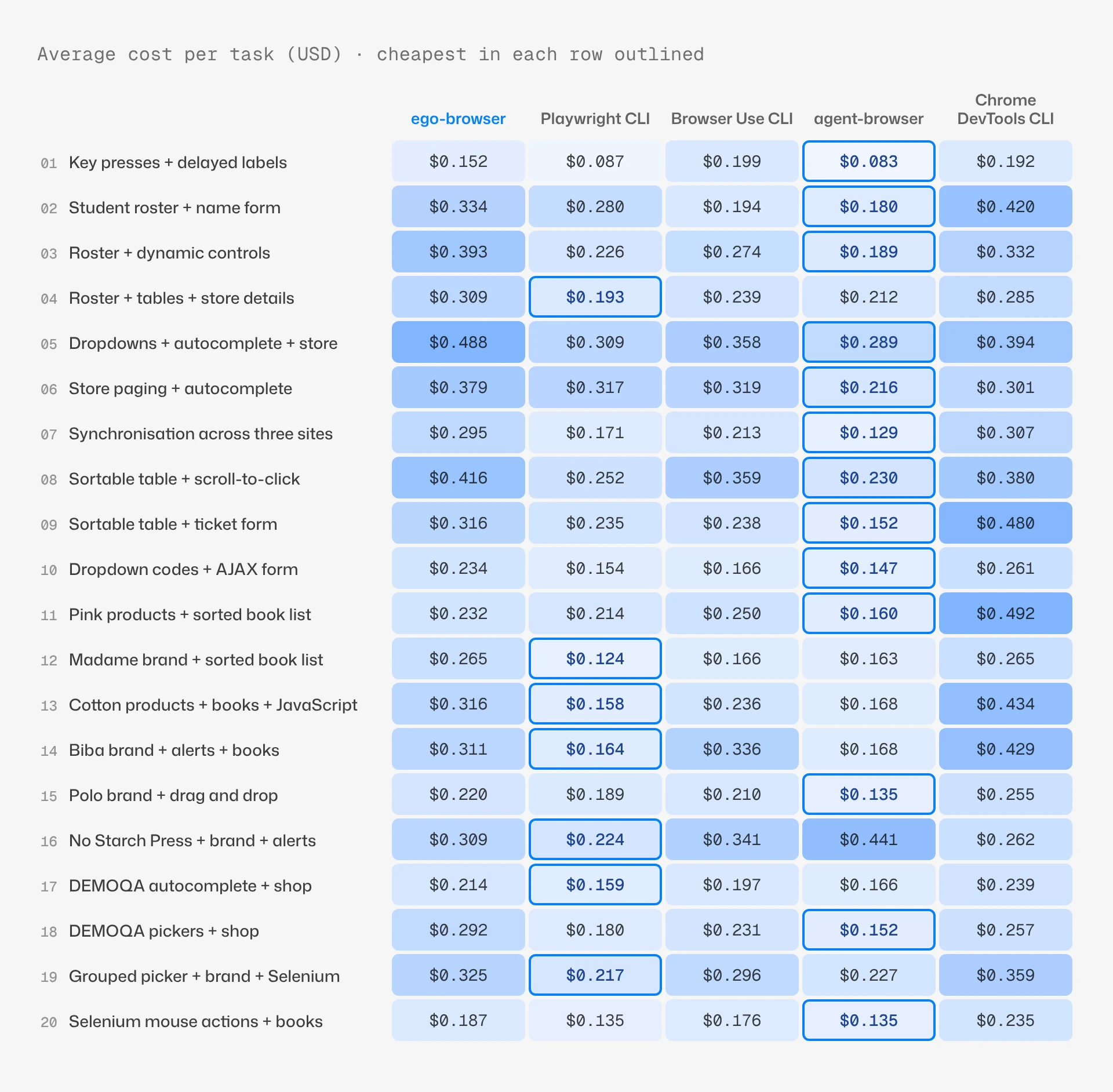
agent-browser was the cheapest of the five at $0.187 per task, and ego-browser was fourth at $0.299. Playwright CLI cost $0.200, Browser Use CLI $0.250 and Chrome DevTools CLI $0.329. Opus 5.5 runs at the same price in every tool, so the gap is token usage, not price. Step count doesn't explain it: ego-browser had the fewest browser steps, 9.3 per task, and still cost more than three of the others.
By type of work, agent-browser was the cheapest on sorting, drag-and-drop and forms, and Playwright CLI on dropdowns and pickers by a tenth of a cent.
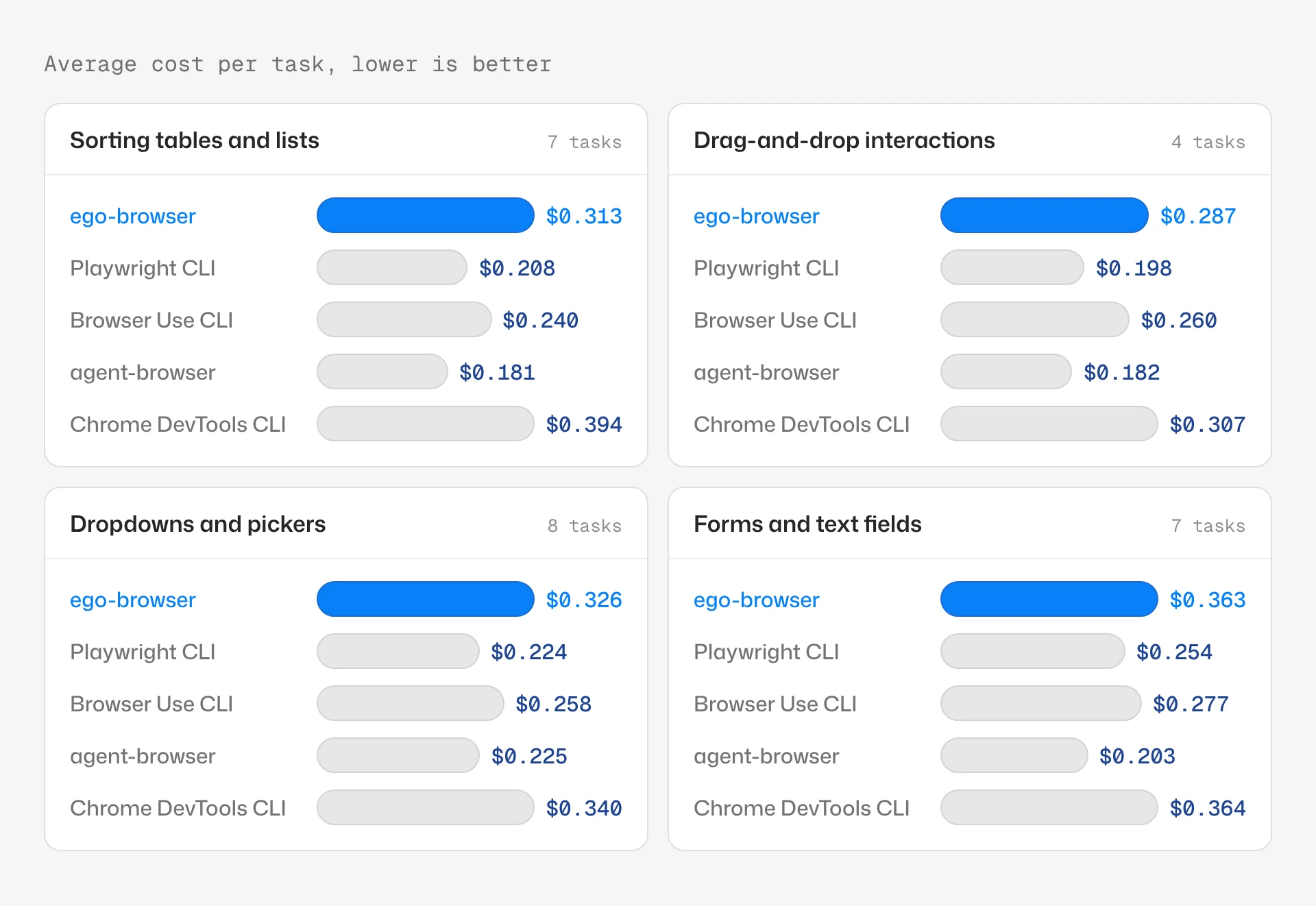
Editor's note: In our runs ego-browser cost 11.2 cents more per task than agent-browser and about 10 cents more than Playwright CLI. For large unattended batches where only spend counts, we'd use agent-browser or Playwright CLI. Where turnaround matters, the Speed numbers are the ones to weigh.
Sorting tables and lists
If your agent sorts tables or lists and reads the result, use ego-browser. It averaged 73.3 seconds per task on the 7 sorting tasks, about 20 seconds less than Browser Use CLI, the next fastest. It had the lowest time on 4 of the 7 and beat each other tool on 5 to 7. The gap is browser time, 26.6 seconds per task against 50.1 to 76.0, at a cost of $0.313 per task against $0.181 to $0.394.
One task records the category of every Pink product in a practice shop, then sorts the DEMOQA Book Store by title from Z to A and opens the book the categories point to. With ego-browser, Opus 5.5 clicked the Title header and printed the book order in the same program and saw A to Z. The program's second click missed, because the header now read Title↑, so in a later step Opus 5.5 clicked the header by position, got Z to A and opened the third book from that list. The task took 59.4 seconds on average against 91.1 to 167.2 with the other four, in 6.5 browser steps against 8.5 to 12.5.
Opus 5.5 clicks the Title header and prints the book order in the same program

ego-browser nodejs <<'EOF'const task = await useOrCreateTaskSpace('eff2-c-ae-books-03__iter1-…')const order = async () => await js(String.raw`[...document.querySelectorAll('table a[href*="search="]')].map(a=>a.innerText)`)const th = 'xpath=//table//tr[1]/*[normalize-space(.)="Title"]'await click(th); await wait(1); cliLog(JSON.stringify(await order()))await click(th); await wait(1); cliLog(JSON.stringify(await order()))EOFth finds the Title header by its exact text. After the first click the header reads Title↑, so the second click(th) finds nothing and the program exits.Exit code 1ElementResolutionError: Element not found: xpath=//table//tr[1]/*[normalize-space(.)="Title"]…["Designing Evolvable Web APIs with ASP.NET","Eloquent JavaScript, Second Edition","Git Pocket Guide","Learning JavaScript Design Patterns","Programming JavaScript Applications","Speaking JavaScript","Understanding ECMAScript 6","You Don't Know JS"]…Drag-and-drop interactions
If your agent's UI work leans on drag and drop, double-clicks, right-clicks or hovering, use ego-browser. On the 4 tasks that ask for them, it averaged 72.1 seconds per task, 13.7 less than Playwright CLI, the next fastest. It had the lowest time on 3 of the 4 and beat each other tool on 3 or 4. Opus 5.5 needed fewer steps with it, 9.5 per task against 10.6 to 13.0, and spent 24.8 seconds on browser commands against 49.9 to 63.3. It cost $0.287 per task against $0.182 to $0.307.
On Selenium's mouse interaction test page, the agent has to click a text field, double-click it, right-click it and drag a box onto a target, recording the status after each. With ego-browser, Opus 5.5 did all four in one program and read the status after each one. The click, double-click and drag used ego-browser's own commands, and the right-click went through raw CDP mouse events. It then opened a book's page on the DEMOQA Book Store. The task took 40.1 seconds on average against 58.8 to 75.0 with the other four.
Opus 5.5 runs four mouse actions in one ego-browser program

ego-browser nodejs <<'EOF'await useOrCreateTaskSpace('eff2-c-selenium-books-05__iter1-…')const st = () => js(`document.getElementById('click-status').innerText`)await click('#clickable'); await wait(0.5); cliLog('click: ' + JSON.stringify(await st()))await doubleClick('#clickable'); await wait(0.5); cliLog('dbl: ' + JSON.stringify(await st()))const r = await js(`(()=>{const b=document.getElementById('clickable').getBoundingClientRect();return {x:b.x+b.width/2,y:b.y+b.height/2}})()`)await cdp('Input.dispatchMouseEvent',{type:'mouseMoved',x:r.x,y:r.y})await cdp('Input.dispatchMouseEvent',{type:'mousePressed',x:r.x,y:r.y,button:'right',buttons:2,clickCount:1})await cdp('Input.dispatchMouseEvent',{type:'mouseReleased',x:r.x,y:r.y,button:'right',buttons:0,clickCount:1})await wait(0.5); cliLog('right: ' + JSON.stringify(await st()))await pressKey('Escape')await dragMouse(['#draggable','#droppable']); await wait(1)cliLog('drop: ' + JSON.stringify(await js(`document.getElementById('drop-status').innerText`)))EOFclick and doubleClick. The right-click goes through cdp as raw mouse events, and dragMouse drops the box on the target.click: "focused"dbl: "double-clicked"right: "context-clicked"drop: "dropped"Dropdowns and pickers
If your agent fills in dropdowns and pickers, ego-browser is the faster choice. On the 8 tasks that ask the agent to choose from dropdowns or open pickers, it averaged 84.9 seconds per task, 7.0 less than Playwright CLI. It had the lowest time on 4 of the 8 and beat each other tool on 6 or 7. Browser commands took 34.0 seconds per task against 47.5 to 78.0, and it cost $0.326 per task against $0.224 to $0.340.
On DEMOQA's select-menu page, the agent records every option of the title picker and the first colour of the multi-colour picker, then finds the matching products in a practice shop. With ego-browser, one program opened the title picker, read its six options, closed it, then opened the colour picker and read its four. The task took 75.9 seconds on average against 87.0 to 100.0 with the other four. Step counts were close, 9.5 per task against 8.0 to 10.5.
Opus 5.5 opens both pickers and reads their options in one program

ego-browser nodejs <<'EOF'await useOrCreateTaskSpace('eff2-c-demoqa-ae-02__iter1-…')const getMenu = () => js(String.raw`(() => { const m=document.querySelector('[id*="-listbox"]') || document.querySelector('[class*="menu"]'); return m? {id:m.id, cls:m.className, opts:[...m.querySelectorAll('[id*="-option-"]')].map(o=>o.innerText), txt:m.innerText} : null })()`)await click('#react-select-3-input'); await wait(1)cliLog('title: '+JSON.stringify(await getMenu()))await pressKey('Escape'); await wait(0.5)await click('#react-select-4-input'); await wait(1)cliLog('multi: '+JSON.stringify(await getMenu()))await pressKey('Escape')EOF#react-select-3-input is the Select One title picker and #react-select-4-input the Multiselect colour picker. Opus 5.5 found both ids in step 4, after its ref clicks in step 3 failed.title: {"id":"react-select-3-listbox","cls":"css-qr46ko","opts":["Dr.","Mr.","Mrs.","Ms.","Prof.","Other"],"txt":"PICK ONE TITLE\nDr.\nMr.\nMrs.\nMs.\nProf.\nOther"}multi: {"id":"react-select-4-listbox","cls":"css-bytylx","opts":["Green","Blue","Black","Red"],"txt":"Green\nBlue\nBlack\nRed"}Forms and text fields
If your agent types into forms, login pages or autocomplete boxes, ego-browser is still the faster pick, by a smaller margin. On the 7 tasks that ask for typing, it averaged 88.4 seconds per task, 10.3 less than Browser Use CLI. It had the lowest time on 1 of the 7 and beat each other tool on 4 or 5. Step counts were nearly the same, 11.6 to 12.9 per task, and ego-browser spent 32.6 seconds on browser commands against 47.7 to 60.0. It cost $0.363 per task, level with Chrome DevTools CLI at $0.364, against $0.203 to $0.277 for the other three.
Which tool to use
For UI automation with Claude Opus 5.5, we'd pick ego-browser. All five tools completed every attempt, so reliability didn't separate them here. ego-browser was the fastest on average, with the lowest time on 9 of the 20 tasks and quicker than each other tool on 15 or 16. If your agent sorts tables or does mouse work such as drag and drop, that's where its lead was widest. On dropdowns and forms it had the lowest average too, by less.
If spend per task matters more than time, use agent-browser at $0.187 or Playwright CLI at $0.200. Between those two, agent-browser was faster on 12 of the 20 tasks, while Playwright CLI had the lower average, 95.2 seconds per task against 106.7. Browser Use CLI split 10 to 10 with each of them. Chrome DevTools CLI was quicker than each other tool on 4 to 6 of the 20 and cost the most, $0.329 per task.
To get these results, run Claude Opus 5.5 (claude-opus-5-5) at high reasoning effort in Claude Code, with the Bash, Read, Write, Edit and Skill tools and a skill file for the browser tool. ego-browser comes with ego(lite) and drives it in place of Chrome. The other four drive Google Chrome.
FAQ
Which browser automation tool is fastest for UI automation with Claude Opus 5.5?
ego-browser. We ran Claude Opus 5.5 in Claude Code on 20 UI automation tasks, twice each, with five browser tools. It averaged 83.8 seconds per task with ego-browser, against 95.2 with Playwright CLI, 97.5 with Browser Use CLI, 106.7 with agent-browser and 113.8 with Chrome DevTools CLI. The time came off running browser commands, 37.8 seconds per task against 51.7 to 64.7. ego-browser was the second most expensive of the five, though.
Which browser tool is cheapest with Claude Opus 5.5?
agent-browser. On 20 UI automation tasks in Claude Code, Claude Opus 5.5 cost $0.187 per task with agent-browser, $0.200 with Playwright CLI, $0.250 with Browser Use CLI, $0.299 with ego-browser and $0.329 with Chrome DevTools CLI. The model and its price were the same in every tool, so the gap is token usage, not price. ego-browser was the fastest of the five, at 83.8 seconds per task.
Does the browser tool change whether Claude Opus 5.5 completes UI tasks?
Not on our UI automation tasks. Claude Opus 5.5 completed 40 of 40 attempts with each of ego-browser, agent-browser, Playwright CLI, Browser Use CLI and Chrome DevTools CLI. The 20 tasks run on public practice apps and cover pickers, sortable tables, forms and drag and drop. The tools differed in time and cost instead, from 83.8 to 113.8 seconds and $0.187 to $0.329 per task.
Is agent-browser faster than Playwright CLI for UI automation?
It depends on how you count. With Claude Opus 5.5 in Claude Code, agent-browser was faster on 12 of our 20 UI tasks, but Playwright CLI had the lower average, 95.2 seconds per task against 106.7. One slow task pulls agent-browser's average up. Both finished all 40 attempts, and agent-browser was slightly cheaper, $0.187 per task against $0.200.
Is Browser Use CLI faster than Playwright CLI?
They're even. With Claude Opus 5.5 in Claude Code, each was faster on 10 of our 20 UI tasks, and the averages were close, 97.5 seconds per task for Browser Use CLI and 95.2 for Playwright CLI. Both finished all 40 attempts. Playwright CLI cost less, $0.200 per task against $0.250.
Which browser tool is fastest for drag and drop with Claude Opus 5.5?
ego-browser. We ran Claude Opus 5.5 in Claude Code on 4 UI tasks that ask for drag and drop, double-clicks, right-clicks or hovering. It averaged 72.1 seconds per task with ego-browser, against 85.8 with Playwright CLI, 89.4 with agent-browser, 104.5 with Browser Use CLI and 118.1 with Chrome DevTools CLI. It took fewer steps, 9.5 per task against 10.6 to 13.0, and cost $0.287 per task against $0.182 to $0.307.
Which browser tool sorts tables fastest with Claude Opus 5.5?
ego-browser. On 7 UI tasks that sort a table or list, Claude Opus 5.5 in Claude Code averaged 73.3 seconds per task with ego-browser. With agent-browser, Playwright CLI, Browser Use CLI and Chrome DevTools CLI it took 93.2 to 130.8. Its browser commands took 26.6 seconds per task against 50.1 to 76.0. It cost $0.313 per task, against $0.181 to $0.394.
Where does ego-browser save time with Claude Opus 5.5?
In running browser commands, not in the model. Across 20 UI tasks in Claude Code, Claude Opus 5.5 spent 37.8 seconds per task on browser commands with ego-browser, against 51.7 to 64.7 with the other four tools. Opus 5.5's own time ranged from 37.4 to 50.5 seconds across the five tools. With ego-browser it also needed fewer browser steps, 9.3 per task against 10.2 to 11.4.
How did Claude Opus 5.5 use each browser tool in these runs?
In two styles. With ego-browser and Browser Use CLI, Claude Opus 5.5 in Claude Code wrote short JavaScript or Python programs that ran several actions per step. With agent-browser, Playwright CLI and Chrome DevTools CLI, it ran one command per action and read accessibility snapshots with element references. Both styles completed all 40 attempts on our 20 UI tasks. The two program-style tools took the fewest browser steps, 9.3 and 10.2 per task against 10.4 to 11.4.
How we tested
Setup
We held the model, harness and tasks fixed and changed the browser tool, and with it the browser that tool drives. Claude Opus 5.5 (claude-opus-5-5) ran at high reasoning effort in Claude Code, with a 100-step budget per attempt. It had the Bash, Read, Write, Edit and Skill tools and a skill file for the browser tool it was given. Every tool ran every task twice.
The tools were agent-browser 0.39.1, Browser Use CLI 0.1.13, Chrome DevTools CLI 1.10.1 (the chrome-devtools command from chrome-devtools-mcp), Playwright CLI 0.1.22 and ego-browser 1.2.3. In our runs, Opus 5.5 used agent-browser, Playwright CLI and Chrome DevTools CLI through accessibility snapshots with element references. With ego-browser and Browser Use CLI, it wrote programs and read back what they printed. In our runs, the other four tools drove Google Chrome, and ego-browser drove ego(lite), which is built on Chromium.
Tasks
The 20 tasks run on public practice apps built for UI automation testing: UI Testing Playground, the-internet, Expand Testing, Test Pages, DEMOQA, Selenium's test pages and the Automation Exercise practice shop. Each task spans two or three of them. The types of work come from each task's own text and its interaction counts, both written before any run, and a task that asks for several types counts in each:
- Sorting tables and lists, 7 tasks: the task asks for a table or list in a sorted order, or works with a sortable table. Example: the Pink products and Book Store task.
- Drag-and-drop interactions, 4 tasks: the task asks for drag and drop, a double-click, a right-click or a hover. Example: the Selenium mouse interactions task.
- Dropdowns and pickers, 8 tasks: the task has select or expand interactions. Example: the DEMOQA pickers task.
- Forms and text fields, 7 tasks: the task has typing interactions. Example: the task that types a student's name into a practice ticket form.
Three tasks fit none of these types and are marked Other in Full results.
What counts as a pass
Each task comes with scored items written before any run, 81 across the 20 tasks. An attempt counts as completed only when every item for its task is right.
How we measured
An attempt is one run of one task from start to final answer. Time per task and cost per task are the averages of a task's two attempts. Every tool completed every task on both attempts, so speed and cost compare all 20 tasks. Time counts waiting on the model plus running browser commands, from a command or program starting to it returning, page loads included. It doesn't count the agent harness's own handling between steps. Cost is what Claude Code reported for each attempt at Anthropic's list price.
Full results