Playwright authentication: log in once, reuse the session, and re-authenticate when it expires

When a Playwright test or scraper needs authentication, there's usually no reason to log in from scratch on every run. A common approach is to log in once, save the cookies and related browser state with storageState, then load that state in later runs to reuse the same session. But having a saved storageState file doesn't mean the login will keep working indefinitely. The session can expire, be revoked by the server, or fail to load correctly in the first place.
If you're automating your own account and you're already signed in to the browser you use every day, there's another option: reuse that existing browser session directly. ego(lite) lets AI agents work in a browser that already has the login state they need, while keeping each task isolated in its own Space. If the task reaches a verification code, QR login, or another step that requires you, you can take over in the visible browser instead of trying to automate MFA.
Whichever approach you use, the goal is the same: make sure your automation actually has a valid authenticated session. A run that suddenly lands back on the login page, an API that returns 401, or a post-login element that never appears can look like three separate issues: navigation, permissions, or a selector problem, when they may all point to the same broken session. In the sections below, we'll use a repeatable local setup to show how to save, reuse, verify, and refresh authentication state in Playwright.
What a broken Playwright login looks like
In the fixture run, one revoked session produced all three symptoms at once. After the server-side session was cleared, a context reusing the saved state was redirected to the login page with a next parameter pointing back at the dashboard, a probe request to the authenticated JSON endpoint returned 401, and a wait for the dashboard table timed out after the configured 3 seconds.
On the public the-internet login, the same class of failure is the bounce. Opening /secure without a live session lands on /login with the red flash You must login to view the secure area. That is the URL check from the callout below: the browser is on the login form, not on the page the locator expected. This screenshot is that bounce. It is not proof that clicking Logout deleted a storageState file. the-internet Logout ends the current window session; a file already written to disk can still reopen /secure until the cookie itself is dead.
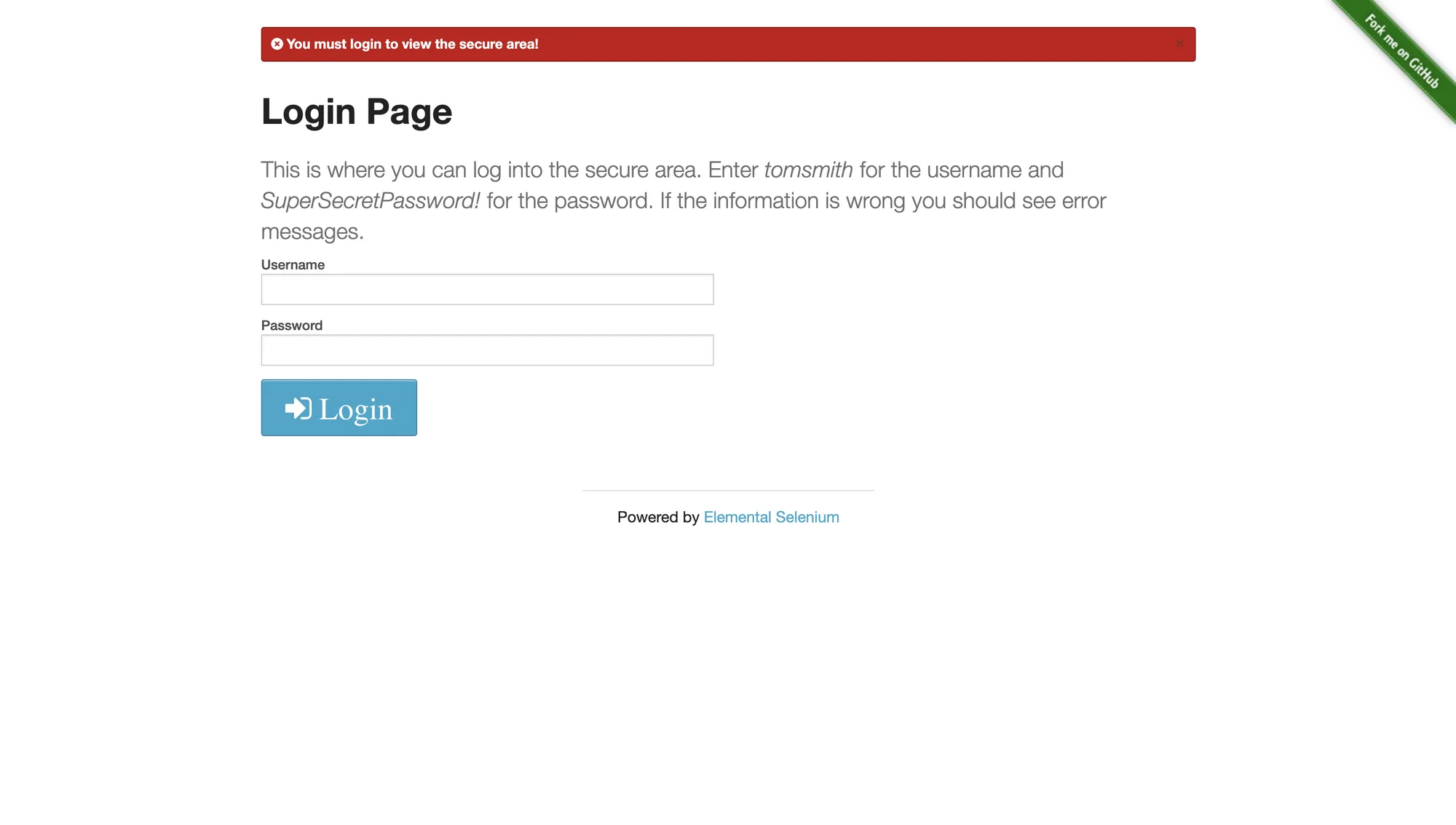
The third symptom is the expensive one. A locator timing out on a post-login element does not say the locator is wrong; it says the page you are looking at is not the page you assumed. In the run above the table never rendered because the browser was sitting on the login form. Treating that as a selector problem leads to patching a query that was never broken.
Four root causes behind authentication failures
Authentication failures cluster into four causes, and each has a different fix. Classifying before patching is what keeps the fix from being another wait statement.
1. The state never loaded
A context created without storageState starts signed out, no matter what happened in a previous run. The same result follows from saving the file after the wrong moment, using a relative path that resolves somewhere else, or running the setup step in a project whose state is not passed to the dependent project. The tell is that a brand-new context behaves identically to the failing one: both are signed out.
2. The cookie is present but dead
A session cookie can exist, carry the right domain and flags, and still be rejected by the server. Session cookies have their own lifetime, and a server can revoke one at any time, including a redeploy, a password change, or an idle timeout. The cookie's expires field is a hint, not a guarantee: the server-side session can die earlier. This is the case the fixture reproduces with an explicit revoke call.
3. Isolation between contexts
Cookies and localStorage belong to a browser context, not to the browser. Saving state from one context and expecting a differently configured context to share it fails silently. The same applies to parallel workers: each worker gets its own context, so each worker needs either its own storage file or its own login step. This isolation is a feature. It is also the reason a session that works in one place appears to vanish in another.
4. SSO redirect chains
With single sign-on, the app you want is rarely the origin that holds the session. The login redirects to an identity provider on another domain, the provider sets its own cookies, and control returns to the app with a code or a token. Saving state before that chain completes captures part of the session and drops the IdP cookies, and the next run reproduces the redirect. The reliable pattern is to wait for the final application URL and an authenticated marker before saving, so the state file carries every origin involved in the chain.
Log in once and save the state correctly
The login-once flow is short: navigate, authenticate, confirm the authenticated state, then write storageState to a file. The confirmation step is what separates a state file that works from one that occasionally does not.
import { chromium } from "playwright";

const browser = await chromium.launch();
const context = await browser.newContext();
const page = await context.newPage();

await page.goto("https://app.example.com/login");
await page.fill("input[name=email]", process.env.APP_EMAIL);
await page.fill("input[name=password]", process.env.APP_PASSWORD);
await page.click("button[type=submit]");

// Wait for the authenticated destination, not just for the click to land.
await page.waitForURL("**/dashboard");

// Verify before saving: an authenticated element plus a 200 from the API.
await page.waitForSelector("#revenue-table");
const probe = await context.request.get("https://app.example.com/api/summary");
if (probe.status() !== 200) throw new Error("login did not take");

await context.storageState({ path: "playwright/.auth/user.json" });
await browser.close();
In the fixture run this step took 119 milliseconds from opening the login page to writing the state file. The file held one cookie, the session identifier the server issued, and the probe returned 200. Numbers like these are properties of the fixture, but the shape of the check is what transfers: verify the destination URL, verify a visible authenticated element, verify an authenticated endpoint, and only then persist.
The headed run below used the-internet.herokuapp.com, not the fixture dashboard. The 119 milliseconds stays with the fixture. The screenshot shows the same save shape on a public login: /secure after authentication, Logout visible, and Claude verifying /tmp/pw-auth.json.
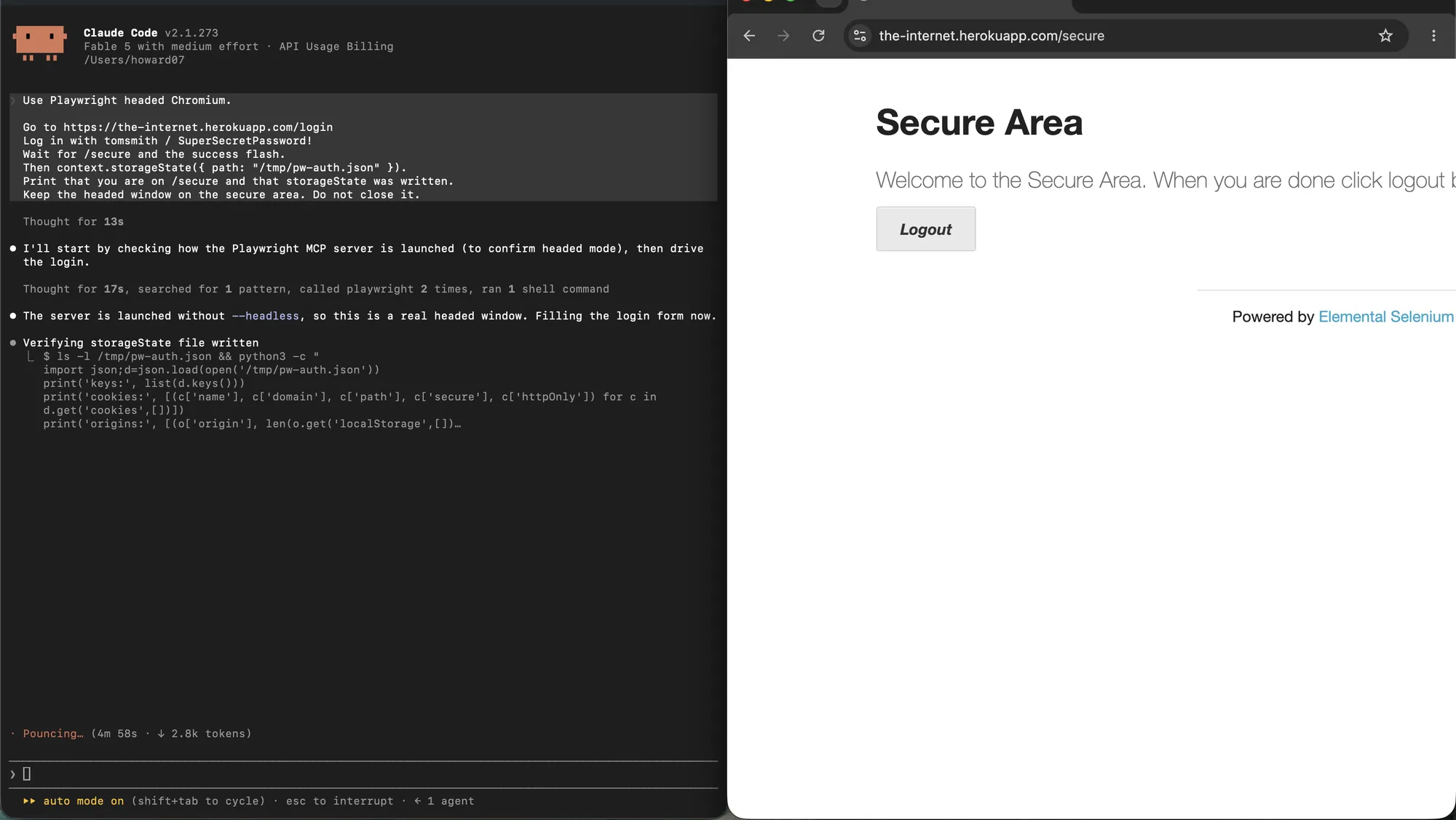
For test suites, the same idea is expressed by a setup project that produces the file and dependent projects that consume it, which is the pattern the official authentication guide documents. For scripts and scrapers, the sequence above is the whole flow. Either way, the file is a credential: it contains live session cookies, so treat it with the same care as a password and keep it out of version control.
Reusing the saved state in tests and scrapers
Reuse is a one-line change at context creation. In a script, pass the file to the context. In a Playwright test suite, set it per project or per test file so every worker starts from the same signed-in state.
// Script: create the context from the saved state.
const context = await browser.newContext({
  storageState: "playwright/.auth/user.json",
});

// Test: use the state for this file (or configure it per project).
test.use({ storageState: "playwright/.auth/user.json" });
In the fixture run, a new context created from the saved file reached the protected dashboard in 6 milliseconds with no login step, and the authenticated probe returned 200 with the expected payload. The interesting number is not the 6 milliseconds; it is that nothing about the flow changed except where the context's state came from.
The reuse screenshot is the same public site. A new headed context loaded /tmp/pw-auth.json, skipped the login form, and opened /secure with Logout already on the page. The 6 milliseconds is still the fixture timing.
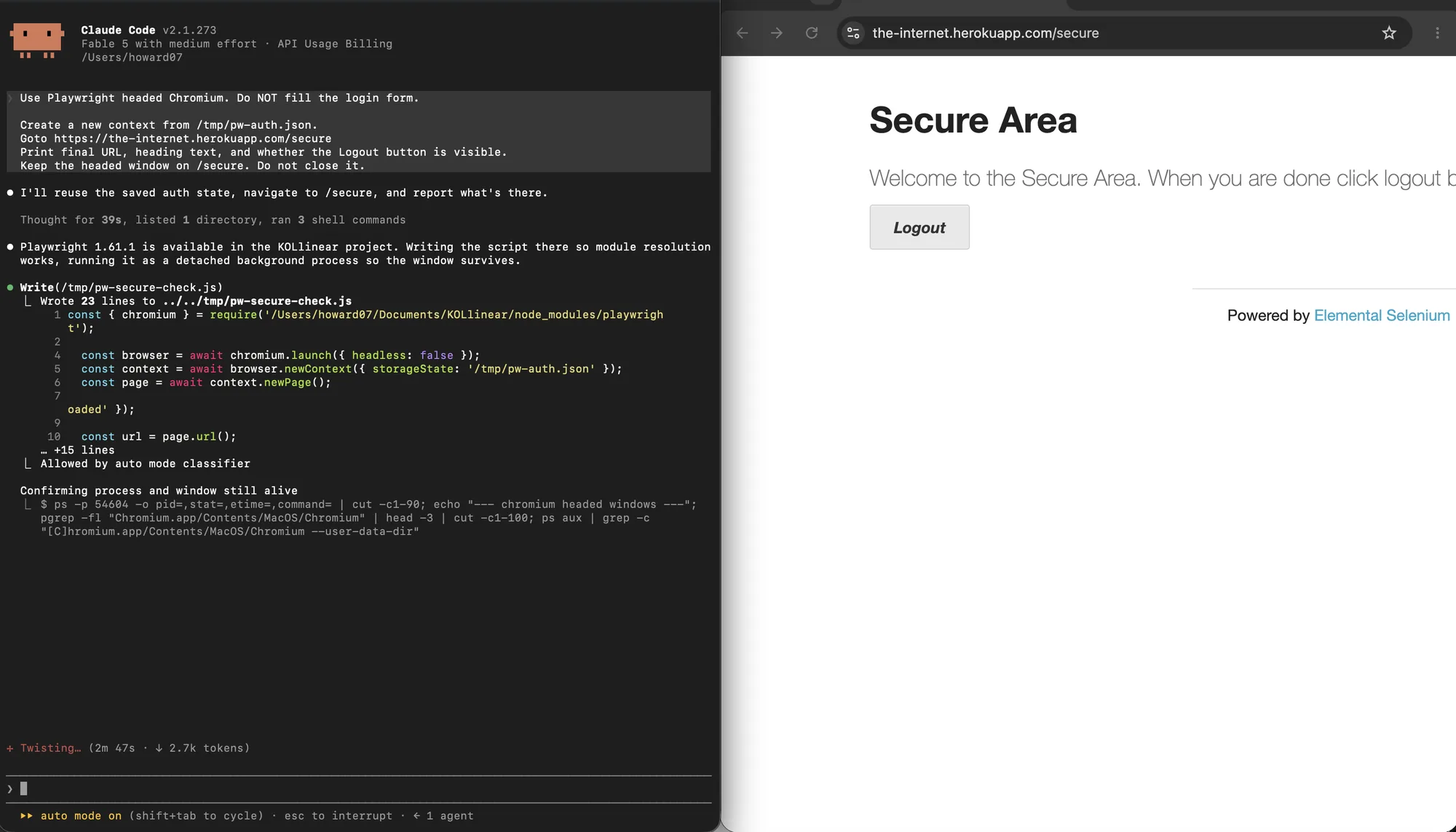
It is worth knowing what the state file does and does not carry. It contains cookies for every origin the context touched and localStorage entries per origin. It does not contain IndexedDB, session storage, or service worker state. Applications that keep their token in IndexedDB therefore need an additional capture step or a re-login; expecting storageState to cover them is a common source of phantom failures. Cookies themselves are governed by domain, path, and flags described in the MDN cookie guide and the Set-Cookie reference.
Detecting an expired or revoked session
The cheapest detector is an authenticated request made before the expensive work. Most applications have a small endpoint that answers with the current user, a count, or a configuration object, and its status code is the session's status code. A request costs milliseconds; discovering the failure halfway through a scrape costs the whole run.
async function sessionIsAlive(context) {
  const probe = await context.request.get(
    "https://app.example.com/api/summary",
    { failOnStatusCode: false },
  );
  return probe.status() === 200;
}

if (!(await sessionIsAlive(context))) {
  await loginAndSaveState(context);
}
Do not rely on the cookie's expires field alone. It says when the browser should stop sending the cookie, which is not the same as when the server stops accepting it. Server-side revocation is invisible until you ask. The fixture's revoke call is exactly that situation: the cookie was still present and well-formed, and the server answered 401.
Re-authenticating automatically
Automatic re-authentication is a small state machine: detect, re-login, refresh the saved state, re-run the failed step once, and verify. The cap matters. A workflow that silently re-authenticates in a loop can mask a wrong password, an account lockout, or a login page that changed, and it will happily generate traffic while doing so.
async function withSession(page, context, task) {
  if (!(await sessionIsAlive(context))) {
    await loginAndSaveState(context, page); // refresh file after login
  }
  try {
    return await task();
  } catch (error) {
    if (!(await sessionIsAlive(context))) {
      await loginAndSaveState(context, page); // one retry, then fail loudly
      return await task();
    }
    throw error;
  }
}
In the fixture, the detector saw the 401, the re-login and the verification completed in 99 milliseconds, and the refreshed state file again held exactly one session cookie. The run finished on the protected dashboard with the table visible and three rows rendered. A re-authentication that ends without those three confirmations is not finished.
If several workers share one state file, they can all notice the expiry at the same moment and race to re-login. The remedy is single-flight coordination: the first worker refreshes the file and the others wait, or each worker refreshes its own copy. The mechanics are the same as the session persistence problems that show up when several agents run against the same browser profile.
Multiple accounts and parallel runs
Isolation is per context, so the rule is one storage file per account or role, one context per worker, and no shared mutable session. In the fixture, two parallel logins produced two different session cookies, both probes returned 200 in the same millisecond, and neither context could see the other's session. That is the property to preserve deliberately, because the failure mode when it breaks is subtle: two accounts overwrite each other's state and a test passes for the wrong user.
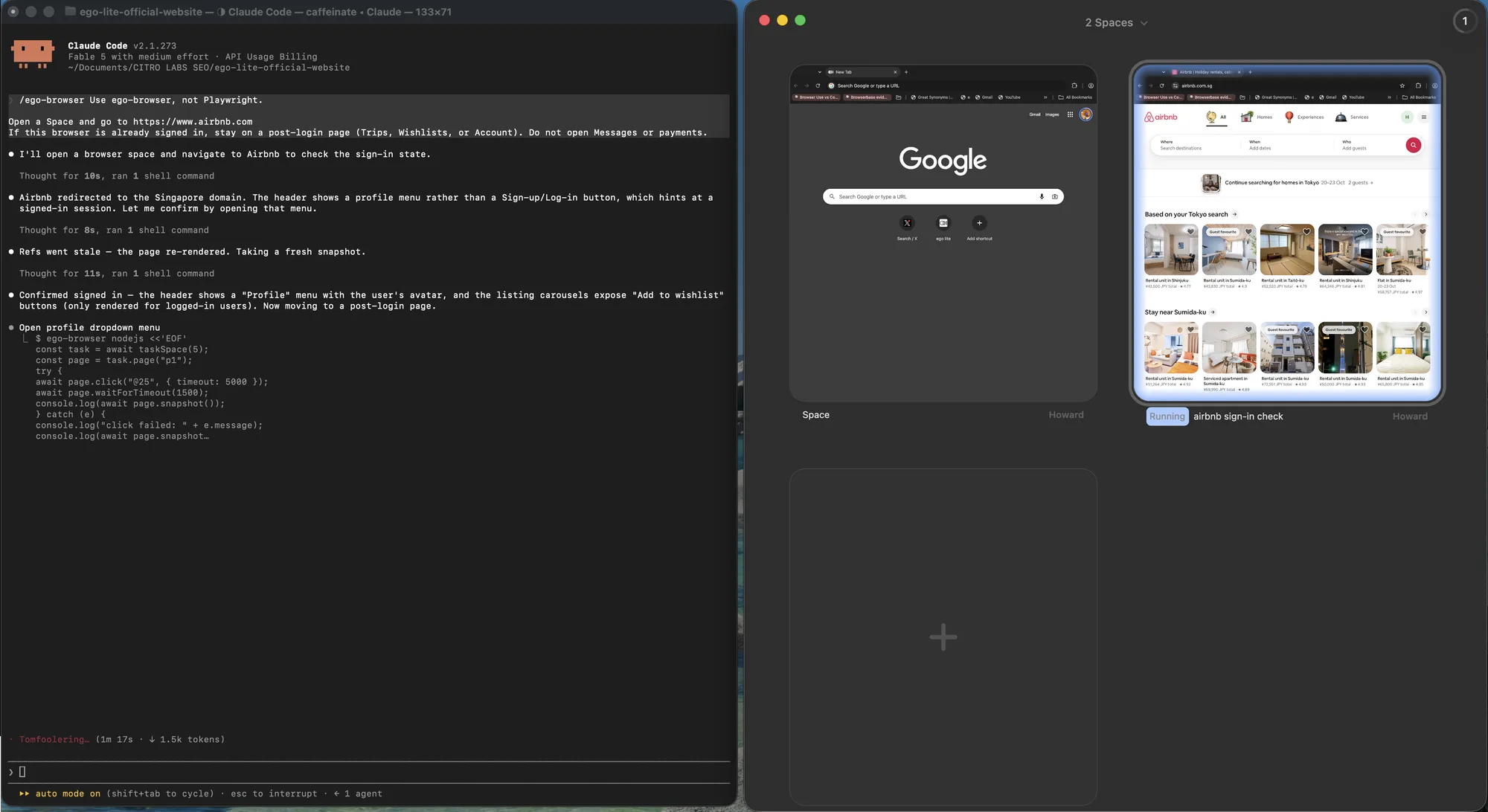
The same rule shows up in a real browser. Two Spaces are two contexts: one can sit idle on a new tab while another keeps a signed-in Airbnb session, without sharing cookies the way a single headed window would. Isolation is the point. The overview is just how you see both at once.
Verifying that authentication took effect
Verification is three checks, and skipping any of them is how a workflow stays quietly broken. The first check is a positive: an element that only exists after login is present. The second is a negative: the login form is absent, so a page that happens to contain both is not accepted. The third is a data check that would fail on a stale or cached page, such as a value that must change between runs.
await page.waitForSelector("#revenue-table");      // positive
await expect(page.locator("#login-form")).toHaveCount(0); // negative
const probe = await context.request.get("/api/summary"); // data
assert.equal(probe.status(), 200);
assert.ok((await probe.json()).q3Revenue);
All three passed in the fixture's reuse run: the table was visible, the login form count was zero, and the JSON payload contained the expected field. The three together take a few milliseconds, and they turn the difference between a working session and a broken one from an inference into a fact. More debugging technique for the runs that still misbehave is documented in the Playwright debug guide, and the best practices page covers the surrounding habits, including which waits are worth writing.
When the session belongs to your real browser
A Playwright storageState file is something you own. That is the right tool when the account is a fixture, the password is in CI secrets, and nobody is sitting at the machine. It is the wrong tool when the login is yours: SSO, a hardware key, a push prompt, a session you already keep warm in daily Chrome. In that case the job is not to reconstruct the login. It is to borrow the browser that already has it.
ego(lite) is that borrow. An agent can open a signed-in tab you already use, keep working in a Space that does not steal your mouse, and stop when a second factor or a payment confirmation needs you. The session never becomes a JSON file on disk. That is the point: a personal login should stay in the browser, not travel through a storageState path that CI would later commit by accident.
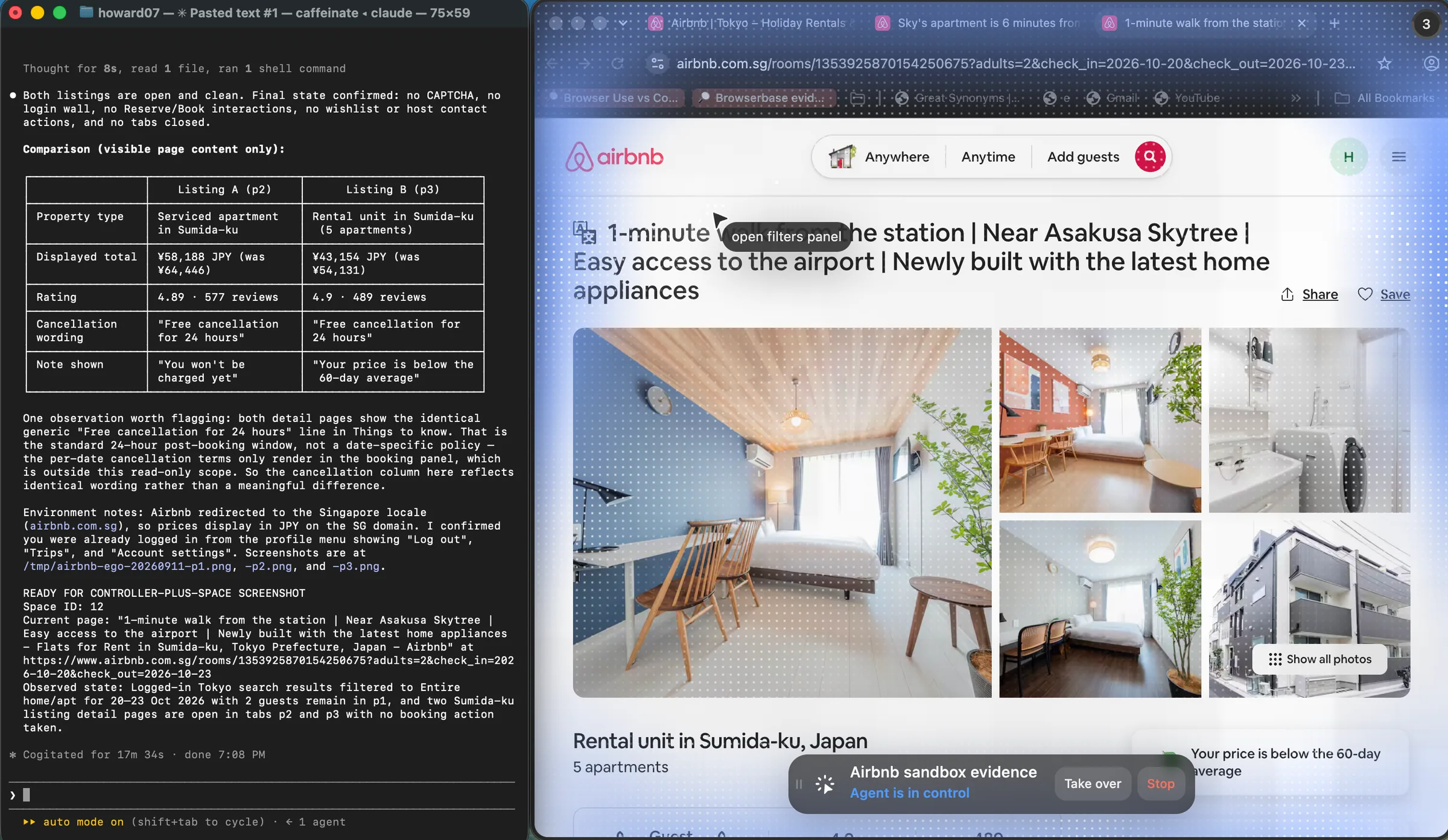
Keep the two instruments apart. Unattended test accounts stay on storageState, as the Playwright auth guide describes. Personal dashboards stay in a visible browser. ego(lite) does not click MFA, does not confirm payments, and does not collect credentials; those stops are documented in the Space docs and the quick start. Current product version is 0.5.0.32 (changelog, 2026-09-12). Recheck the changelog and the GitHub repo before you quote a newer build.
FAQ
Why does Playwright still land on the login page after I save storageState?
Playwright still lands on the login page after storageState when the file was saved too early, the context never loaded it, or the server revoked the cookie. Check the file's cookies first, then the context options. If both look right, treat it as a dead session, not a navigation bug.
Do session cookies survive storageState?
Yes. The file records cookies whether or not they have an expiry, along with localStorage per origin. What does not survive is anything the browser keeps outside that structure: IndexedDB, session storage, cache, and service workers.
How long does a saved Playwright login last?
As long as the server keeps accepting the session, which is a decision the server makes and can reverse at any time. The cookie's expiry date is an upper bound, not a promise. Treat any long-lived state file as stale until a probe says otherwise.
Can parallel workers share one storageState file?
They can read it, and each worker's context will be isolated. The problem appears when one worker refreshes the file after a re-login while another is mid-run. Either give each worker its own copy, or serialize the refresh so only one login happens at a time.
How do I authenticate with OAuth or SSO in Playwright?
Complete the full redirect chain once, in a context that will keep the identity provider's cookies, and save the state only after the application's final URL is reached. If the provider requires an interactive step, do it once by hand in the same run and reuse the resulting state afterwards.
How should MFA and one-time codes be handled?
Not by automating the second factor with a stored code. The honest pattern is a one-time human step whose result is the saved session, or a session that was already authenticated in a browser you own. Storing OTP secrets or SMS codes next to a storage file converts a security control into a liability.
Is it safe to commit storageState to version control?
No. The file contains live session cookies. Keep it in the working directory, ignore it in git, and in CI inject it from a secret store. If it has ever been committed, treat the session as leaked and revoke it.
How do I deliberately test that my automation handles an expired session?
Add a test hook that invalidates the session server side, the way the fixture's revoke endpoint does, and run the reuse path against it. Assert the redirect, the 401 from the probe, and the recovery. That single test covers the code path that otherwise only fires in production.
What if the app stores its token in IndexedDB?
storageState will not carry it, so use one of two paths: capture the token through a page script after login and re-inject it on reuse, or authenticate inside each run using the API that issues the token. The first is faster, the second is less coupled to the app's internals.
Should every run re-authenticate instead of reusing state?
For CI with a disposable test account, re-authenticating per run is the safer default. For a job that runs frequently against a stable session, reuse plus a probe and a capped re-login is cheaper and easier to reason about. Both are legitimate; unverified reuse is not.
Why does the login work locally but fail in CI?
Usually because the state file is missing or older in CI, the clock differs, or the login page serves a different variant to a fresh IP. Reproduce with the same headless setting, viewport, and storage file, and probe the session before the suite runs. The failure is often environmental, not a code difference.
Can one storageState file serve two accounts?
No, and attempts to merge them tend to keep whichever cookie was written last. Use one file per account or role, name it for the identity it belongs to, and pass the right one to each context.