Playwright vs Selenium: which test framework fits?

Playwright is the stronger default for a new web end-to-end suite when the team can use its supported languages and browser engines. Selenium remains the safer choice when you need standards-based WebDriver interoperability, Safari-specific coverage, a language outside Playwright's official set, or an existing Grid and test estate whose replacement cost exceeds the benefit.
That conclusion is about test engineering, not scraping. Our existing three-way article compares Playwright, Puppeteer, and Selenium for extraction workloads; this page answers the narrower question teams actually face when choosing or migrating a browser test framework. If the job is a coding agent working against a browser session you are already signed into, that sits outside what a test framework is for, and the ego(lite) section below covers it.
Is Playwright better than Selenium?
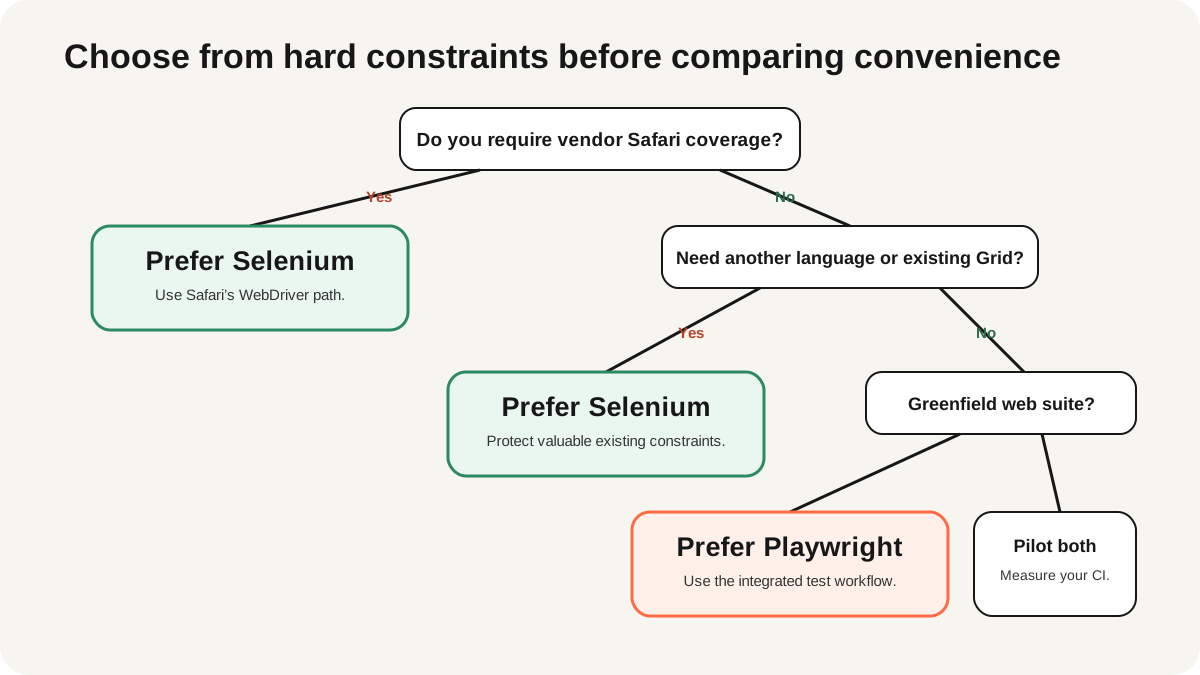
Playwright is usually better for a greenfield JavaScript, TypeScript, Python, Java, or .NET test suite that targets Chromium, Firefox, and WebKit. Selenium is better when your compatibility contract depends on vendor WebDriver implementations, especially Safari, or when the organization already operates a mature Selenium Grid across languages and platforms.
| Constraint | Prefer Playwright | Prefer Selenium |
|---|---|---|
| New suite | Built-in runner and debugging workflow | Only if standards or language needs dominate |
| Browser requirement | Chromium, Firefox, WebKit | Vendor browsers through WebDriver, including Safari |
| Existing infrastructure | Little legacy investment | Large Grid, fixtures, and page-object estate |
| Primary pain | Waiting, traces, and local authoring | Cross-platform reach and organizational reuse |
How do Playwright and Selenium differ?
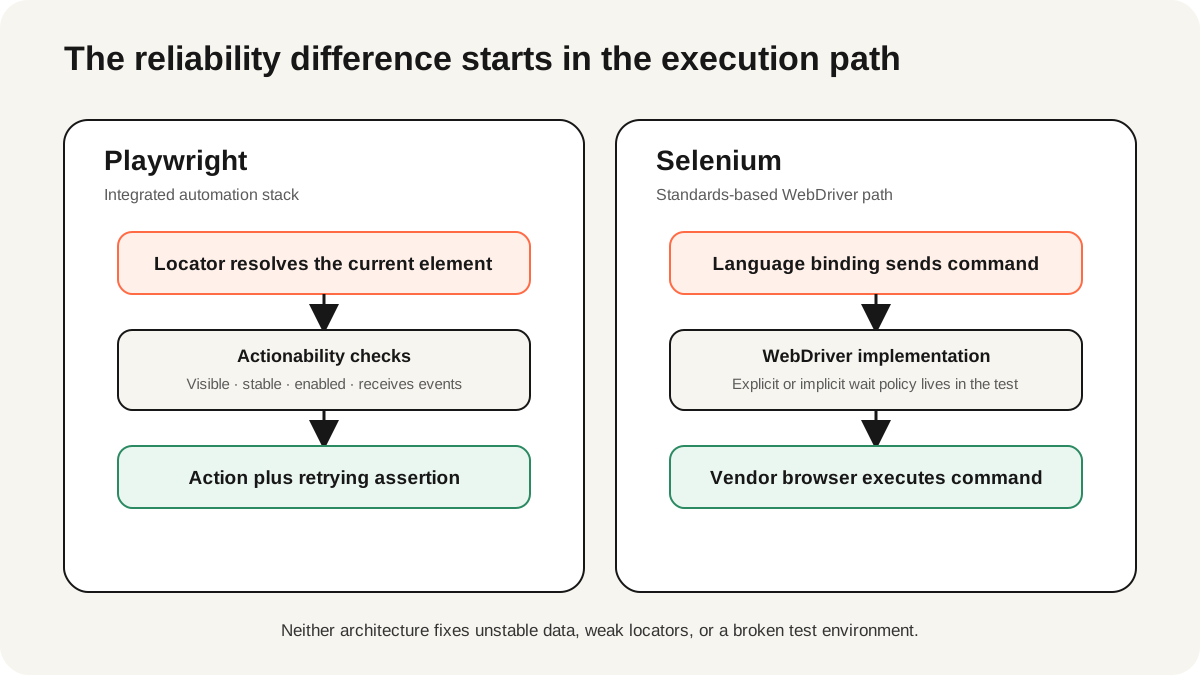
Selenium WebDriver implements the W3C WebDriver remote-control interface. A language binding sends commands to a browser-specific driver, which delegates them to the browser. That standards boundary is Selenium's strategic advantage: browser vendors participate in the implementation, and the same conceptual API spans local and remote machines. WebDriver BiDi adds an event-capable WebSocket path for network, log, and script events without making CDP the cross-browser contract.
Playwright ships one automation implementation with bindings for Node.js, Python, Java, and .NET. Its browser support covers Chromium, Firefox, and WebKit builds tested by the project. The Node.js package includes Playwright Test, so fixtures, parallel execution, retries, traces, screenshots, and an HTML report arrive as one opinionated toolchain. Other language bindings integrate with their own test runners.
Which framework produces more stable tests?
Playwright has a better stability default. Its actionability checks wait for a target to be visible, stable, enabled, and able to receive events before common actions. Locator assertions retry until their condition succeeds or times out. A locator also resolves the current DOM node before each action, reducing stale-element patterns when a framework rerenders the page.
Selenium provides waiting strategies rather than the same actionability contract. Its official waits guide identifies race conditions as a primary cause of flaky tests and warns that mixing implicit and explicit waits creates unpredictable timeout behavior. A disciplined Selenium suite can still be reliable, but teams must centralize explicit conditions and remove fixed sleeps.
Neither tool can infer business readiness. A button can be visible and enabled while the backend is still reconciling an order. Stable suites wait on user-visible outcomes or explicit application contracts, isolate test data, and record enough evidence to distinguish a product defect from an environment failure.
Make the same test contract explicit in both tools. For a checkout confirmation, begin from a known cart fixture, use a unique order identity, act through accessible labels, and assert the final confirmation plus the server-visible order state. Capture the URL, browser version, console errors, and screenshot on failure. Do not compare a carefully rewritten Playwright test with a neglected Selenium page object; compare equivalent locators, data, assertions, retries, and artifacts. If the failure disappears only after adding a fixed sleep, classify it as unresolved rather than successful.
Which has broader browser and language support?
Selenium has the broader compatibility surface. Its project documents Chrome, Edge, Firefox, Safari, and browser-specific capabilities, with maintained bindings across Java, Python, JavaScript, C#, Ruby, and Kotlin. Playwright officially supports Node.js, Python, Java, and .NET; all expose core browser automation, while test-runner integration differs by language.
| Question | Playwright | Selenium |
|---|---|---|
| Can it test Chromium? | Yes | Yes, through Chrome or Edge drivers |
| Can it test Firefox? | Yes, project browser build | Yes, through GeckoDriver |
| Can it test Safari itself? | No; WebKit is not the Safari app | Yes, through SafariDriver on supported macOS |
| Best-integrated language | TypeScript or JavaScript | Depends on the team's existing runner |
The Playwright project explicitly says to choose a language based on team experience and ecosystem constraints. Treat that as a maintenance decision: the framework with a richer demo is not automatically the framework your on-call team can debug at 2 a.m.
Which debugging workflow is better?
Playwright's integrated trace viewer is the easier default for new teams. A trace can preserve actions, DOM snapshots, network activity, console events, and attachments for a failed retry. The HTML report links directly to test results, while UI mode lets an author step through locators and assertions locally. The tools share one vocabulary with Playwright Test.
Selenium debugging quality depends on the runner and reporting stack around WebDriver. That can be a disadvantage for a new suite, but it can be an advantage in an organization that already centralizes video, logs, network capture, and test history around Grid. Compare the evidence available after a CI-only failure, not the polish of a local demo.
How do they scale in CI?
Playwright Test runs workers in parallel and uses lightweight browser contexts for isolation. Sharding can split a suite across CI jobs. Selenium can also run tests concurrently, while Selenium Grid routes WebDriver sessions to remote machines and supports different browser versions and operating systems. Grid is a separate distributed system; that is valuable reach if you need it and avoidable operations work if you do not.
The Selenium Grid documentation frames Grid around parallel execution on remote machines, multiple browser versions, and cross-platform testing. If your suite only needs one Linux image and three browser engines, Playwright workers may be the smaller system. If release approval requires real vendor browsers across managed hosts, Grid or a WebDriver cloud may be the correct architecture.
Should an existing Selenium suite migrate?
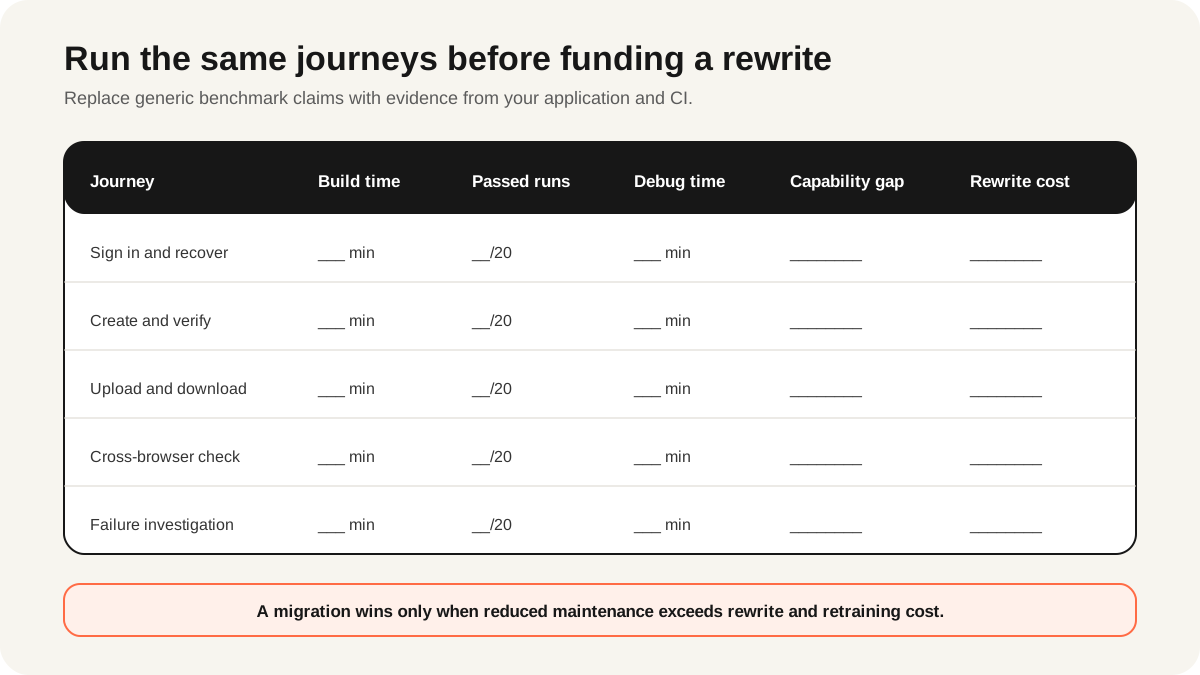
Migrate only when measured maintenance cost or missing capability justifies it. Start with five to ten flows representing authentication, a dynamic form, file transfer, multiple tabs, and the most common flaky failure. Implement them in Playwright without translating page objects line for line. Run both suites in CI for several weeks and compare authoring time, median duration, retry rate, failure diagnosis time, and coverage gaps.
Before the pilot, take a 30-day Selenium baseline: unique failures, reruns, quarantined tests, engineer minutes spent diagnosing failures, and release delays caused by missing coverage. During the pilot, record the same measures for Playwright and include browser-install time, CI image size, report retention, and retraining effort. Separate product defects from test defects. The decision should name the expected payback period and the capability being bought. If the pilot saves seconds but loses required Safari evidence or mature Grid observability, the migration has not met its contract.
| Signal | Stay on Selenium | Pilot Playwright |
|---|---|---|
| Suite health | Failures are actionable and maintenance is stable | Waits and diagnostics consume recurring engineer time |
| Coverage | Safari or remote vendor browsers are mandatory | Chromium, Firefox, and WebKit satisfy policy |
| Infrastructure | Grid and reporting are sunk but still valuable | The team wants a smaller integrated stack |
What are the limits of this comparison?
No framework comparison can predict results without the application, team, browsers, and CI environment. Playwright's WebKit coverage is not identical to testing the Safari product. Selenium's standards boundary does not make every driver feature identical. Cloud vendors add capabilities beyond open-source Grid. Framework versions also change, so verify current browser and language support before signing a long-lived test contract.
This guide deliberately avoids unsupported performance rankings. A useful benchmark must hold the application, data, browser, host, concurrency, retries, and artifacts constant. It should also run enough repetitions to expose variance instead of reporting the fastest sample. Report cold and warm runs separately when browser startup is part of the claim. Publish those conditions with the result or treat it as anecdote.
Which framework should your team choose?
For most new web-app suites, start the pilot with Playwright. Keep Selenium when Safari, a broader language, remote-browser standardization, or an effective Grid is part of the requirement. For an existing suite, choose based on recurring maintenance and diagnostic cost rather than enthusiasm for a rewrite. The best result is a smaller suite with clear ownership and useful failure evidence, not a framework logo.
If the real job is browser extraction, use our scraping-specific three-way comparison. If an AI agent is selecting the control layer, compare Browser Use and Playwright or follow the Claude Code browser-testing workflow.
Where does ego(lite) fit?
ego(lite) does not replace Playwright or Selenium as a test framework. It keeps you from being locked into one built-in assistant, one desktop app, or one browser panel, since Claude Code, Codex, Cursor, Gemini CLI, or any compatible agent can drive the same browser.
Keep deterministic regression tests, CI assertions, Safari release evidence, and Grid coverage in Playwright, Selenium, or the infrastructure built around them. Reach for ego(lite) instead when the work is exploratory and authenticated: a coding agent poking at a real logged-in account, or reproducing a bug report. The roles are complementary. Open the ego(lite) browser workflow if that missing layer matches your team.
FAQ
Is Playwright replacing Selenium?
No. Playwright is a strong default for many new suites, while Selenium remains the standards-based ecosystem for broad browser, language, Grid, and vendor support.
Is Playwright faster than Selenium?
Sometimes, but a universal speed ranking is not defensible. Application latency, worker count, data setup, retries, and artifact capture can dominate framework overhead. Benchmark your own flows.
Is Playwright less flaky than Selenium?
Playwright has stronger waiting defaults, which removes a common source of races. Poor locators, shared data, external dependencies, and incorrect assertions can still make either suite flaky.
Can Playwright test Safari?
Playwright tests its WebKit browser build, not the Safari application. Use Selenium with SafariDriver or another Safari-capable system when the release requirement names Safari itself.
Does Selenium support auto-waiting?
Selenium supports page-load, implicit, and explicit waiting strategies, but not Playwright's same per-action actionability model. Selenium warns not to mix implicit and explicit waits.
Should a Java team choose Selenium?
Not automatically. Both have official Java support. Compare the team's runner, Grid needs, browser contract, diagnostics, and existing suite investment with a representative pilot.