Sandbox web browser for AI agents: local vs remote


A sandbox web browser runs web content inside an explicitly limited browser environment so a failure or hostile page has fewer ways to affect the host, other users, or later sessions. For AI agents, ‘sandbox’ can mean several different things: Chromium's process sandbox, a separate browser profile, a local app workspace, a container, a virtual machine, network policy, or an ephemeral remote session. You need to name the boundary before you can judge it.
What is a sandbox web browser?
A useful definition has three parts: the browser process is constrained, browser state is scoped, and the surrounding system limits what the session can reach or retain. If a product only opens a URL in another tab, that is not enough information to call it a security sandbox. If it launches a fresh remote browser but gives that browser broad network credentials, ‘ephemeral’ does not automatically mean low risk.
Chromium itself separates browser and renderer processes and applies platform-specific sandbox mechanisms. A service may then add a fresh user-data directory, container or VM, outbound network controls, secret injection, file mounts, resource limits, and teardown. Each layer protects a different asset and has a different failure mode.
For AI agents, the threat model is wider than malicious JavaScript. The agent may follow prompt injection on a page, select the wrong control, expose a secret in a form, download an unsafe file, or reuse a privileged session for an unintended task. Browser isolation must therefore work with agent permissions and confirmation policy.
Should an agent use a local or remote sandbox?
Make the choice in this order: identity, risk boundary, scale, then handoff. The first requirement that cannot be relaxed should decide the route.
- Choose a local persistent browser when the task must reuse an authorized login, local extension, or device-bound state.
- Choose a remote sandbox when untrusted pages must stay off the user's device, each run must start clean, or many sessions must run in parallel.
- Choose a local or remote browser with a verified live-view and takeover path when a person must inspect, authenticate, approve, or stop the run.
- Choose a hybrid when identity continuity and off-device isolation are both required: keep the account-dependent step local and send anonymous or high-scale work to disposable remote sessions.
| Decision factor | Local persistent browser | Remote sandbox |
|---|---|---|
| Existing login | Can reuse an authorized local profile or dedicated local state | Usually imports, recreates, or injects state under provider rules |
| Human takeover | Directly visible near the user | Depends on provider live-view/control support and latency |
| Isolation from host | Browser/profile boundary; host remains local | Can add container or VM separation from the user's host |
| Concurrency | Bounded by one machine and local contention | Designed for provisioned fleets, quotas, and parallel sessions |
| Custody | State and artifacts stay on the user's machine unless synced | State, traffic, and artifacts enter provider-controlled infrastructure |
| Maintenance | User or team owns browser, machine, updates, and capacity | Provider owns more infrastructure; customer owns policy and integration |
Which isolation layers actually matter?
Evaluate at least six layers separately. Process isolation limits what a compromised renderer can do to other processes. Profile isolation separates cookies, local storage, history, and extensions. Filesystem isolation limits readable and writable paths. Network isolation controls destinations, DNS, proxies, and private-network reach. Compute isolation adds a container or VM boundary. Tenant isolation prevents one customer's browser, logs, secrets, or artifacts from crossing into another's workload.
Also separate lifecycle from isolation. Deleting a session after ten minutes reduces persistence, but it does not prove that the session could not reach a sensitive network while alive. Conversely, a persistent local Space can be acceptable for a narrow trusted account workflow if the profile, agent permissions, and task scope are intentionally limited.
How do login state and data custody differ?
A local persistent browser can keep cookies, local storage, client certificates, and compatible extensions close to the user. That removes repeated login work but raises the consequence of overbroad access: an agent may inherit more account state than the task requires. Prefer a dedicated work profile or Space, allow only required sites, and require confirmation for irreversible actions.
A remote sandbox commonly starts clean, then receives storage state, a login flow, or provider-managed persistence. This improves reproducibility but sends some browser state and traffic into a remote control plane. Review encryption, region, retention, logs, replay artifacts, employee access, subprocess isolation, and deletion behavior. Do not upload a personal profile because a provider supports a storage-state field.
Session expiry remains application behavior. MFA, risk checks, device binding, IP changes, and cookie rotation can invalidate either path. A reliable agent detects an expired session, stops before acting on the wrong page, and returns control or follows an approved reauthentication flow.
How do human takeover and debugging differ?
Local visible execution puts the browser beside the user, which is useful when a person must inspect context, solve an authentication step, or stop an unsafe action immediately. A dedicated local Space also avoids mixing agent actions into an unrelated everyday tab.
A remote browser environment may expose a live session surface, command stream, logs, recordings, and replay. Those features can support distributed teams and post-run debugging, but takeover latency, access control, retention, and regional availability remain implementation-specific. Verify them in the exact environment you operate.
In a live authenticated Airbnb run, Claude Code used the ego-browser path to verify login from visible UI, search Tokyo for October 20 to 23 and two guests, apply the Entire home filter, open two listings, and compare visible fields while the dedicated Space remained under Agent control. It did not inspect session cookies or perform booking, wishlist, messaging, or account actions.
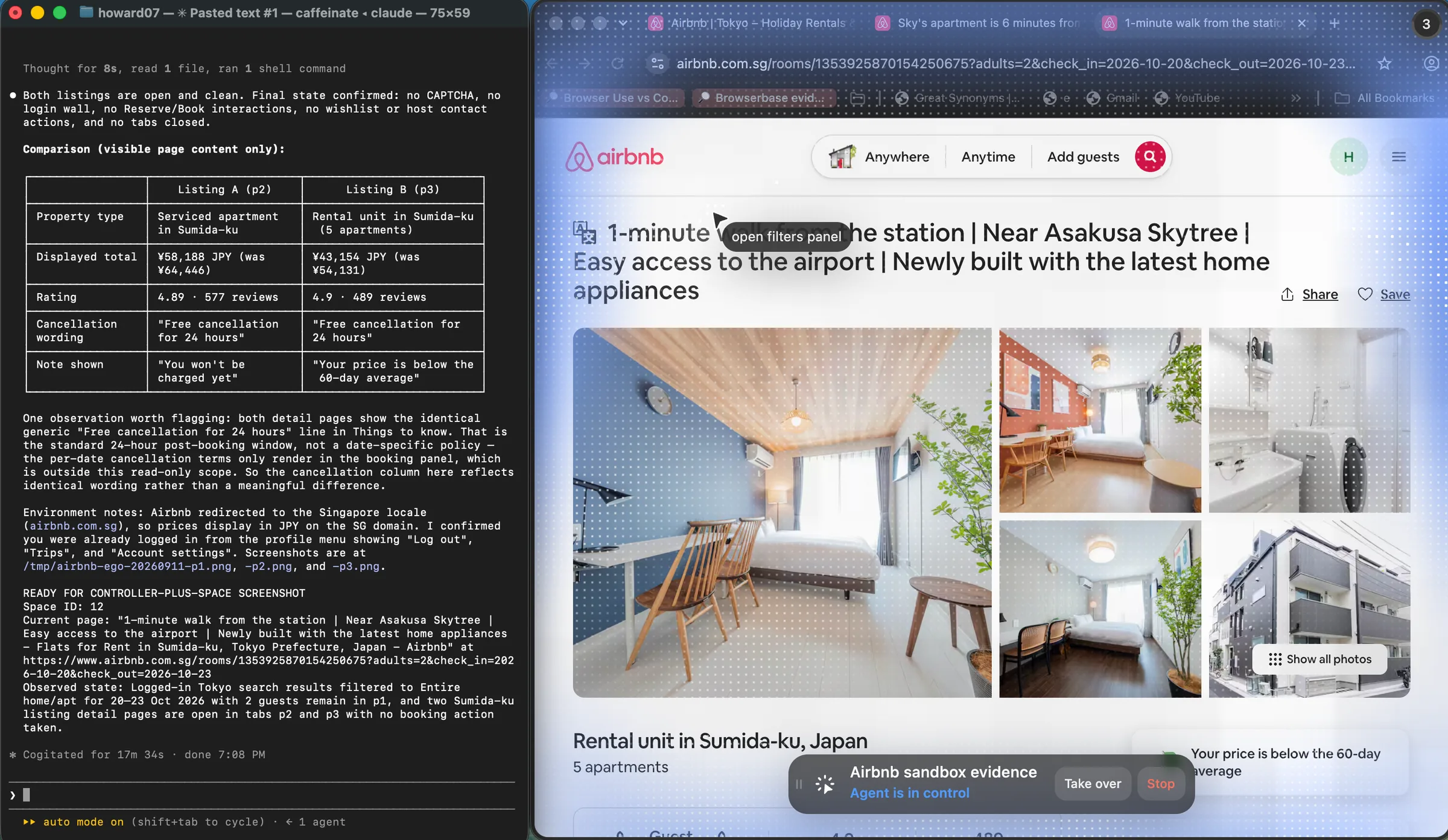
The run compared only what the two pages visibly exposed. Listing A showed a serviced apartment at JPY 58,188 with a 4.89 rating from 577 reviews. Listing B showed a rental unit at JPY 43,154 with a 4.9 rating from 489 reviews. Both pages used the same generic 'Free cancellation for 24 hours' wording, so the agent did not infer date-specific cancellation terms without entering the booking panel.
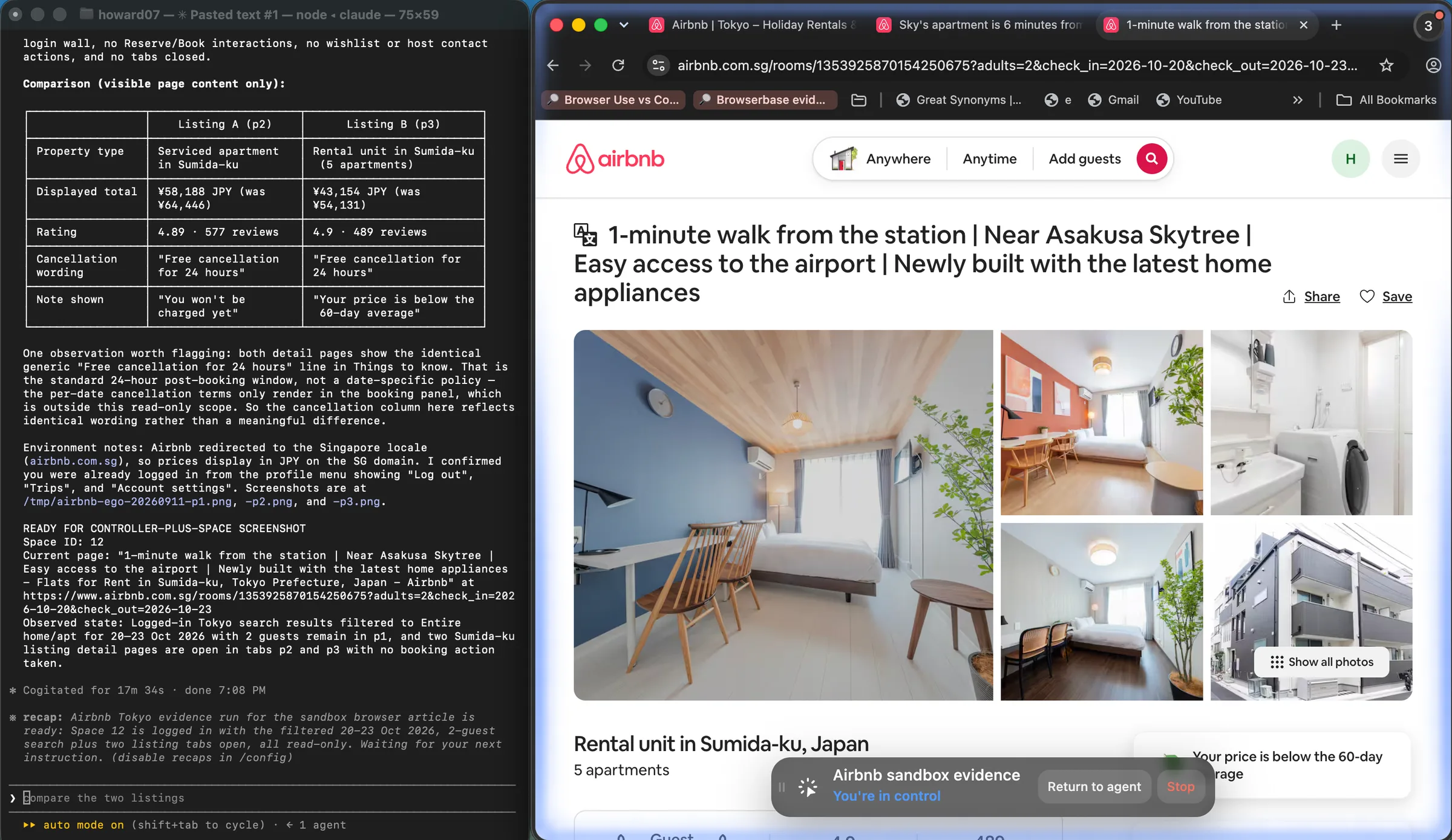
After the comparison finished, the user selected Take over. The same Space and listing remained open, the status changed from Agent is in control to You're in control, and the available action changed to Return to agent. This is a direct interface-level handoff observation; it does not establish how every website or interrupted action will behave.
How do concurrency, replay, and cost differ?
A local machine has finite CPU, memory, display, profile locks, and network capacity. It is appropriate for interactive or low-concurrency work, but parallel agents must not mutate the same profile at once. Remote services can provision many isolated sessions and centralize recordings, yet quotas, startup time, browser minutes, proxy traffic, storage, and observability features affect cost.
Cost comparisons need a matched unit: completed task, not raw browser minute alone. Include setup, retries, proxy traffic, CAPTCHA or MFA handoff, state creation, artifact storage, failed-session replay, and operator time. We did not have comparable billing telemetry for this article, so we do not publish a winner or price table.
What did our local persistence test show?
We used ego-browser 0.5.0.31 with Chromium 152.0.7977.54 in one dedicated ego(lite) Space. A first Claude Code process completed the read-only Airbnb comparison and handed the Space to the user. After the user returned control, a fresh Claude Code process resumed Space 12 and inspected its existing tabs without navigating, reloading, or changing them.
| Check | Observed result |
|---|---|
| Same Space found by fresh process | Yes, Space 12 |
| Tokyo search-results tab retained | Yes, p1 |
| Two listing-detail tabs retained | Yes, p2 and p3 |
| Visible listing remained active | Yes, p3 |
| Navigation, reload, or tab mutation required | No |
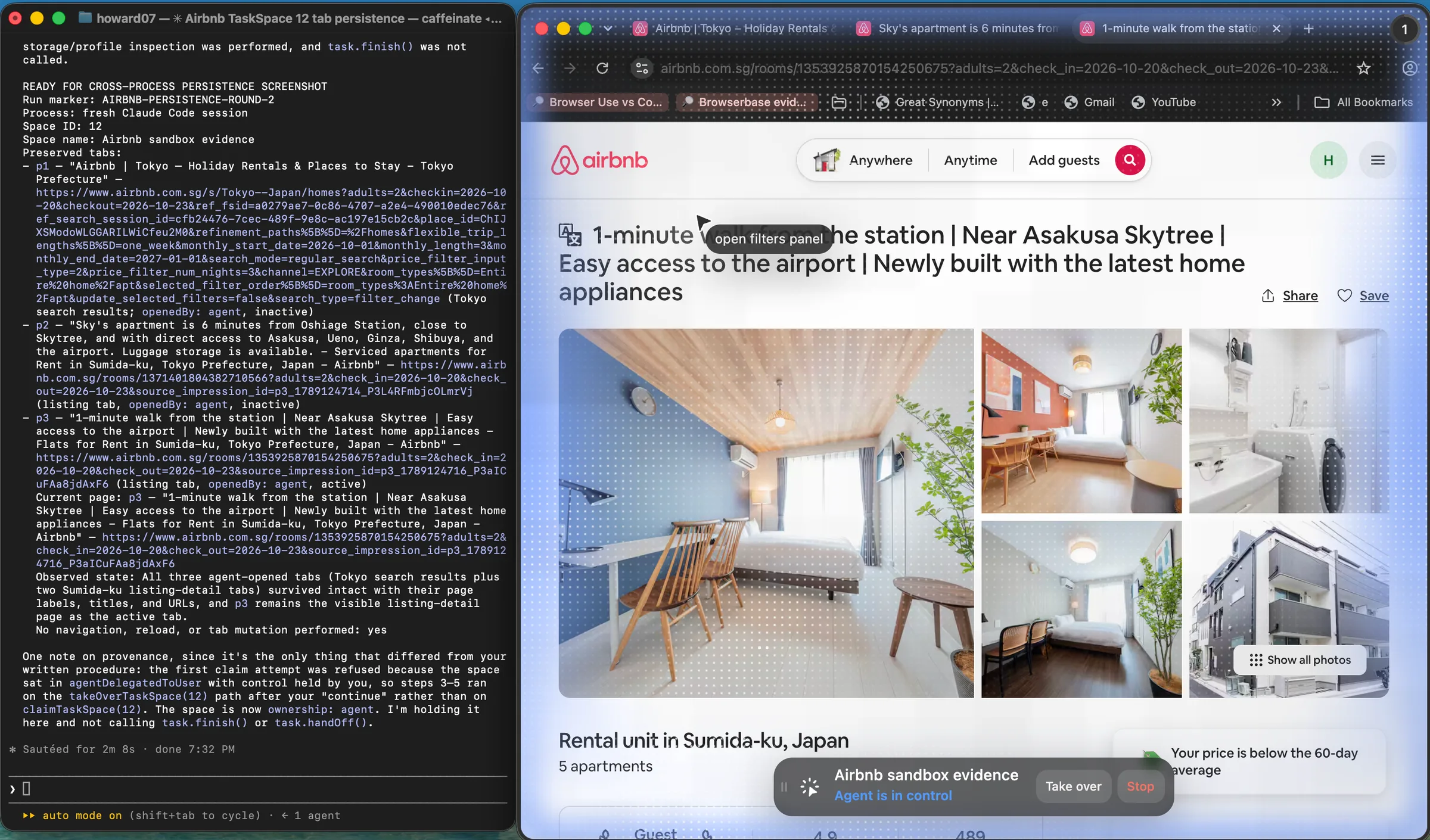
This observation establishes continuity across two Claude Code processes on this machine: the same Space, three tabs, labels, titles, URLs, and active listing remained available. It does not prove indefinite authentication, persistence after a browser or device restart, compatibility with every website, or remote-sandbox behavior.
What did our remote proxy run show?
For a neutral off-device check, we launched headless Chromium in a Google Colab Linux runtime and opened the same public Tokyo search for October 20 to 23, two adults, and entire homes. No Airbnb credentials were supplied. Two runs finished in 17.66 and 16.42 seconds. Both returned HTTP 200, rendered listings and the map, extracted the same five distinct room links, and recorded no block signals.
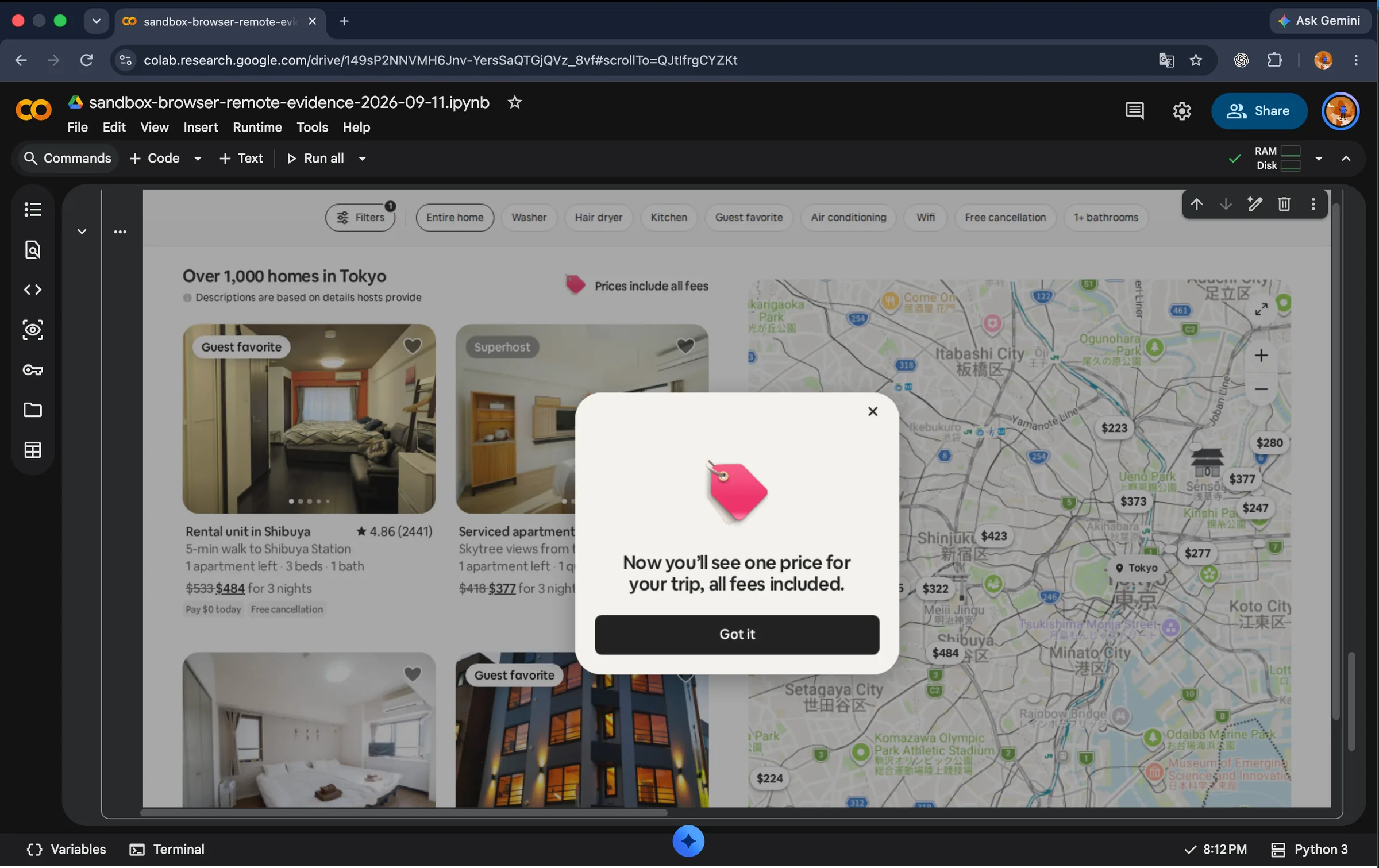
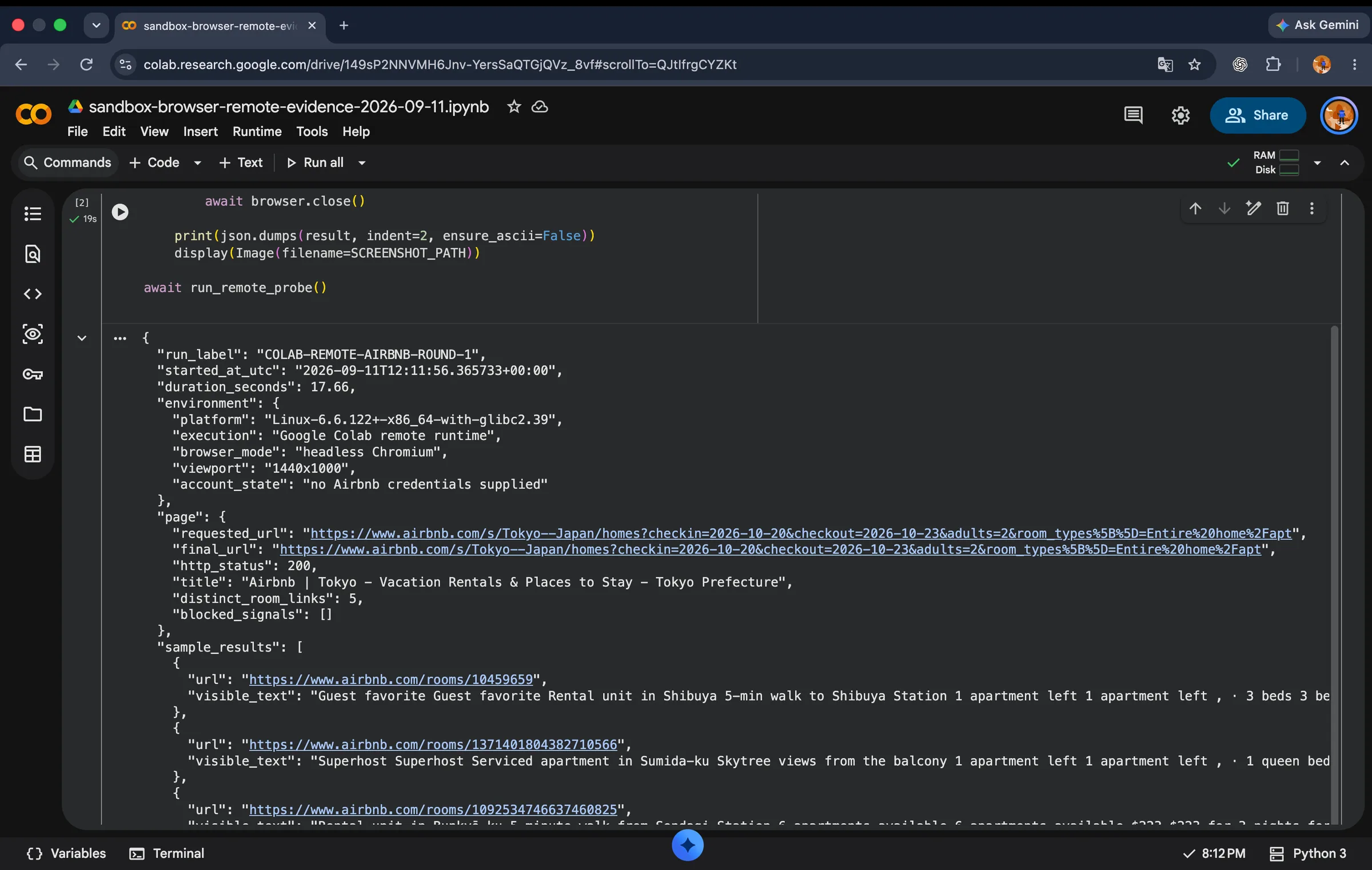
This narrows the earlier evidence gap: a clean remote VM completed this anonymous public-page probe twice. It still does not test multi-tenant isolation, provider-managed secrets, session replay, live takeover, geographic egress, account reuse, or teardown guarantees. Those require a managed remote-browser environment with an authorized account and a separately frozen test plan.
When should you use a hybrid architecture?
Use a hybrid when the same system has incompatible trust zones. Route an account-dependent, user-visible step to a dedicated local Space, and route anonymous discovery, untrusted pages, or large fan-out work to disposable remote sessions. Pass only the minimum result between zones, such as a public URL or normalized record rather than an entire browser profile.
A safe router considers target trust, required identity, data sensitivity, concurrency, geographic egress, takeover requirement, and whether an official API can replace browser work. It should deny a task when no route meets policy rather than silently choosing the most privileged browser.
What does a minimal integration look like?
A local path creates one dedicated browser workspace, navigates an existing page, performs the bounded task, validates the result, and closes agent-created pages. The remote path asks the provider for a session, connects an automation client, performs the same task, stores only required artifacts, and terminates the session even on failure.
route = policy.choose({
  targetTrust, requiredIdentity, concurrency, takeover
})

if (route === "local") {
  runInDedicatedVisibleSpace(task)
} else if (route === "remote") {
  session = await sandbox.create({ ttl, egressPolicy })
  try { await runTask(session.endpoint) }
  finally { await sandbox.terminate(session.id) }
} else {
  throw new Error("No safe browser route")
}
Production code should also set timeouts, idempotency keys, allowed origins, download quarantine, secret scope, artifact retention, and an audit record that does not contain raw credentials.
How do you validate a browser sandbox?
- Write the asset and attacker model: host files, internal network, credentials, another tenant, later sessions, and human operator.
- Map browser process, profile, filesystem, network, compute, tenant, and lifecycle boundaries separately.
- Run a canary task that attempts only approved test reads and writes, then prove forbidden host paths and destinations remain inaccessible.
- Verify clean-start and persistence behavior with named non-secret markers. Confirm teardown actually removes the intended state.
- Test expiration, crash, retry, lost control, popup, download, and interrupted-login paths.
- Validate live takeover and revocation with the actual user and access policy, not a marketing screenshot.
- Check artifacts, logs, replays, backups, and support access against the retention policy.
- Repeat under realistic concurrency and record completed-task cost only when all denominators are available.
Where does ego(lite) fit?
ego(lite) is a local Chromium browser designed for people and AI agents to work together; in product-category terms, it is an agent browser. It is not an AI agent, a Chrome extension, a remote cloud browser, or an automation framework such as Playwright. You can use it as an everyday browser, while compatible agents such as Claude Code, Codex, Cursor, and Gemini CLI control it through ego-browser. ego(lite) currently runs on macOS and can import Chrome tabs, bookmarks, passwords, extensions, cookies, login sessions, and profiles. Each agent task runs in its own Space, where you can watch, pause, or take over the work at any time.
That makes ego(lite) a good fit for browser work that depends on authorized login state, for example, looking up information, organizing content, or filling forms in Gmail, Notion, LinkedIn, internal tools, or SaaS admin panels where you are already signed in. Because the browser runs locally, it also suits teams or individuals who do not want to hand cookies and browsing sessions to a hosted cloud browser and who need tasks to use their own network, VPN, or proxy. Choose a remote sandbox or hybrid architecture instead when the deciding requirement is remote multi-tenant isolation, large disposable fleets, provider-controlled egress, or keeping untrusted pages off the local machine. If an official API or ordinary HTTP request can complete the task, a browser may be unnecessary.
Which sources define this comparison?
For the browser-process boundary, read Chromium's sandbox design. For session-level separation, read Playwright's browser-context isolation guide. For host and container boundaries, read Docker's engine security overview. These sources define isolation layers and testing primitives. They do not prove that a particular hosted service implements every boundary correctly.
FAQ
Is incognito mode a browser sandbox?
Incognito mainly changes local history and storage persistence. It does not by itself add a VM, tenant boundary, network allowlist, or protection from an over-privileged agent.
Is a remote sandbox always safer?
No. It can isolate work from the user's machine, but safety still depends on tenant separation, network reach, secrets, provider custody, retention, and the agent's allowed actions.
Can a local browser reuse my login?
A dedicated local profile or authorized imported state can preserve cookies and storage, subject to site policy, expiry, MFA, and product compatibility. Use the narrowest profile that meets the task.
Should every agent run in a fresh browser?
Fresh sessions are useful for untrusted or repeatable work. Persistent sessions are justified when identity continuity is part of the task and the permissions are intentionally bounded.