Stagehand vs Playwright is a choice about where decisions happen: Playwright lets you specify browser actions and assertions in code, while Stagehand adds model-assisted actions and extraction. For a release gate, start with Playwright Test; for an application that needs to interpret unfamiliar pages, evaluate Stagehand with explicit outcome checks.
The version matters. The current Stagehand v4 documentation describes a CDP-native browser layer with no Playwright or Puppeteer dependency. Older integration examples can still appear in search results. Do not assume that a v3 Playwright example, a v4 package import and a current return type can be combined into one working script.
A coding agent can use ego (lite) to carry out a browser task in a visible Space. The release-reading example below shows this route alongside a scripted Playwright run and a Stagehand attempt blocked by missing model credentials.
What changes when you choose Stagehand or Playwright?
Playwright is a browser automation library; Playwright Test supplies a test runner, fixtures and assertions. Stagehand is an SDK for model-assisted browser work, with deterministic browser APIs alongside AI primitives. Comparing those layers accurately makes the decision easier.
This table summarizes documented mechanisms, not measured speed or reliability. The architecture entries reflect Stagehand v4's introduction and the Playwright documentation.
| Decision | Playwright / Playwright Test | Stagehand v4 |
|---|---|---|
| Choose a target | A locator written in code | An instruction can infer a target; recorded actions can be replayed |
| Read a known field | Explicit DOM access and parsing | Deterministic reads or model-assisted extraction |
| Judge a test outcome | Assertions defined by the test author | Application checks still need to define success |
| Run a regression suite | Runner, fixtures, projects and reports | Add a test runner and your own acceptance contract |
| Browser implementation | Playwright's browser APIs | CDP-native layer with Playwright-style concepts |
| Model involvement | Not required for scripted execution | Used by AI operations; not every browser call needs inference |
A role locator can tolerate a rearranged DOM. A natural-language instruction can still choose the wrong matching control. Neither “scripted” nor “AI-assisted” establishes correctness without knowing the application state and expected result.
When is Playwright the better starting point?
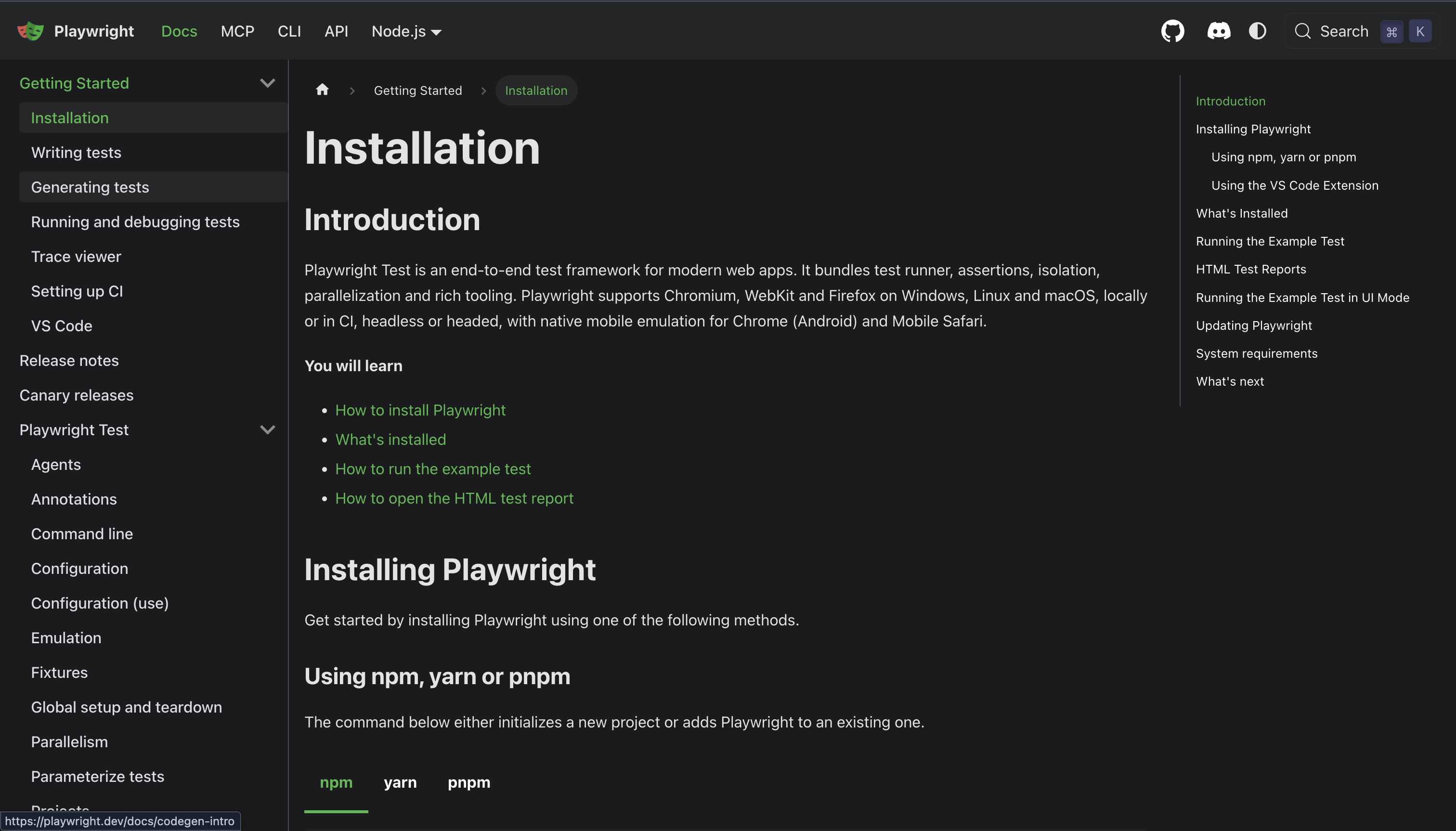
Choose Playwright Test when you own the application and can define its expected behavior. A checkout test should assert the order that was created, its amount and its persistence. Inferring what “checkout succeeded” means during each CI run makes that release gate harder to review.
Playwright's best practices recommend testing user-visible behavior and using resilient locators. Its actionability checks wait for conditions relevant to an action. Those waits help a click reach a suitable element; they do not establish that the subsequent business operation persisted.
For example, this illustrative test assumes your owned fixture has a reset API, a unique request ID and an accessible Status field. Adapt those contracts and authentication to your application. The fixture is not provided here, and the snippet reports no actual test result.
import { test, expect } from "@playwright/test";

test("the selected request stays Ready", async ({ page, request }) => {
  const reset = await request.post("/api/test/reset", {
    data: { id: "request-17", status: "Draft" },
  });
  expect(reset.ok()).toBeTruthy();

  await page.goto("/requests/request-17");
  await expect(page.getByLabel("Status")).toHaveText("Draft");
  await page.getByRole("button", {
    name: "Mark ready", exact: true,
  }).click();

  await page.reload();
  await expect(page.getByLabel("Status")).toHaveText("Ready");
  const saved = await request.get("/api/requests/request-17");
  expect(saved.ok()).toBeTruthy();
  expect(await saved.json()).toMatchObject({
    id: "request-17", status: "Ready",
  });
});
Set baseURL and authorized test credentials in your test configuration. Keep reset routes confined to a test environment. If your application is eventually consistent, use a bounded polling assertion for the saved state rather than inserting an arbitrary sleep or treating a stale read as a definitive failure.
The important contract is the exact record and stored outcome. A toast can be an additional UI check, but it should not be the only evidence that a write succeeded.
When does Stagehand's AI layer help?
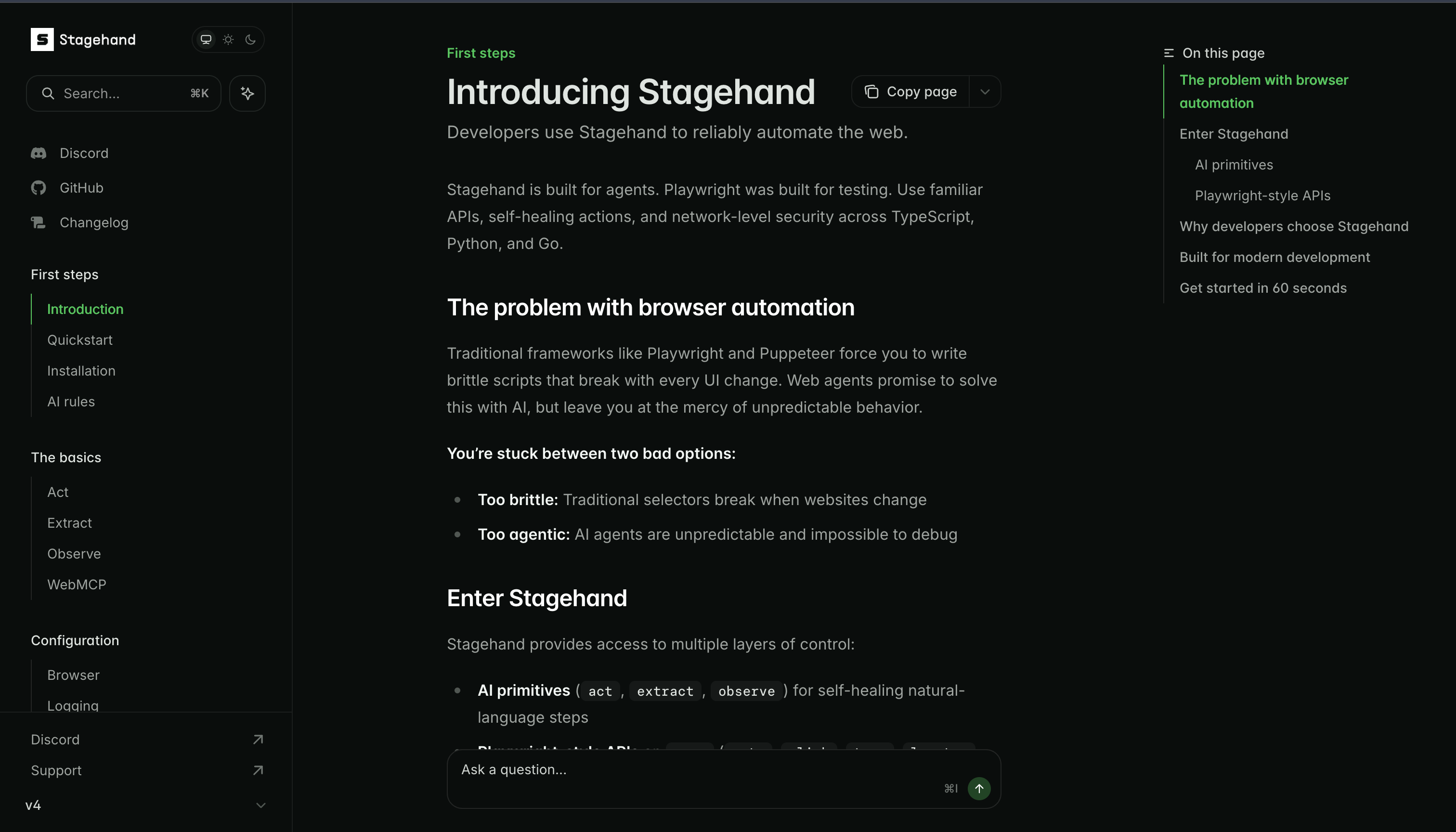
Evaluate Stagehand when your application must interpret pages whose precise structure is not known in advance. Examples include finding a relevant control from a page's meaning or mapping displayed information into a schema. Keep the task narrow enough to inspect the selected target and the returned data.
The v4 act documentation distinguishes an instruction that triggers inference from replaying an action returned by observe. The v4 extract documentation uses a schema for structured results. A schema checks the output's shape; it cannot by itself establish that a field came from the correct row.
This illustrative fragment assumes an initialized v4 Stagehand instance targeting the inspected page and Zod's z import. Follow the current official repository setup, pin the package version in your lockfile, and configure the model credentials separately.
await stagehand.act("open the request details for request-17");
const result = await stagehand.extract(
  "Read the request ID and its displayed status. Do not infer missing values.",
  z.object({
    id: z.string().nullable(),
    status: z.string().nullable(),
  }),
);

if (result.data.id !== "request-17" || result.data.status === null) {
  throw new Error("Request identity or status could not be verified");
}
The fragment reads a page and checks record identity; it is not a substitute for verifying a write. If the next step changes state, define the allowed action, then verify the outcome through a fresh read or an authorized application API. Allow an uncertain result to stop the workflow.
A single instruction should describe one action. Separate opening a form, entering a value and submitting it so each transition can be observed. Specify the record and context rather than asking the SDK to “finish the task” with an undefined stopping point.
How do caching and recovery affect the choice?
Caching can reduce repeated inference when a previously resolved action is reusable. It also creates a distinction between discovering an action and executing that stored action. Record which route ran when you investigate a failure.
A changed selector may justify rediscovery. A changed business requirement needs review. If a page adds two similarly named buttons, automatic recovery should not silently choose a new target for an important write. Recheck the target's identity and permitted effect.
Use the following failure table to set your recovery policy before implementation. It describes possible failures, not outcomes measured in a comparison.
| Failure | Playwright response | Stagehand response | Outcome check |
|---|---|---|---|
| Button moves within the DOM | A semantic locator may still resolve | Inference may locate it again | Same intended record and action |
| Two controls share a label | Scope the locator; investigate ambiguity | Narrow the instruction and inspected region | Correct target identity |
| Backend write fails | Assert persisted state; inspect the response | Separate action success from task success | Fresh UI/API state |
| Source omits a required field | Reject or explicitly handle missing data | Return uncertainty; validate required fields | Source-backed completeness |
| Model/provider unavailable | Scripted suite can still run without that dependency | Bound retries and return an explicit failure | No false success or duplicate write |
Repeatedly clicking after a timeout can duplicate a write. Inspect whether the application committed the action before retrying, and use an idempotency mechanism when the application provides one. Recovery budgets should be finite and visible in logs.
Can you use AI exploration and scripted CI together?
A hybrid workflow can use an AI-assisted browser pass to discover the real sequence, then implement the reviewed behavior as a Playwright test. The handoff needs more than copying a successful action log.
Record the starting state, target record, expected transition and forbidden side effects. Replace incidental selectors with application contracts where possible. Make setup reproducible, and add an assertion that would fail if the application displayed success without saving the change.
Keep the resulting test in version control. When the requirement changes, review the expected outcome alongside the code. Avoid running an unconstrained recovery agent inside a release gate that can rewrite assertions to get a green result.
How should you compare the tools on your own task?
Compare an exact implementation, not product labels. Use the same owned fixture, account state, permitted operations and expected outcome. Pin SDK, browser and model versions, and give both routes an explicit timeout and recovery budget.
This evaluation table defines evidence to collect. No head-to-head experiment or universal winner is claimed here.
| Evaluation dimension | Evidence to collect | Decision it supports |
|---|---|---|
| Correct completion | Exact final state, fresh UI/API check | Whether the workflow actually works |
| Wrong-target or false-success cases | Seeded ambiguity and suppressed-write cases | Whether failure is detected safely |
| Repeatability | Every attempt, including failures and interventions | How much supervision the task needs |
| Model use | Calls, cache hits, provider usage and retry count | Which steps introduce inference dependencies |
| Cost and latency | Browser/hosting charges, model usage, elapsed times | Budget for this particular workload |
| Maintenance | Defined UI changes and reviewed repairs | Work required to preserve the contract |
Report all attempts and distinguish unassisted completion from completion after human repair. Include environment limitations. A short demo on a stable page cannot establish production reliability, and pricing or token usage should come from the actual configured services rather than a general estimate.
Where does ego (lite) fit in a browser task?
The October 12, 2026 captures use one fixed GitHub task: read the v1.64.0, v1.63.0 and v1.62.1 Playwright releases, record the tag, displayed publication date, detail URL and first substantive heading, then reload and verify tag identity. Each route was asked to read the source independently. Select an image to inspect the full-resolution capture.
What stopped the Stagehand attempt?
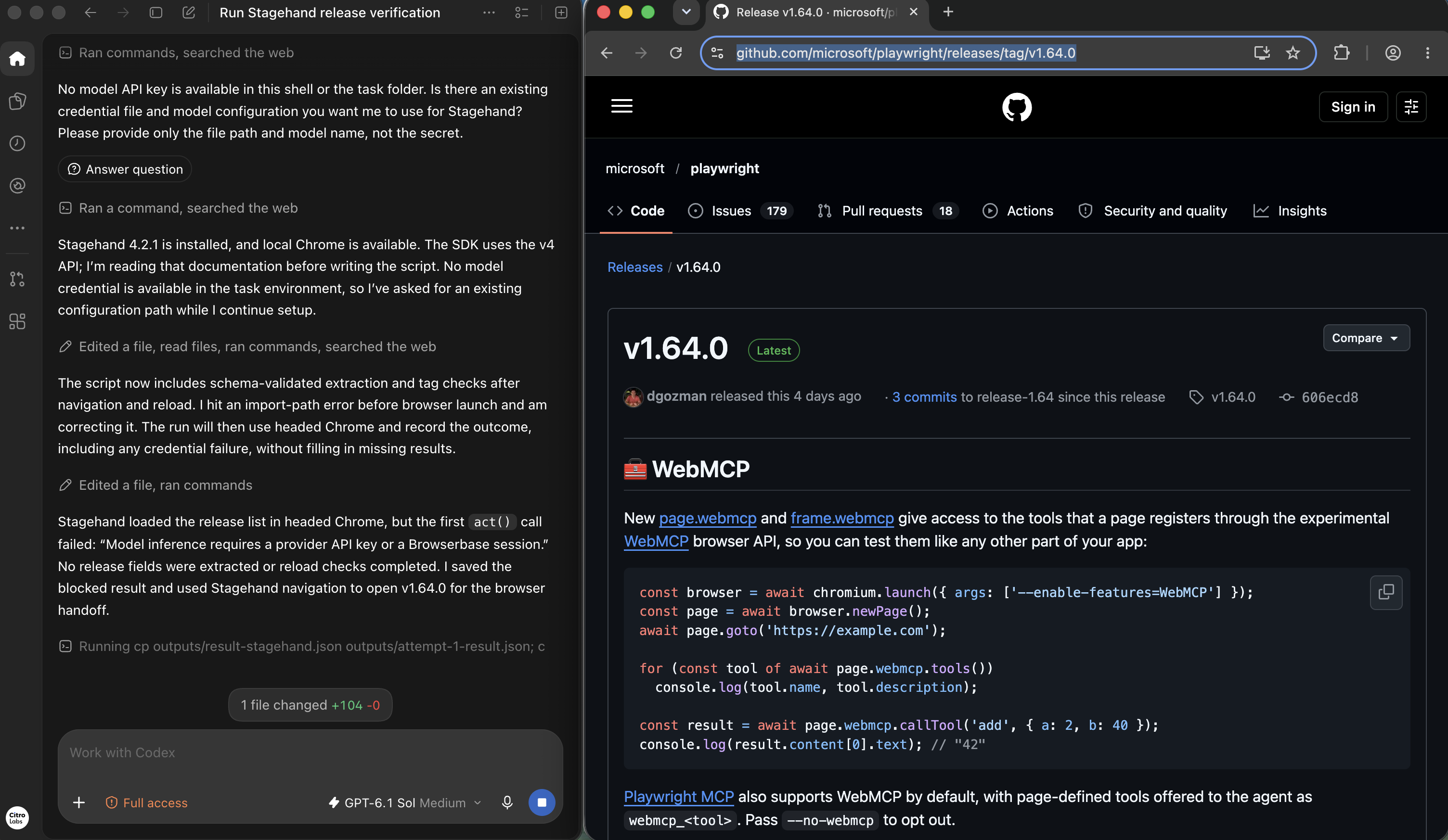
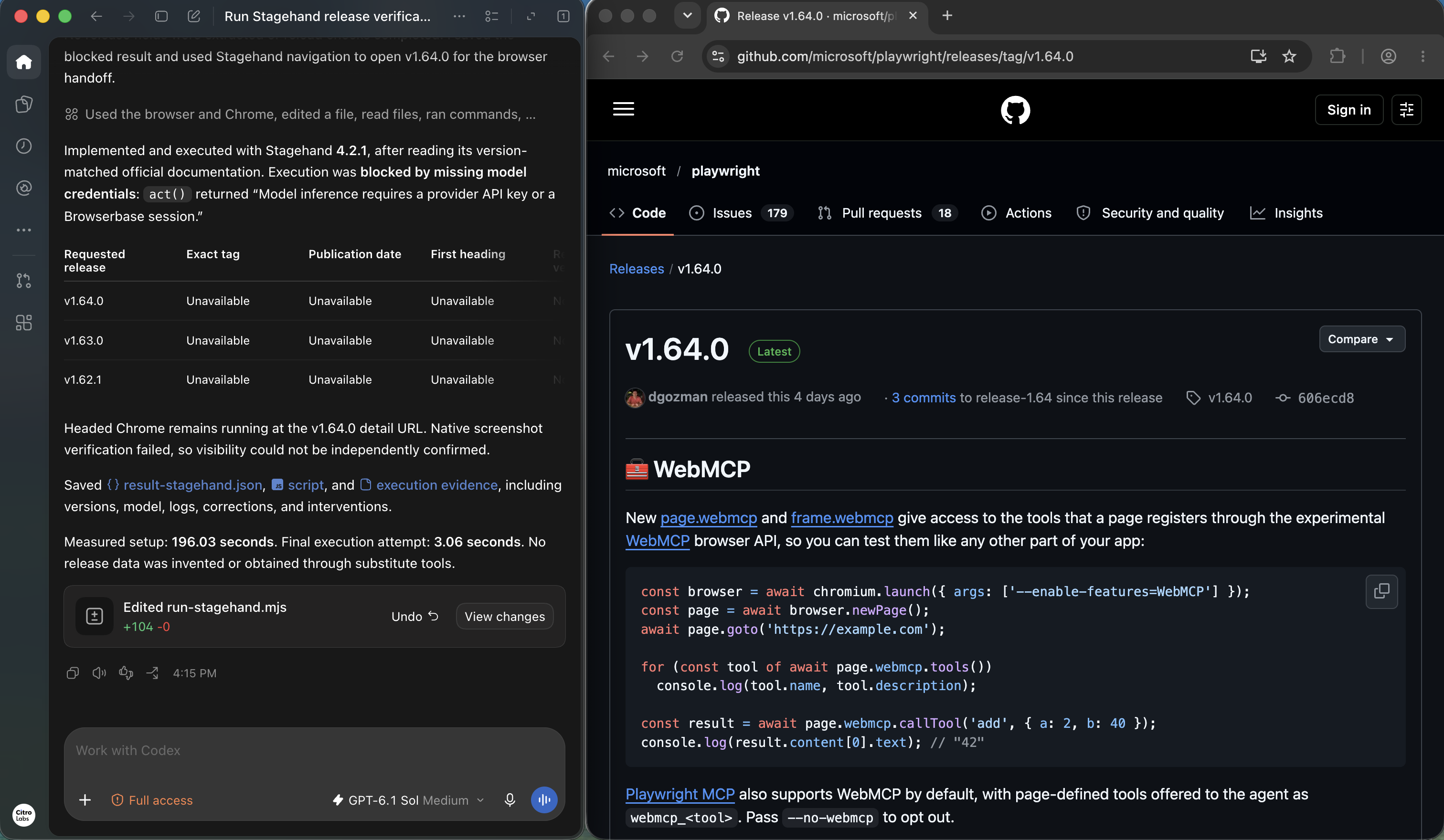
The controller reports Stagehand 4.2.1 installed and a headed browser opened. An import-path issue was corrected during setup, but the act call required a provider API key or Browserbase session that was unavailable. No release fields or reload checks were completed. This is a configuration blocker in this attempt, not evidence that a configured Stagehand model cannot perform the task.
What did the Playwright run report?
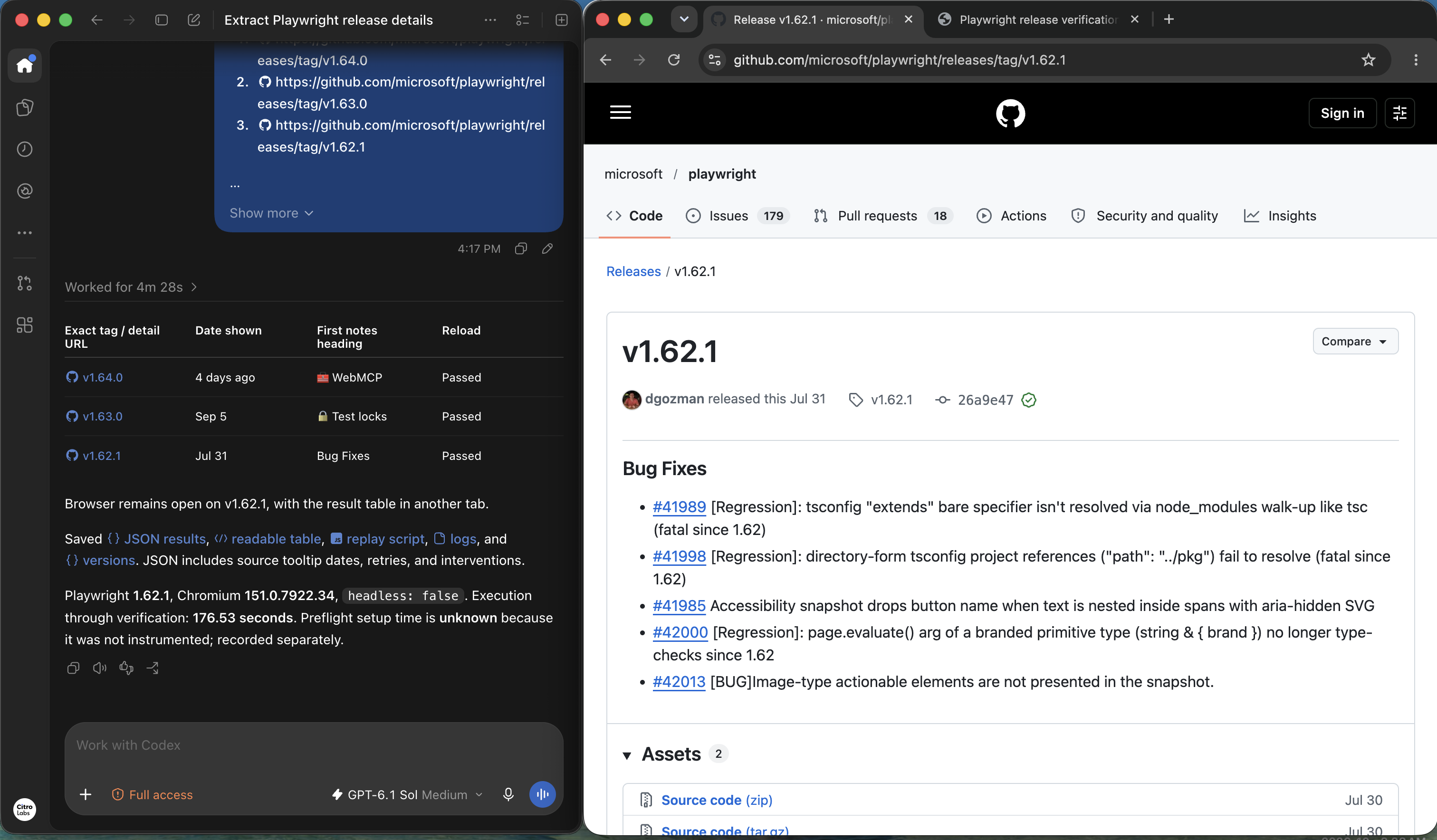
The Playwright result lists all three releases and marks their reload checks Passed. The controller identifies Playwright 1.62.1 with Chromium 151.0.7922.34 and headless: false. The adjacent GitHub page makes the v1.62.1 tag and Bug Fixes heading directly readable. The screenshot reports the other two records; it does not show all three source pages at once.
How does the visible ego (lite) task look?
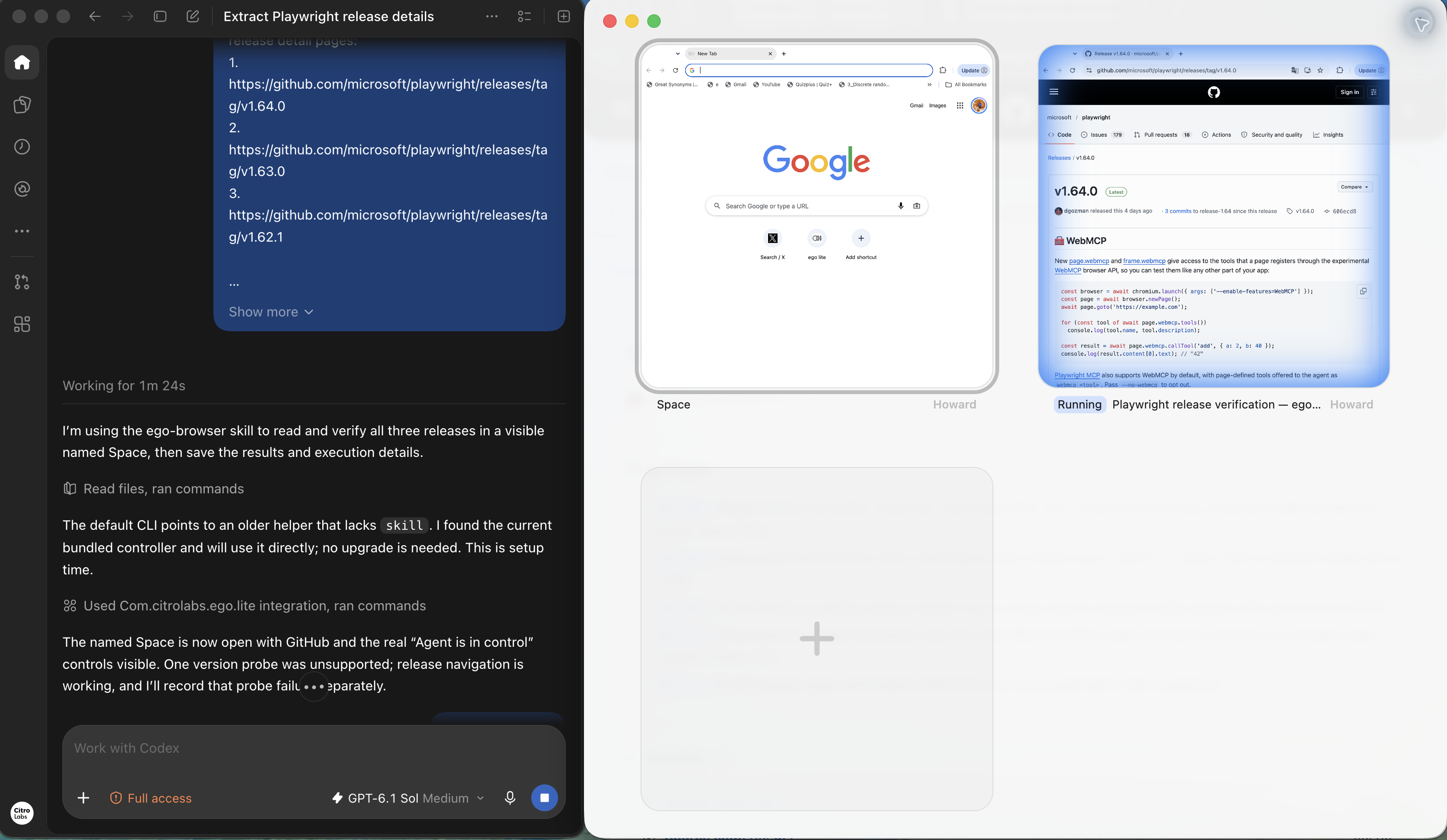
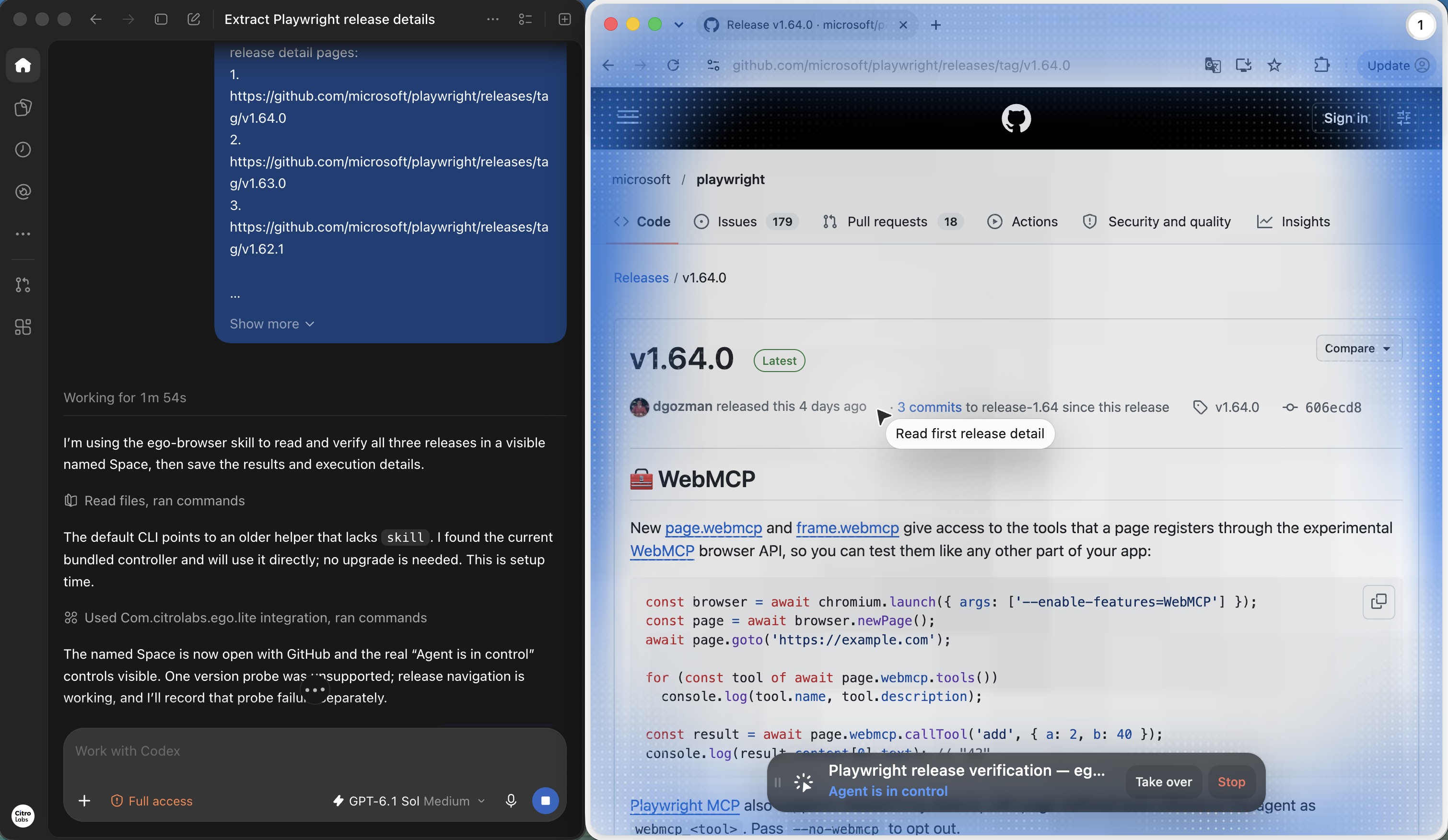
The Space overview shows the named GitHub task marked Running beside another Space. The detail capture shows Codex reading v1.64.0 with the real Agent is in control, Take over and Stop controls visible. Only one task is shown running; this frame does not establish concurrent completion of multiple tasks.
What did the ego (lite) run report?
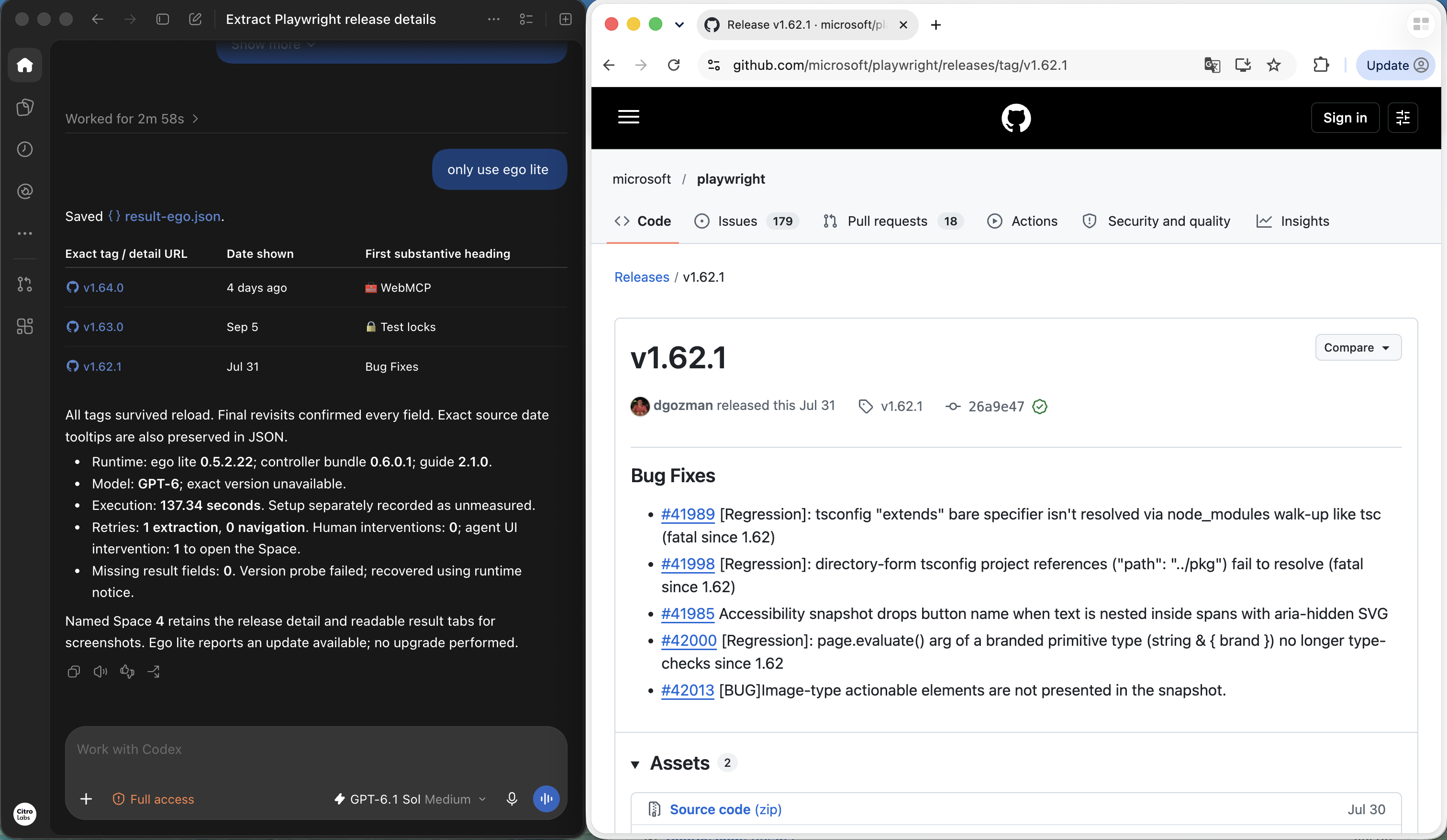
The final ego (lite) result lists the same three release tags, displayed dates and headings, and reports that the tags survived reload. It also records an extraction retry and an unsupported version probe, so the successful result does not erase setup and recovery issues. The visible Space lets a person inspect the source and take over during execution.
Which route is easier to start?
In this setup, Stagehand added a credential step before its AI actions could run: it required a model provider API key or a Browserbase session. Playwright and ego (lite) completed the task using the available browser environment without adding a separate model API key for these runs. Playwright's browser automation itself does not require model inference credentials; the coding agent used to write its script may still require its own account or model access.
The convenience of ego (lite) is the short path from a request to a visible browser task. With the app and agent integration already available, you can describe the task in natural language and let the agent work in a Space, without writing a separate automation script yourself. The source page and takeover controls stay visible, making it straightforward to watch the work and inspect the result. Playwright remains a direct option when you want to implement and maintain the workflow in code.
For an already configured ego (lite) user, this can mean a simpler, quicker start to a one-off task. It does not mean zero initial setup or faster execution than a configured Stagehand or Playwright implementation. This recording used an existing app, skill and coding-agent environment; it did not measure a fresh installation.
How do the reported records line up?
Both completed result screenshots report the following fields. Stagehand returned no extracted fields in the blocked attempt. Relative date text is preserved exactly as captured; it depends on the capture time and should not be treated as a permanent publication date.
| Release | Date shown in both results | First heading in both results | Reload reported |
|---|---|---|---|
| v1.64.0 | 4 days ago | 🧰 WebMCP | Passed in Playwright and ego (lite) results |
| v1.63.0 | Sep 5 | 🔒 Test locks | Passed in Playwright and ego (lite) results |
| v1.62.1 | Jul 31 | Bug Fixes | Passed in Playwright and ego (lite) results |
These are user-supplied execution captures, not an independently audited benchmark. Raw scripts, logs and JSON outputs are referenced in the screenshots but have not been supplied with this gallery. The reported execution durations use different setup boundaries, and Stagehand did not complete the task, so they cannot support a speed or reliability ranking.
Use the Space documentation to understand the visible workspace. For a CI gate, still encode and run explicit assertions in the test framework you choose.
What can this comparison establish?
The comparison combines documented APIs with user-supplied screenshots from one release-reading task. Playwright and ego (lite) report completion; Stagehand was blocked by missing credentials. The evidence does not establish which configured tool is faster, cheaper or more accurate. A recommendation can change with the task, SDK version, model configuration and application state.
Both routes need a permitted target, an explicit outcome check and a way to report uncertainty. Browser interpretation cannot decide your business requirements for you. Use the evaluation protocol above to qualify the implementation you intend to deploy.
FAQ
Is Stagehand v4 built on Playwright?
The current v4 introduction describes a CDP-native implementation without a Playwright dependency. Read versioned documentation before reusing older integration code.
Does Playwright require an LLM?
Scripted Playwright execution does not require model inference. You can use a coding assistant to author a test without making its runtime dependent on that assistant.
Does Stagehand replace Playwright Test?
Stagehand supplies browser and AI APIs. A regression suite still needs a runner, setup, assertions and reports; Playwright Test is designed to supply that testing layer.
Can I mix code copied from Stagehand v3 and v4?
Check the migration guidance and your installed version. Imports, initialization and result envelopes can differ; similar method names do not establish compatibility.
Is natural language always more resilient than locators?
Natural language can help interpret a changed page, but ambiguous targets remain a risk. Semantic locators can also survive structural changes. Evaluate your specific mutations.
Does valid extraction JSON prove the data is correct?
A valid schema establishes shape and types. Verify identity and source values separately, and preserve unknown fields instead of accepting a plausible completion.
Can a cached action skip outcome checks?
A cached action changes how execution is selected. The application may still fail to save its effect, so the final-state check remains necessary.
Which option costs less?
Measure your workload, including browser hosting, inference, retries and engineering work. This guide provides no matched cost experiment from which to rank the tools.
What should I use for a small known regression suite?
Start with Playwright Test when the expected behavior and fixture are known. Add runtime interpretation only for a requirement that scripted browser APIs do not address well.
What is a sensible first evaluation?
Choose one owned task, define its final state and inject one wrong-target case plus one failed write. Compare detection and recovery under the same constraints.
Related reading
For the broader agent-environment choice, read Browser Use, Stagehand and ego (lite). For locator design, see Playwright locators. Before adopting either route, write the task's outcome check and use it in your evaluation.