WebMCP explained: how it changes browser automation (and where it doesn't)


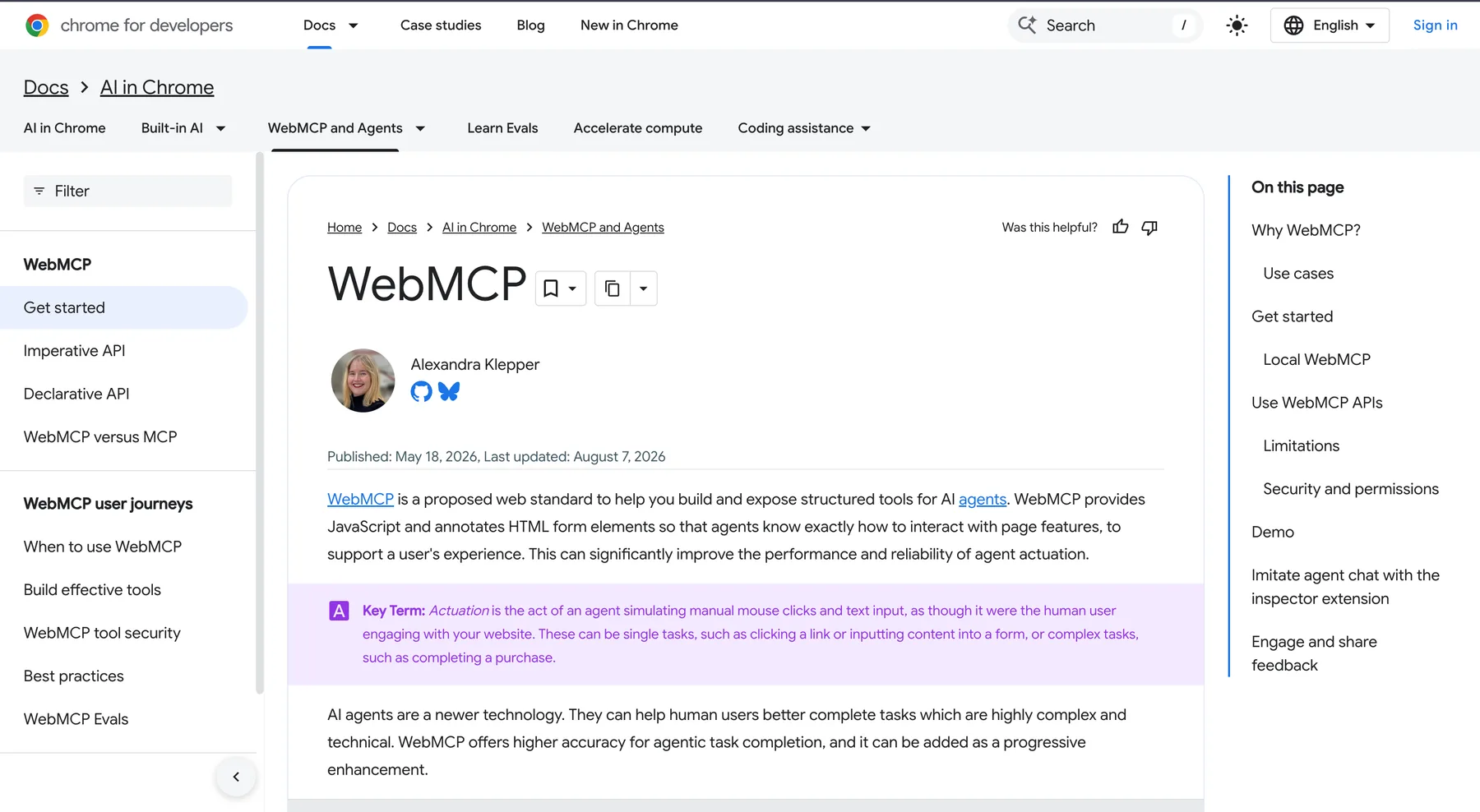
WebMCP is a proposed browser API that discovers, describes, and executes structured tools for an AI agent on behalf of a user. The website declares what an action does and what inputs it accepts; the agent calls that tool instead of guessing which button or field to click. That can make a form, booking flow, or diagnostic task faster and more reliable, but it is not a universal replacement for browser automation. Chrome's WebMCP documentation
The practical choice is architectural. WebMCP is server-side cooperation: the site owner publishes an agent-facing contract. Browser automation is client-side observation: an agent operates the interface that already exists, including an authorized logged-in session. Use the former when you control the site and can define safe tools; use the latter when you need to work with today's web. The secure-tools guidance
What is WebMCP?
WebMCP (Web Model Context Protocol) is a browser-facing API proposal from the Chrome team and the WebMCP community. Chrome's documentation describes it as a way to build and expose structured tools for agents, while preserving the visible web application and the user's control. A site can publish a search, checkout, date-picker, support, or diagnostics tool as a progressive enhancement; a human can continue using the same page when no agent is present. Chrome's origin-trial announcement
How does WebMCP work?
A WebMCP page registers tools with the browser. Each tool has a name, description, input schema, and an implementation that runs in the page. The imperative API uses JavaScript for custom actions; the declarative API annotates ordinary HTML forms. Chrome's docs call out three pieces that matter to an agent: discovery, JSON Schemas for inputs and outputs, and state describing what the current page can do.
The result can be a shorter action path. Instead of reading a large DOM, inferring that a button means submit_application, and hoping a selector survives a redesign, an agent can call the named tool with schema-described fields. The action still executes visibly in the website, so the page can show progress and ask for confirmation before a purchase or other state-changing operation.
What happened in our hands-on WebMCP test?
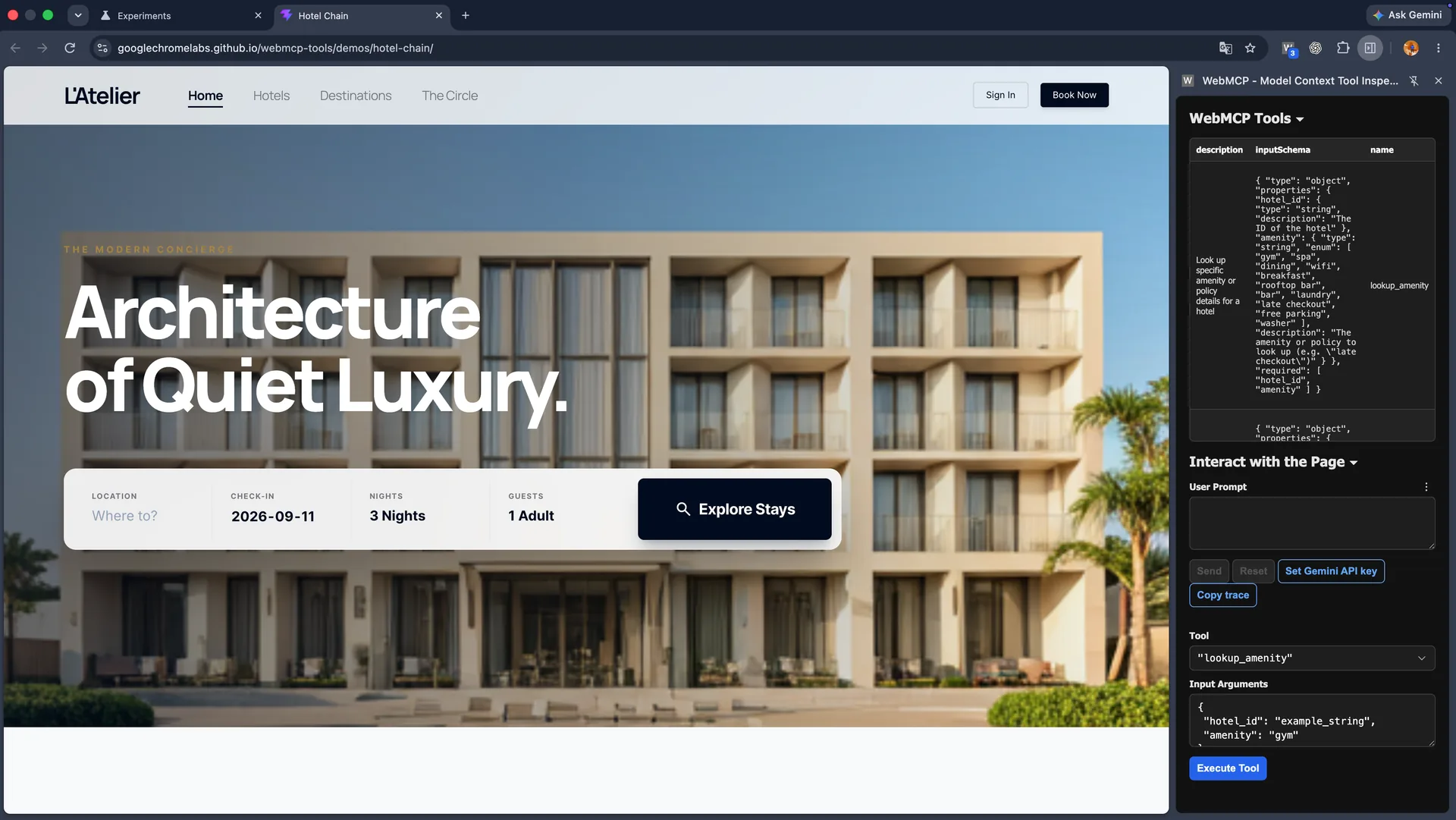
On September 11, 2026, we ran one guided test on the official Chrome Labs Hotel Chain demo using Google Chrome 152.0.7977.76 on macOS and WebMCP Model Context Tool Inspector 1.9.15. The operator used synthetic guest data, no Gemini API key, and no real hotel, payment, or account credentials. This was a behavior walkthrough, not a speed or reliability benchmark.
- The Inspector discovered the page's tools and schemas. We called search_location for Paris, September 18, three nights, and one adult; the page showed two properties.
- We called filter_search_results with breakfast. The visible result count changed from two to one, leaving Montmartre Suites.
- We opened that hotel, started the booking flow, and supplied the synthetic identity Alex Chen. The tool prepared the form but did not finalize the reservation.
- The page stopped at Confirm Reservation. Only after the human operator clicked that control did the demo show Reservation Confirmed.
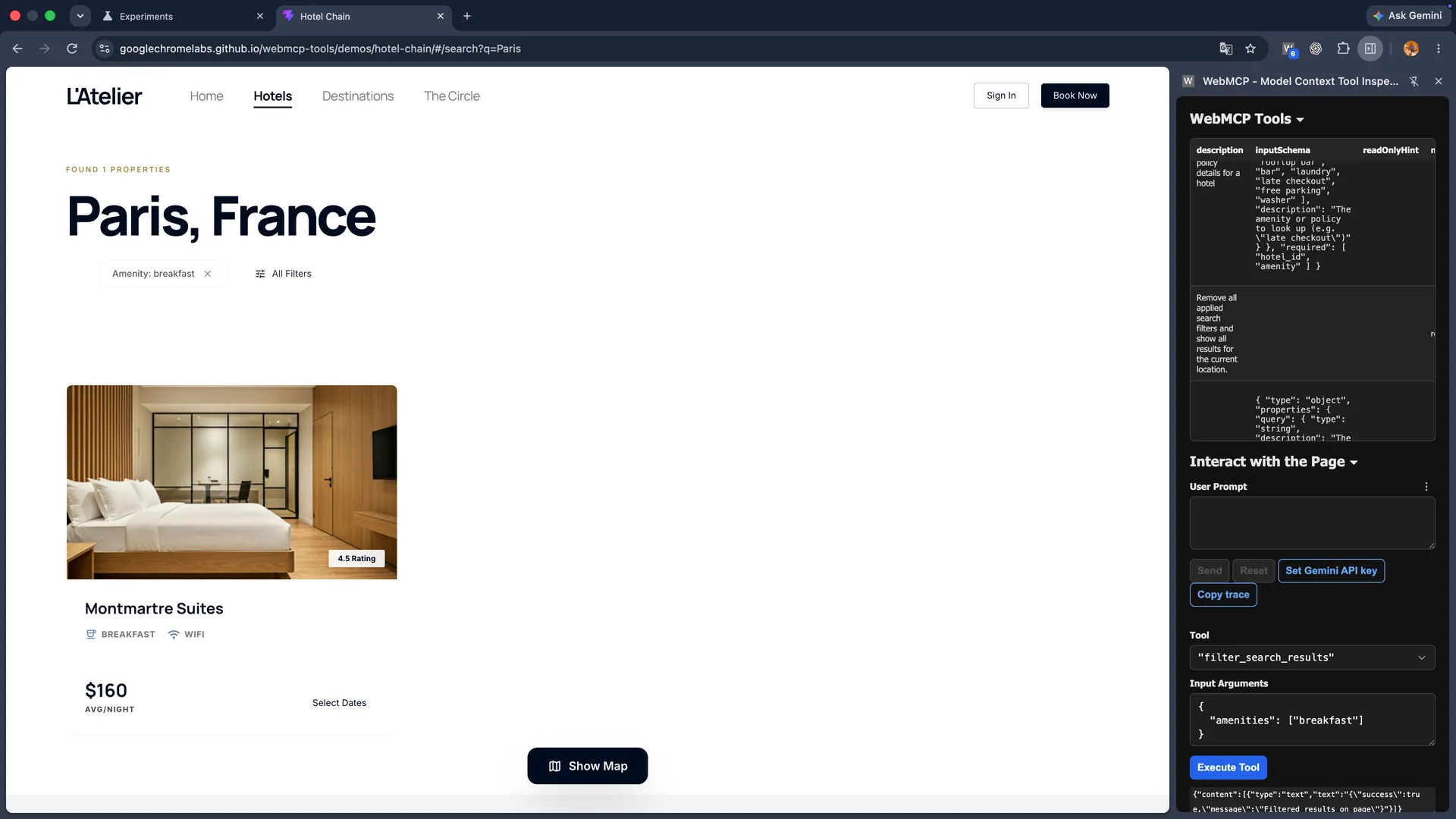
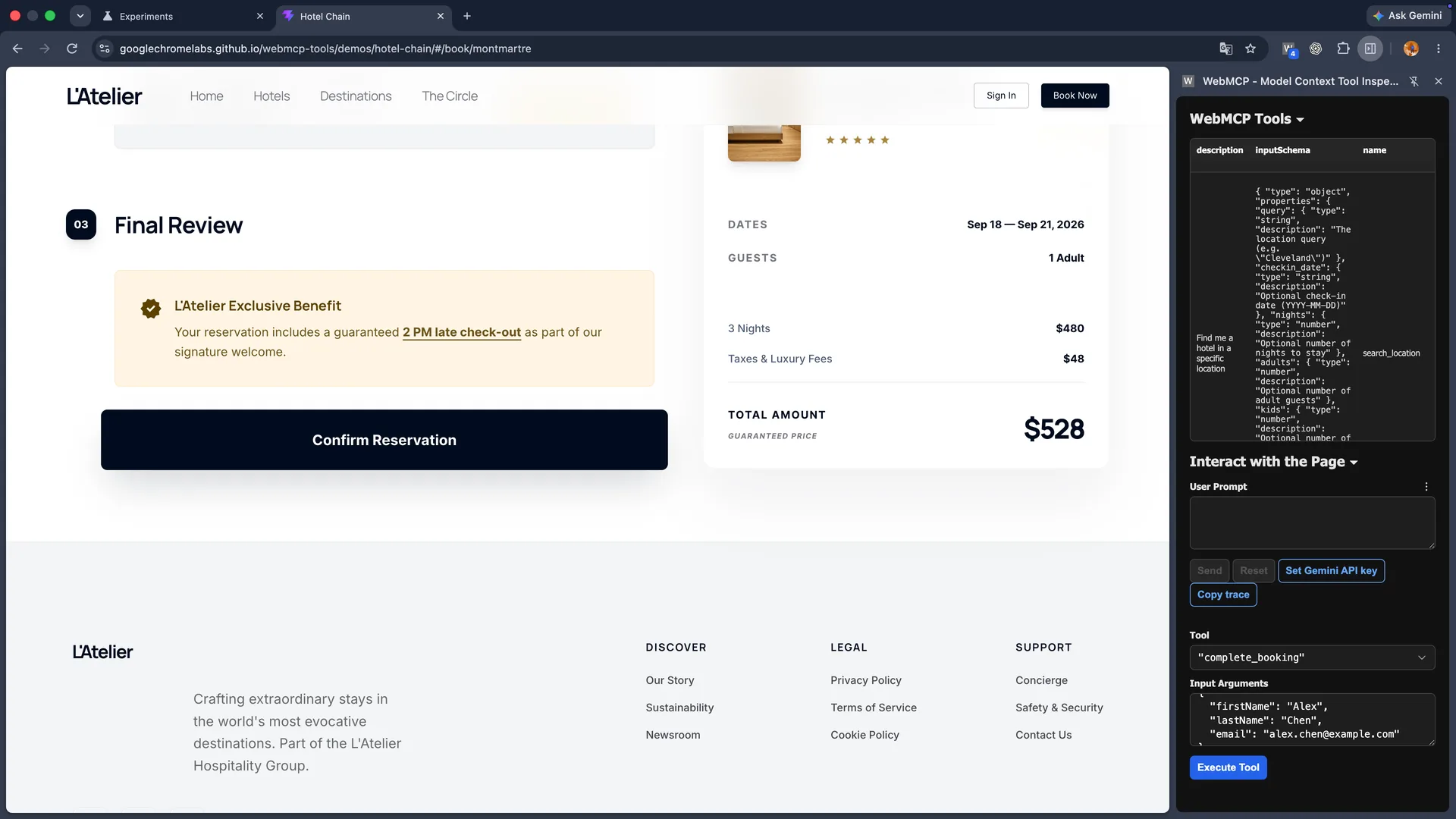
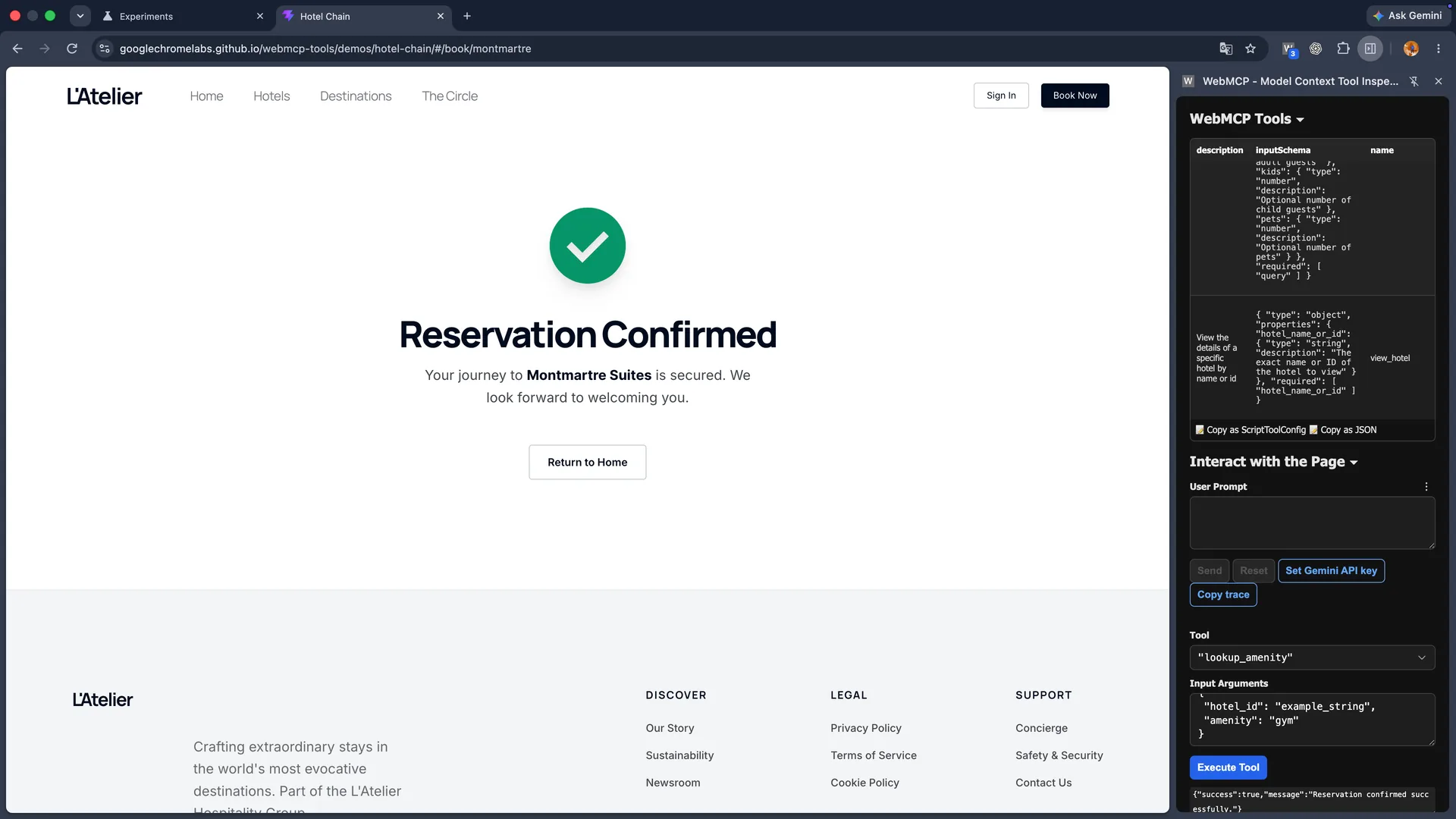
One tooling limitation also mattered: the Inspector's Copy trace action returned an empty JSON array after our manual Execute Tool flow. We therefore use screenshots and a structured step record as the evidence for this run, and we do not generalize that trace result to other Inspector modes.
How is WebMCP different from browser automation?
WebMCP and browser automation solve different failure modes. WebMCP removes ambiguity when the site publishes a good contract. Traditional automation, including Playwright, Selenium, browser-use, or an agent driving a real browser, handles sites that publish no contract by reading the rendered page and interacting with it. WebMCP therefore complements automation: a client can call a page tool when available and fall back to ordinary browsing when it is not.
The distinction is easiest to audit as a capability boundary. Read both the positive and negative column before choosing a route.
| Approach | What it can do | What it cannot do |
|---|---|---|
| WebMCP | Call named, schema-described tools exposed by a page | Reach pages that do not register tools or import a separate browser login |
| DOM-based automation | Operate almost any rendered page with selectors, screenshots, or accessibility state | Know the site's intended action without interpreting the interface |
| Real-browser session reuse | Use an explicitly provisioned, authorized logged-in browser state | Guarantee access, bypass CAPTCHA, or override site policy |
A practical rollout starts with one read-only tool, one supported browser, and a visible confirmation step. Expand only after the fallback path works.
The session boundary is just as important. WebMCP runs inside the page the client visited; it does not transfer a user's Chrome cookies to a new cloud session. On a site without WebMCP, ego (lite) lets you import your Chrome profile so the agent starts from a browser you are already logged into, which means 2FA, SSO redirects, and CAPTCHA prompts show up far less often, and you decide how much of that state to open. That Space is not a remote VM or tenant-isolation boundary. This route changes what the browser can do for you, not the site's UI contract. OpenClaw 2.0's release notes
Use this evaluation table to make the decision explicit instead of treating WebMCP as a universal upgrade.
| Evaluation question | Choose WebMCP when... | Choose browser automation when... |
|---|---|---|
| Do you control the site? | Yes; you can ship and secure page tools | No; you need to work with a third-party site |
| Does the task need an existing login? | The page's own authenticated session is enough | The agent must reuse a separately provisioned local session |
| What is the deployment goal? | A stable, typed contract for supported clients | An immediate workflow across pages with no adoption work |
When should you use WebMCP?
Choose WebMCP when you own the application, can define stable task boundaries, and want agents to complete structured work such as support forms, travel search, checkout, or internal diagnostics. It is especially useful for complex interfaces where a human knows the intended action but an agent would otherwise need many interpreted clicks. Keep the tool small, typed, and observable.
Choose real-browser automation when you do not control the site, need an existing authorized login, must work across many unrelated sites, or need a workflow today rather than after site adoption. For committed CI scripts, deterministic automation remains appropriate; for interactive logged-in work, a visible local browser gives the agent the same account and page state a person can review.
What are WebMCP's security limits?
WebMCP does not grant authority by itself. Chrome gates the APIs with origin isolation and the tools Permissions Policy; cross-origin iframes are disabled by default. A site can expose tools only to origins it trusts, and Chrome's security guidance recommends readOnlyHint for non-mutating tools and untrustedContentHint when output contains user-generated or external text.
Prompt injection remains possible because an agent processes instructions and web content together. Keep descriptions and outputs concise, validate inputs on the server, require user confirmation for consequential actions, and expose the smallest set of origins and tools needed. WebMCP is a clearer interface, not a reason to skip authentication, authorization, audit logs, or human review.
What are WebMCP's challenges and limitations?
WebMCP's main limitation is adoption: a client must visit a compatible page, and the browser must implement the experimental API. Chrome also notes that headless scenarios are not the primary design target, complex applications may need state refactoring, and the proposal is still changing.
That creates a mixed stack for the foreseeable future. A site may expose one excellent checkout tool while leaving account settings as ordinary DOM controls; a browser may support WebMCP in testing but not in your production fleet. Keep a normal automation fallback and measure tool errors, confirmation rates, and human handoffs across repeated runs.
How do you try WebMCP today?
For local experiments, enable chrome://flags/#enable-webmcp-testing in Chrome and relaunch. For live testing, Chrome's documentation points developers to the Chrome 149 origin trial. Use the official demos and the Model Context Tool Inspector Extension to see registered tools, manually call them, and test both valid and invalid inputs. Because the proposal is under active discussion, pin the browser version and expect API changes. The OpenAI WebMCP Challenge
If you are an agent user rather than a site owner, you do not need to wait for WebMCP adoption. Run /ego-browser in your supported coding agent, describe the bounded task, and keep the browser session and permissions explicit. The two approaches will coexist: WebMCP makes cooperating sites easier to operate; real-browser automation reaches the rest.
FAQ
Is WebMCP the same as an MCP server?
No. A traditional MCP server is an external process or service that exposes tools to a client. WebMCP exposes tools from the web page itself to an agent in the browser, with browser-origin and Permissions Policy boundaries.
Can WebMCP automate a site that has no WebMCP support?
No. The client must visit a page that registers tools. Use ordinary browser automation for a site that has not adopted WebMCP, and stop for human input when authentication or a challenge requires it.
Who needs to implement WebMCP?
The website owner implements WebMCP tools; an agent client and browser must support consuming them. A visitor cannot add tools to an unrelated site.
What are WebMCP's main benefits?
WebMCP gives agents named actions, schema-described inputs, and page state, which reduces selector guessing and interpreted clicks on cooperating sites. The application still needs to validate every payload.
What are WebMCP's main limitations?
WebMCP needs page adoption and browser support, remains experimental in Chrome, and does not solve headless parity, authentication policy, or prompt injection.
Can WebMCP tools run without a human?
Some low-risk tools can run automatically, but sensitive actions should request user interaction and confirmation. The Chrome design targets local browser workflows with a human in the loop.
Does WebMCP expose tools to every iframe?
No. Origin isolation and the tools Permissions Policy gate registration; cross-origin iframes need explicit permission and trusted exposure.
How long will the WebMCP API stay stable?
There is no stability guarantee yet. Chrome labels WebMCP a proposed standard under active discussion, so pin versions and monitor the explainer and origin-trial notes.
Can I use WebMCP with a logged-in account?
A page can expose tools within its own authenticated session, but WebMCP does not transfer cookies to another browser. Keep authorization and confirmation in the site's security model.
What should I use while a site lacks WebMCP?
Use ordinary browser automation. When the work needs an authorized local session, ego (lite) imports your Chrome profile so the agent inherits your real logged-in state.
Where can I read the implementation guidance?
Start with Chrome's WebMCP documentation, secure-tools guidance, origin-trial page, and the WebMCP explainer on GitHub; links are listed in the source notes below.