

Bringing AI agents into the browser is powerful because the browser is where real work happens. It is also sensitive for the same reason.
A browser holds logged-in sessions, cookies, extensions, bookmarks, workspace settings, SaaS access, internal tools, and the small pieces of state that make everyday web workflows possible. When an AI agent can operate in that environment, users should have a clear understanding of what the agent can access, when it can act, and how they remain in control.
That is why ego (lite) supports browser migration with clear privacy and safety boundaries.
Migration is not data collection. It is a way to preserve the browser environment users already rely on, so agents can work in real context instead of starting from an empty browser every time.
Our approach is built around three ideas: a local-first browser environment by default, task-scoped context when the agent acts, and visible user control at sensitive moments.
Why ego (lite) supports browser migration
Most useful browser tasks do not begin from a blank state.
They happen after the user is already logged in, after SSO has completed, after the right workspace is loaded, after extensions are installed, and after the browser has the settings and permissions needed for work.
If an agent starts in an empty browser, the user often has to log in again, pass 2FA again, rebuild context, reinstall extensions, or manually copy information into prompts just to help the agent continue. That creates friction. In some cases, it can also make privacy worse, because users may end up pasting sensitive details into the agent that the browser environment already had in a more structured form.
ego (lite) uses browser migration to reduce that friction. The goal is to let users bring the browser environment they already use, while keeping agent access tied to the task the user actually starts.
Browser migration does not mean credential collection
Browser migration does not require sending your saved passwords to ego.
There is an important difference between using an existing authenticated browser session and collecting credentials. If you are already logged in to a website, your browser may have session state that allows that site to recognize you. When you ask the agent to perform a task on that site, the agent can operate through the active session already present in your browser.
That does not mean the agent needs your password. It does not mean your password should be passed into the model. And it does not mean sensitive credentials become part of the agent's general context.
For sensitive moments such as login, payment, account changes, message sending, or final submissions, the user should remain in control. ego (lite) is designed so users can see what the agent is doing, pause the workflow, and take over when needed.
Agent access is task-scoped
An agent cannot be useful with no context at all.
If you ask it to summarize a page, it needs the page content. If you ask it to fill out a form, it needs to understand the form fields. If you ask it to work inside a logged-in SaaS tool, it may need the relevant page state and authorized session context for that task.
The boundary is task scope.
The agent should use the context needed to complete the instruction you gave it, not broad access simply because more information exists in your browser. Depending on the task, that context may include page text, page structure, screenshots, user instructions, files you explicitly provide, or browser state required to operate an authorized page.
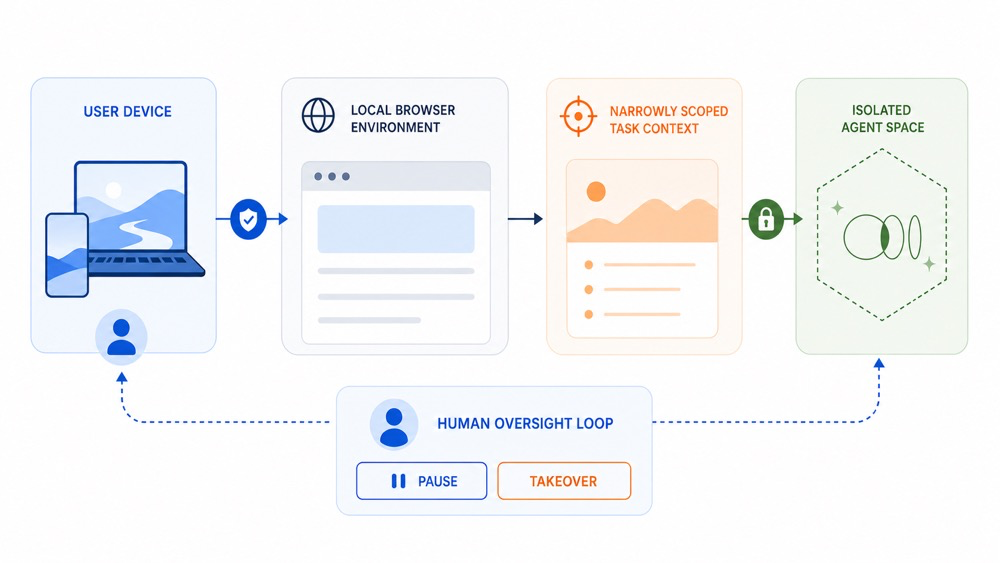
This is the model behind ego (lite): local-first browser environment by default, task-scoped context when the agent acts, and user visibility when actions matter.
Local-first means browser migration keeps your working environment on your device by default. When you ask the agent to act, ego (lite) scopes its context to what that specific task actually requires.
In other words, browser context gives the agent the continuity it needs to be useful, while task scope defines the boundary for what the agent should use.
Spaces make agent work visible and separate
Safety in an AI browser is not only about data handling. It is also about product design.
In many browser automation setups, the agent works in the same surface the user is using. It opens tabs, moves windows, steals focus, and mixes human browsing with agent activity. That makes it harder for users to understand what the agent is doing or step in at the right moment.
ego (lite) uses Spaces to separate human browsing from agent work.
You can keep browsing in your own Space while the agent works in another one. The agent does not need to take over your current tab or interrupt your window. At the same time, its work remains visible. You can enter the agent's Space, inspect what is happening, pause the task, or take over.
This separation gives agents a practical place to work while preserving the user's own browsing surface and supervision.
Privacy controls and sensitive data
ego (lite) is designed to avoid treating the user's browser profile as a company dataset.
Browser migration exists to preserve continuity, not to extract a user's browser life. Agent workflows use task-related context to complete the work the user requested. Sensitive information such as passwords, payment-card numbers, and other credentials should not be transmitted to the agent or stored as AI inputs.
When AI features require model assistance, task context may be processed to generate a response or complete an action. We take steps to restrict third-party model providers from using user data for their independent model training.
Users should also be able to manage their privacy settings, revoke access where applicable, and avoid providing sensitive personal data directly into prompts or working folders.
Limitations
Browser agents are still an emerging product category. They can save time, reduce repetitive work, and operate across tools that were originally designed for humans, but they may still make mistakes.
Complex interfaces, unexpected page layouts, hidden prompts, authentication flows, and high-stakes actions can create failure points. That is why ego (lite) is built around visibility, separation, and user control rather than fully invisible automation.
AI automation should make browser work smoother, but it should not remove human judgment from moments that matter.
ego (lite) supports browser migration because agents become more useful when they can work where real work already happens. The challenge is to make that context useful without making it uncontrolled.
That is the direction we are building toward: a browser where agents can work in real context, users can supervise and intervene, and browser migration preserves continuity without becoming data collection.
For more details on how Citro processes personal data across ego services, please refer to our Privacy Policy.