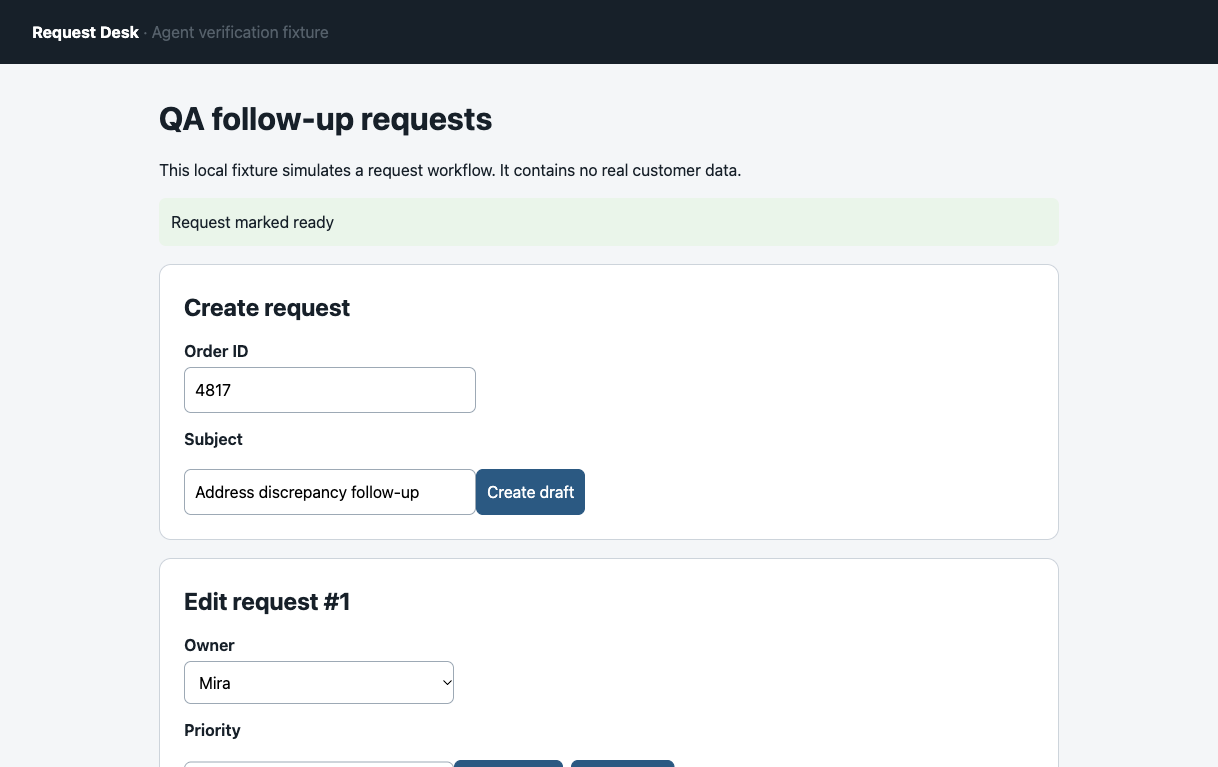
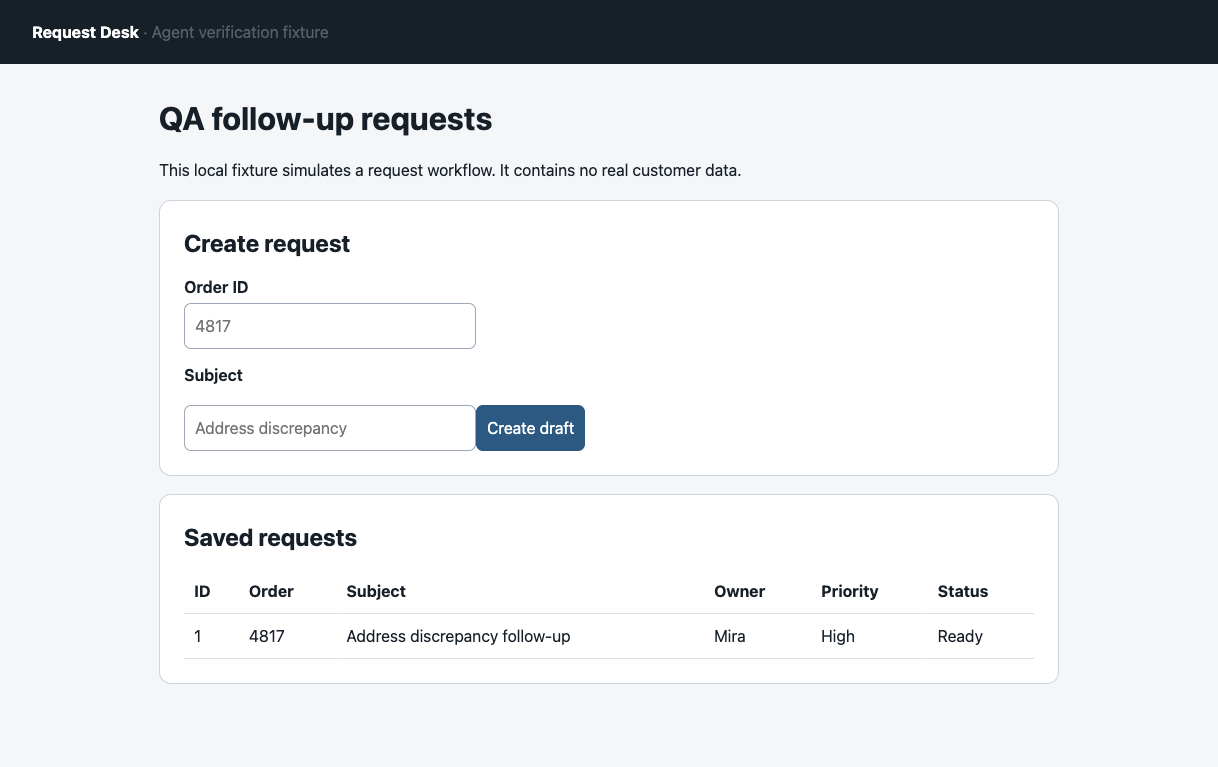
On our owned Request Desk, ego (lite) showed a green “Request marked ready” banner. We reloaded the record. It was still Draft. Browser agent verification starts there: check the application's state after the agent acts, not just the message it saw.
Browser agent verification compares the requested outcome with a fresh read of the exact record. Check that the right fields changed, the change survived a reload, and nothing else was altered. Keep the agent's action log for context, but grade the result from the application.
In the separate N2/F2 replay, ego (lite) let one Page act on the request while another loaded its fresh status. Our server read checked the stored record. N2 ended Ready; F2 showed the same success toast but stayed Draft after reload, with no stored write. The second Page gave us another view, not an independent security boundary. The ego (lite) workflow and original screenshots below show the checks.
What counts as browser agent verification?
A useful verifier checks an outcome against a task contract. For a write, the contract names the target record, required fields, final status, and actions that must not happen. The browser agent is the actor; a separate check is the verifier. The distinction matters because a correct click path can still end in a rejected or lost write.
The September 2026 Samelogic guide also uses task contracts and durable state checks. This article adds a runnable local fixture, paired browser screenshots, raw server events, and an independently recalculated ten-run rule check.
This separation also appears in the Universal Verifier paper, whose authors distinguish process evidence from outcome evidence when judging computer-use agents. Their human-labeled benchmark is a different scale of research; the small case below is an operator's reproducible example, not a replication of its results.
A browser signal can prove only what it actually observes:
| Signal | What it can show | What it cannot prove alone |
|---|---|---|
| Click or tool call | The actor attempted an action. | The application accepted or saved it. |
| Toast or final URL | The interface displayed a message or navigated. | The correct record reached the required state. |
| Fresh UI read | The application currently renders the expected record and value. | Persistence beyond the checked session or an unseen side effect. |
| Authorized API or server record | The system of record has the expected value. | The user saw the right page or the actor followed an approved path. |
What did our controlled browser task show?
We used ego-browser 0.5.2.16 with Chromium 154 on September 28, 2026 to operate a synthetic local request desk. The task had three dependent steps: create an order follow-up, assign Mira and High priority, then mark it Ready. Success required the right row after a page reload plus a matching server-side record and event. We ran one normal case (local:S1) and one deliberately broken case (local:F1). No real account or customer data was involved.
Here is the complete result, including the failed task:
| Run | Toast | After reload | Server record | Verdict |
|---|---|---|---|---|
| local:S1, order 4817 | Ready | Ready | Ready | Task complete |
| local:F1, order 4818 | Ready | Draft | Draft | False success |
S1 changed the server record to Ready. The page also showed that value after a fresh load. The pair of screenshots matters: one records the immediate response, the other records the later state.
Why did the false success pass the first check?
F1 received HTTP 200 and the same Ready toast. For this controlled failure, we configured the fixture to return a successful response while suppressing the final server write. The client optimistically painted Ready in the table, so a screenshot taken at that instant could also mislead the verifier. A reload removed that optimistic state.
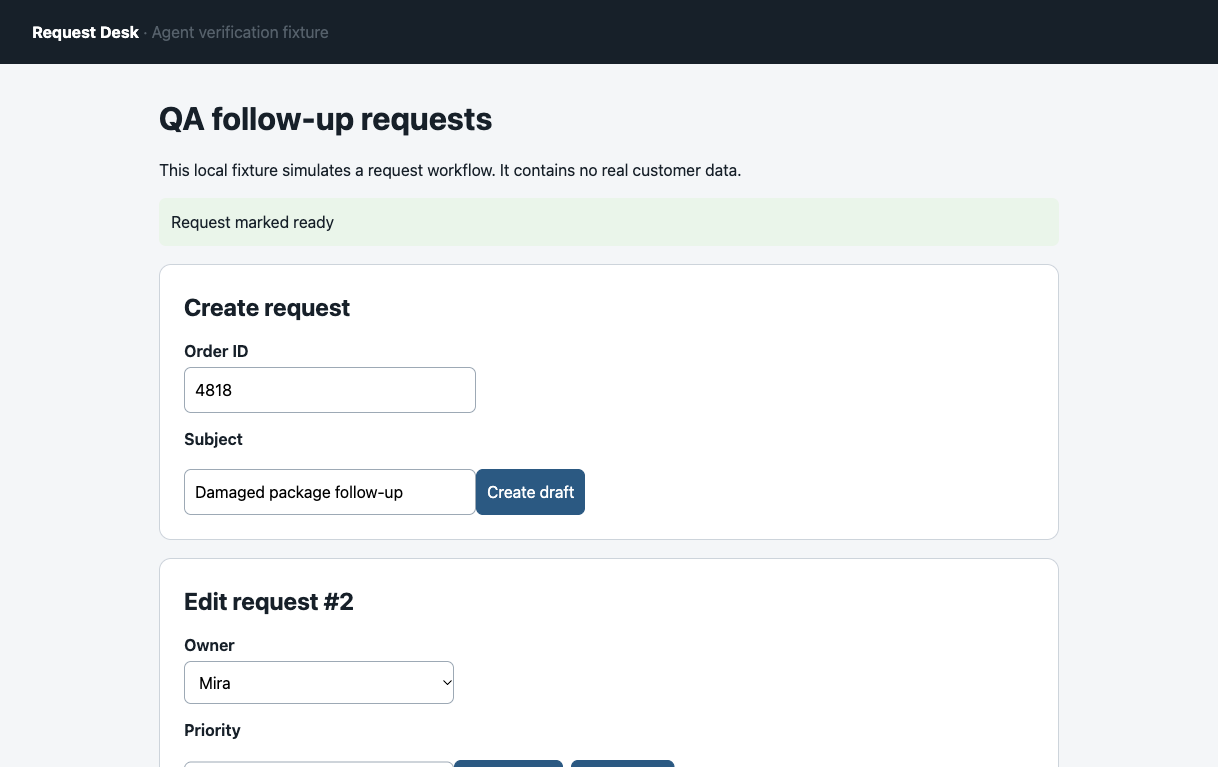
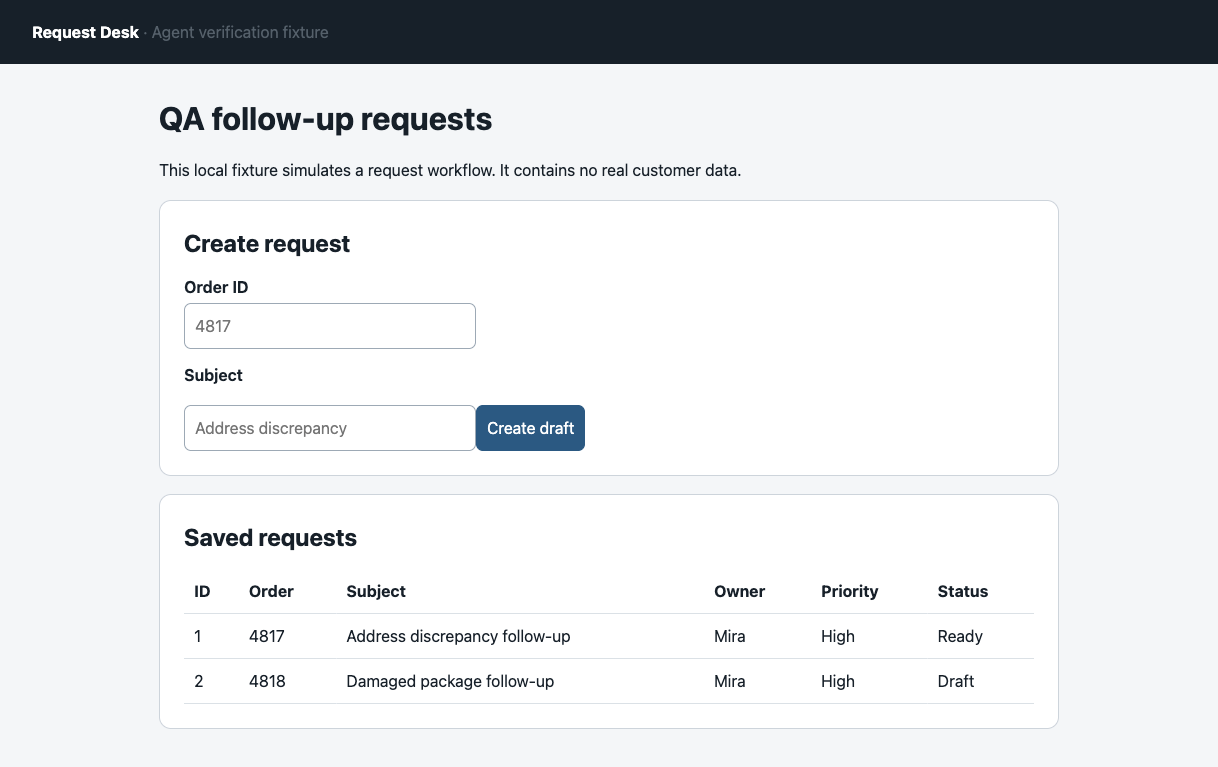
We also hit a smaller, real verification failure in S1. A broad text selector for “Ready” matched both a hidden button and the visible status cell. ego-browser refused the ambiguous match; the agent switched to the target row's status cell and kept the original error in the log. A verifier that silently chooses either match could grade the wrong element.
What did the ten-run verification check find?
We then replayed a fixed three-step task ten times on a separate copy of the same local request desk, using ego-browser 0.5.2.16, Chromium 154, and macOS 26.5.1. Each trial reset the in-memory fixture and reused order 4820; its verifier run ID distinguishes the result from the local:S1 and local:F1 two-run case. Five runs allowed the Ready write; five deliberately displayed a Ready toast while suppressing that write. The ten-run plan was frozen before execution with SHA-256 7e2abc329a84e402ce676bcaf46e693fab5218efc5d0d04a3db1ef49b7ede6a8, recorded in run-metadata.json inside the evidence pack. The same scripted browser actions and success rubric applied every time. We graded the first result before any recovery click. Toast alone made five false success calls; the fresh row plus server check made none in these ten trials.
The benchmark evidence pack contains the fixture, runner and analyzer. In its extracted 20260928-verifier-benchmark directory, start the server in one terminal, run the browser script in another, then inspect the generated results:
node fixture-server.mjs
ego-browser nodejs < run-benchmark.mjs
python3 analyze-results.py
The archived runner uses taskSpace(6), actor page p1 and verifier page p2; set the TaskSpace ID to your own test Space before replay. The commands reproduce a local synthetic fixture and do not run an AI model on each trial.
The table compares both verification rules against the same ten preset outcomes.
| Verification rule | Correct calls | False success calls |
|---|---|---|
| Ready toast alone | 5 of 10 | 5 of 10 |
| Fresh row plus server record and event, also used to define ground truth | 10 of 10 by definition | 0 of 10 |
These are ten predetermined fixture conditions, including a deliberately high five-in-ten fault share. The second rule uses the same fresh row and server signals that define the task's ground truth, so its ten correct calls demonstrate this verification mechanism on this fixture. They do not estimate a real site's error rate or an independent verifier's predictive accuracy. The five failed writes were each recovered with one later Ready retry, after their original Draft verdict was saved.
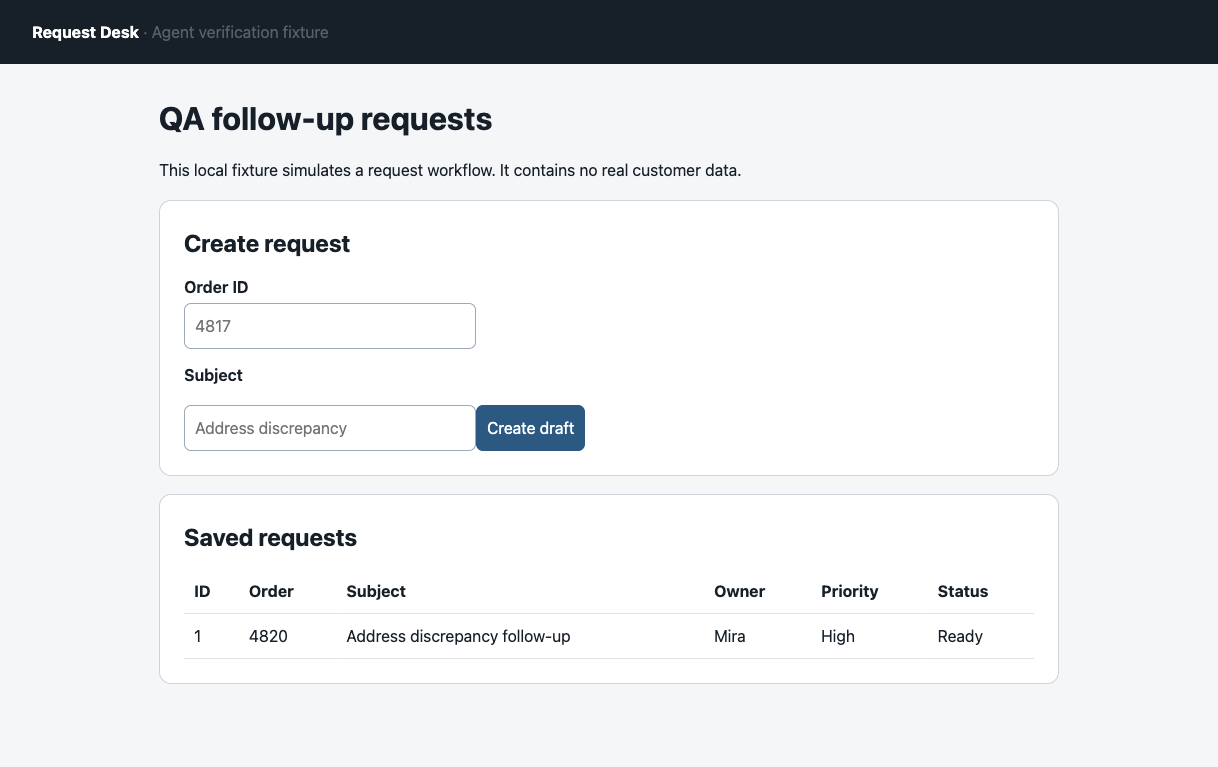
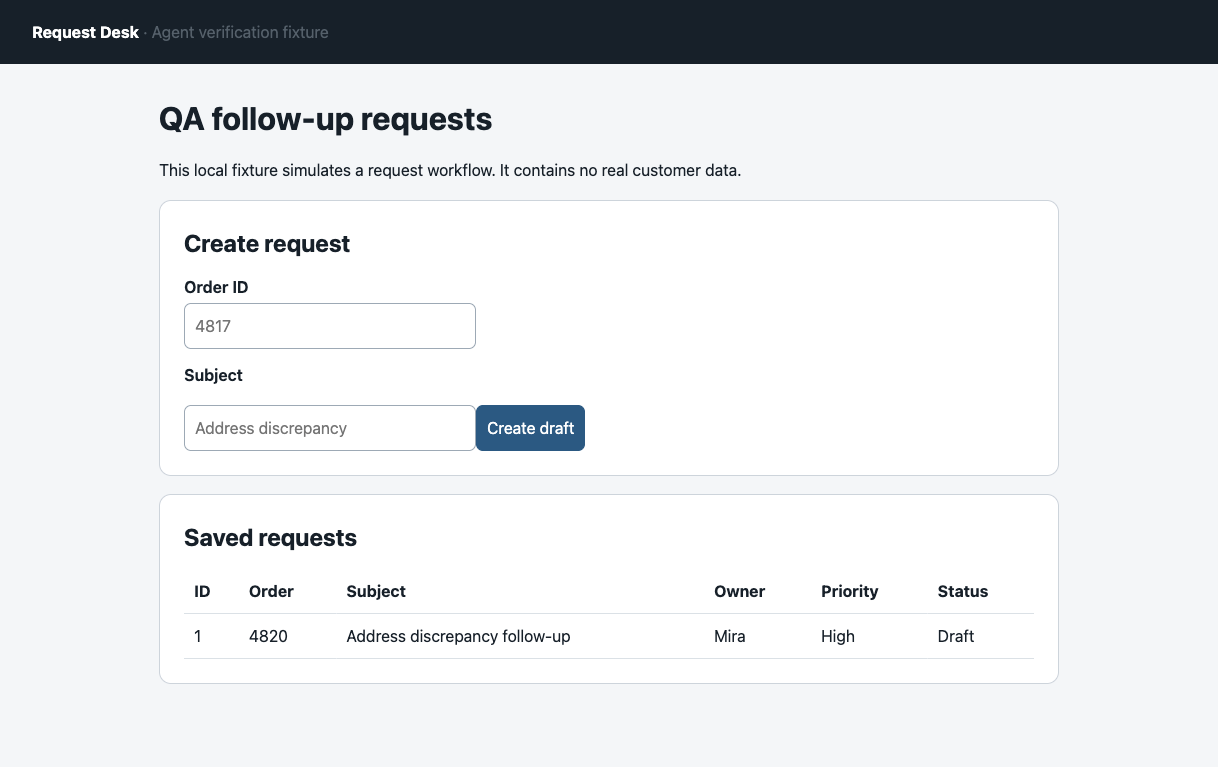
Open the original benchmark screenshots at native resolution: verifier:S1 Ready and verifier:F1 Draft.
The two full browser images above preserve the page context but make the saved cells small on a phone. The next two images are native screenshot clips from separate display replays, M7 and M8, of the same fixture and failure setting. They enlarge the decisive cells without changing their pixels. These display replays are not part of the ten-trial benchmark; the complete source images are linked immediately after the clips. The M7 and M8 full PNG files are byte-identical to verifier:S1 and verifier:F1 because the reset fixture rendered the same rows at the same viewport. Separate action transcripts, run IDs, capture times, and server events document the display replays.
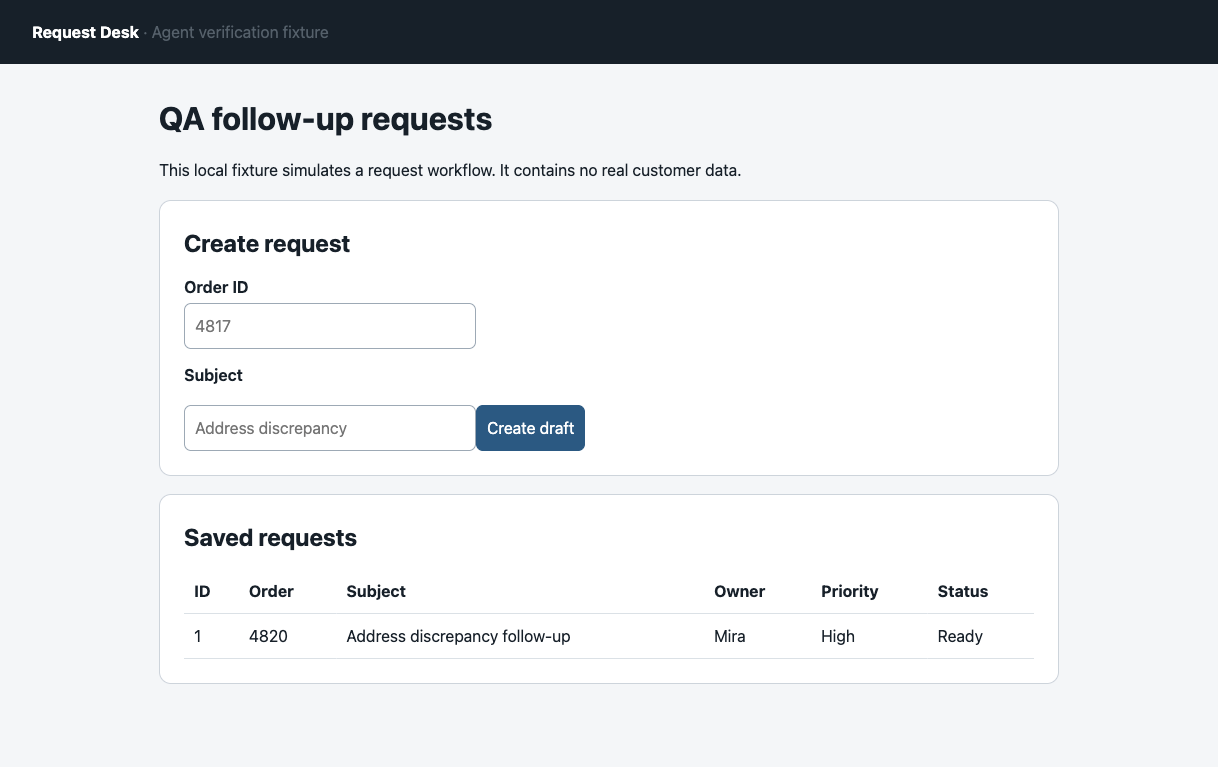
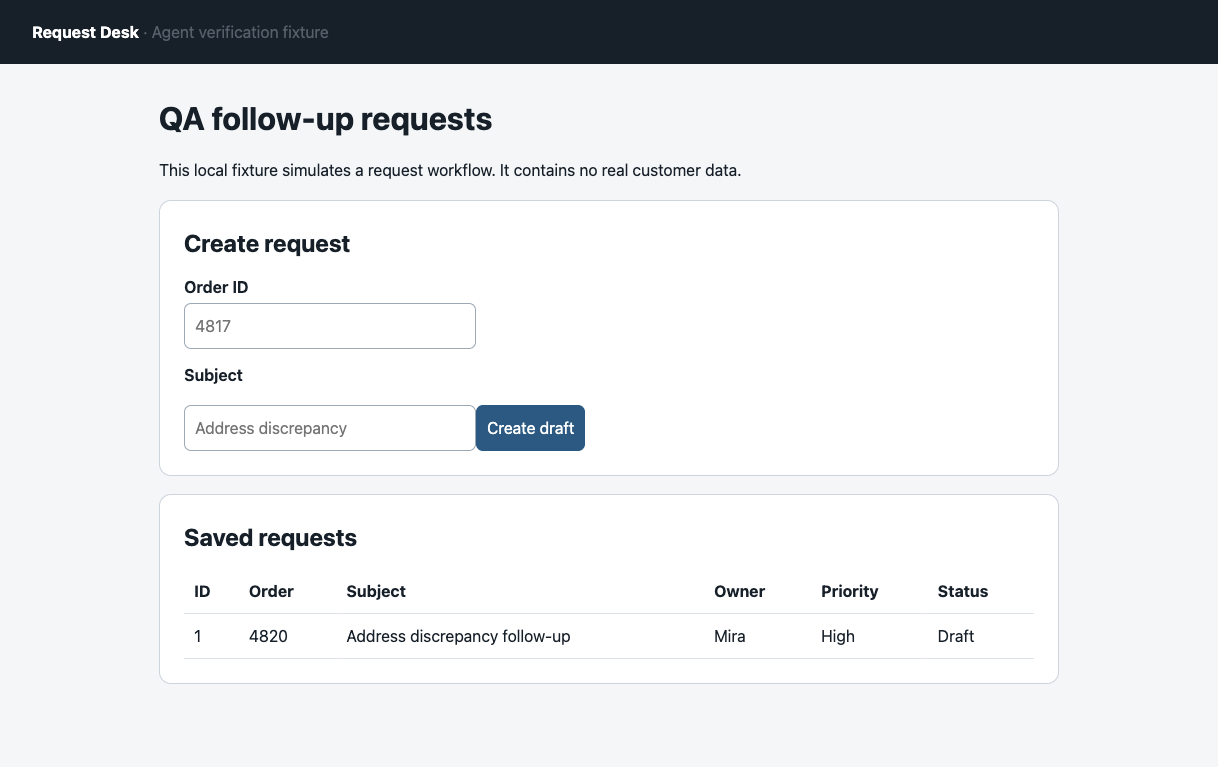
Open the complete Request Desk screenshots for the separate display replays: M7 Ready source and M8 Draft source.
The M7 and M8 display replay audit pack contains their original full images, the display script, ordered action transcript and server events. Its source hash map records the substitutions of private local paths in the public copy. These replays remain outside the ten-trial benchmark.
Inspect all ten trial rows and download the complete benchmark evidence pack for the fixed plan, scripts, original action transcript, 50 server events, five screenshots, and independent QA.
The benchmark CSV was generated before independent review, so its evidence_completeness column still says pending_independent_qa. The later review is preserved as 20260928-verifier-benchmark/independent-qa.md inside the benchmark evidence pack. A separate reviewer Agent recalculated all ten rows and the 50 server events from the original files. That PASS covers this local fixture and its preset rubric only; it does not establish predictive accuracy on real sites. The public archive hash map records which runner and ledger paths were made relative or replaced by placeholders for download.
How should a verifier check a real task?
Start with the business record the agent was meant to change. Identify it by a stable ID, reload it, check the required fields, then look for duplicates or changes to other records. If you have access to an API or audit log, read that too. A final URL shows where the browser went; it does not establish that a write persisted.
Our fixture's out-of-band check was deliberately small:
const state = await fetch("http://127.0.0.1:48217/admin/state")
  .then((response) => response.json());
const record = state.records.find((item) => item.order === "4818");
if (record?.status !== "Ready") throw new Error("Task not complete");
On a real site, replace the fixture's admin endpoint with an authorized record read. Playwright's assertion docs cover retrying UI checks such as text and URL assertions; those checks become stronger when they target a fresh, specific record. The framework's testing guidance also favors user-visible behavior and isolated test state.
A read-only check on a public article
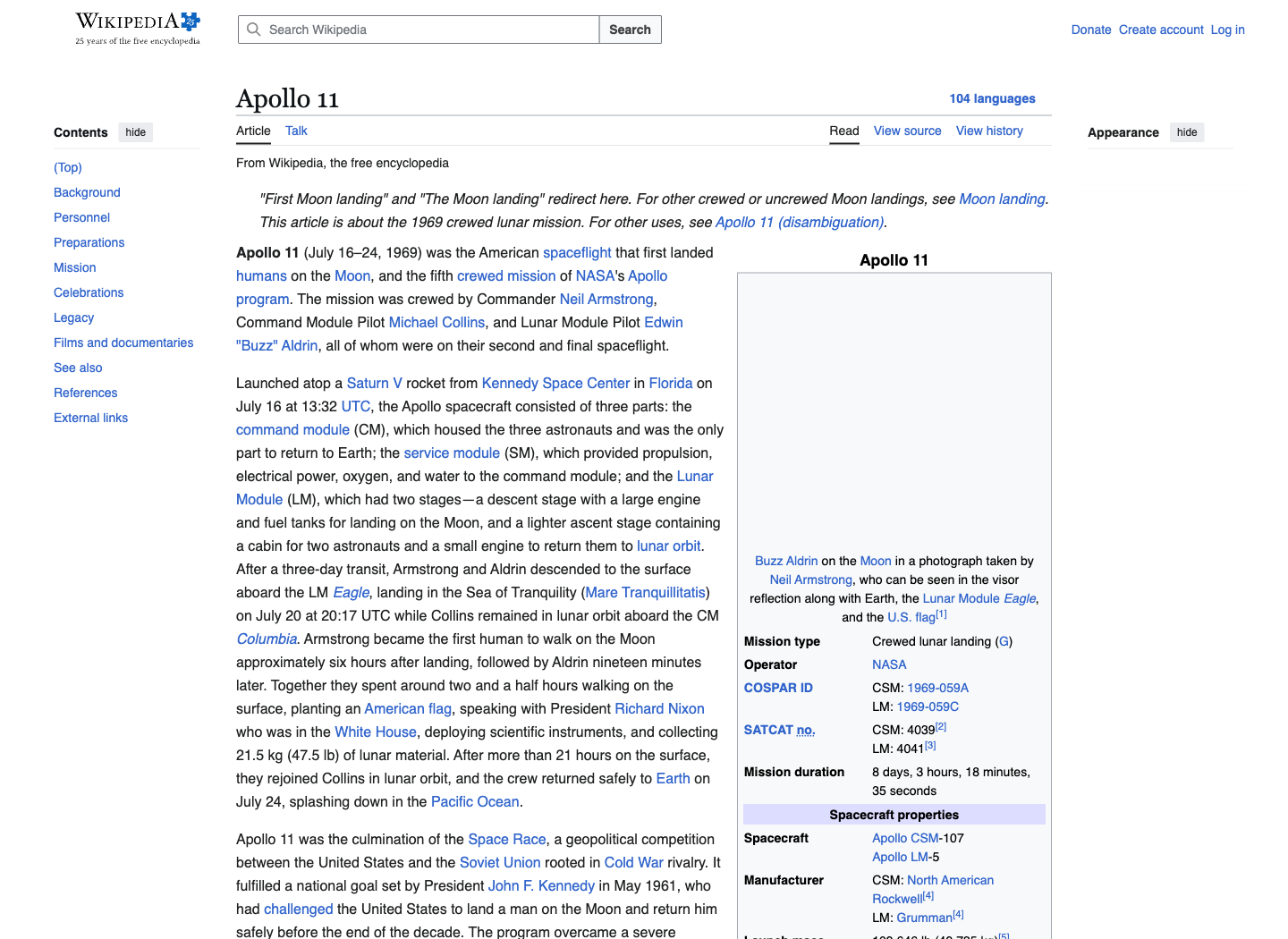
A separate September 30, 2026 capture used Wikipedia's Apollo 11 article to illustrate verification when the task is to compare public content, not save a record. The first checkpoint is the live article's title and opening statement. The supplied current-page frame shows those fields; its infobox photo is blank in that frame.
Which evidence should you keep for replay?
Playwright's Trace Viewer guide documents action snapshots and network evidence for locating a failure. The application record still determines whether a requested write persisted.
A replay record should include the task input, environment and browser versions, ordered actions, raw errors, fresh-read result, server or API record, verdict, and screenshots around the decisive state change. A screen recording can show motion, but it cannot substitute for a structured record check. Record both successes and failures under the same rubric.
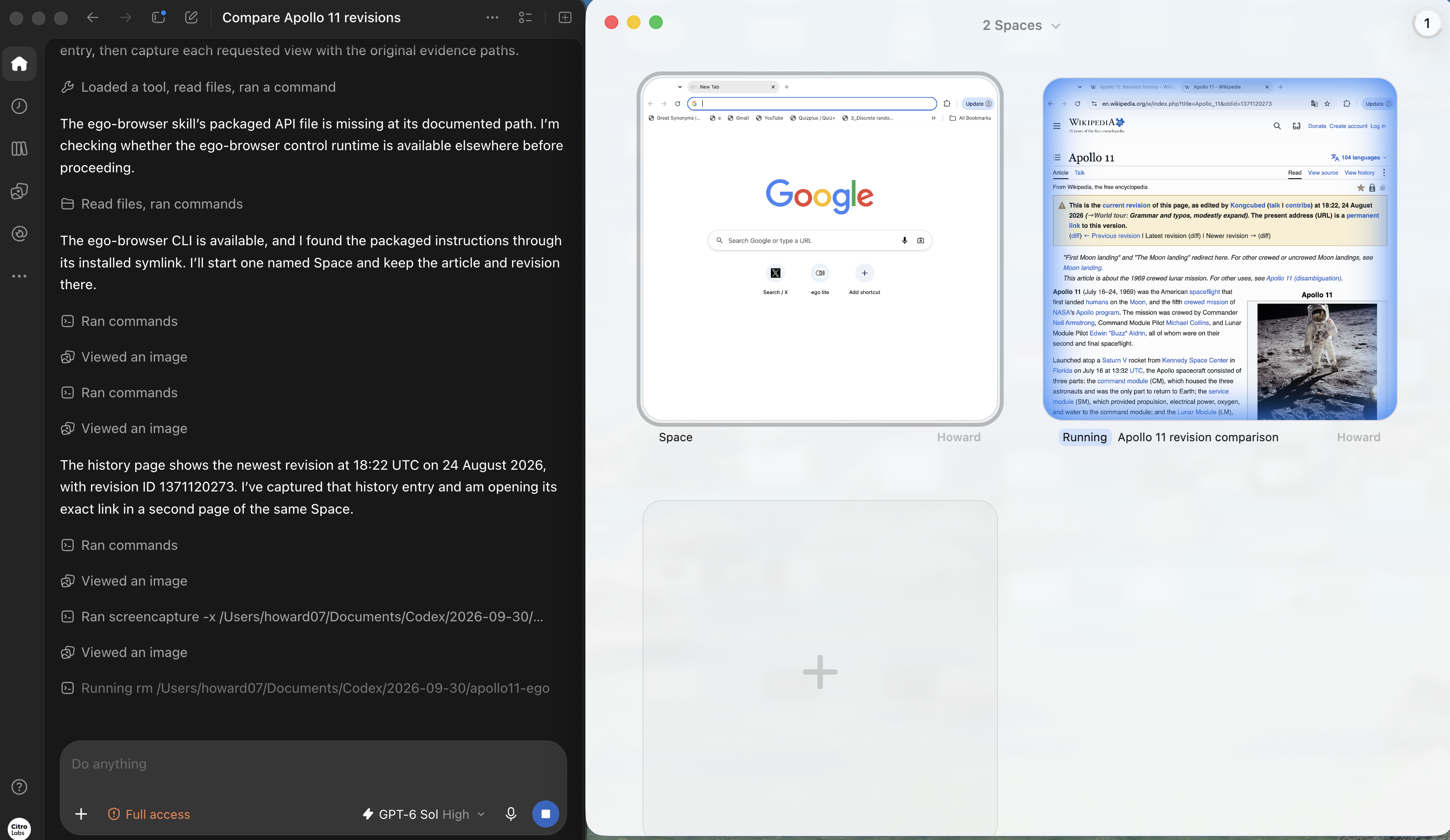
For the Wikipedia comparison, the next checkpoint is the article's revision history. The captured history page lists its newest entry at 18:22 UTC on August 24, 2026. That is an observation from this run, not a claim about the page's newest revision at a later date.
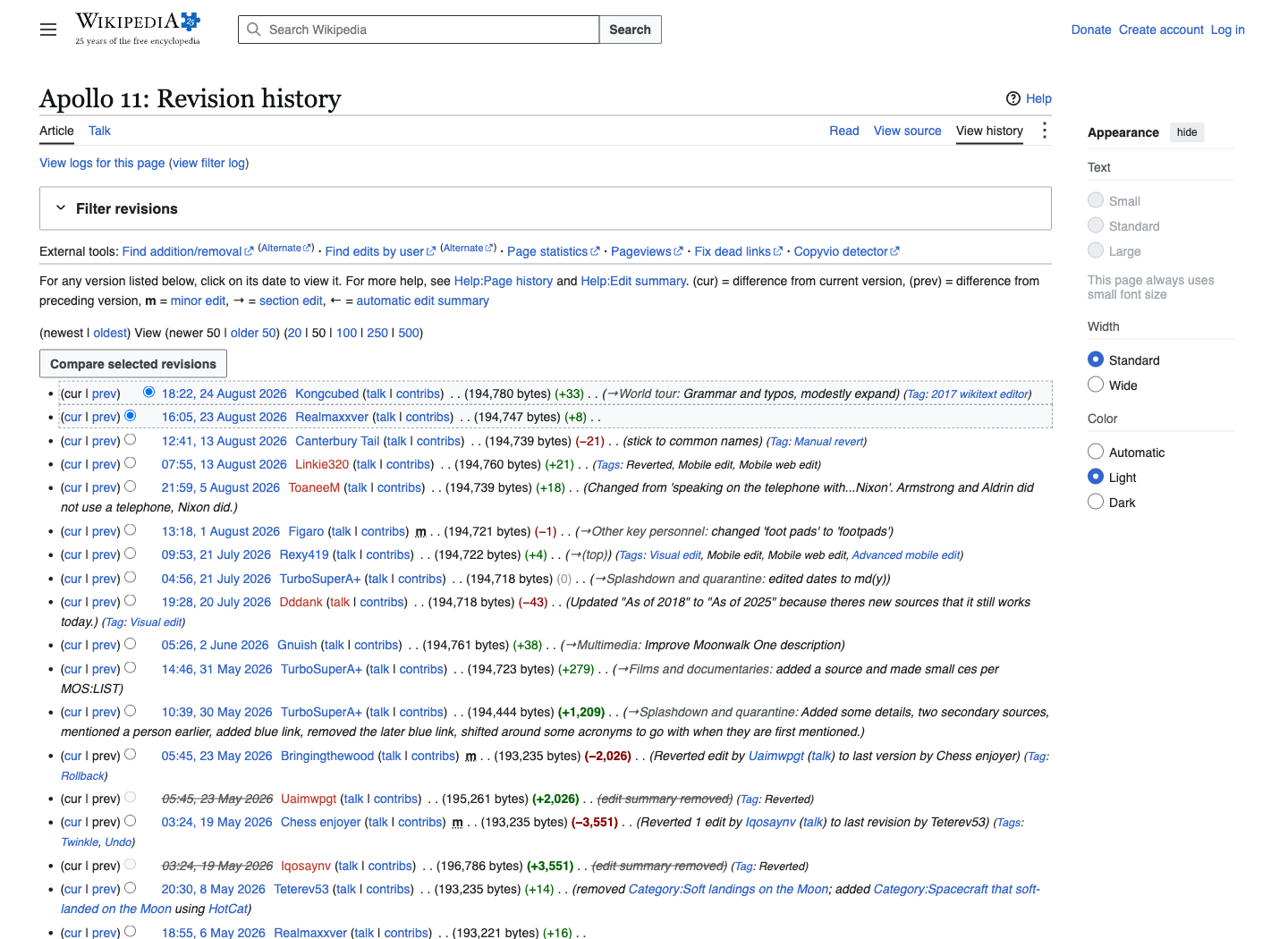
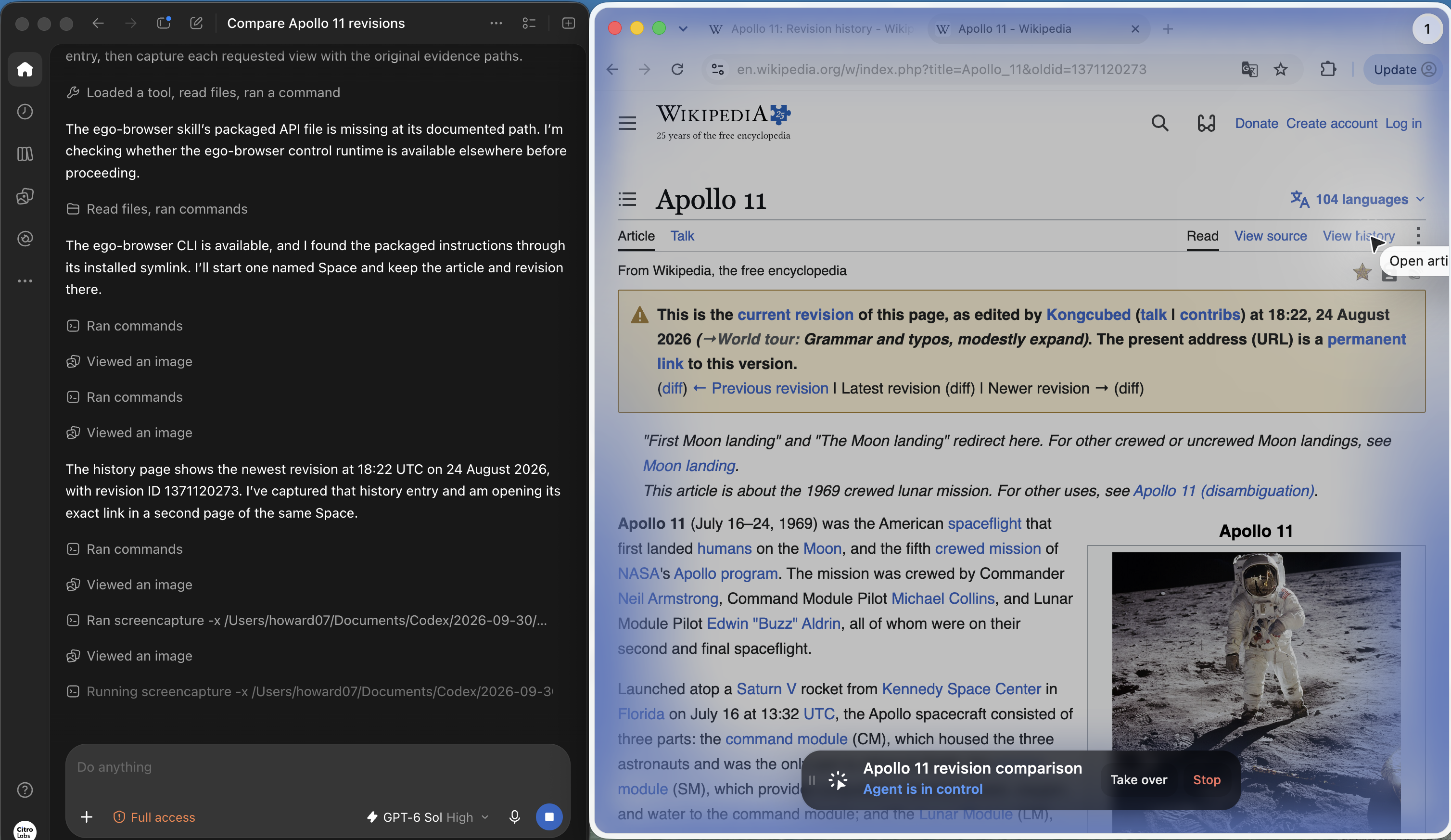
Open that exact revision and compare the requested fields, rather than treating a history listing as the content check. The version page in the next capture shows a permanent-version banner and the article's title and opening statement. These screenshots establish the visible pages; they do not prove that every paragraph was compared.
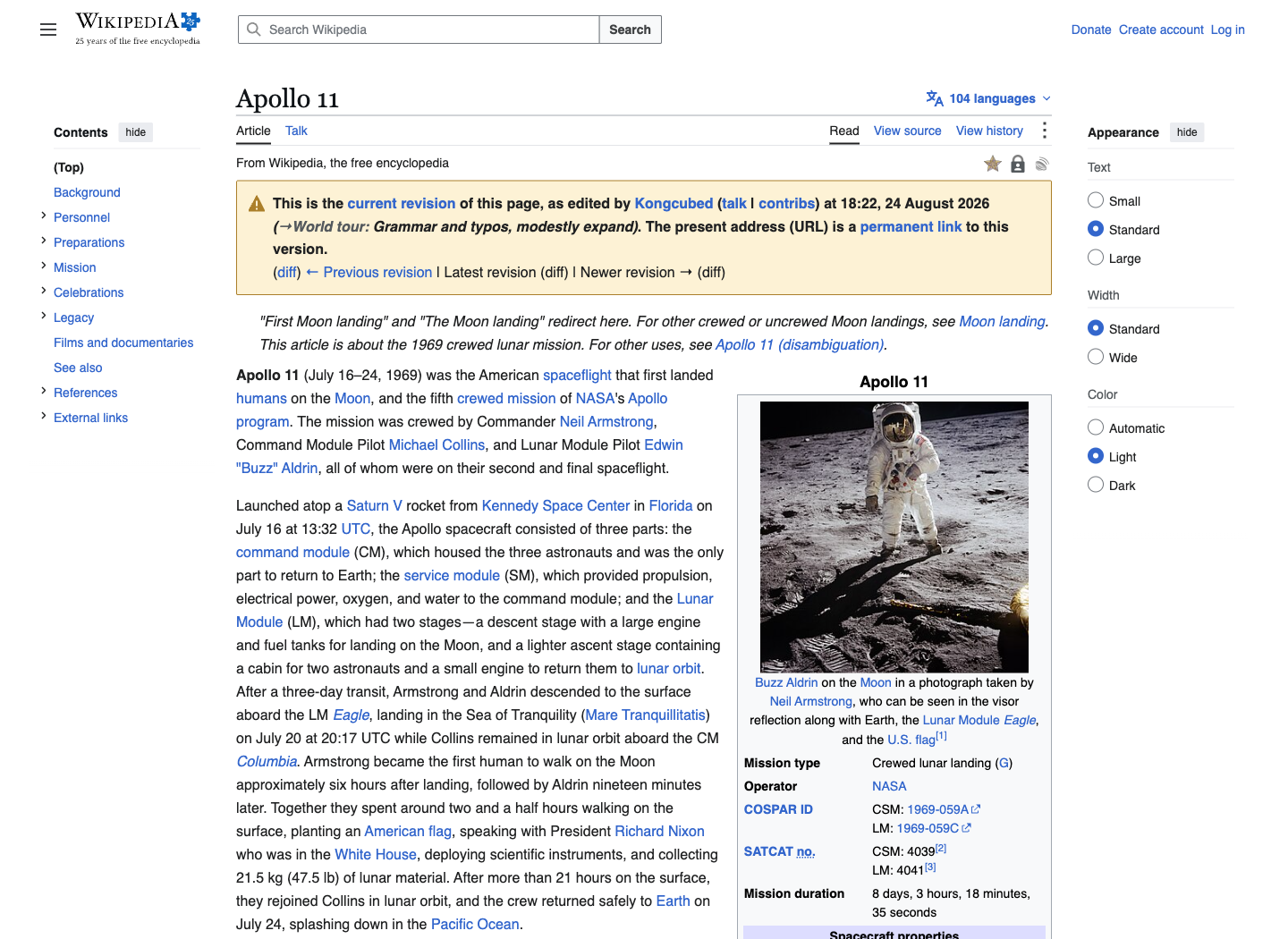
For this case, download the local fixture source and raw evidence or inspect the two-row results table. The package includes the original locator error, its recovery, the injected write failure, event log, and image files. Its results.csv was generated before independent review and still says complete_pending_independent_qa; the later review is independent-qa.md inside that ZIP. The local:S1 and local:F1 aliases refer only to this two-row case; the separate ten-run package uses verifier-prefixed IDs.
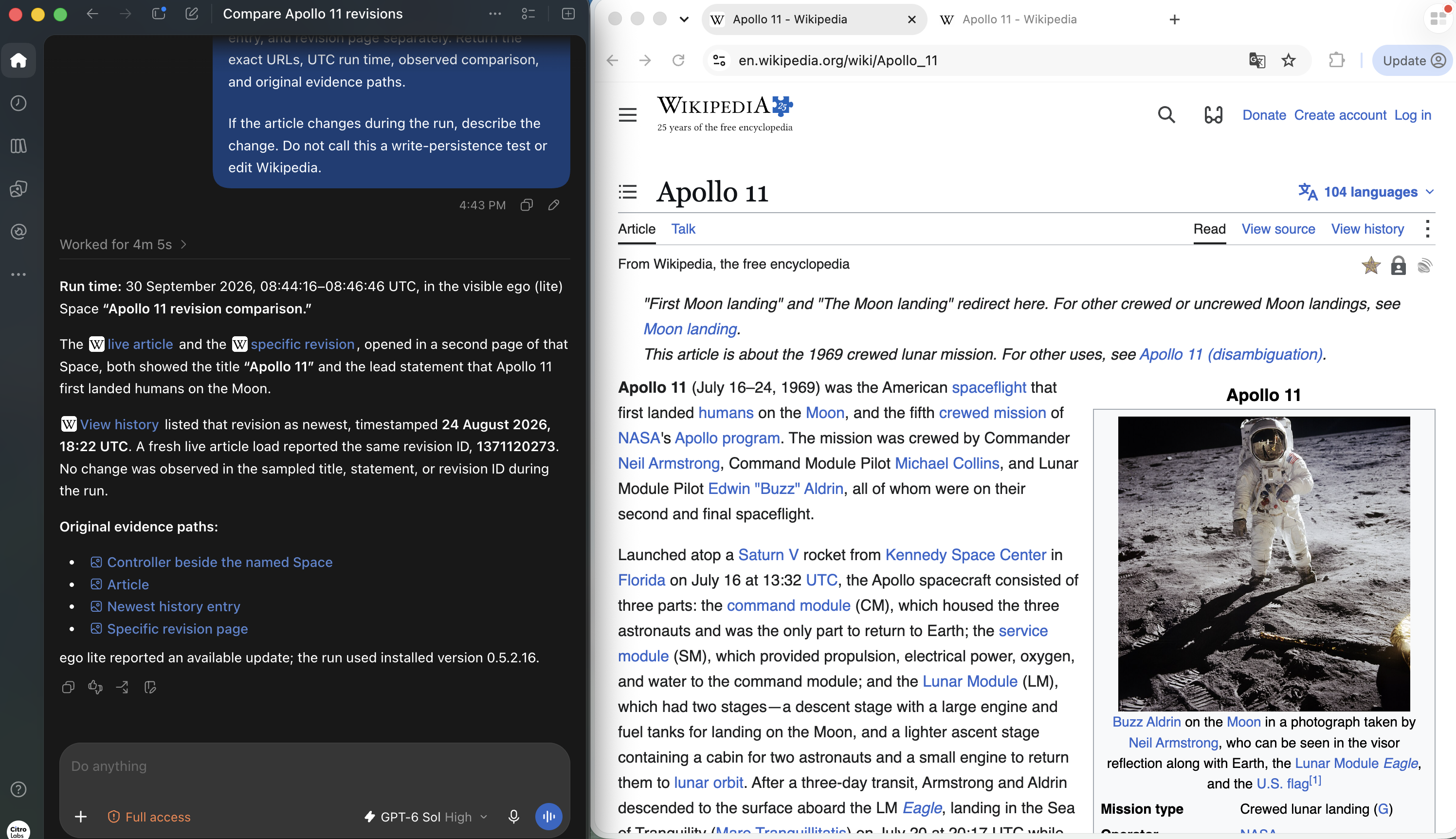
The Codex report for this separate public-site run records the two page URLs, a UTC run interval, and revision ID 1371120273. It says the sampled title, opening statement, and live revision ID matched during the run. The screenshot below shows that report beside the live page; the report is an agent-produced summary and should be read alongside the page and history captures.
Where does ego (lite) fit?
ego (lite) was the local browser execution environment for this test. Its official Quick start describes a separate Space for an agent's browser work. In our ten-run setup, page p1 performed the task and page p2 reloaded the result inside TaskSpace 6; a separate server read graded the outcome. Two Pages in one Space are two browser observations, not independent security principals. The application-specific server assertion was our code, not an ego (lite) feature. Read the official Space setup before connecting an agent to your own authorized site.
The public Wikipedia run also shows what the visible ego (lite) workspace adds to a read-only check. One named Space contains the Apollo 11 history and revision tabs. The neighboring blank Space is idle in this capture; it does not demonstrate two tasks running in parallel.
A second frame shows active agent control on the fixed revision page and its oldid URL. The control overlay shows that the browser was being operated during capture. It does not, by itself, verify Codex's comparison result; the article, history, fixed revision, and report together provide the review trail.
To make that division usable, we repeated the same three-step task in a separate two-case display run, N1 and F1, on September 28, 2026. The actor used p3 and the verifier used p5 in our test Space. After the actor saw “Request marked ready,” p5 reloaded the exact order 4829. N1 showed Ready in the new page and server record; F1 deliberately suppressed the write and showed Draft in both, despite the same Toast. This display run is outside the ten-run result above and does not add two trials to its denominator.
The decisive browser operations in that run were:
const task = await taskSpace(1); // Our test Space; use your own ID.
const actor = task.page("p3");
const verifier = task.page("p5");
await actor.click("css:#ready");
await actor.waitForSelector("text=Request marked ready");
await verifier.reload();
await verifier.waitForSelector('css:tr[data-id="1"]');
const cells = await verifier.evaluate(() =>
  [...document.querySelectorAll('tr[data-id="1"] td')]
    .map((cell) => cell.textContent?.trim() ?? ""));
// Also read the authorized application record and events outside the actor.
The page IDs and CSS selectors belong to this owned fixture. On another site, choose its exact record key and authorized read channel before adapting them. A fresh browser page is useful because it drops the actor's optimistic in-page state; the server or API read checks what the application stored. If those channels are unavailable, report the write as unverified rather than treating the Toast as completion.
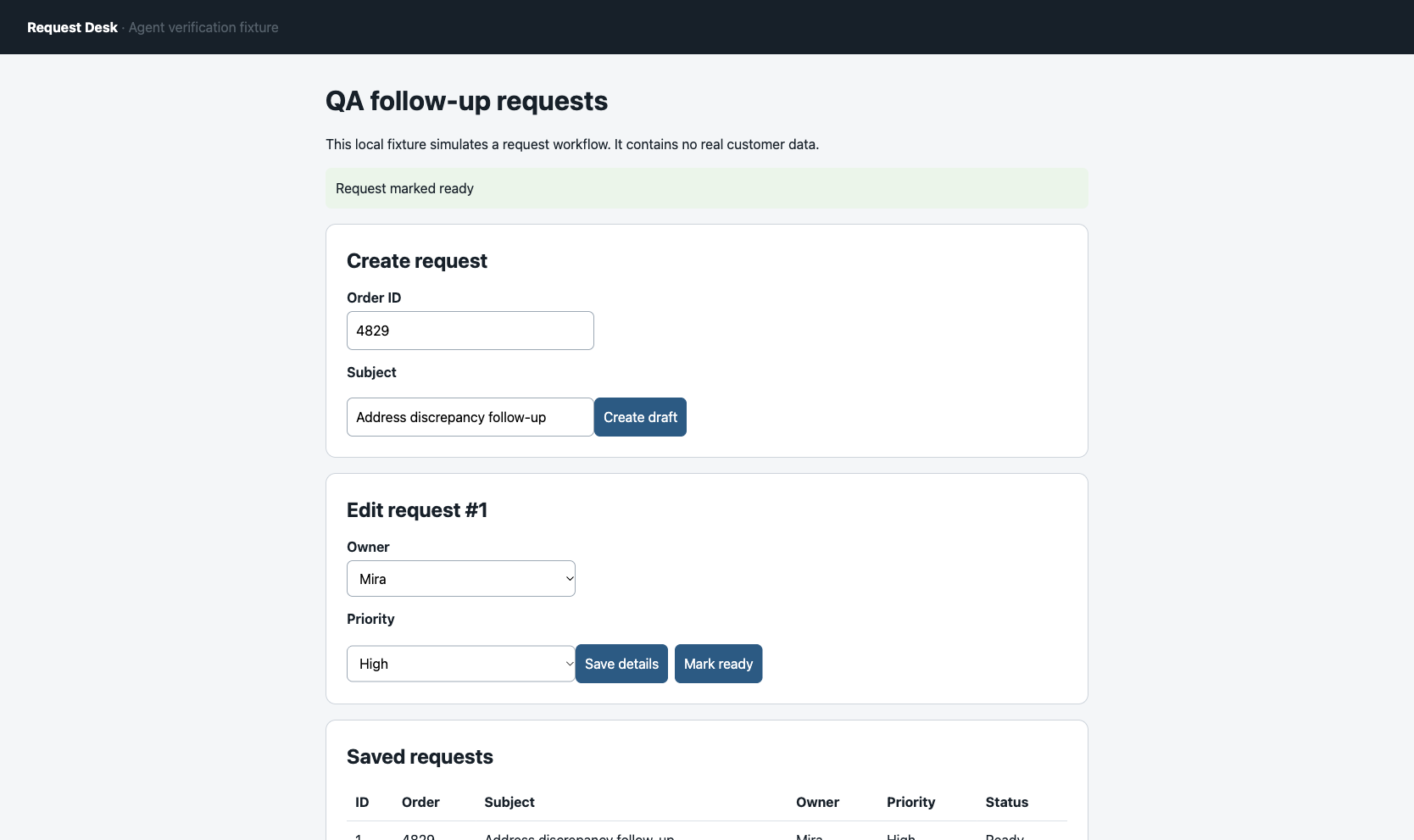
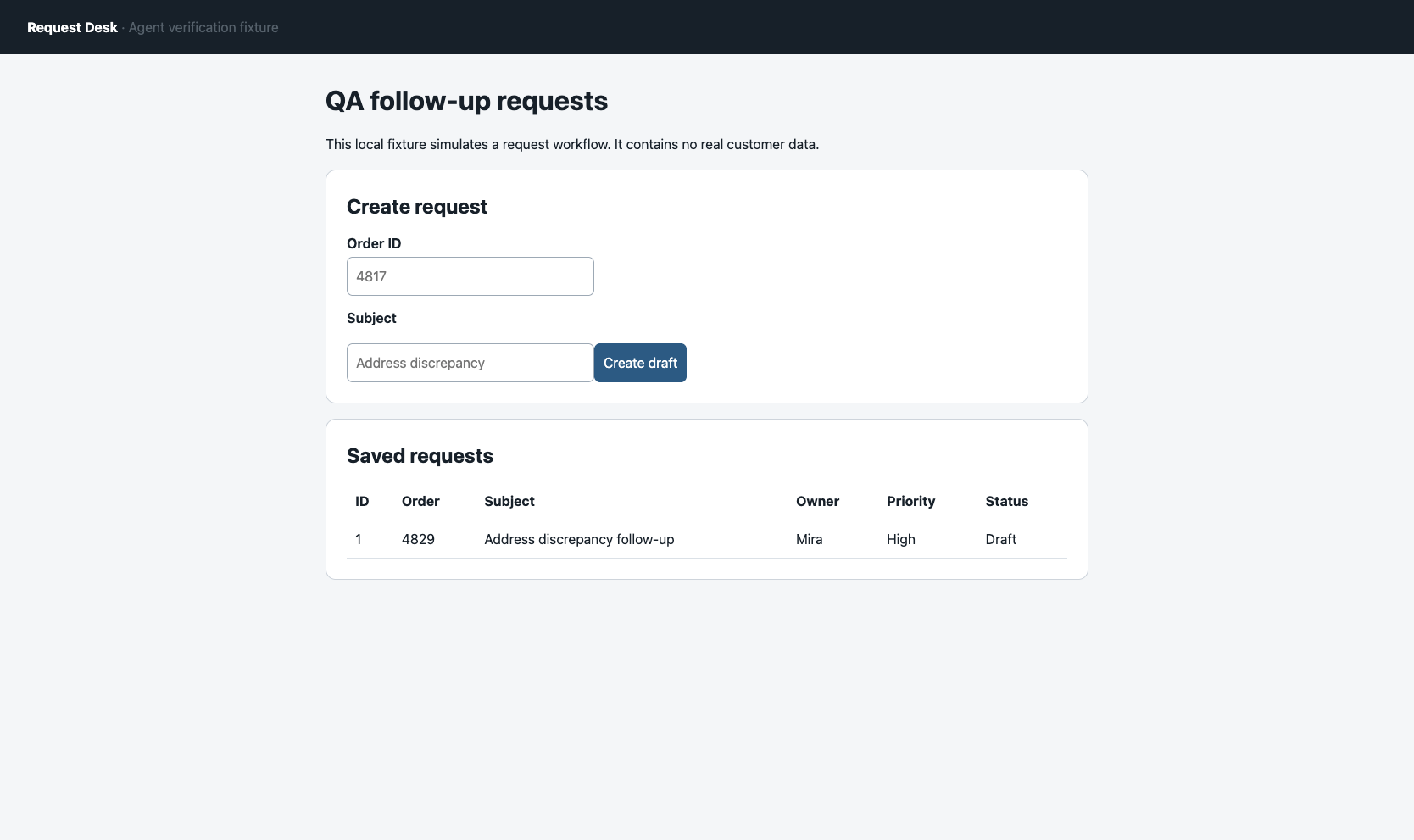
The supplementary run package contains the frozen plan, scripted Page actions, both run results, server events, raw action log, screenshots, and source hashes. It records N1 as pass and F1 as fail under the same rubric. These two scripted cases show the Page workflow on our in-memory fixture; they do not measure autonomous Agent reliability or disk durability.
The original N1/F1 CLI console output was not saved. We therefore froze a separate replay plan and ran N2/F2 on the same owned task, retaining the actual CLI stdout, stderr, Page action log, per-run environment, four original screenshots, fresh reads, and server events. N2 reached Ready in both the reloaded page and server record. F2 showed the same optimistic Toast, then Draft in both checks. An initial replay script failed before either case because its CDP version call was unavailable; that stderr is retained in the new package. The replay is two new scripted observations, not a repair of missing N1/F1 receipts or an addition to the ten-run benchmark. Inspect the N2/F2 replay evidence.
If your work needs a local browser session, run the same workflow in ego (lite) on macOS and pair it with checks against your authorized application state. Prefer a supported API for a deterministic write; use browser actions when the task depends on the interface a person sees. For hosted replay across many remote sessions, use cloud browser infrastructure that actually provides those sessions. For repeatable CI assertions and cross-browser coverage, use a test runner; our browser testing guide shows that workflow.
What are the limits of this method?
A fresh UI read and server read caught our deliberately suppressed write. They will not catch every wrong action. Both checks could agree on the wrong record if the rubric uses a loose identifier; an API may return stale data; a server can lose in-memory state after restart. For high-impact work, verify the exact target and side effects, use an idempotency key or authoritative transaction record where available, and require a person to approve irreversible actions.
The Request Desk screenshots are from one synthetic site. The separate Wikipedia screenshots illustrate a read-only revision comparison; they do not extend the write-verification benchmark to a real site. We did not test authenticated workflows, OTP, third-party writes, server restart durability, or multiple browser tools head to head. Codex chose actions for the initial two-row case from a page snapshot; after that case was inspected, the ten-run check replayed a fixed script with deliberately injected failures. No model planned each of those ten runs, and we did not measure model tokens or cost. The ten-run result is a verification-rule check for this fixture, not a cross-site or product benchmark. The Universal Verifier paper studies verifier quality at a larger scale.
FAQ
These answers distinguish a completed browser action from a completed user task.
Can a final URL prove a browser agent finished?
A final URL proves navigation to that URL, not that the intended record was saved. Pair it with a fresh read of the exact record for write tasks.
Is a screenshot enough to verify a browser agent?
A screenshot can show visible state at one moment. In F1, the fixture source and event record show that the client briefly painted Ready before reload, while the published toast screenshot captures only the message. The server record stayed Draft, so the task needed a fresh read and the raw event log.
Should the same model judge its own browser actions?
No. The model can summarize its trace, but a deterministic check should grade exact fields when the outcome is machine-readable. Human review remains useful when the outcome itself is subjective or high impact.
What if the browser action times out?
Treat the outcome as unknown until a fresh state check resolves it. Repeating a write before checking can create a duplicate; an idempotency key or authoritative record lookup is safer when the application supports one.
Can ego (lite) verify task completion automatically?
No. ego (lite) supplies the browser environment and observations used in our case. We wrote the task-specific verification separately; this article does not claim an automatic built-in verifier.
What if I cannot read the server record?
Use a newly loaded, authorized application view or export for the exact record key, and check the requested fields and side effects. If no independent read is available, report the write as unverified instead of treating the agent's message or a transient toast as proof.
Related reading
These pages cover adjacent browser Agent behavior, security boundaries, and persistent sessions.