When an LLM agent gives a bad answer to a web question, the mistake may have happened well before the final response. It may have skipped search, dropped a name or date while rewriting the query, retrieved the wrong results, opened the wrong page, or read the right evidence and failed to use it. Inspect the trace in order and fix the first stage that stopped producing what the task needed.
Keep the original question, generated queries, tool calls, result URLs, pages opened, relevant passages, and final claims in one trace. That record shows whether the agent failed to find evidence or failed to use evidence it found. If the source requires an authorized login or a page interaction, search can find the entry point, but a browser must finish reading it. ego (lite) can make that browser step visible in a Space so you can step in when needed. The final answer still needs to rest on evidence the agent actually checked.
Find the stage that failed
A final answer hides where the failure began. Inspect the stages in order and stop at the first missing or incorrect artifact. A 2026 search-agent study calls out two useful classes: a retrieval gap, where the needed evidence never arrived, and a utilization gap, where evidence arrived but the agent did not use it correctly. The distinction matters because another query can help the first case and distract from the second. See the search-agent failure analysis for the study's scope and method.
| What you see | Inspect | First repair |
|---|---|---|
| Answer from memory; no search event | Tool registration and invocation policy | Enable the tool and require it for questions that need current sources. |
| Search ran, but results miss the task | Query text, dates, names, language and domain filters | Rewrite the query around the missing constraint or source. |
| Tool returned an error or empty list | Arguments, status, quota and response shape | Fix the call or handle the empty response explicitly. |
| Relevant URL found, but no usable facts | Fetched text, rendering, login and page structure | Open the source correctly and extract the relevant passage. |
| Relevant passage read, but answer is wrong | Evidence packet, context truncation and citations | Fix selection and synthesis; do not search blindly again. |
Fix query generation and rewriting
An agent often copies the whole user request into a single search field. That can bury the terms that distinguish the needed page. The opposite mistake is stripping too much context, such as the product version, time window or official source requirement. Generate a short first query, inspect its results, then rewrite only what failed. Do not turn every question into many broad searches by default.
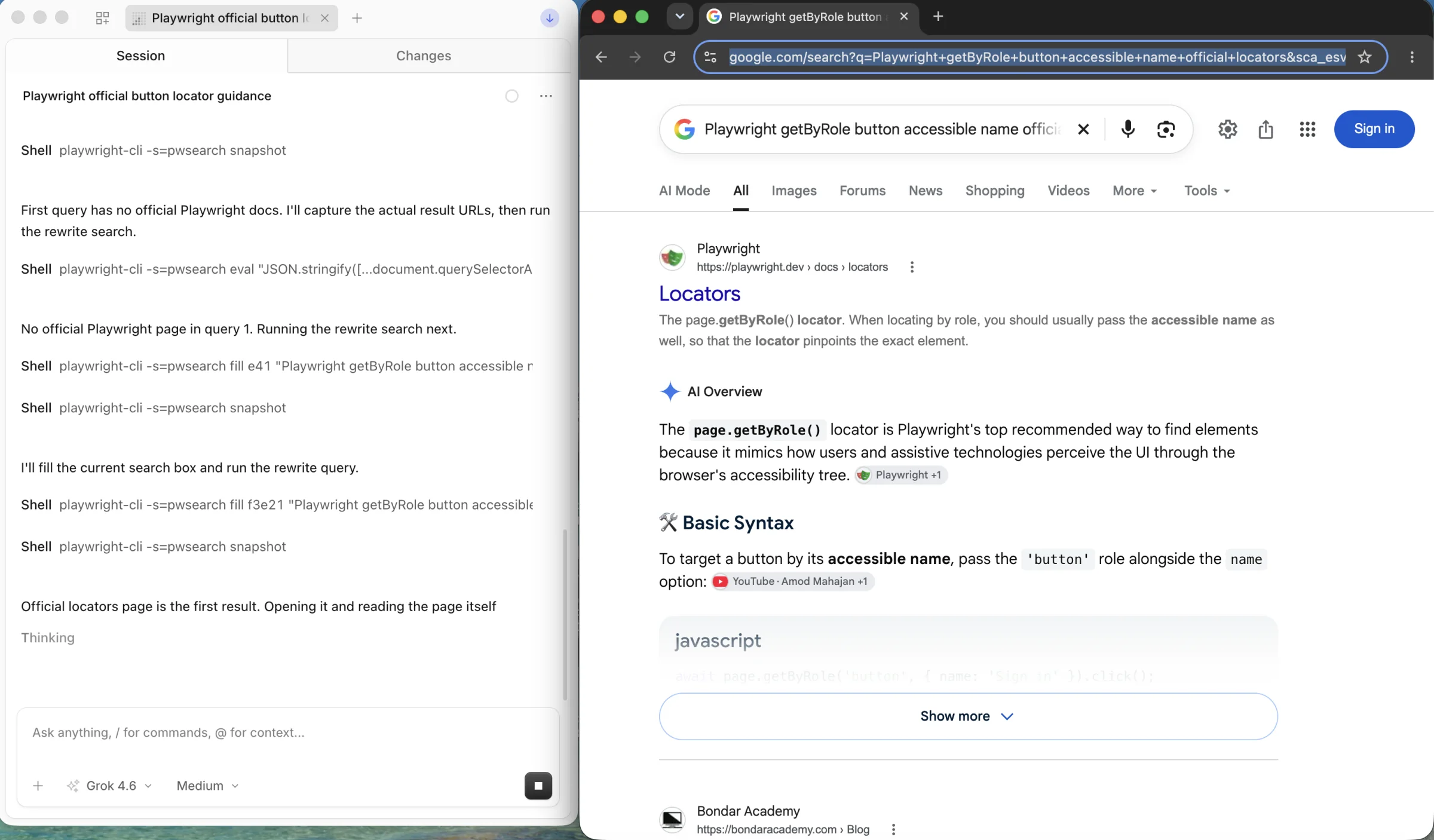
Suppose the task is to find current guidance for locating a button in Playwright. A query such as “best way to click button in automation” can surface unrelated frameworks and old advice. A tighter query is “Playwright getByRole button accessible name official locators”. If the task needs the official reference, add a source constraint or select the Playwright locator guide directly. The rewrite changes the retrieval target; it does not assert that the first result is correct.
- Extract the entity, question, time range and required source type from the user request.
- Search one subquestion at a time when the answer has independent parts.
- Compare the first results with the target. If they drift, change a named constraint rather than adding more generic keywords.
- Stop reformulating when you have sufficient relevant evidence, or record that the evidence is missing.
The aim is not to maximize query count. In the cited search-agent study, answer quality aligned more closely with the quality of accumulated evidence than with the number of searches for the agents and tasks studied.
Check the search tool call and API response
Before blaming query quality, verify that the search capability is actually available. For example, OpenAI's web search documentation states that asking for search in the prompt does not enable the tool if the tool was omitted from the agent configuration. Check your own provider's current schema rather than assuming that a prompt can repair a missing integration.
Log the tool name, submitted query, optional filters, request identifier, latency and raw status before transforming the response. Separate a successful call with no matches from a failed call. For example, Anthropic's web search tool documentation describes error objects for failures and an empty result list for a successful search with no matches. That distinction tells you whether to repair the call or rewrite the query.
Read and filter results before answering
A result list is a map to possible evidence, not evidence itself. Open the promising pages. Check whether the page is the original source, whether it answers the exact question, when its information applies, and whether the extraction contains the relevant paragraph or table. A snippet may omit qualifications, dates or a later correction.
If the extractor returns a navigation menu, consent banner or empty shell, do not ask the model to guess from it. Try the publisher's accessible text, a documented API or the page's rendered view, as appropriate for the source. Keep a small evidence record per accepted result: title, canonical URL, observed date, relevant passage and why it answers the subquestion. Remove duplicate and off-topic pages before they consume context.
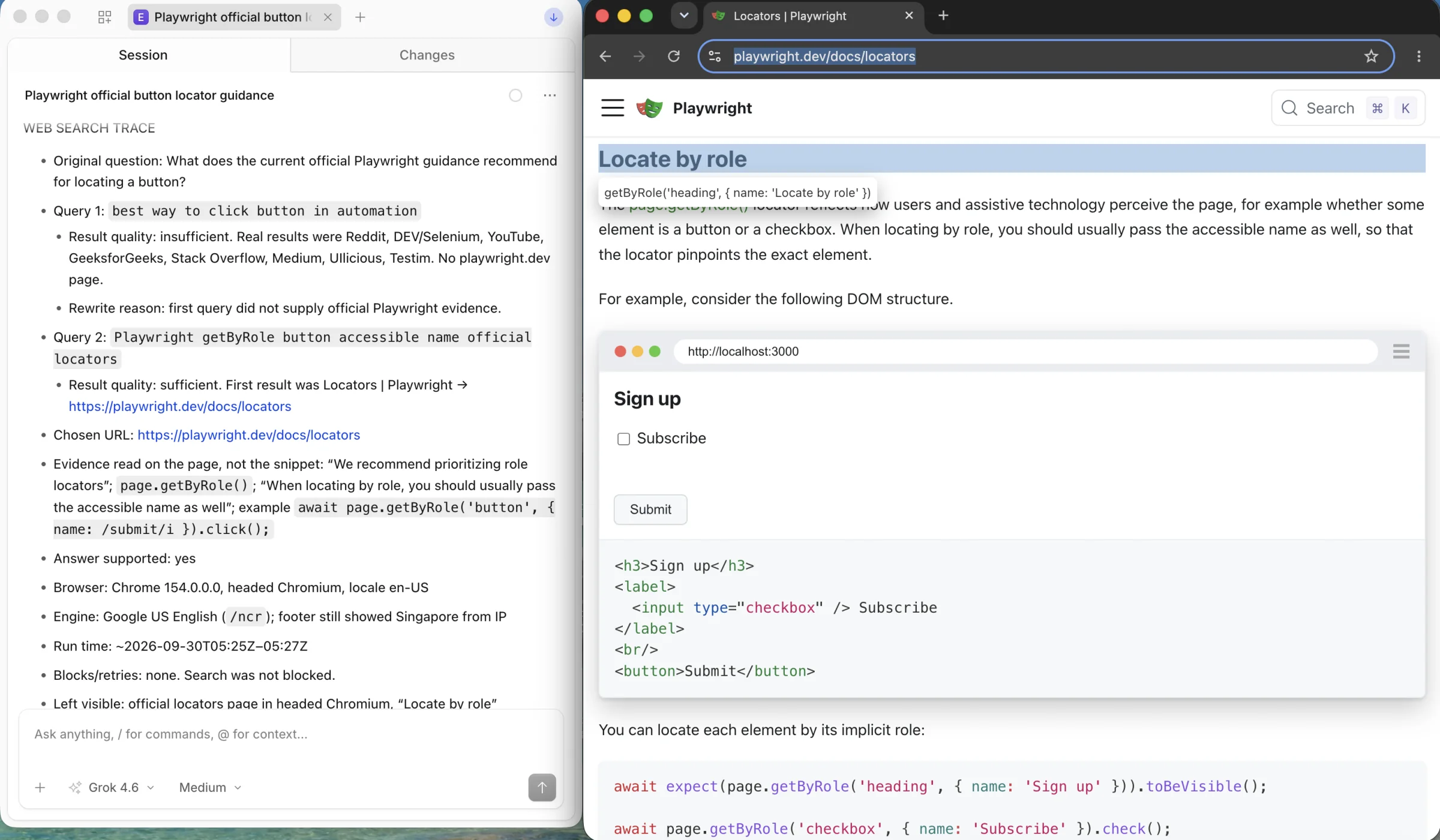
Filtering also needs an exit path. If a primary source is unavailable, report that gap and either use a clearly labeled secondary source or say that the answer cannot yet be verified. A search result's high rank is not a substitute for source quality.
Give the model a usable evidence packet
Once the right passages are available, the next risk is synthesis. Long unfiltered pages can push the decisive sentence out of the model's working context. Pass the question, the relevant passages with URLs and dates, and an explicit instruction to separate supported findings from missing evidence. Ask the agent to cite the source for each factual claim and to state which requested detail was not found.
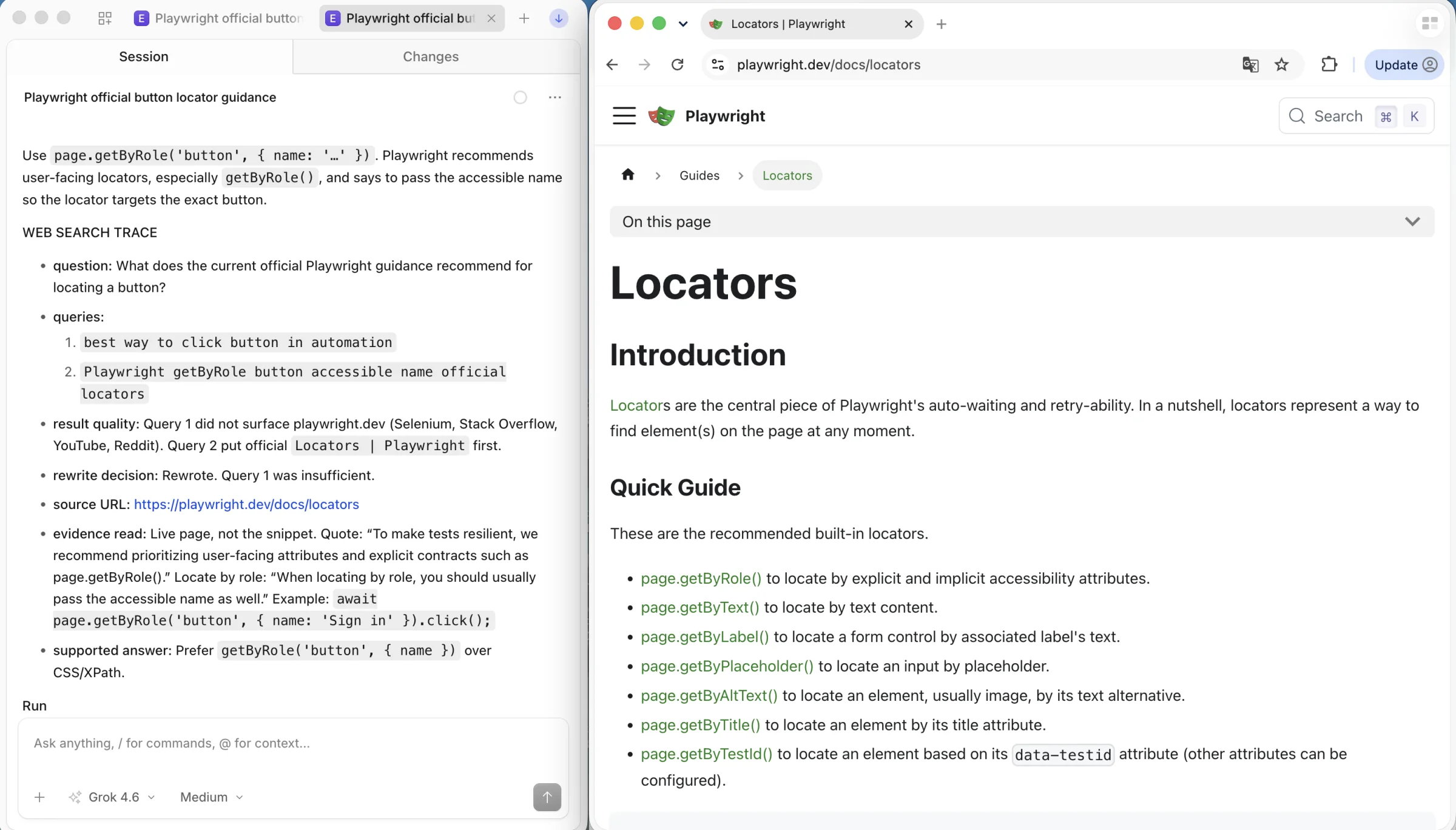
Question: What does the current official Playwright locator guide recommend for a button?
Evidence: [official URL, page title, checked date, relevant passage]
Answer only from the supplied evidence. Cite the URL for each claim.
If the passage does not answer the question, say what remains unverified.
This is a synthesis instruction, not a replacement for retrieval or verification. If the trace shows that the needed passage was never fetched, fix retrieval first. If it was fetched and the answer still contradicts it, change the evidence selection or synthesis step and retest.
Use a browser only when the source requires one
An ordinary HTTP request or official API is the simplest route when it returns the information you need. A browser becomes useful when the authorized source needs a signed-in session, renders the answer after interaction, spreads it across pages, or requires a form or several validation steps. In that case, the search result only finds the entrance; it does not complete the evidence-gathering task.
One option for that browser step is ego (lite). Its quick start describes an agent working in its own visible Space. Have the agent open the authorized page, note the starting URL and page state, follow the needed navigation, and return the final page URL and the passage supporting the answer. If login or verification needs the user, pause for the user to complete it. Reopen the resulting page or check another authorized record before accepting the result. This is an execution and inspection path, not a search ranking fix or an access-control bypass.
You can open separate Spaces for parallel tasks while keeping their pages apart. The overview below shows two Spaces, with this search running in one and the other open for a different task. Only one task is running in this frame.
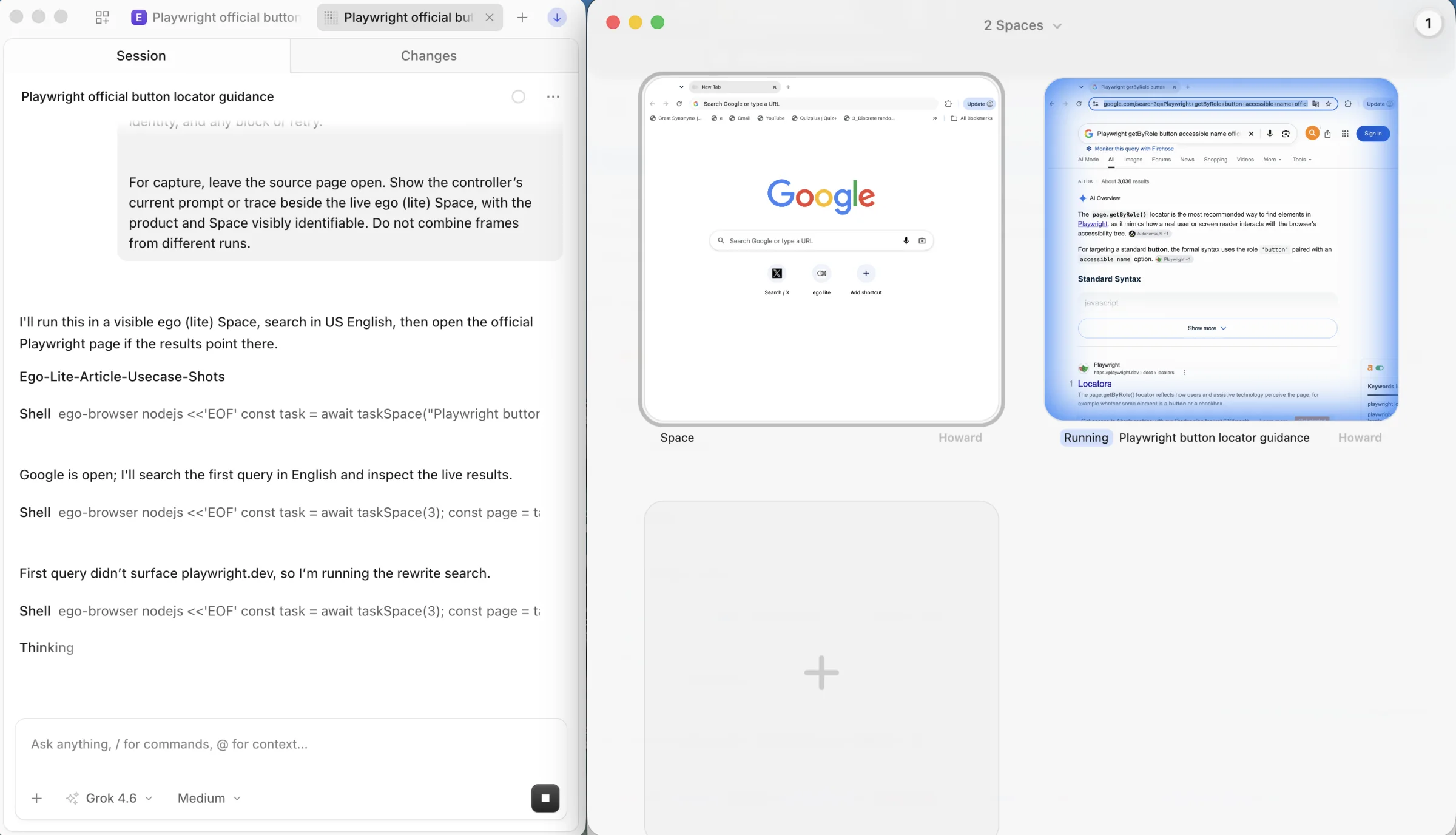
For example, if a search API finds a help article but the requested account-specific setting appears only inside a signed-in dashboard, stop trying to answer from the public snippet. Ask the agent to inspect that setting in the user's authorized browser session and report exactly what it saw. If the official API returns the same setting, use the API and skip the browser.
For account and access boundaries, see our guide to AI scraping behind login walls. For a recurring browser workflow that must survive page changes, use the separate browser automation maintenance guide. Neither task is solved by changing a search query alone.
Debug and evaluate changes on a fixed task set
Keep a small set of real failed questions that represent your workload. For each task, write down the expected source or answer criteria before changing the system. Include a current-information question, a multi-part question, a question whose answer is absent, and one whose source needs interaction if your product supports that path. Protect private questions and credentials when saving traces.
| Measure | Question it answers |
|---|---|
| Tool invocation rate | Did the agent search when the task needed a live source? |
| Relevant-source recall | Did any retrieved or opened page contain the required evidence? |
| Evidence use | Did the final answer use the relevant passage correctly? |
| Answer acceptance | Did the answer meet the task's predefined criteria and cite its support? |
| Calls and elapsed time | What did the repair cost per accepted answer? |
Replay the same questions after changing one layer, such as query rewriting, the provider, extraction or the synthesis prompt. Hold other settings and the search budget steady. When live pages change, save the result set or record the check time so you do not mistake a source update for an agent improvement. Repeat uncertain tasks enough times to see whether a gain persists; one successful run is a debugging observation, not a reliability rate. This follows the controlled-variable approach in the You.com agent evaluation guide and the failure separation in the Parallel search evaluation guide. Those provider guides inform the method, not a claimed score for this article.
FAQ
Why does my agent search repeatedly and still miss the answer?
Inspect the queries and opened pages. If every rewrite drops the decisive name, date or source type, fix query generation. If the right page was read, stop searching and inspect the evidence packet and final synthesis.
Should I switch search APIs first?
Only after the trace shows a retrieval miss with valid queries and successful calls. Test another provider on the same tasks while holding the model, prompt and scoring method steady.
Does a browser agent replace web search?
No. Search locates candidate sources. A browser can inspect an authorized interactive source that a static request cannot read. Both routes still need source checks and a final answer that matches the evidence.