Browser automation that survives UI changes


One fundamental reason browser automation fails is that a script remembers the path but does not truly understand the task objective. More stable locators can survive class-name changes, added wrappers, or component re-renders. But when the page structure changes substantially, a control moves into a different flow, or the task requires a new route, the locator itself cannot decide what should happen next.
When a team owns a stable workflow that must run repeatedly, Playwright performs well. It can encode expected behavior precisely through explicit locators, assertions, and traces. That precision also creates a maintenance boundary: once the workflow changes materially, a developer usually needs to update the automation before it can run reliably again.
ego(lite), by contrast, starts from the task objective rather than a fixed sequence of steps. The agent observes the visible page state, chooses the most appropriate next action, and replans when the environment or objective changes. That self-correction lets it reassess the page, revise its execution path, and keep working after a change, when many scripts built around predefined steps would already have stopped. In our firsthand comparison, this made ego(lite) the stronger tool for real-time exploration, while Playwright was better suited to stable, repeatable regression workflows.
How do you keep automation working across UI changes?
You keep it working by owning several layers instead of one. Identity handles where elements are found. Abstraction handles what the automation is trying to do. Verification handles whether the action actually took effect. Recovery handles what happens when it did not. Monitoring handles whether you can tell why. Escalation handles what happens when the system no longer knows what changed.
A fix that touches only the first layer is why the same automation breaks again. Each of the six layers catches a failure the others cannot, and the sections below take them in the order they fail.
Why do UI changes break browser automation?
Automation breaks when something the script depended on stops being true. It helps to name the kinds, because each one needs a different response and most teams treat them all as the selector broke.
| What changed | What the automation sees | Layer that prevents it |
|---|---|---|
| An element moved or gained a wrapper | A path or positional selector now points at nothing, or at the wrong node | Identity |
| A class name changed | A styling hook no longer matches, because hashed and utility classes churn per build | Identity |
| The visible text changed | A selector anchored on copy breaks even though the control did not move | Identity, if the anchor is the name rather than the words |
| The flow gained a step | Nothing is missing, but the sequence is no longer the sequence | Abstraction |
| Readiness stopped being signalled the old way | A navigation event never fires, or a fixed sleep clicks into a skeleton screen | Abstraction and verification |
| The session ended | The page renders and the script runs, quietly, against a logged-out view | Verification and recovery |
| The data contract changed | The assertion passes and the value is a different unit, currency, or column | Verification |
The first three are about identity. The next two are about the task. The next is about state. The last is about verification. That mapping is the reason a single fix never holds: each layer solves a different failure, and repairing one layer while ignoring the rest just relocates the breakage.
One more failure deserves its own name, because it is the most expensive. Automation that recovers onto the wrong element and reports success is more dangerous than automation that stops. A run that heals onto a cookie banner and clicks through it has produced a passing test for a flow that never happened. Every layer below is designed with that failure in mind.
How should automation identify elements?
Identify a thing by what it is, not by where it is. Browsers already expose what a thing is: the accessibility tree carries each control's role and its accessible name, and a button that moves, restyles, or gets re-nested is still the button named for what it does.
Playwright makes this concrete with role, label, and test ID locators, and its documentation is direct about the trade-off. It recommends prioritizing user-facing attributes and explicit contracts, and it states that CSS and XPath are not recommended because the DOM can often change, leading to tests that are not resilient. The same documentation warns against positional accessors such as first, last, and nth, because they retarget silently when the page changes, and advises building a locator that uniquely identifies the element instead.
If you own the application, the most valuable change you can make is not in your automation code. It is giving controls stable, meaningful identifiers: a test ID, an accessible label, a hand-written id. That route has an honest cost, and the documentation names it. Testing by test IDs is the most resilient way of testing, and it is not user facing, which means you are buying durability by testing something no user ever sees. That trade is usually worth taking for the handful of controls a critical flow depends on, and rarely worth taking everywhere.
What to avoid is well established. Auto-generated framework identifiers change per build. Styling hooks change when the design changes. Position in the page changes on any reflow. A long chained selector is not a precise selector; it is a bet on layout that nobody agreed to keep.
This layer matters, and it is also the smallest of the six. A perfect locator strategy still breaks when the flow changes, still passes when the session expires, and still reports success when the extracted value moved to a different column. Treat identity as the foundation and then stop expecting it to carry the building. The locator strategies themselves, including how role, text, label, and test ID rank against each other and the cases where each one wins, belong in a dedicated locator guide rather than here.
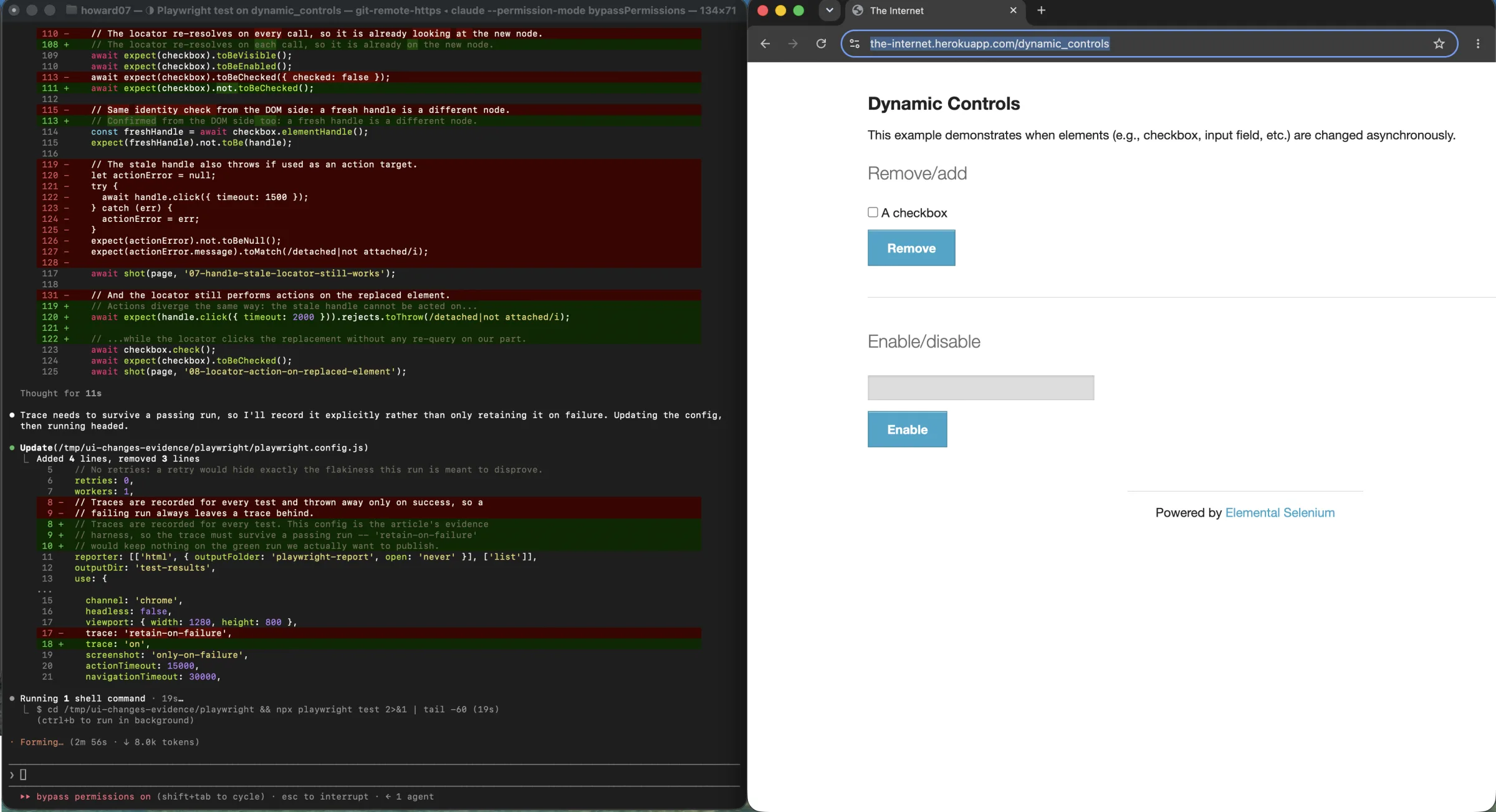
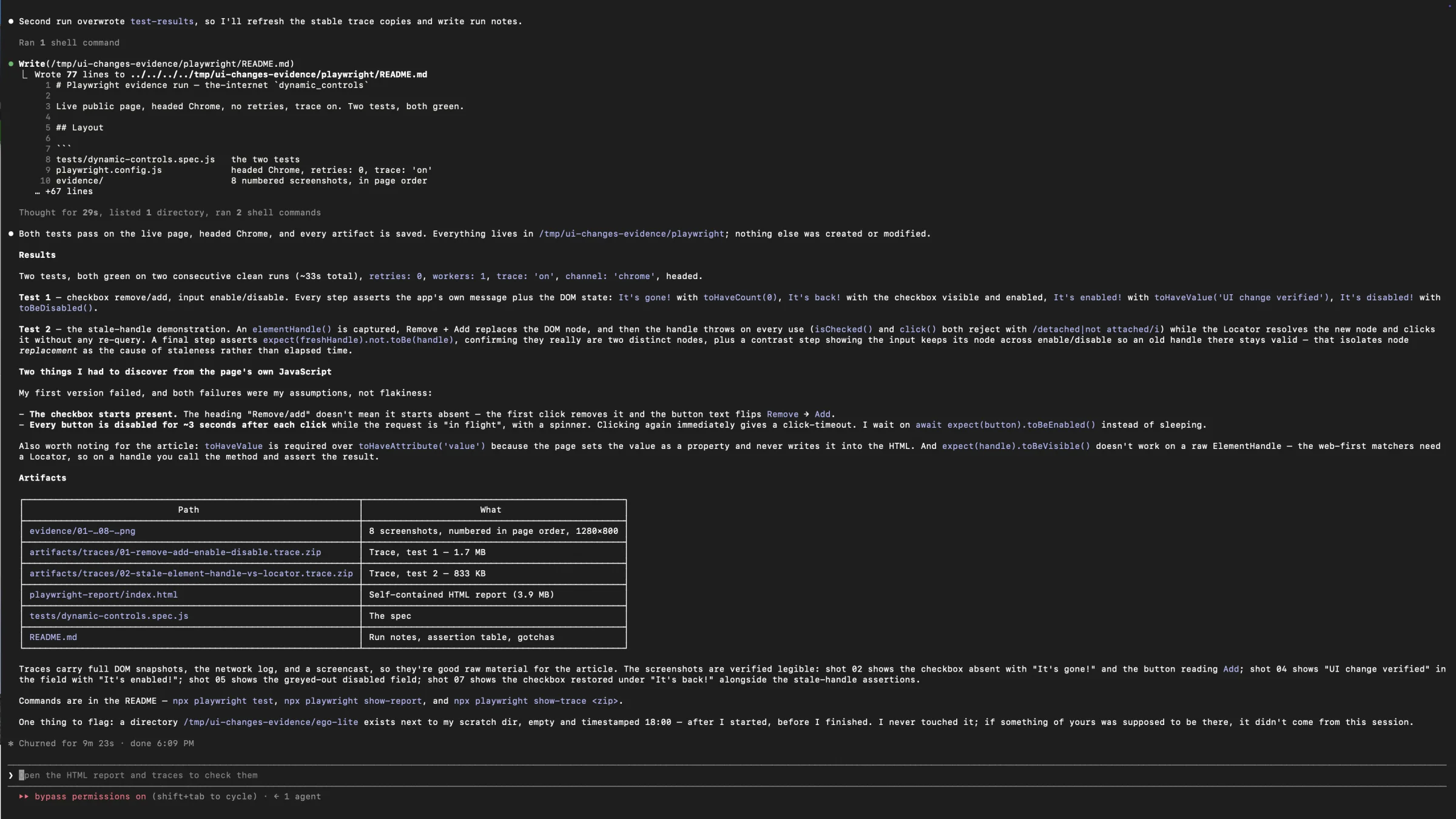
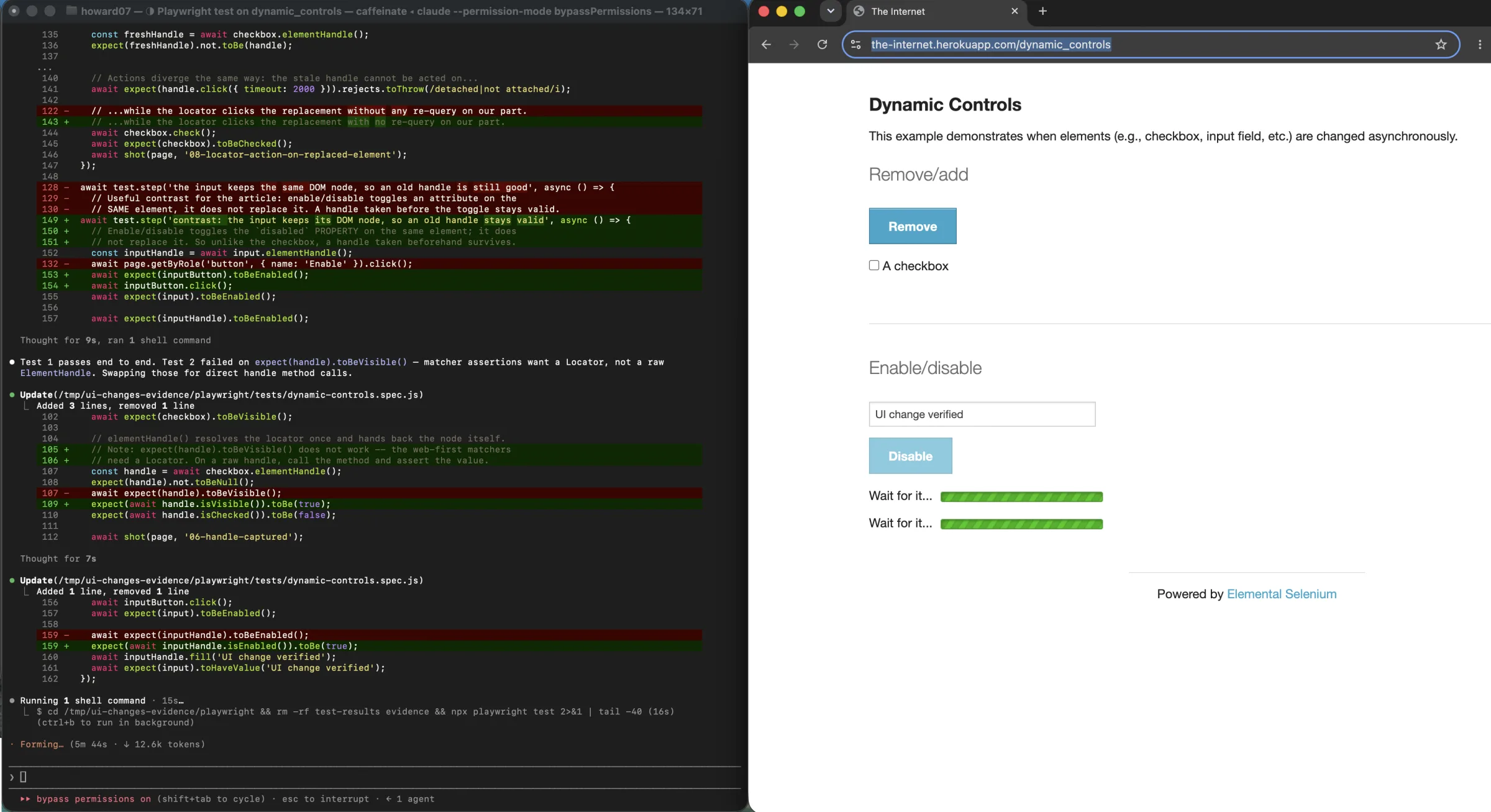
The firsthand Playwright run made the identity difference visible. Removing and adding the checkbox replaced its DOM node. Two operations against the stored element handle failed after replacement, while the Locator resolved the new checkbox and checked it successfully. The accepted suite used zero retries and retained both traces.
Why separate the task from the page markup?
Identity tells the automation where to click. It does not tell anyone what the automation was trying to do, and those two things should not live in the same place.
When a selector is written inline at the point of use, business intent scatters across every step. A line that clicks a submit button says nothing about whether that click places an order or saves a draft, and when the button is renamed, nobody can tell which of forty inline selectors served which purpose. The page object pattern exists to fix exactly this. Playwright's documentation frames it as a maintenance structure: a page object represents a part of your application, and the pattern simplifies maintenance by capturing element selectors in one place.
A page object is one way to hold that boundary. A task layer is another, and often a better fit for workflows that span several pages. The shape matters less than the rule: the code that decides what to do should not know the markup of the page it is doing it to. When the checkout button is renamed, you change one locator in one place, and every task that used it keeps working.
The value shows up in the failure pattern. If a rename breaks four workflows at once, the identity layer leaked into the task layer. If it breaks one locator and nothing else, the boundary held.
How do you verify an action actually worked?
This is the layer most teams skip, and it is the one that catches silent failure. A click that did not throw is not evidence that anything happened. The element was found, the event fired, and the page did whatever it does. Whether the intended state now exists is a separate question that requires a separate check against something you did not control.
Verify against observable state after any action that mutates data. The confirmation text, a new row in the table, a status field that moved from pending to sent, a count that went from three to four, a fresh timestamp, a URL that now includes the record you created. Playwright's guidance pushes in the same direction with web-first assertions, which wait until the expected condition is met rather than checking once and returning immediately.
Then handle the third outcome honestly. You will check for the success signal and find it, or not find it. You will check for the error banner and find it, or not find it. The case that must not pass is neither appeared. Automation that treats an absent error as success will report a clean run while the record sits unsaved, and a person downstream will discover the failure after trusting the report. Treat nothing appeared as a failure, and preserve the page state when it happens.
Verification is also what makes the earlier layers safe. A semantic locator that resolves to the wrong element still produces a wrong outcome, and the only thing that catches it is a check on the result rather than the click. Independent verification is the difference between automation that is fast and automation you can believe.
How many retries should automation attempt?
Retries are where fragile setups quietly become dishonest ones. A retry is a bet that the failure was temporary. Sometimes that bet is good: a network blip, a slow render, a rate limit that clears in a second. Sometimes it is bad: the page changed, the account was locked, or the flow now requires a step that does not exist.
Retrying a structural failure produces the same failure with more noise and, on sites that count attempts, makes the situation worse. Retry storms against a locked or rate-limited account are a well-known way to turn a small problem into a large one.
The fix is to classify before you retry. A transient error earns a bounded rerun with backoff. An authentication failure earns a stop and a sign-in, not a retry. A missing element after a page has settled is evidence of a change, not a hiccup, and it should snapshot the page and stop.
| Failure class | Correct response | Do not do this |
|---|---|---|
| Transient network or timing | One or two bounded retries with backoff | Retry indefinitely or remove the bound |
| Authentication or session | Stop, re-authenticate, then re-verify state | Retry against a revoked session |
| Element missing after settle | Snapshot the page and stop as a structural change | Treat it as a slow page and keep waiting |
| Rate limit | Defer past the window, then resume | Repeat immediately inside the window |
| Permission or account block | Halt and escalate to a person | Attempt an alternate account or path |
Playwright's retry mechanism is worth understanding precisely here. It re-runs a failed test, and it buckets the result as passed, flaky, or failed, where flaky means the test failed on the first run but passed when retried. That bucketing is a useful signal, and it is also easy to misread. A flaky result is not a pass. It is a failure that happened to resolve, and if nobody looks at the flaky bucket, it becomes a place where real problems hide. The documentation describes the mechanism and does not warn that retries can mask genuine failures, which means the discipline of reading the flaky bucket is yours to enforce.
So make the bounds explicit. Cap retries per step, with a number. Decide what happens when the cap is hit, which is usually to stop and escalate rather than to retry harder. Distinguish the classes of failure before deciding, because a single generic handler is what produces retry storms. And make the stop condition a first-class outcome rather than an error path. A system that stops and reports what it saw is working. A system that retried until it looked successful has learned to lie.
What should you record when a run fails?
The difference between a five-minute fix and a two-day investigation is whether you recorded enough to say what broke. When a run fails, four questions need answers: which step failed, what the page actually showed, whether this is new, and which layer is responsible.
Answering them requires artifacts captured at the moment of failure, not reconstructed afterward. The current URL, a screenshot, the page's text or HTML, the console output, the values involved, and a timestamp are the minimum. Log the step name and the intended action, not just the exception, so the failure is located in the task rather than in the stack trace.
The last question is the one that pays for the rest. Locator drift, flow drift, an expired session, a network condition, and a genuine product bug all present as it failed, and they need different responses. A monitor that cannot tell them apart sends the alert to the wrong place, and an alert sent to the wrong place gets ignored. Recording the classification alongside the artifact is what lets the next person skip the diagnosis.
There is a second, earlier signal worth having. If you can probe a few critical elements on a schedule against a known account, you learn about drift before your production run hits it. A small canary that checks whether the ten controls you depend on still resolve, and writes down what they look like now, turns the automation broke into the page changed three hours ago, and here is what changed. The cost is low and the payoff is measured in incidents that never page anyone.
Should you use selectors, an agent, or a hybrid?
The layers above are the same regardless of what drives the browser. What differs is which of them you implement in code, which you delegate to a model, and which you leave to a person. The choice is worth making deliberately, because the two extremes are both common and both wrong.
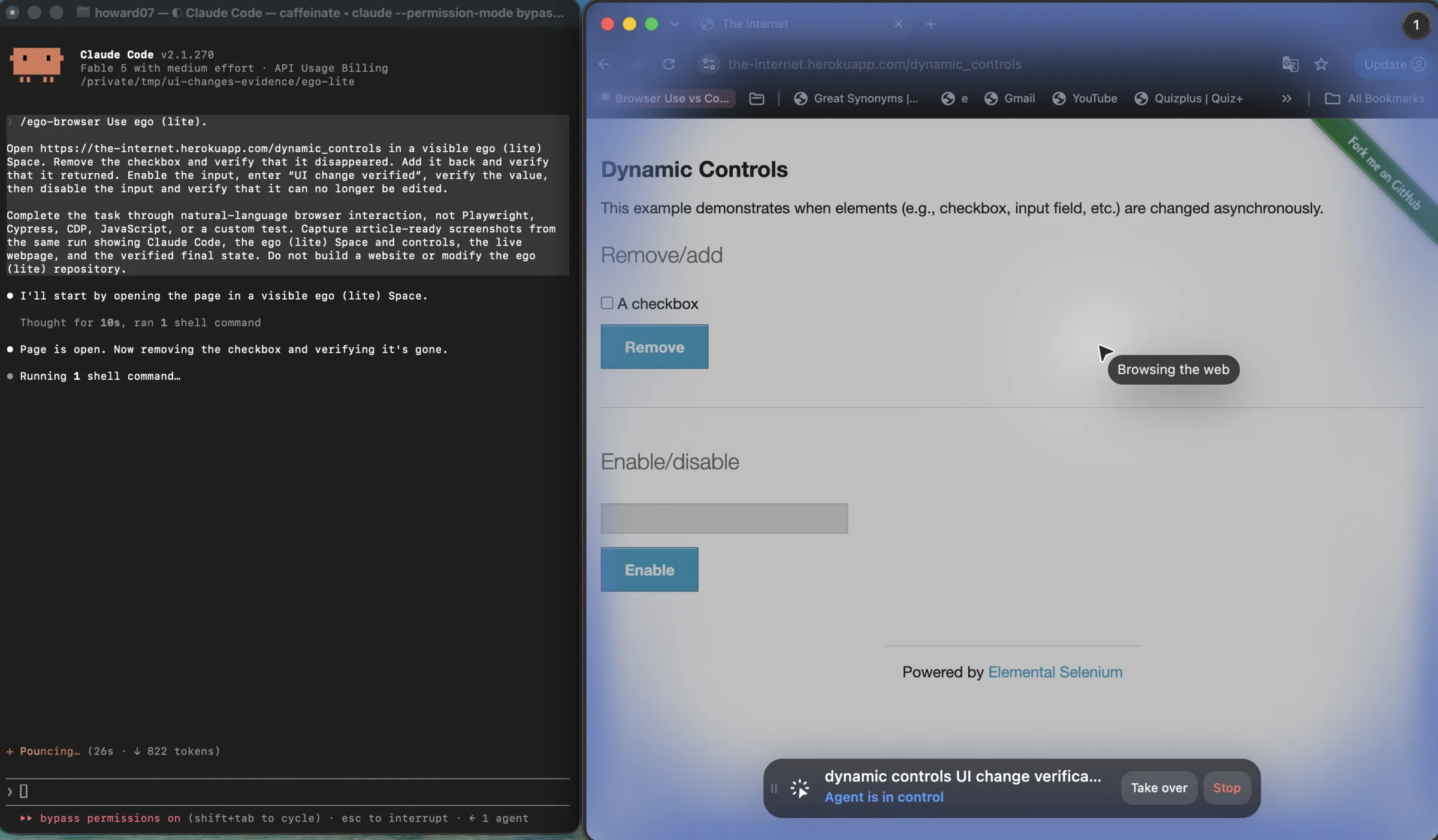
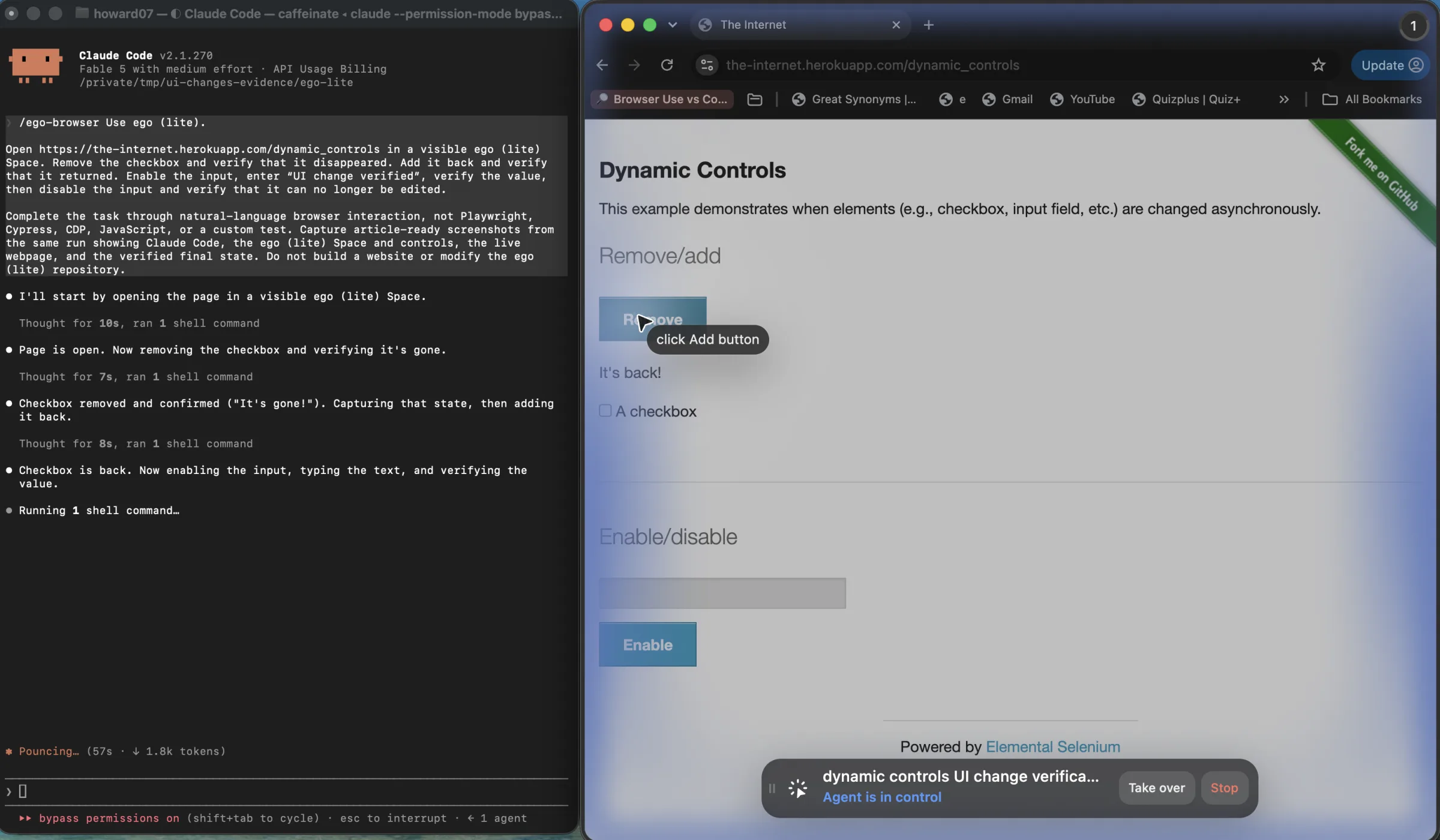
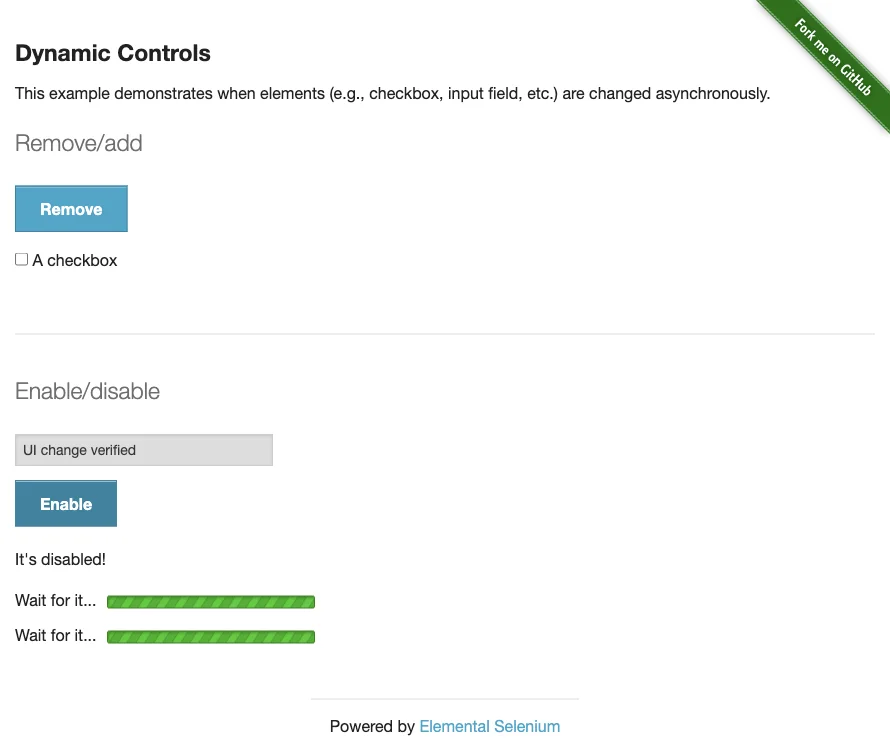
We ran the same four-state task on the live Dynamic Controls page with Playwright Test and with ego(lite). Both paths completed the task. The useful difference in this run was implementation overhead: ego(lite) reached the same verified page states without creating a test or writing locators, because each page reaches the Agent as an accessibility-tree Snapshot rather than raw HTML. Every product cell below is a recorded number from the retained artifacts. Open the tested page.
| Observed metric | ego(lite) | Playwright Test |
|---|---|---|
| Verified UI transitions completed | 4 | 4 |
| Automation source and config files authored | 0 | 2 |
| Retained lines in those files | 0 | 186 |
| Named locator variables authored | 0 | 8 |
| Visible in-run intervention controls | 2 | 0 |
The comparison is deliberately narrow. Playwright completed the task through two authored files containing 186 retained lines and eight named Locator variables. The ego(lite) path completed the same four transitions from one natural-language task with zero automation files and zero written locators. That is an advantage for exploratory or changing work, not evidence that an agent should replace a deterministic regression suite.
Use deterministic code when the work is stable, owned, repeated, and enforced. If you control the application, the flow rarely changes, the task runs often, and a broken run should fail a build, then a script with explicit contracts is the right answer. It is fast, cheap, reproducible, and testable, and its failures are legible. Most teams should move more work into this category rather than less, because the stable path is what makes the unstable path affordable to investigate.
Use a visible browser agent when the pages are not yours, the layout changes often, and the task is exploratory or occasional. Writing and maintaining a selector ladder against a third-party site that redesigns on its own schedule is a treadmill. When the work is a one-off, or the flow changes every time, or you genuinely need to understand what a page currently says before deciding what to do next, an agent working in a browser you can watch is a better fit than a script you keep repairing.
Use a hybrid when the task is valuable, repeated, and changeable. Keep the stable portion deterministic and let the agent handle the edges. Then feed what the agent learned back into the deterministic path, so the exception becomes a rule. The hybrid is not a compromise. It is the target state for the workflows that matter most, and the feedback step is what makes it more than a permanent workaround.
The third option is where a tool like ego(lite) fits, and it is worth being precise about why. It is a free, full Chromium, so the agent reads the page as the real site renders it right now, modern JavaScript apps, cross-origin iframes, shadow DOM, and embedded third-party widgets included, and its design intent is to pull you in only when it needs you to log in, verify something, or check a result, stopping before high-stakes actions such as a final submit or a payment page rather than completing them unattended.
A proposed workflow, offered as an illustration rather than a measured recipe:
- You describe the goal and the success condition in plain language to your agent, rather than scripting each step.
- The agent attempts the task in the visible browser, using the page's semantic structure to find elements.
- The result is checked against the actual page state, not against the agent's own claim of success.
- If the page is ambiguous, permissions have changed, or a critical step fails, the task stops and comes back to you.
- Once the task settles into a stable, frequent routine, the deterministic portion is written into a framework such as Playwright and moved into continuous integration.
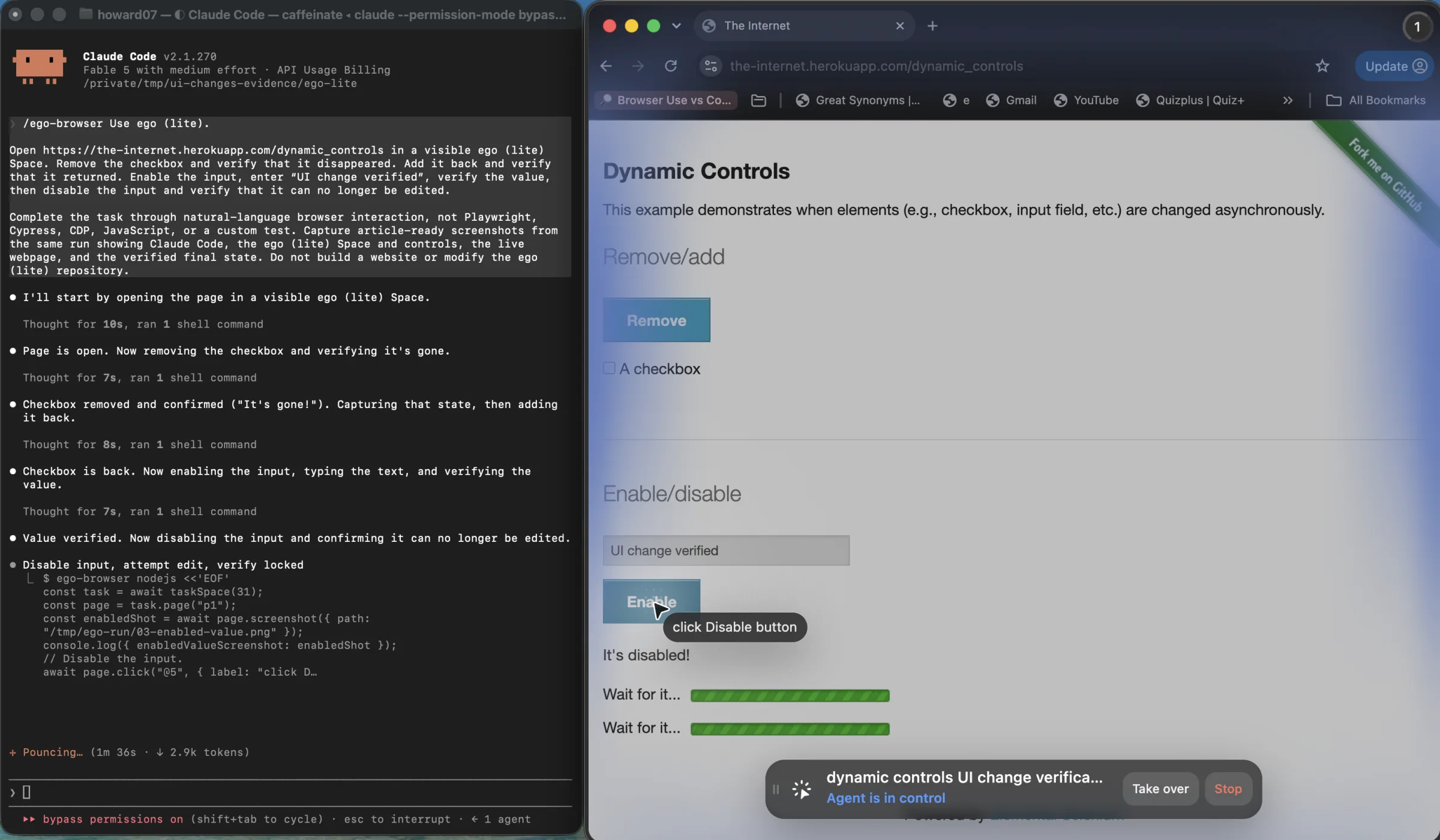
The reason this is a real option rather than a marketing one is that the observable browser changes what you can verify. When you can watch the run and take over, the cost of a single uncertain step is a glance rather than a silent wrong result, and that is what makes an agent route reasonable for work you would not otherwise automate at all.
It is also worth being clear about the limits. ego(lite) is not a permanent self-healing guarantee, and its documentation does not claim to be one. Two documented details are instructive here. Page snapshots expose a location selector described as a stable reference to the same element across rounds, while the short numbered refs are rebuilt on every snapshot and go stale when the page re-renders; the documented remedy for a stale ref is to fall back to the stable selector or a written one. That is a checkable illustration of this article's own thesis, that identity should be separated from position. Second, the documentation states plainly that the tool is not a replacement for Playwright or Puppeteer. Stable, high-frequency, continuous-integration work belongs in deterministic code, and ego(lite) is not the endpoint for it. Where it earns its place is the middle of the decision: work that changes often, needs real page state, involves an existing login, or benefits from a person watching, and that would otherwise cost more in selector maintenance than the task is worth.
When the task is a visible user flow rather than a selector suite, AI browser testing in an isolated Space lets you observe the run and keep evidence. It is not a self-healing guarantee or a replacement for deterministic CI.
How do you maintain automation on sites you do not own?
When the site is someone else's, you lose the option of preventing the change and gain only the chance to detect it. You cannot demand stable identifiers from a site you do not own. What you can do is make the contract explicit and owned on your side.
Write down what the automation depends on, and treat those dependencies as a contract with a version. When a field, a button, or a flow step changes, that contract changed, and the change should be visible rather than discovered.
Pin what you can. The browser version, the viewport, the locale, the account scope, and the test data. Pin the package versions your automation depends on, so a dependency update does not arrive disguised as a site change. Run a small canary after any release you know about, and keep a fallback path for the flows that matter most.
Then define the boundary between fallback and failure. A controlled fallback is a documented procedure: try the primary path, try the alternate, and stop with evidence if both fail. An uncontrolled fallback is the agent guessing, and a guess that succeeds is worse than a failure, because it is invisible. Preserve the rule that a candidate which always resolves is a candidate that is never actually validated.
Finally, name an owner. Automation that nobody owns drifts until it fails, and by then the person who understood it has moved on. Someone should be responsible for the contract, for reviewing the failure classifications, and for deciding when a repeated exception should be promoted into the deterministic suite. This is the least technical layer and the one most likely to be missing.
FAQ
Is self-healing automation reliable?
Self-healing, as the term is used in most tools, is a fallback chain with a scoring function. It captures a richer fingerprint of an element when a locator is written, then tries to re-identify that element when the original locator stops resolving. That genuinely reduces maintenance. What it does not do is verify meaning. A healed locator can find an element that looks like the original and behaves differently, and if the healing runs silently, the result is a passing test for the wrong action. Use it with a confidence floor, in a mode that reports when it fires, and never on payment, authentication, or destructive paths.
Do retries make browser automation reliable?
No. Retries make it resilient to transient faults, which is a narrower claim. A retry is a bet that the failure was temporary, and it is a losing bet against a structural change, an expired session, or an account lock. Bounded retries with backoff are correct for network and timing faults. An unclassified retry loop hides the failures you most need to see.
Should I replace my Playwright tests with an AI agent?
Not as a wholesale swap. Deterministic tests are fast, cheap, reproducible, and their failures are readable, and those properties are exactly what you lose when you move routine work to a model. The useful move is the opposite: move work into the deterministic suite as it stabilizes, and reserve the agent for the work that changes too often or is too exploratory to script profitably.
How do I know whether my automation broke because of a UI change or something else?
Record a screenshot, the page text, the console output, and the current URL at the moment of failure, along with the step name. Compare the captured page against the previous successful run. If the structure changed, it is drift. If the structure is intact and the values are wrong, it is a data problem. If the page is a login screen, it is a session problem. Without those artifacts you are guessing, and guessing is what makes the investigation take days.
How much of my automation should be deterministic?
More than most teams assume. The stable, owned, high-frequency portion should be deterministic and enforced in continuous integration, because that is what frees your attention for the portion that genuinely needs judgment. A useful diagnostic is the ratio: a task that is almost entirely non-deterministic is usually a signal that the flow depends on unlabeled controls, and the fix may be in the application rather than the automation.
Continue with the related guides on browser automation, or see how ego(lite) runs a visible browser task when your work fits the middle of that decision.