A browser returning a green status is only one step in an n8n job. We ran n8n 2.40.7 on a local Mac, let its Execute Command node drive ego-browser in ego (lite) through a three-step synthetic request, parsed the browser's JSON result, wrote it to a separate endpoint, and read that record back. The same workflow failed visibly when the destination acknowledged a write without saving it.
In our n8n 2.40.7 workflow, n8n orchestrated an external ego-browser process through Execute Command. Its current integration directory lists Browserless and Browser Use, while Browse AI and community packages offer other connection paths. For a browser available to the n8n execution process, Execute Command is possible in self-hosted n8n, but n8n 2.x disables that node by default. In queue mode that execution process may be a worker rather than the main n8n server. Which route fits depends on the execution host, account state, permissions, and how you verify the final record.
What are the four routes?
Choose the connection by where the browser runs and who manages it. An n8n integration listing is a way to connect to a service, not proof that n8n itself starts a browser or that the service completed your task.
| Route | Browser owner | n8n handoff | Evidence needed |
|---|---|---|---|
| Browserless hosted | Provider | HTTP Request to REST or BrowserQL with an API token | Response schema, page source, and final destination readback |
| Supplier integration, such as Browser Use or Browse AI | Provider or its configured runner | Provider node or API workflow | Execution ID, task result, and independent business record |
| Community browser package | Your configured browser host | Installed community node | Package version, host boundary, logs, and result check |
| Same-host browser, including ego (lite) | Your authorized desktop session | Self-hosted Execute Command or a narrow private runner | Command exit, structured browser output, and destination readback |
For hosted browsing, Browserless's n8n documentation shows HTTP Request templates for REST endpoints and BrowserQL. n8n's Browser Use directory entry and its Browse AI integration show supplier-managed alternatives. We did not have provider accounts or tokens for a matched run, so the local experiment below tests only the same-host route.
A community node adds code to your n8n instance and may depend on a separate browser service. Check its maintained version, permissions, network access, and deployment model before using it. The same-host route instead uses the browser installed on the n8n machine; it is not a shortcut from n8n Cloud into a laptop's browser profile.
How do costs and capabilities compare?
Our case did not measure provider billing, browser minutes, model tokens, or staff maintenance. Compare the exact provider plan and task volume before assigning a monthly cost. The operational boundary is clearer than an untested price ranking:
| Route | Account state | Who maintains execution |
|---|---|---|
| Hosted browser API | Provider-managed session unless separately configured | Provider operates browsers; you validate the API result |
| Supplier integration | Defined by that supplier and credentials | Supplier plus your n8n workflow |
| Community package | Defined by its browser host | You maintain the package and host |
| Same-host ego (lite) | Only a browser profile you explicitly provision | You maintain the Mac, session, n8n process, and checks |
What did a real n8n-to-browser workflow return?
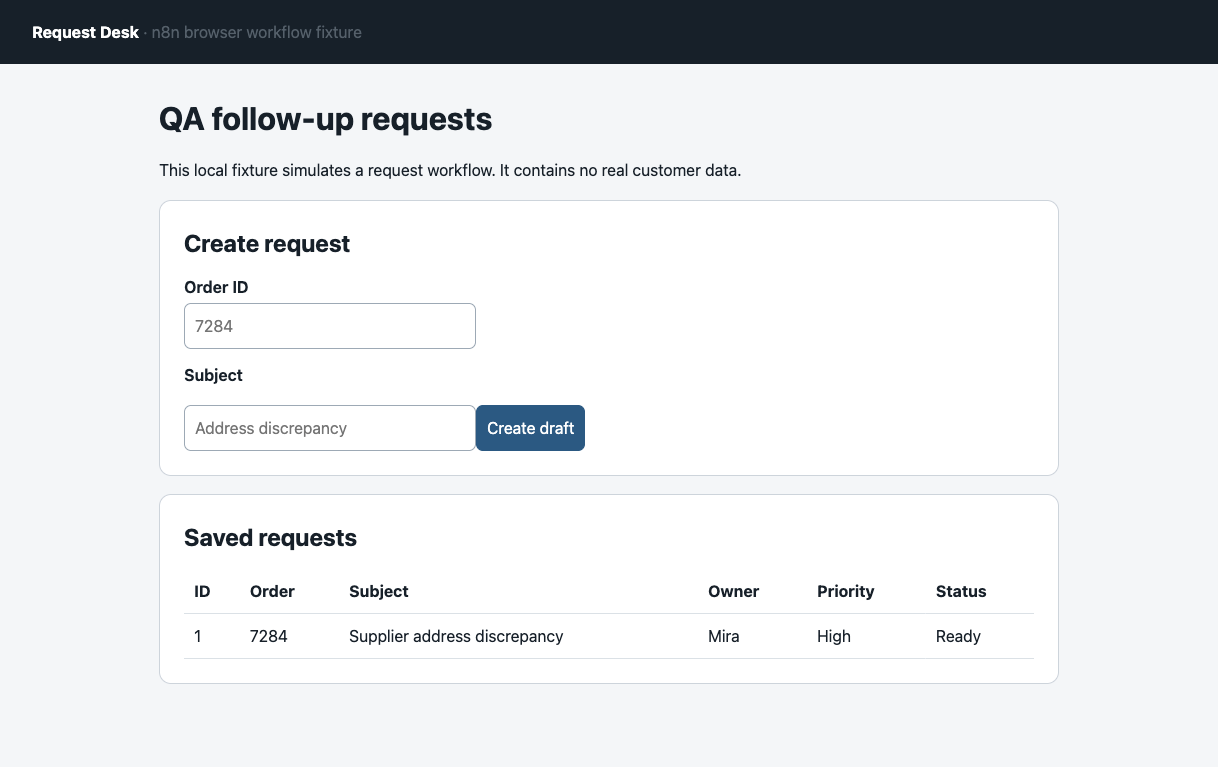
On September 28, 2026, we installed n8n 2.40.7 with Node 24.16 and used ego-browser 0.5.2.16 on macOS. A local Request Desk required three dependent UI actions: create order 7284 with subject “Supplier address discrepancy”, save Mira as owner and High priority, then mark it Ready. The browser reloaded the page and returned the visible row as JSON. A separate local sink accepted the n8n HTTP write; n8n then fetched the sink record and compared five fields. This was a synthetic test app without a login, not a supplier portal or a test of existing account sessions.
The six-node workflow appears in three unresized source-pixel crops below, in left-to-right order. Each crop links to the full original n8n canvas for context. The source and crop manifest lists each source SHA-256, crop SHA-256, and pixel coordinates.
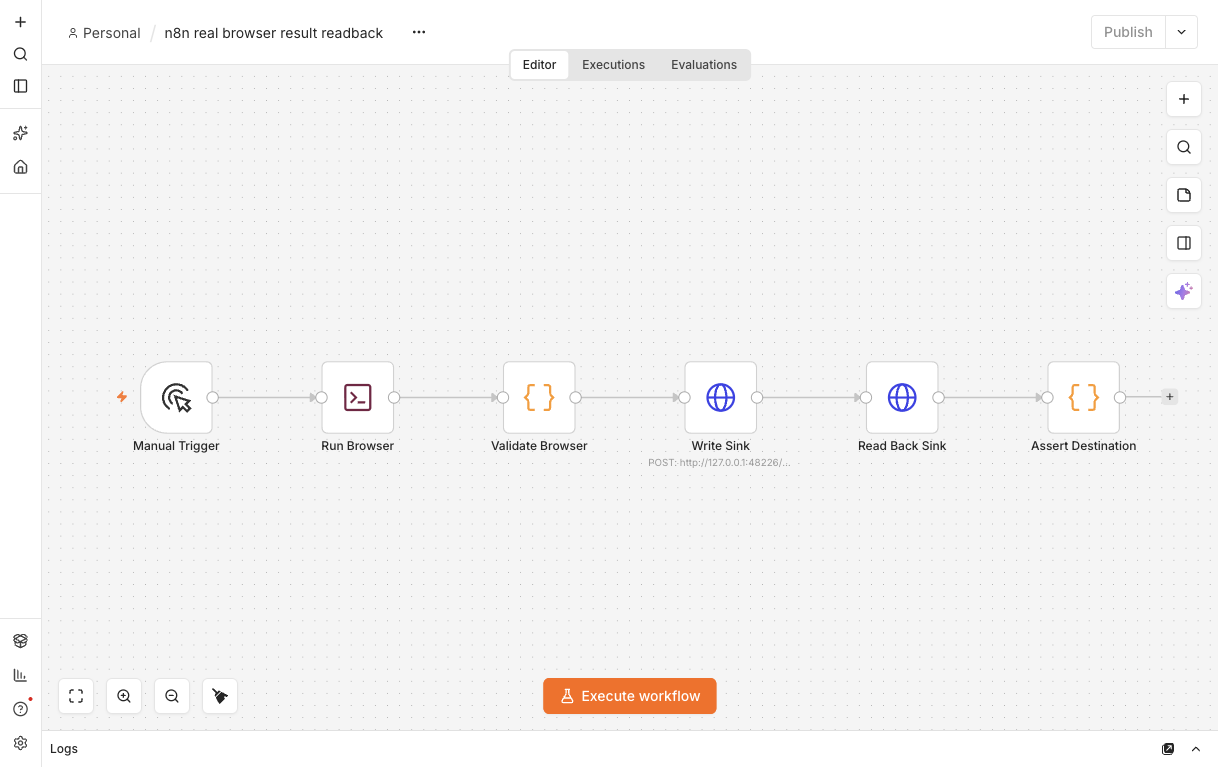
The Execute Command node called a saved shell script. That script ran the real ego-browser CLI, wrote a structured JSON file, and returned its contents to n8n stdout. The Code node rejected missing or wrong order, subject, owner, priority, or status before the HTTP write. The complete workflow JSON, browser script, fixture, sink, raw execution output, and screenshots are in the reproduction pack. The pack's README assumes n8n is on PATH; with a local npm install, invoke ./node_modules/.bin/n8n instead. The shell command in this local run was:
sh '/path/to/reproduction-pack/run-browser.sh'
# stdout: {"runId":"N2","order":"7284","subject":"Supplier address discrepancy","owner":"Mira","priority":"High","status":"Ready",...}
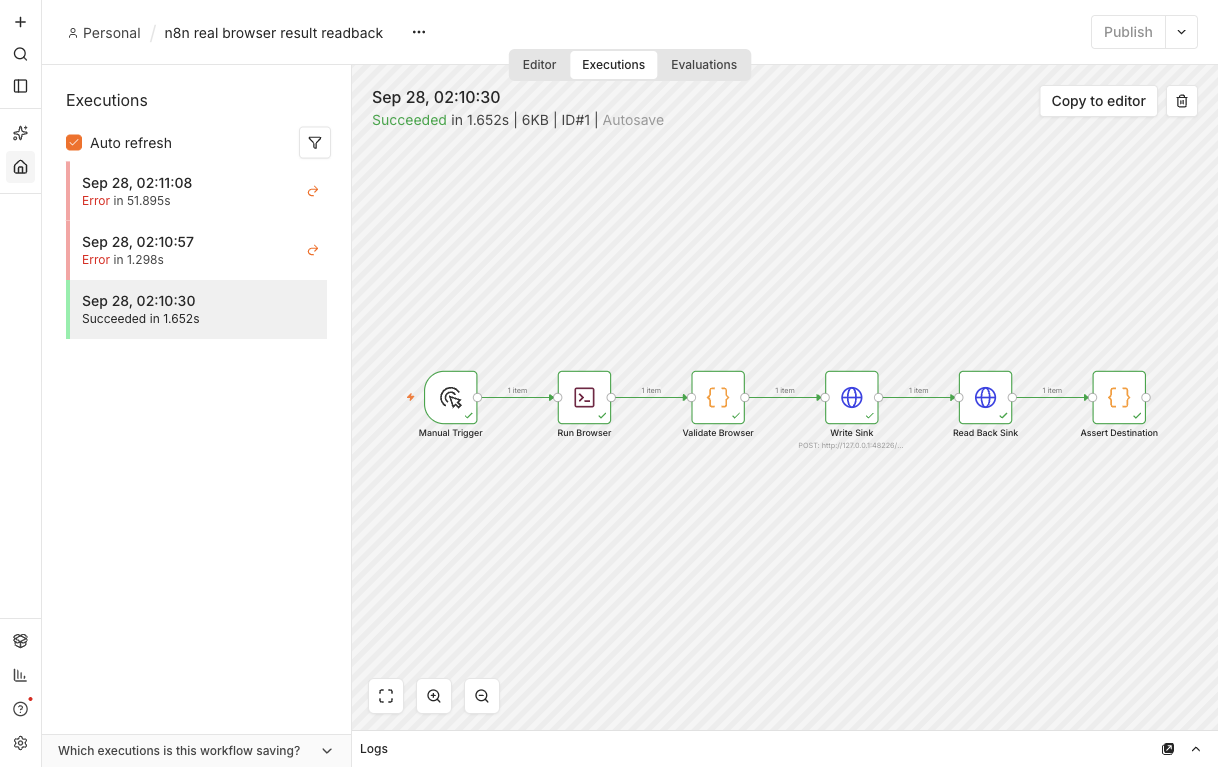
The pass rule required the refreshed browser row, the Request Desk server event, all six n8n nodes, and the sink readback to agree. The two fixtures used separate local ports. Run N1 was a browser-script pilot outside n8n and was excluded from the workflow conclusion. No provider model or browser-service API key was used.
| Run | Browser after reload | n8n HTTP write | Sink readback | Workflow verdict |
|---|---|---|---|---|
| N2, normal | Order 7284, Mira, High, Ready | 200, accepted | Same record returned | Success; Assert Destination executed |
| N3, controlled sink fault | Order 7284, Mira, High, Ready | 200, accepted | 404; no record stored | Error at Read Back Sink |
| N4, default node exclusion | Browser never started | Not attempted | Not attempted | Unrecognized Execute Command node |
The N2 execution status and its decisive nodes are shown in unresized source-pixel crops. Open the full N2 execution view to inspect the surrounding n8n interface.
After a fresh browser reload, these three native crops show the saved Request Desk row. Open the full N2 browser screenshot for page context.
What did the failed runs expose?
For N3, we deliberately made the sink return HTTP 200 while suppressing its write. n8n marked Write Sink successful, then Read Back Sink received 404 and stopped the workflow. The browser itself had completed its source task; the downstream business result had not persisted. This is an injected failure case, not a measured n8n defect or a real-world failure rate.
N3's header and upstream nodes are shown below in unresized source-pixel crops. Open the full N3 execution view to see the error node in context. The sink event log records write_suppressed and no write.
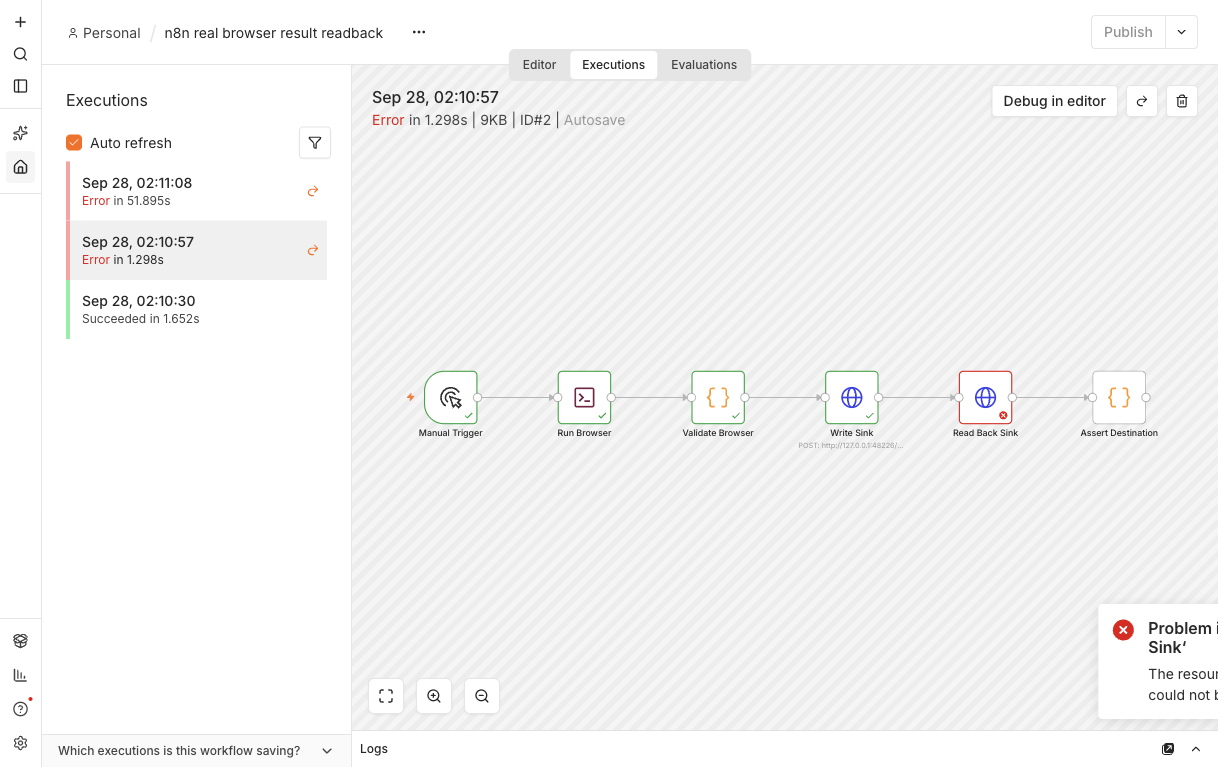
These two existing native screenshot clips show the decisive destination nodes. Each clip links to its complete original execution image. The new mobile crops are mapped in the source and crop manifest above; no screenshot pixels were altered.
For N4, we removed the explicit NODES_EXCLUDE=[] setting. n8n stopped before any browser action with “Unrecognized node type: n8n-nodes-base.executeCommand.” This matches n8n's current Execute Command documentation, which says the node is disabled by default from version 2.0 and unavailable on n8n Cloud. In this manual local run it executed on the main n8n host. Docker places the command inside the n8n container; in queue mode, production executions run it on the worker and manual executions stay on the main instance unless offloaded. Enabling shell execution should be a deliberate, restricted deployment decision.
Which route for which workflow?
Public pages on a schedule, with a provider-approved access path: evaluate Browserless hosted or a self-hosted community-node deployment against your access rules, provider quota, and maintenance capacity. Browserless documents additional handling for some protected flows, but neither route guarantees access or overrides a site's rules. Browse AI is another supplier-managed option for a monitor; we did not test its limits or compare its cost.
Data behind your own authorized login, at personal or team scale: consider the local route when a separately provisioned browser and an always-on host fit the policy. It does not remove login expiry or operational cost; it keeps the session on infrastructure you control.
For a workflow that spans public discovery and authorized account checks, keep each browser route within its approved access conditions and merge structured records only after each stage passes its own checks. Our local case tested only the same-host route, so it does not establish the outcome of a combined deployment.
Download ego (lite) for Mac, free, or read the login-wall guide for the session model behind route 4.
How do you build an n8n Google Maps lead-generation workflow?
We did not run a Google Maps workflow in this case. A possible design is a scoped discovery-and-verification pipeline: trigger a search, collect only public business fields, normalize and deduplicate them, verify a small sample, then route qualified records to a CRM or review queue. A browser step may handle a rendered map result when no approved API exists, but it does not grant permission to harvest personal data, bypass rate limits, or send unsolicited outreach.
- Trigger with a bounded query. Use a city, category, and maximum result count. Store the query, run time, authorization basis, and source URL with each execution.
- Extract public fields only. Prefer an official business-data API or licensed provider. If a browser is required, collect visible business name, category, address, website, and published contact details while respecting Google's terms, robots guidance where applicable, and origin rate limits.
- Verify before enrichment. Validate URLs, remove duplicates by a stable key, and send uncertain records to human review. Keep lead qualification and email sending in separate nodes with an approval gate.
A durable n8n shape is Schedule Trigger → HTTP Request or browser step → Code normalization → deduplication → human review → CRM or Sheets. Keep the browser task narrow; n8n should own retries, state, and routing rather than asking an agent to improvise the entire sales funnel.
How can you research social and real-estate data without Apify?
We did not run a social or real-estate workflow in this case. Apify is only one execution option. For a new task, first check an official API, data export, feed, or licensed provider; then consider self-hosted HTTP parsing for stable public HTML or a browser for a small, supervised set of dynamic pages. This is an architecture choice to test, because replacing Apify with a local node moves proxy, rate-limit, parser, and compliance work onto your team.
- Stable public pages. Use HTTP Request plus a parser, cache responses, and validate the schema. This avoids starting a browser for stable HTML, but we did not measure its total cost or maintenance effort against a browser.
- Dynamic or account-owned pages. Use a real browser only for data you are authorized to access. Keep the session local or in an approved vault; never sync raw cookies to a shared worker or paste them into n8n.
- Large recurring volume. Prefer a licensed feed or API. A self-hosted scraper is not automatically free once you count storage, maintenance, blocked runs, and review.
Do not promise that any replacement will avoid blocks. CAPTCHA, 403, account warnings, and terms-based denials are stop signals; switch to an approved source or human review instead of adding stealth, identity rotation, or challenge-solving logic.
What are cost-effective alternatives to Zapier and Apify?
Self-hosting may replace one subscription charge with hosting and operations work. We did not collect bills for this case. Compare total cost per successful workflow at your own volume: hosting, execution time, browser minutes, model tokens, retries, storage, maintenance, and human review. A free Apify alternative or a Zapier replacement is cheaper only if measured costs and reliability support that conclusion.
| Pattern | Best fit | Hidden cost |
|---|---|---|
| Hosted API | Public data when provider quotas and measured cost fit the workload | Metered requests and provider limits |
| Self-hosted n8n + parser | Stable pages and internal systems | Server, updates, monitoring, parser upkeep |
| Local browser step | Small authenticated workflows | Machine uptime, session expiry, manual review |
Control cost with queue limits, idempotency keys, cached responses, compact structured output, and a budget alert. Count failed retries and duplicate notifications as spend, not as free execution.
How do you trigger a local browser from n8n remotely?
Keep n8n as the orchestrator and expose a narrow, authenticated job interface on the machine that owns the browser. A webhook or queue can pass a task ID and approved parameters to a local runner; the runner executes the browser step and returns structured output. Do not expose Chrome DevTools Protocol, an unrestricted shell, or a browser profile directly to the public internet.
- Define the contract. Accept a task type, URL or record ID, allowed fields, timeout, and idempotency key. Reject arbitrary commands and unknown origins before they reach the browser.
- Authenticate the bridge. Use a private network, mTLS or a short-lived signed token, allowlist the n8n caller, and log each request. The local listener should run as a least-privilege user.
- Return a verifiable result. Return status, schema-version, source URL, timestamp, and validation errors. Route timeout, blocked, and partial states separately instead of returning an empty success payload.
For the manual single-process setup we tested, n8n's Execute Command node called the browser on the main host. In Docker, the command runs inside the n8n container. In queue mode, n8n's documentation places production commands on the executing worker; manual runs stay on the main instance unless manual executions are offloaded. The browser and its authorized profile must be available to whichever process actually executes the command. For n8n Cloud, use an authenticated private bridge or self-host the browser step; a cloud workflow cannot see your laptop's profile by default.
How should n8n handle authenticated browser sessions?
Keep authentication in the browser or an approved identity provider, not in workflow text. For a small local job, sign in interactively to the authorized browser profile and let the browser step reuse that session. For a remote worker, use the site's supported OAuth or service account flow; never sync Chrome cookies, auth.json, or refresh tokens as a shortcut.
- Expect MFA and expiry. Pause for 2FA, device checks, consent, and reauthentication. Branch an expired session to a human review path rather than retrying credentials.
- Scope and rotate access. Use a dedicated account with only the required permissions, rotate it through the provider, and revoke access when the workflow or machine is retired.
- Do not treat a cookie sync as portability. Cookies can be device-bound, expire, trigger security checks, or expose the whole account. A supported login flow is safer and easier to audit.
Store only the minimum status n8n needs—such as an opaque task ID and last successful timestamp. Keep screenshots, DOM snapshots, and downloaded statements on an encrypted, access-controlled path with a defined retention period.
How do you debug silent failures in n8n browser workflows?
Make every browser workflow observable and idempotent. A green node means the node returned successfully, not that a remote write landed or that a page contained valid data. Capture the input scope, browser status, exit code, output schema, source timestamp, and downstream write result so a partial failure cannot look like a completed run.
The quickest diagnosis is a three-gate readback. Check whether n8n started the expected execution, whether the browser reached the expected state, and whether the destination accepted the result. The first failed gate owns the incident.
| Gate | Evidence | Terminal state |
|---|---|---|
| Workflow | Execution ID, trigger time, input scope, node path | Not started, running, stopped, or completed |
| Browser | Final URL, page marker, request status, extracted schema | Passed, blocked, empty, partial, or failed |
| Destination | Idempotency key, write response, record readback | Accepted, duplicate, rejected, or not attempted |
- Name failure states. Separate timeout, 401/403, rate limit, CAPTCHA, empty result, parse error, duplicate, and downstream write failure. Route each to a visible error branch.
- Validate and read back. Check required fields, record counts, types, and ranges. After a database, sheet, or CRM write, read back by idempotency key before notifying anyone.
- Bound retries. Retry transient 5xx or network failures with exponential backoff and a maximum attempt count. Do not retry account blocks, CAPTCHA, or malformed output as if they were temporary.
Use n8n's execution history and error workflows, keep browser traces only as long as necessary, and test scheduled runs with the same user, timezone, filesystem, and environment variables as production. If a node succeeds locally but fails on schedule, compare the execution host and permissions before changing the browser prompt.
n8n's official error-handling guide documents error workflows and node-level error handling. That mechanism routes detected errors; the browser and destination readbacks above are still required to catch a run that returns normally with an empty or wrong result. Source and Google US SERP rechecked 2026-09-28.
How do you secure n8n AI workflows with approval steps?
Put human approval between an AI decision and any irreversible browser or connector action. Let the model propose a scoped task and a structured payload; let a person or deterministic policy approve the destination, fields, amount, audience, and expiry before n8n executes it.
- Preview the action. Show the URL, account, changed fields, message body, attachments, and expected side effect. Do not ask a reviewer to approve an opaque “run agent” button.
- Expire and audit approvals. Bind approval to one task ID and short expiry, record who approved it, and reject replayed or modified payloads.
- Keep a kill switch. Operators must be able to stop the queue, revoke browser credentials, and disable the bridge without asking the model. Limit concurrency and connector permissions by default.
Treat page text, scraped leads, and incoming webhook fields as untrusted input. Validate schemas, escape output, restrict domains, and keep outbound email, purchases, account changes, and public posts behind policy and review. A local browser or self-hosted n8n reduces external sharing but does not remove prompt-injection risk.
FAQ
Does n8n have a built-in browser automation node?
Our tested n8n 2.40.7 workflow used an external ego-browser process; Execute Command did not create its own browser session. n8n's integration directory lists Browserless and Browser Use, and its HTTP Request node can call browser services. Self-hosted teams can also install community nodes or deliberately enable Execute Command where the executing host or worker can reach a provisioned browser. An integration listing does not supply your account session or verify that a task finished.
Which route is cheapest to start with?
This case did not collect provider bills or model usage. If n8n and a browser already run on your machine, the same-host route avoids a separate hosted-browser subscription for this task, but still uses machine time and operator work. Compare current provider plans against your actual run volume and failure-recovery cost.
Can n8n Cloud use the local browser route?
Not through Execute Command: n8n's official documentation says the node is unavailable on n8n Cloud. Use a hosted browser service or an authenticated, narrowly scoped bridge to an approved local runner. A cloud workflow cannot read your laptop's browser profile by default.
How do I handle sites that block automation?
For public targets, Browserless documents an unblock endpoint and BrowserQL handling for some protected flows, with the caveat that no vendor wins every arms race and no tool guarantees access. For your own accounts, use an approved session and follow the site's rules; a real browser does not remove automation detection, rate limits, or account policy.
Does the local route work while I'm logged out of my machine?
A scheduled same-host run needs the machine, n8n process, browser, and intended profile available at trigger time. We ran the local case while all three were open; we did not test sleep, logout, reauthentication, or a long-running schedule. For unattended workloads, test the exact host and session lifecycle or use a supported hosted route.
What about AI agent nodes in n8n?
An AI Agent node can choose actions, but its browser connection still needs an explicit service or runner, scoped credentials, and a separate result check. Our fixed workflow did not call a model, so it does not establish AI Agent accuracy or token cost.