











ego (lite) is just a browser, ego is your personal agent across devices.
Join waitlist
View public TikTok comments with your AI agent

Free TikTok comment viewer with your AI agent

Use this free TikTok comment viewer with your AI agent in Codex or Claude Code. Give your agent public TikTok video URLs, watch it review the comments and replies TikTok currently displays, and export the visible results to a source-linked CSV or Markdown report.

Download for Mac(yes, free)

Trusted by developers from

OpenAIAnthropicGoogleMetaNVIDIACursorPerplexity
SpaceXTeslaNotionFigmaStripeNetflixAirbnb

How to use ego (lite) as a TikTok comment viewer

A TikTok comment viewer workflow starts with the videos you want to review. Choose the comment fields and row limit, let your agent work in a visible browser, then check a report that keeps every collected comment tied to its source video.

1

Install ego (lite) for TikTok comment viewing

Download ego (lite) for Mac and connect it to Codex or Claude Code. Choose a browser context where the public TikTok videos you want to review are already visible; TikTok's normal login, privacy, and access rules still apply.
2

Set up your TikTok comment viewer task

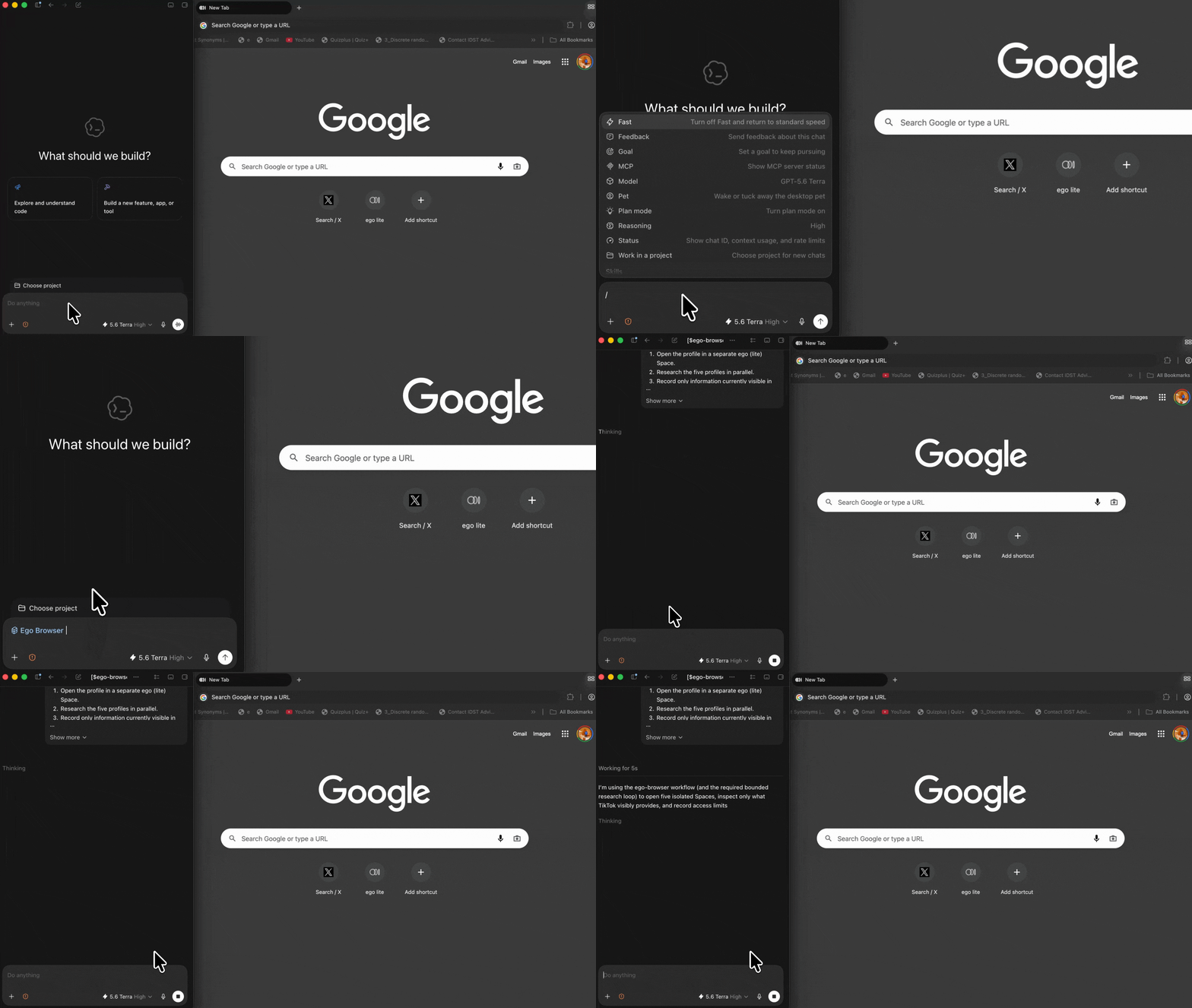
Paste the TikTok video URLs you want to check. Tell your agent how many top-level comments to review, whether to expand visible replies, which fields to save, and when it should stop instead of continuing through an access request.

Existing TikTok profile research prompt example used to demonstrate a bounded AI agent brief
3

Open TikTok comments in a visible browser

The TikTok comment viewer opens each supplied video in an ego (lite) Space and records the comments and replies shown on the page. The browser stays visible, so you can inspect the source, follow progress, or stop the task at any time.

4

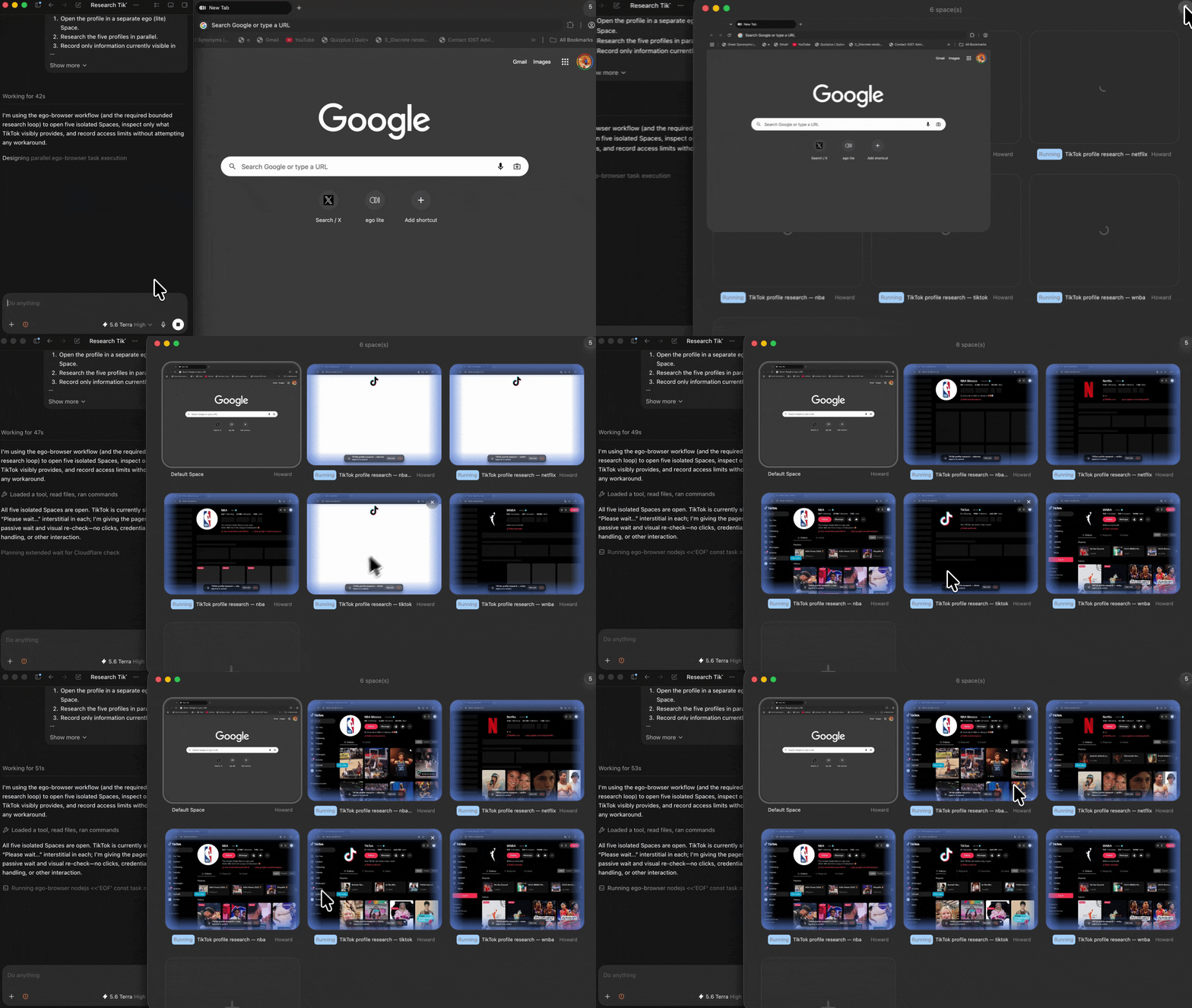
Review multiple TikTok videos in separate Spaces

Give each video or small URL group its own Space. Multiple TikTok comment reviews can run side by side without mixing page state or collected rows, while every result remains connected to the correct source video.

Existing TikTok profile tasks running in separate ego (lite) browser Spaces
5

Export your TikTok comment viewer results

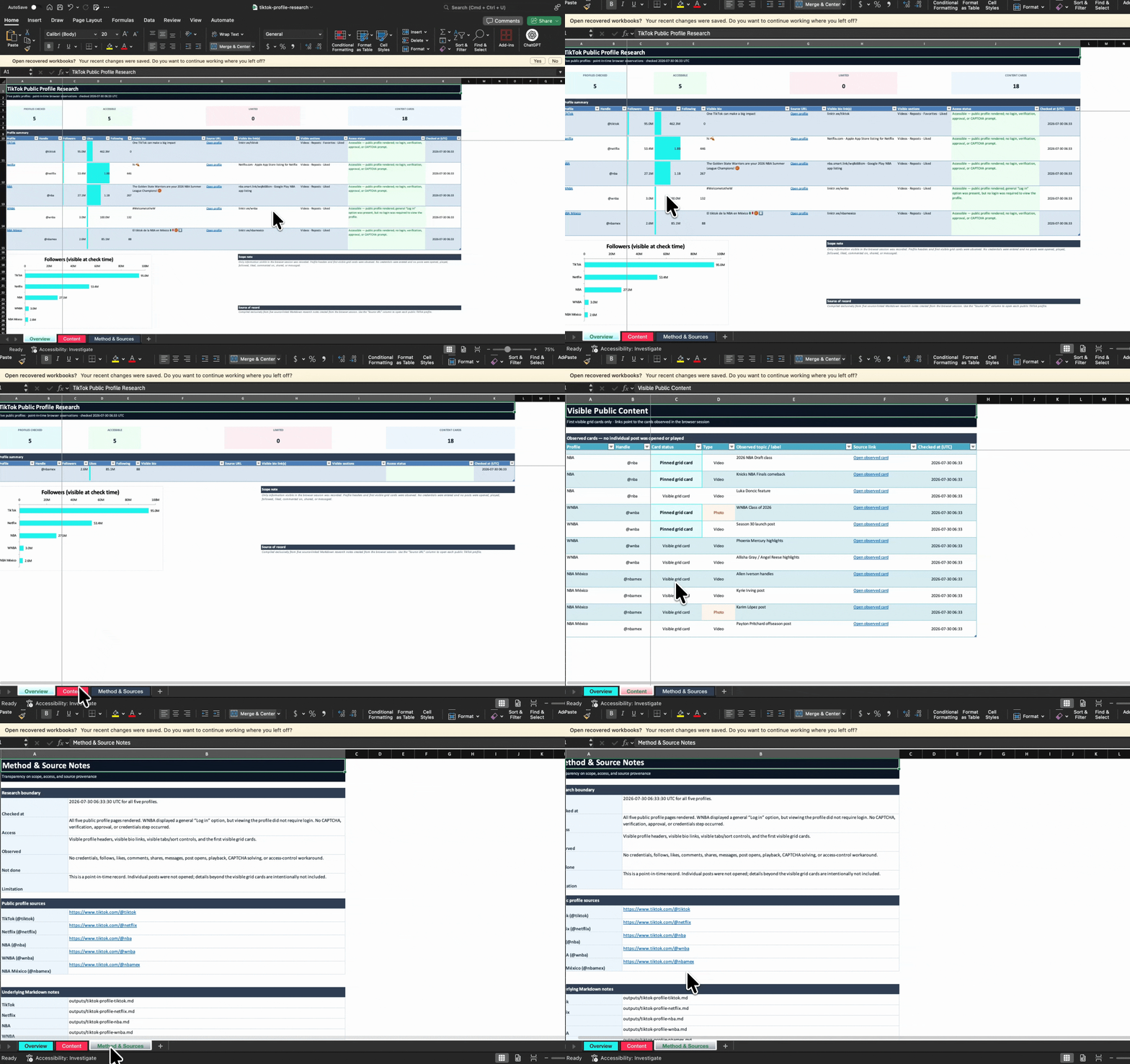
Open the finished CSV or Markdown report to review comment text, displayed author or handle, posted time, visible likes, replies, source video URL, collection time, and access status. The file also shows the actual row count and whether the review was complete, partial, or blocked.

Existing source-linked TikTok research report shown in the ego (lite) workflow

Why use ego (lite) for TikTok comment viewing?

ego (lite) turns the coding agent you already use into a visible TikTok comment viewer. You can review several public videos, keep each browser task separate, and finish with a report that preserves the source and collection status of every result.

Review TikTok comments with less waiting

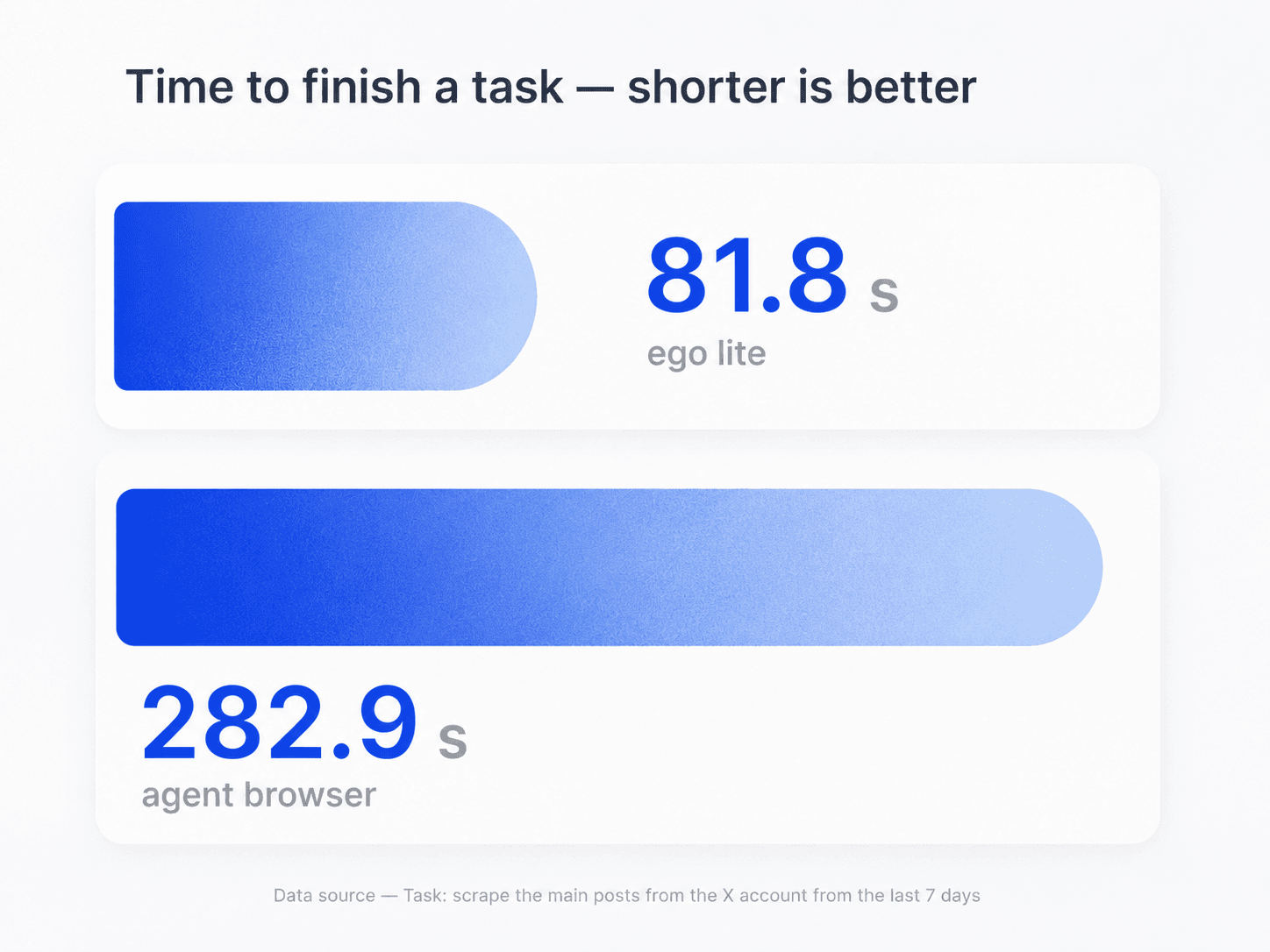
In this shared browser-task comparison, ego (lite) finished in 81.8 seconds versus 282.9 seconds for an agent browser. That can reduce the time spent waiting while your agent checks a bounded list of TikTok videos. Actual timing varies by website, workflow, list size, and network conditions.

Task-time comparison showing ego (lite) finishing in 81.8 seconds versus 282.9 seconds for an agent browser

Keep every TikTok comment source separate

Assign each TikTok video or small URL group to its own Space. Parallel browser work keeps videos, comments, and access states from being mixed while the agent follows one consistent collection brief.

Shared ego lite demonstration of generic browser tasks running in parallel Spaces

Work in parallel and multitask more efficiently

Run several TikTok comment reviews in separate Spaces while you continue with other work. Check progress or take over one task at any time without interrupting the reviews still running in parallel.

What this TikTok comment viewer can and cannot do

This TikTok comment viewer works with the comments and replies TikTok displays in the browser context you choose. TikTok still controls video visibility, comment availability, login requirements, and access restrictions. Keep each review bounded, follow the platform's current rules, and confirm that your use of the collected data is permitted.

What your agent can record

Visible comment data from the specific video URLs and coverage limit you provide.

  • Comments and expanded replies currently displayed on public or already-authorized videos
  • Displayed comment text, author name or handle, posted time, visible likes, and reply relationship when the page shows them
  • Video URL, collected-at time, actual row count, access status, coverage label, and notes for missing fields
  • A bounded CSV or Markdown report plus clearly labeled observations about the collected sample

What stays out of scope

No hidden data, universal completeness claim, access bypass, or engagement action.

  • Private, deleted, filtered, hidden, age-restricted, region-restricted, or otherwise unavailable comments
  • A person's TikTok-wide comment history or comments found only from a username
  • Guaranteed all comments, 100% accuracy, unlimited extraction, anonymous access, or a claim that TikTok cannot observe normal browser requests
  • Bypassing login, CAPTCHA, verification, consent, privacy controls, rate limits, or any platform restriction
  • Liking, replying, following, posting, messaging, or changing any TikTok account or video state
  • Claiming use of TikTok's Research API unless that separate access has been approved and configured

Read TikTok's current Terms of Service

Start a source-linked TikTok comment review

Turn Codex or Claude Code into a visible TikTok comment viewer. Add the video URLs and fields you need, set a practical row limit, and let ego (lite) return a reviewable report with every result tied to its source.

Try the TikTok comment viewer

TikTok comment viewer FAQ

A TikTok comment viewer is a tool or workflow for reading comments attached to a TikTok video. With ego (lite), your own AI agent reviews comments visible in an authorized browser Space and organizes the collected rows into a source-linked CSV or Markdown report with its check time, coverage, and access status.

Install ego (lite), give your agent a bounded list of TikTok video URLs, and set the maximum number of comments and visible replies to review. The agent opens each video in a separate Space, records only what the page displays, and returns a source-linked report. It stops when TikTok requires a human or restricts access.

Sometimes. TikTok may display comments on a public video without login, but availability varies by video, region, browser state, and TikTok's current requirements. ego (lite) does not bypass a login or verification request; it records the restriction and lets you decide whether an authorized human step is appropriate.

No universal all-comments guarantee is safe. TikTok may rank, paginate, filter, delete, hide, or restrict comments, and a browser may stop loading more rows. The workflow records the actual number collected and labels each source as a bounded sample, partial result, visible completion, or blocked run instead of treating every result as complete.

It can record replies that TikTok displays and allows the agent to expand in the current browser session. Hidden, collapsed, deleted, restricted, or unloaded replies remain unavailable. The report marks a row as a top-level comment or reply and records its parent relationship only when the page shows enough information to do so.

Yes. Ask your coding agent to save the visible comments it collected as CSV, which can be opened in Excel, plus an optional Markdown findings note. ego (lite) is the visible browser workflow rather than a hosted bulk-comment API, so the file should retain source URLs, collected-at times, row counts, coverage labels, and access status.

You can filter a collected report by a commenter handle that appears in those rows. This workflow cannot discover a person's complete TikTok comment history or find comments that TikTok does not display on the specific video URLs you supplied.

Only when TikTok already makes that video and its comments visible in the browser context you are authorized to use. ego (lite) cannot unlock private videos, bypass follow approval, or reveal restricted comments. If access is unavailable, the report records the source as blocked or restricted.

Do not assume or promise anonymity. TikTok receives normal browser requests and may process session, device, and network information under its own policies. ego (lite) lets the agent work in the browser context you authorize; it does not make that activity invisible to TikTok.

The default workflow on this page is browser-based. TikTok offers separate research tools and API access for eligible, approved use cases, but installing ego (lite) does not grant those credentials or permissions. Do not claim official API access unless it has been separately approved and configured for your project.

The agent stops, records the video URL, check time, and visible restriction, and leaves the Space available for inspection. It does not solve or bypass the control. You can complete an appropriate authorized step yourself or end that source while keeping the partial result clearly labeled.

ego (lite) is free to download for Mac and does not charge per collected comment. Your chosen coding agent, such as Codex or Claude Code, may have its own subscription or usage costs. The workflow is designed for bounded, supervised research rather than an unlimited hosted data feed.