Browser Use with local LLMs: what actually works


Browser Use can run with a local model through Ollama, and the setup itself is straightforward. The harder question is reliability. A local model may connect successfully, yet still fail because the tool call has the wrong shape, the context fills up, or one browser step takes too long to complete. Browser Use documents the local path, but it does not publish a quality benchmark that guarantees small local models will handle long, multi-step tasks well.
That makes verification especially important. A local run should prove that the expected browser actions actually happened, not just that the agent returned a final answer. Browser Use exposes history and structured results for that check, and a deterministic read of the destination can catch a run that looked successful but produced the wrong outcome. If you also want the browser side to stay local and visible, ego(lite) can pair with a local model through the ego-browser skill, keeping the browser session, page data, and model on the same machine while still allowing you to watch or take over the run.
The rest comes down to the limits of the machine and the model. Context size, VRAM, tool-call discipline, and latency all affect whether a local browser agent finishes the task. The commands and model details below come from official documentation checked on September 20, 2026, together with one earlier matched test in this repository; this article does not present a new benchmark run on this machine.
Can Browser Use run on a local LLM?
Yes, and the documented path is short. The supported-models page lists Ollama alongside the hosted providers and shows the whole configuration as one line: llm = ChatOllama(model="llama3.1:8b"). The same page describes the setup as installing Ollama, running ollama serve, and pulling the model with ollama pull llama3.1:8b, which it notes is a 4.9GB download.
The nuance is what the documentation does and does not claim. It documents the plumbing; it does not publish a local-model benchmark or a compatibility list. The quickstart recommends the hosted ChatBrowserUse model, which Browser Use describes as matching the accuracy of top models while completing tasks 3-5x faster. Treat local support as a real path with an unproven quality margin, and test your own task before building on it.
There is also a second route. The Browser Use CLI gives a coding agent direct browser control, installs as a skill, and attaches to your local Chrome or Chromium over CDP. With a local model driving a coding agent, that combination is what a no-cloud setup looks like in practice.
Which local models actually work with Browser Use?
No official page publishes a ranked list of local models for Browser Use, and anyone who gives you one is guessing. What the primary sources do provide is a small set of documented examples and one explicit warning.
The documented example is Llama. The Ollama section of the supported-models page uses llama3.1:8b and no other model, with a 4.9GB download size and no reliability claim attached.
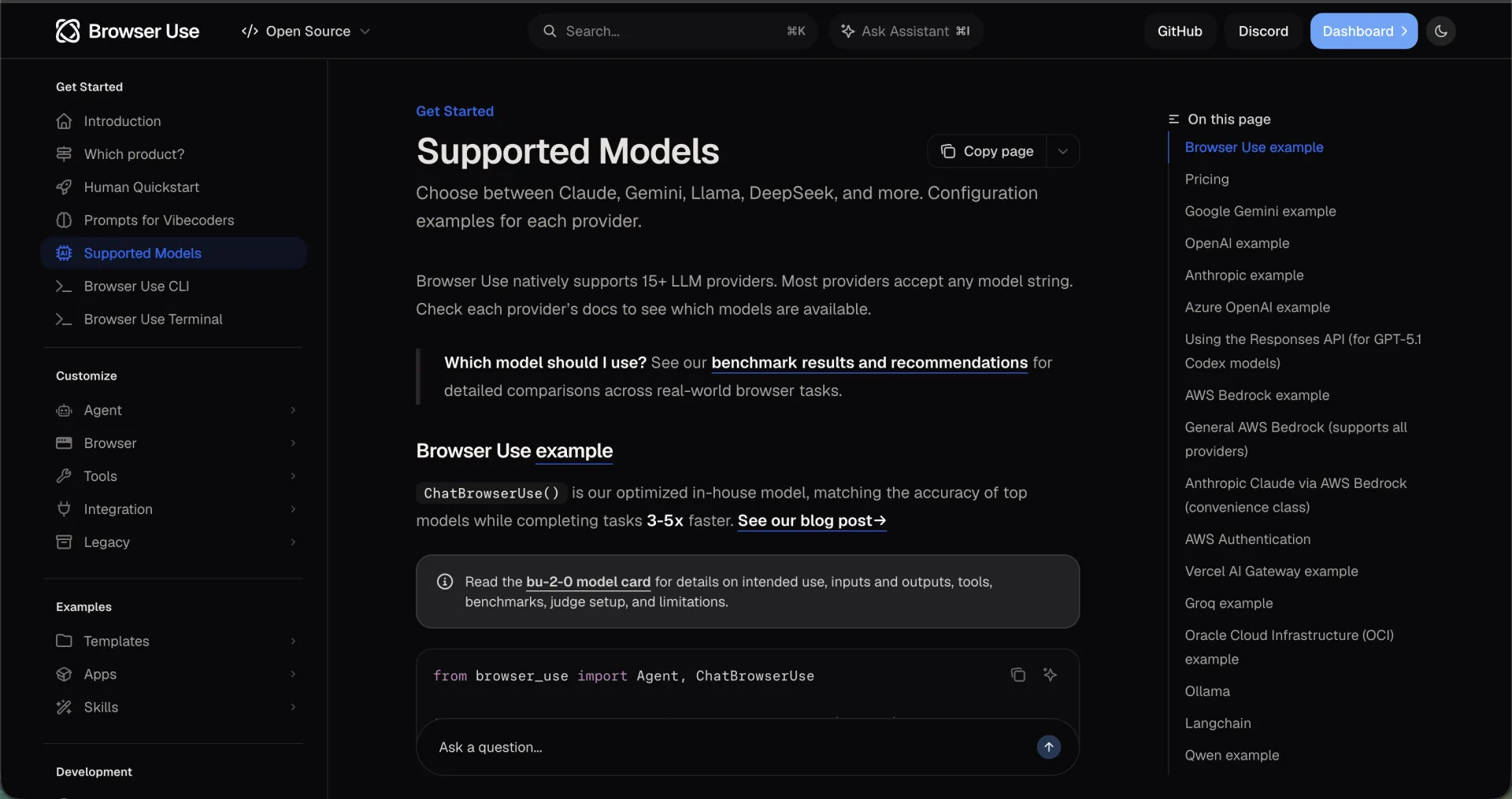
The explicit warning is about Qwen. The Qwen section on the same page says that currently only qwen-vl-max is recommended for Browser Use, that other Qwen models including qwen-max have issues with the action schema format, and that smaller Qwen models may return actions: [{"navigate": "google.com"}] where the agent expects actions: [{"navigate": {"url": "google.com"}}]. Its suggested fix is to add concrete examples of the correct action format to your prompt. Note that qwen-vl-max is a hosted Alibaba model, not a local download, so the only specifically recommended Qwen is not a local model at all.
Ollama's own tool-calling page is the right place to confirm that a model supports tools in the first place. Its examples use qwen3, which does not make qwen3 a Browser Use recommendation; it means the model class supports the API shape.
| Check | Pass condition | Documented fail signal |
|---|---|---|
| Tool calling | The response carries a tool call, not only text | A content-only reply with no tool call in it |
| Action schema | Arguments match the nested object the agent expects | A flat value such as google.com where an object is required |
| Structured output | A JSON schema passed in the format field parses cleanly | Prose around the JSON, or fields that drift from the schema |
| Multi-turn loop | The tool result returns and the next step follows it | The loop repeats one call or stops before a result |
Four checks, one sitting. If the action-schema check fails, the documented remedy is prompt-level: include a concrete example of the expected action object. Do not add more tools to compensate for a model that cannot format one call.
How do you set up Ollama plus Browser Use on a normal machine?
Work in this order, and keep each step separately verifiable.
- Install Ollama. Download it for macOS, Windows or Linux and open the app, or start from the terminal. Local models need no API key, per the Ollama quickstart.
- Start the server and pull a model. Browser Use documents ollama serve and ollama pull llama3.1:8b. The Ollama quickstart uses ollama run gemma4:e2b for a first local chat, notes that model is about a 7.2GB download, and recommends 8GB of available VRAM or unified memory.
- Install the Browser Use library. The quickstart installs uv, creates a Python 3.12 environment, installs browser-use, and runs uvx browser-use install to install the browser and Chromium. The repository README states Python 3.11 or newer for the library.
- Point the agent at Ollama. The documented line is llm = ChatOllama(model="llama3.1:8b"); the rest of the agent call follows the quickstart example, with your own task string.
- If a coding agent is your interface, use the CLI instead. Browser Use CLI page installs it with uv tool install browser-use, registers the skill with browser-use skill install, checks the connection with browser-use --doctor, and attaches to running Chrome or Chromium over CDP by default.
Does using DeepSeek mean Browser Use runs locally?
A DeepSeek model name doesn't tell you where inference runs. Browser Use can call a hosted provider while the browser stays on your computer. That setup still sends model inputs to the provider. A local browser and local inference are separate choices.
The Browser Use supported-model guide documents ChatDeepSeek with DEEPSEEK_API_KEY and ChatOllama for a local Ollama server. The DeepSeek API quickstart checked on October 22, 2026 lists deepseek-flash for its current Flash endpoint. Browser Use documentation still includes an older deepseek-chat example, so confirm the provider model name and the installed library rather than treating either example as a permanent default.
On a narrow screen, scroll this table sideways to read every column.
| Inference route | Configuration to inspect | What it establishes |
|---|---|---|
| DeepSeek hosted API | ChatDeepSeek + DEEPSEEK_API_KEY + an available provider model | A hosted model connection; it does not establish local inference. |
| Locally served weights | ChatOllama + the exact installed Ollama model tag | A local inference route, if the model and server really run locally. |
| Another compatible endpoint | The adapter, base_url, model ID, and endpoint owner | An API format match; compatibility alone does not prove valid browser actions. |
This is a configuration example assembled from those interfaces, not a completed browser run. Set DEEPSEEK_MODEL to a model available in your provider account and keep the API key outside the script and source control.
import os
from browser_use import Agent, ChatDeepSeek

llm = ChatDeepSeek(model=os.environ["DEEPSEEK_MODEL"])
agent = Agent(
    task="Open https://example.com and report its visible heading. Do not submit forms.",
    llm=llm,
)
# In your existing async entry point: await agent.run()
Use the native adapter's provider defaults unless you intentionally operate another endpoint. If you change base_url, record who runs that endpoint and which data leaves the machine. For local weights, verify the installed model tag and tool-call output first; a successful chat response doesn't establish Browser Use action-schema compatibility.
We did not run DeepSeek or download local weights for this update. There is no new success-rate, latency, cost, or ego(lite) comparison here. Before choosing between providers, use the same owned task, browser state, completion check, and retry policy; measure the bill and failures separately. ego(lite) changes the browser execution workflow, while the configured model still determines where inference happens.
What should a reproducible model-route receipt record?
A reproducible Browser Use run needs more than a model label. Record the requested model, the provider-reported model if available, endpoint host, provider adapter and version, browser mode, task input, and the independent completion check. Keep an unavailable field unknown. Never put API keys, authorization headers, cookies or session exports into a public receipt.
The DeepSeek quickstart checked on October 30, 2026 recommends deepseek-flash and says that the legacy deepseek-v4-flash and deepseek-v4-flash-vision-exp names are still accepted but are served by DeepSeek-V4.1-Flash-1017. Browser Use's supported-models example still uses deepseek-chat with DEEPSEEK_API_KEY. That documentation mismatch is a reason to verify the installed adapter and provider model, not evidence that we ran either combination successfully.
Keep the requested name and any returned model field separately. An accepted alias is not an immutable checkpoint identifier, and a provider-reported name is not proof of identical weights across runs. The official OpenAI-compatible DeepSeek base URL is https://api.deepseek.com; its Anthropic-compatible route is different. Do not mix protocol paths just because both examples use a base_url setting.
| Offline configuration | Consistency result | What remains unverified |
|---|---|---|
| Hosted DeepSeek endpoint claimed as local inference | Rejected: the declared backend conflicts with the claim. | No provider or model request was made. |
| Ollama at 127.0.0.1:11434 claimed as local | Accepted as configuration-consistent only. | Whether the process actually computes locally or proxies elsewhere. |
| Ollama at a remote example endpoint claimed as local | Rejected: the endpoint is not loopback. | No remote endpoint was contacted. |
| Hosted DeepSeek endpoint explicitly declared hosted | Accepted as configuration-consistent only. | Availability, model resolution, costs and task completion. |
We ran four offline configuration cases for this update. Two contradictory local-inference claims were rejected; two configurations were accepted only as internally consistent. The checker used fixed inputs, called no endpoint or model, and imported no Browser Use SDK. The table shows the complete scope of that check.
A loopback endpoint can forward requests elsewhere. Confirm the process and backend configuration, and inspect an authorized run's actual traffic before claiming inference stayed on the machine. The checker cannot verify model availability, action-schema support, browser task success or the provider's current alias routing.
ego(lite) can provide the visible browser execution environment while a selected agent supplies its model. That makes browser actions inspectable; it does not make hosted DeepSeek inference local. Use a verified local model/backend when that is a task requirement, then independently check the browser result. The downloadable checker is a preflight aid, not a performance or privacy certification.
Check the Browser Use provider adapter example
Check DeepSeek model names and protocol endpoints
Download the offline inference-route checker
Inspect the four offline configuration results
See a local-model workflow with ego(lite)
How much VRAM and context length does a local browser agent need?
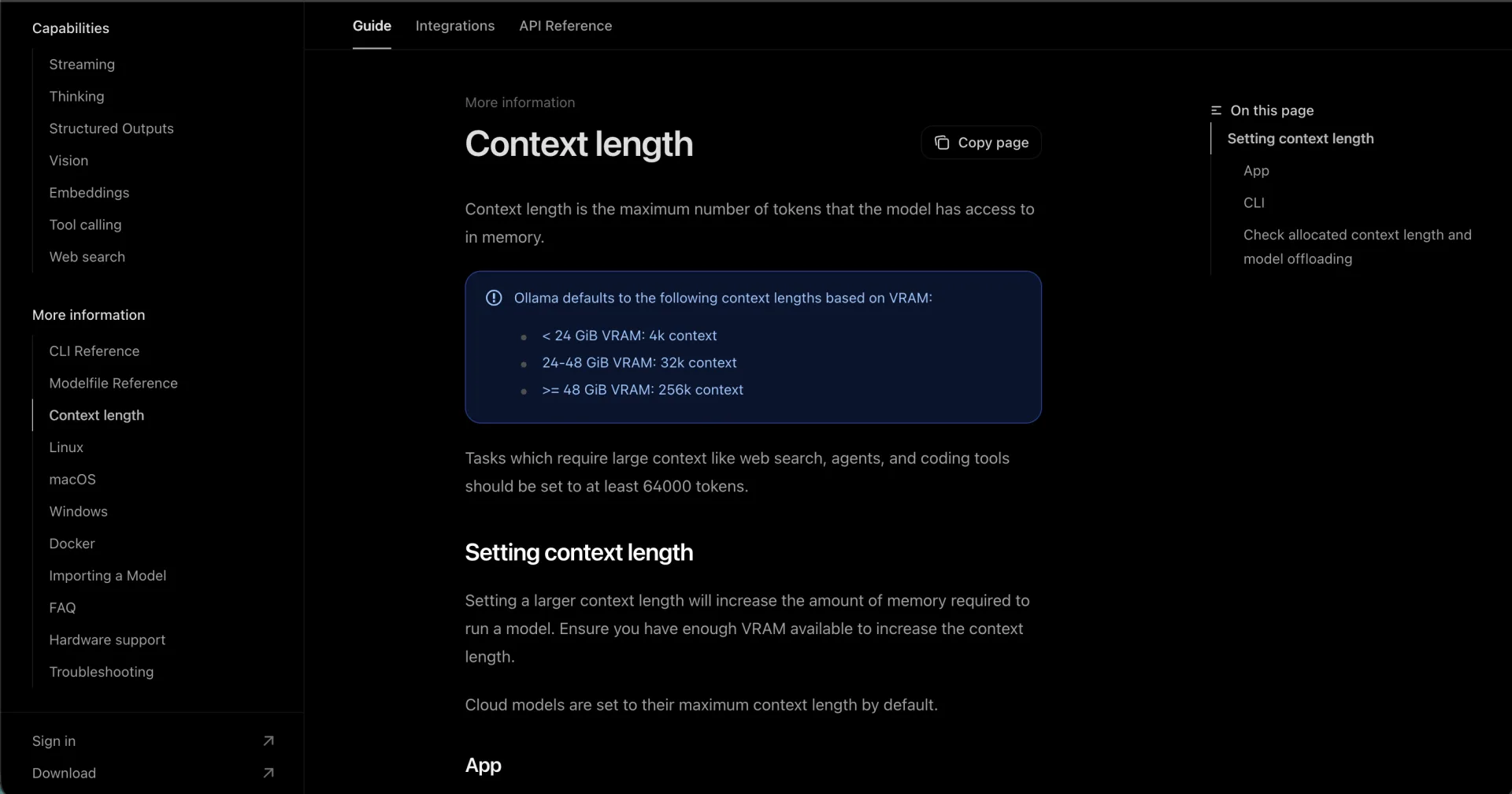
The memory question is mostly a context-length question. The Ollama context-length documentation sets the default from available VRAM: under 24 GiB gets 4k tokens, 24 to 48 GiB gets 32k, and 48 GiB or more gets 256k.
| Available VRAM | Ollama default context |
|---|---|
| Under 24 GiB | 4k tokens |
| 24 to 48 GiB | 32k tokens |
| 48 GiB or more | 256k tokens |
That default is wrong for agents. The same page states that tasks which require large context, such as web search, agents and coding tools, should be set to at least 64,000 tokens, and that raising the context length raises the memory required. Ollama also warns against offloading the model to CPU; ollama ps shows the PROCESSOR split and the allocated CONTEXT so you can confirm both.
Concrete download sizes from the same documentation set: llama3.1:8b is 4.9GB; gemma4:e2b is about 7.2GB with 8GB of available VRAM or unified memory recommended; and ego(lite)'s local-model tutorial uses qwen3.8:27b, a 4-bit quantized model with an approximately 18GB download, and notes that running it also needs memory for the context and other applications.
Page evidence is the other half of the bill. Browser agents send the model a representation of the page at every step, and that representation is not small. In a different browser-agent harness, we measured one accessibility snapshot of the Hacker News front page at 38,285 characters, roughly 9 to 10K tokens, for a single call. Browser Use's own page serialization will differ, but the shape of the budget is the same: model, tool schemas, page evidence and history all share one context window.
What failures do people actually hit?
Three failure modes show up repeatedly in the documentation and in our own test, and each has a different first check.
The first is a malformed tool call. Browser Use documents this for smaller Qwen models with the flat-versus-nested argument example above. The agent receives a call it cannot execute, and depending on the loop it either retries the same wrong shape or reports a step failure. The documented remedy is to put a concrete correct example in the prompt.
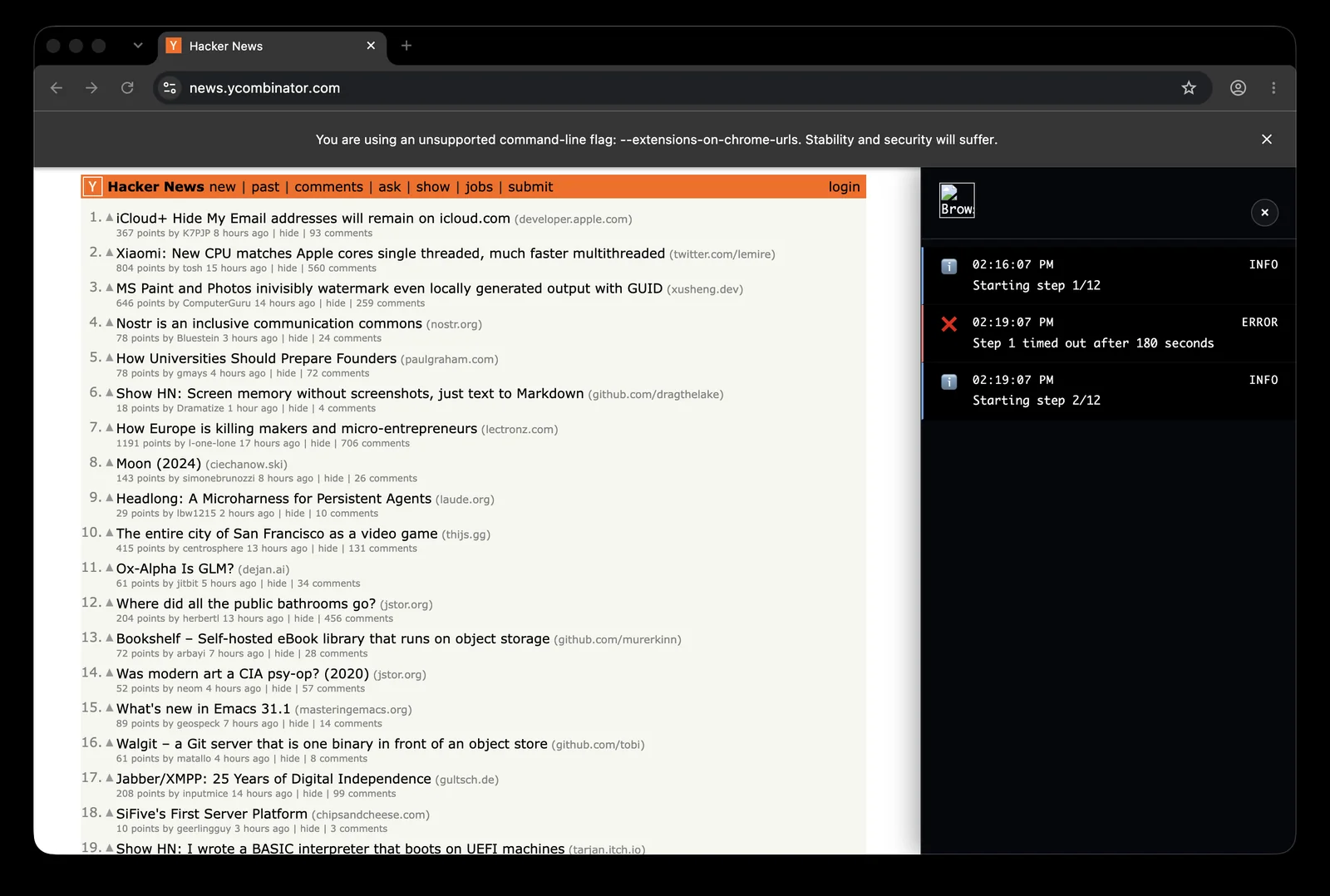
The second is timeout, and it is the one we have observed. In the August 2026 matched test in this repository, Browser Use 0.13.8 with the native Ollama adapter and qwen3:4b never left step one: the first attempt hit four 75-second model timeouts, and attempts two and three, with a 180-second timeout, still produced no structured result. The same installed browser layer, with the model removed from the route, returned the correct visible rows through BrowserSession and Page.evaluate in 4.92 seconds. That split is the diagnostic: a failed model loop is not a failed browser.
The third is state your pipeline loses rather than the model. Ollama's streaming documentation is explicit that a streaming tool-call flow has to gather every chunk of thinking, content and tool_calls and send those fields back together with the tool results; a handler that keeps only the text drops the call. Two more state traps are documented by Browser Use: is_done() means the agent emitted a done action rather than that the task succeeded, and is_successful() is the agent's own assessment. A run can look finished and still be wrong.
| Failure | What you see | First check |
|---|---|---|
| Malformed tool call | The agent rejects a call or repeats the same wrong shape | Compare the arguments against the expected action object |
| Model timeout | Step one never completes and no structured result appears | Run the same browser task without the model in the route |
| Dropped tool call | A streamed call never reaches the executor or the loop stalls | Confirm the stream handler keeps tool_calls, not only content |
How do you verify that a run actually worked?
Verification has three layers, and a local run needs all three because the model is the least predictable component.
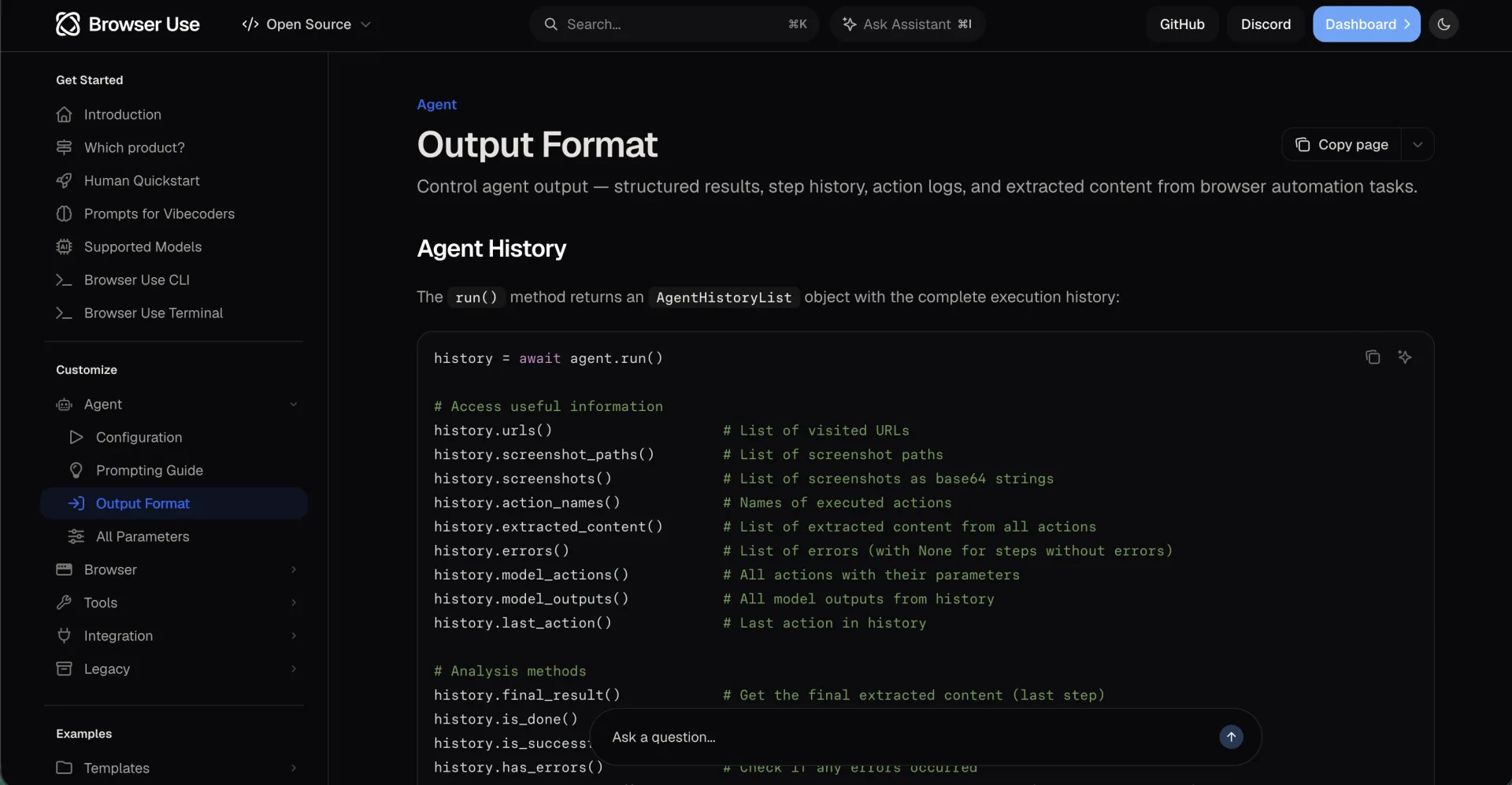
- Read the history, not the summary. output-format documentation lists what agent.run() returns: errors(), action_names(), final_result(), screenshot_paths(), and structured_output when an output model schema is used. Confirm which actions actually ran and which error slots stayed empty.
- Re-read the result deterministically. In our matched test, a second deterministic read of the source page is what caught a schema-valid but wrong extraction in the other tool we tested, and the Browser Use page-evaluation route is what confirmed the correct rows after the model timeouts. A model call can be the writer; it should not be the only reader.
- Check the machine, not the chat. ollama ps shows the allocated context and whether the model sits on GPU or CPU. If CONTEXT is far below 64k or PROCESSOR shows CPU offload, fix the runtime before blaming the model.
For external actions, the documentation is blunt: verify important outcomes such as a submitted form or a completed purchase against the destination system. That applies to a local model exactly as it applies to a hosted one.
When the browser is ego(lite), the official troubleshooting list gives a browser-side check that is easy to forget: if the model responds but the browser does not move, confirm that the agent is issuing tool calls rather than only describing actions, and check that it loaded the ego-browser skill and has permission to run local commands. Generating text about a browser is not browser control.
When is a hosted model the right call?
Browser Use's own documentation answers this in one direction: it recommends ChatBrowserUse, its hosted model, and describes it as matching the accuracy of top models while completing tasks faster; eligible new accounts receive $15 in one-time credits. That is a vendor claim, and it is also the path the project supports hardest.
Local is the right call when the constraint is privacy or independence, not capability. If prompts and page content must not leave the machine, or you want a run with no external inference bill, a local model is the only way to get there. The trades are explicit: you own memory, context, latency and the tool-call format.
| Situation | Better route | Why |
|---|---|---|
| Page content or prompts must stay on your machine | Local model | No inference request leaves the machine, and the cost moves to your hardware |
| First prototype, or the site is hard | Hosted model | Tool-call formatting and long loops are the vendor's problem, per Browser Use's own recommendation |
| Long multi-step research across many pages | Hosted model | Our local 4B run never cleared step one, and long loops raise the reliability bar |
| Narrow, repeatable extraction with a validator | Local model | A small task with a deterministic check is where local models have the best odds |
| Many parallel browsers, or a CI pipeline | Cloud browser infrastructure | One desktop browser on one machine does not scale out |
A hybrid is often the honest answer: draft and screen with the hosted model, then move one narrow, verified task to the local model and compare accepted results rather than impressions.
Where does ego(lite) fit when the model is local?
ego(lite) is the local, visible Chromium browser that an agent drives through the ego-browser skill or CLI. That is a natural pairing with a local model, because neither half of the loop needs a cloud account: the model runs in Ollama on your machine, the browser runs on your machine, and the login state comes from the profile you already use.
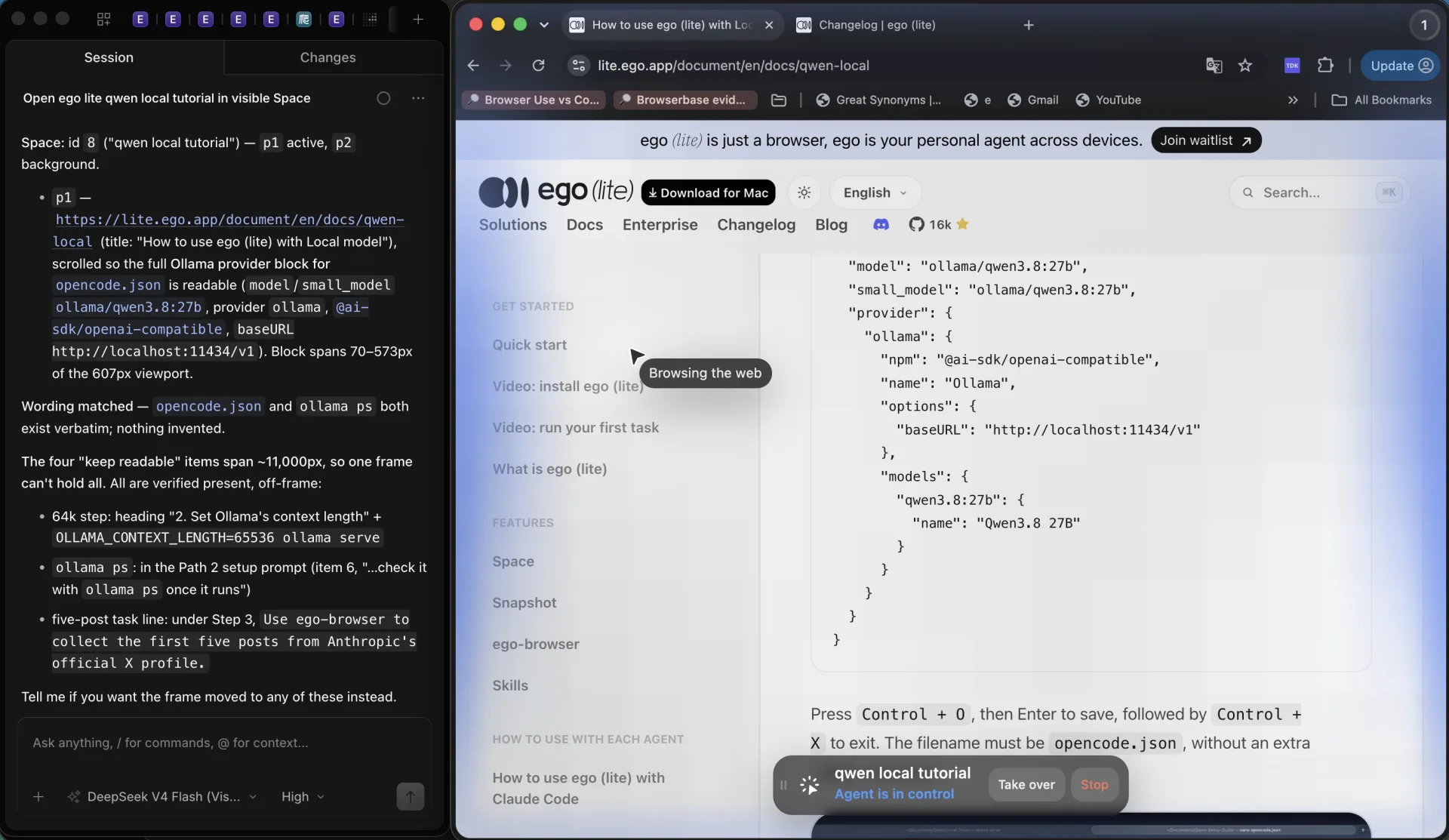
The official local-model tutorial documents the whole loop with Ollama, OpenCode and ego(lite) on one Mac. The reproducible sequence is: install ego(lite) and finish onboarding, which writes the ego-browser skill into your agent skill directories; set Ollama's context length to 64k or higher; pull the model with ollama pull qwen3.8:27b; add the documented Ollama provider block to opencode.json; confirm http://localhost:11434/v1/models lists the model and ollama ps shows the 64k context; then load /ego-browser and run the tutorial's own task, Use ego-browser to collect the first five posts from Anthropic's official X profile.
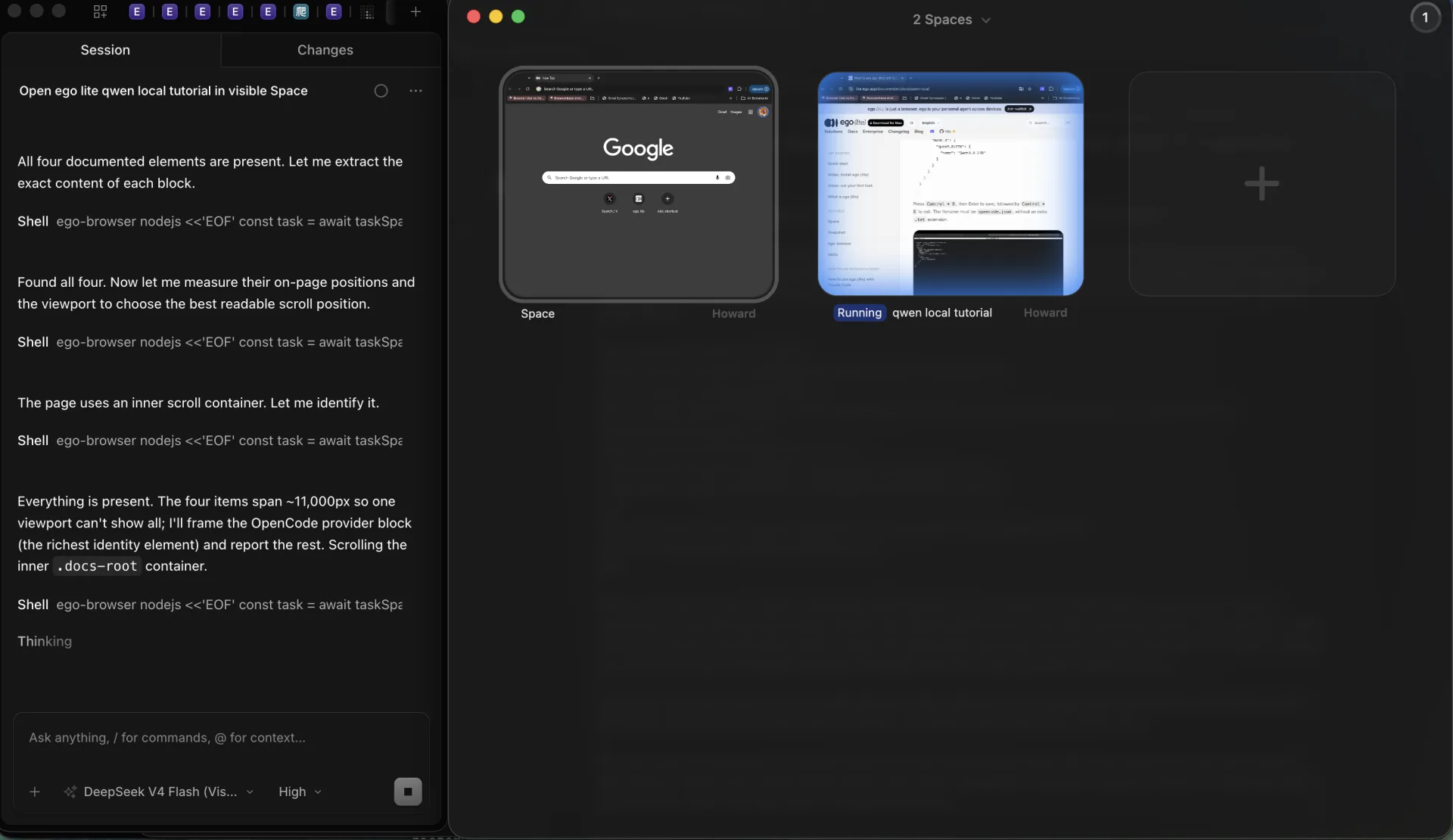
Here is the decision in one line. If the task is read-only, sits behind a login you already hold, and the page content should not leave the machine, a local model plus ego(lite) is the combination that satisfies all three, and that five-post task is a fair first test. If the agent responds but the browser never moves, fix the skill load and permissions first; if the task takes minutes per step, shrink the task or free memory rather than raising timeouts.
The limits are real and worth stating plainly. ego(lite) is a desktop browser for macOS, not a headless browser you can run in a CI container, and it is not a test framework. Spaces keep agent work separate from your browsing, but they are task separation, not a hardened multi-tenant boundary, so ego(lite) does not replace a cloud sandbox for elastic or parallel workloads. The local model also stays the bottleneck: browser-side improvements cannot make a 4B model plan a long task. As of the changelog checked on September 20, 2026, the current release is 0.5.0.32 from September 12, 2026, and 0.5.0.28 from September 8, 2026 added a new ego-browser skill and toolset and moved the browser to Chromium 152.
ego(lite) quick start covers install and onboarding, and the changelog is the place to confirm the release you are running. Session expiry, CAPTCHA, 2FA and site terms still apply to every route in this article.
FAQ
Does Browser Use support local models through Ollama?
Yes. The supported-models page documents Ollama and shows ChatOllama(model="llama3.1:8b"). It does not publish a quality benchmark for local models, so the reliability of your task is something you have to establish yourself.
Which local model works best with Browser Use?
No official ranking exists. The documented Ollama example is llama3.1:8b, and the only Qwen model the docs specifically recommend is the hosted qwen-vl-max. Screen any local model with four checks: a tool call is emitted, the action schema shape is right, structured output parses, and the multi-turn loop continues.
Why does a small local model return a tool call the agent rejects?
The most common documented reason is the action schema shape. Smaller Qwen models have returned a flat argument where the agent expects a nested object. The documented fix is to add concrete examples of the correct action format to the prompt.
How much VRAM do I need to run a local browser agent?
Ollama's defaults are 4k context under 24 GiB of VRAM, 32k from 24 to 48 GiB, and 256k at 48 GiB or more, and its documentation says agent and coding workloads should be set to at least 64,000 tokens. Raising context raises memory use. If the model offloads to CPU, responses slow down; ollama ps shows both the context and the processor split.
How do I know whether a local run actually succeeded?
Do not trust the done flag alone. is_done() only reports a terminal done action and is_successful() is the agent's own assessment. Read the history for errors and executed actions, re-read the result with a deterministic check, and verify external outcomes against the destination system.
Is a local model actually free?
The Browser Use Python library is free and MIT-licensed, and a local model adds no inference bill, but you pay in hardware, memory and latency. The repository's FAQ puts it plainly: model inference and hosted browsers are separate costs, and a local setup is subject to your hardware and model requirements.
Can a local model replace a cloud sandbox?
No. A local model and a desktop browser such as ego(lite) run on one machine for one user. They are not a fleet of isolated browsers, and Spaces are task separation rather than a multi-tenant security boundary.
Local models are a legitimate way to run Browser Use when privacy or independence is the constraint, and the documented Ollama path is small enough to try in an afternoon. Go in with the right expectation: the plumbing is documented, the quality margin is not, so screen the model, measure with a deterministic check, and keep a hosted model within reach for the tasks your local setup cannot finish.