How to handle login and OAuth in AI browser agents


AI browser agents often reach authentication steps they should not complete on their own, such as OAuth consent, MFA, SMS verification codes, or QR-code logins. A more reliable approach is to pause when the agent reaches one of these authentication boundaries, let the user complete the required step, and then resume the task from where it left off.
The key is to keep the entire handoff in the same browser context. Once the user finishes authentication, the agent can continue with the newly authenticated session without copying cookies or restarting the task. ego(lite) is well suited to this workflow: the agent can work in its own Space, pause and hand control back when user input is required, then continue in the same browser environment once the user is done.
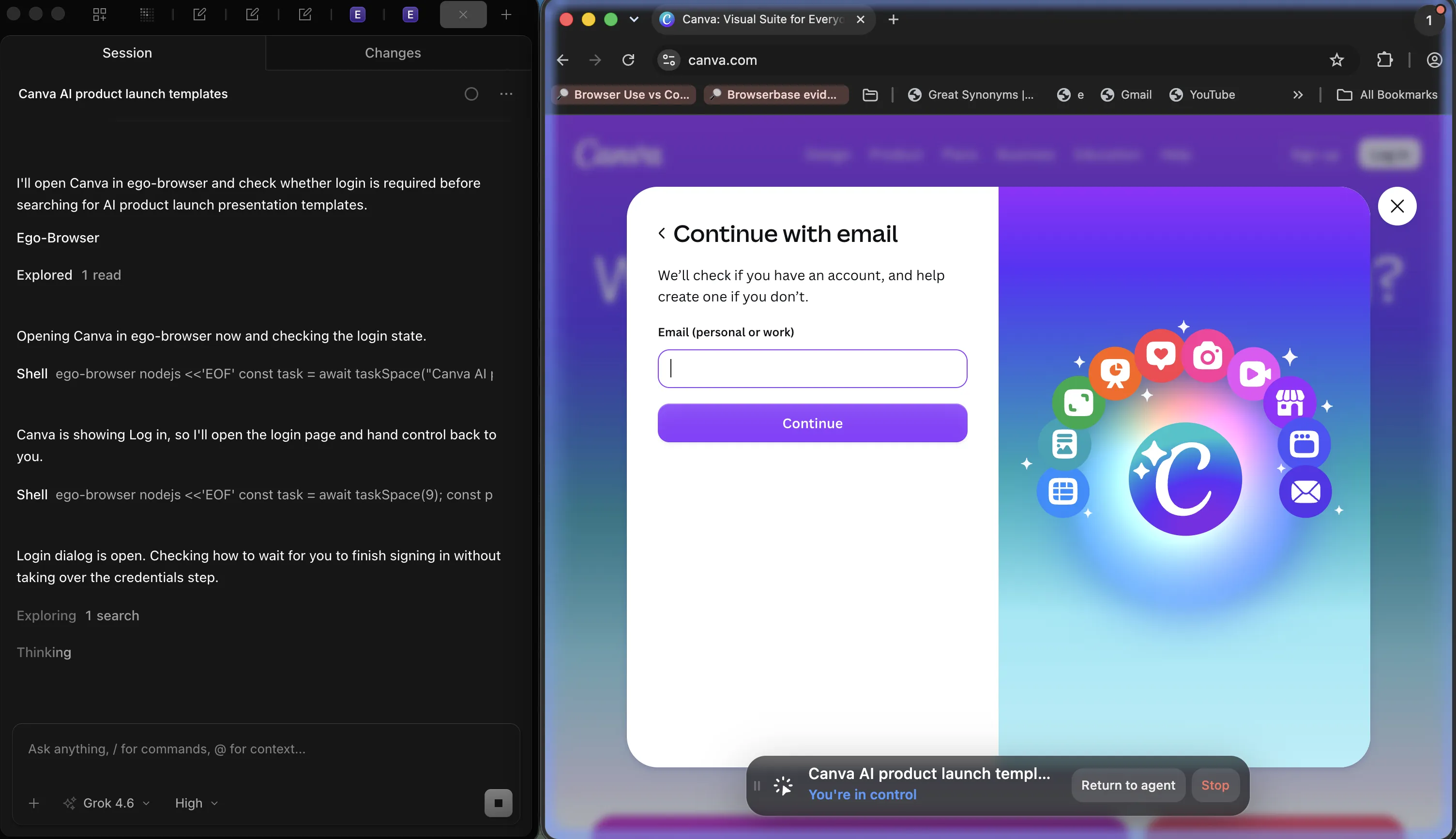
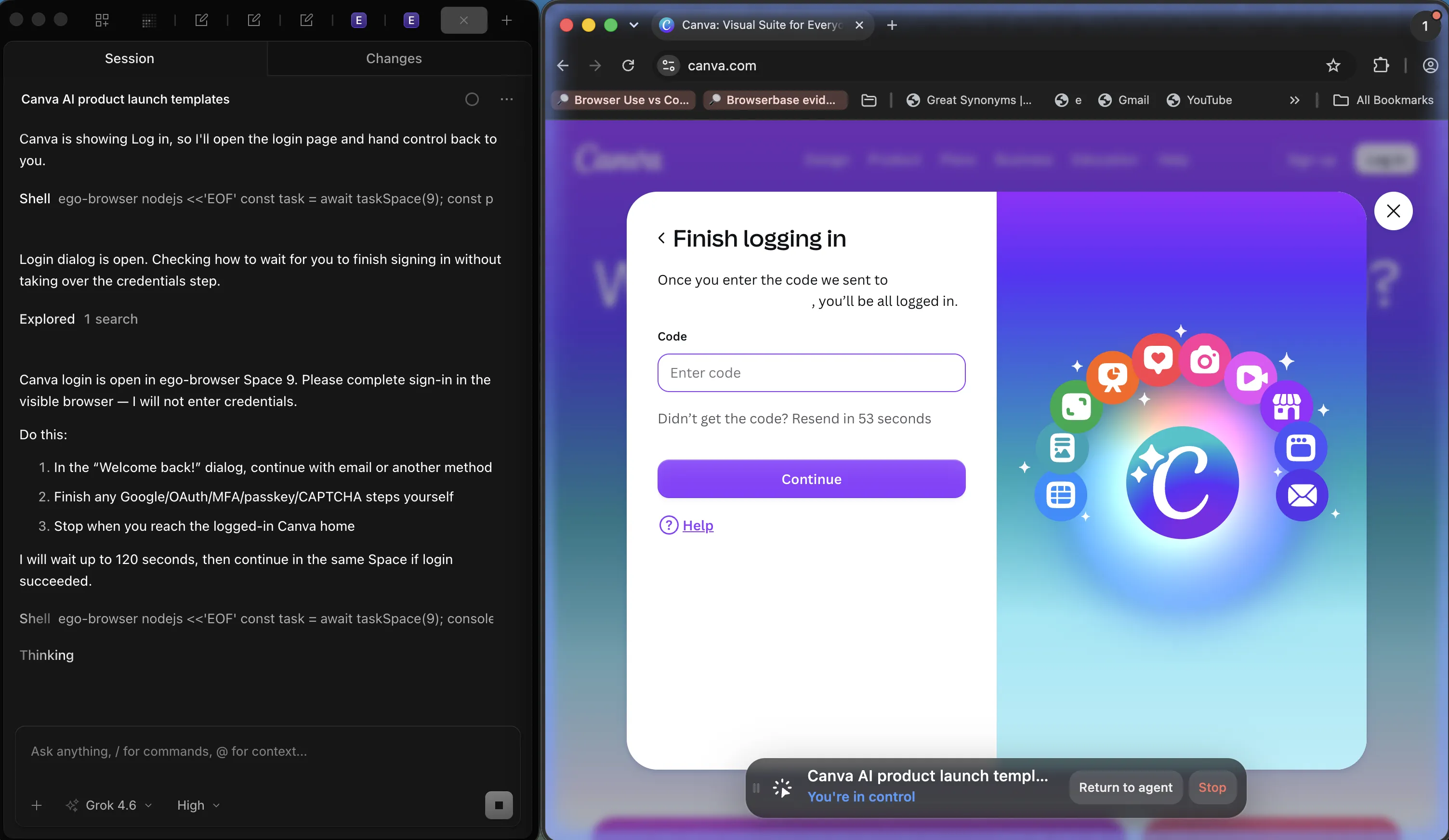
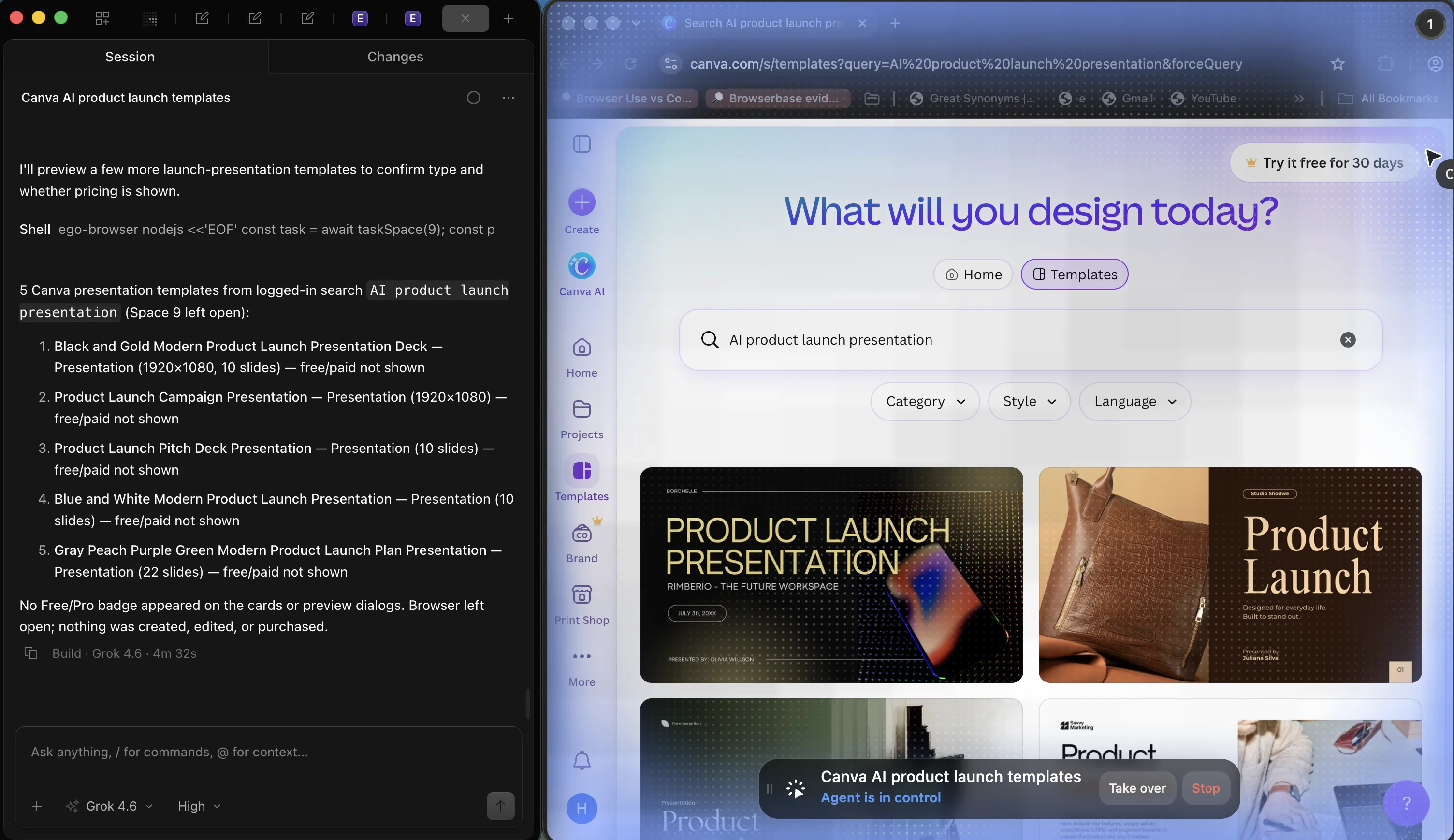
The screenshots below come from a live ego(lite) run on September 16, 2026. A coding agent asked ego-browser to search Canva for AI product-launch templates, hit a login wall, handed control back, waited through an email verification code, then resumed in the same Space. A separate local fixture also covers the timeout path: what happens when no one takes over, and how the agent can fail cleanly instead of waiting indefinitely.
What the login handoff pattern is
A handoff has three parts. The agent detects that it has reached an authentication boundary, which is a state it can identify from the URL, a visible control, or a response code. It then suspends its own action and surfaces a request for the human, including what the human is expected to do and what happens next. When the human finishes, the agent confirms the new state and continues from the same place.
The pattern applies when the account is real, the session is valuable, and the boundary requires a person. It does not apply when the work runs unattended against a test account with credentials you control: there, a stored session or an API token removes the human step entirely, and the Playwright authentication workflow is the better starting point. Choosing the wrong one is expensive: a handoff added to an unattended job turns it into a permanent pause, and automation added to a person's primary account turns a mistake into an incident.
When an agent must stop and hand over
The trigger list should be written down before the workflow runs, not discovered when it gets there. Four categories cover the important cases.
- Authentication boundaries: a redirect to a login page, an OAuth consent screen, a second-factor prompt, a CAPTCHA, or a device or QR-code approval.
- Financial and contractual actions: payments, orders, transfers, refunds, and anything that creates a commitment.
- Destructive or hard-to-reverse operations: publishing, deleting, archiving, bulk edits, and permission changes.
- Account and authorization changes: granting a third-party application access, changing settings, or adding collaborators.
In the Canva run, the wall was equally clear. The agent opened Canva, saw Log in, opened the login dialog, and stopped. The coding agent named the boundary in the session log, asked the person to finish sign-in in the visible browser, and said it would not enter credentials. That is the trigger: a login-only control, not a retry of the same unauthenticated request.
Saving and passing session state
The handoff preserves the browser context, and that is what makes the resumed session coherent. The agent must not close the page, navigate away, or create a fresh context while waiting; the human interacts with the visible browser window, and the session cookies land exactly where the agent will continue from.
After the human finishes, the state is worth capturing for later runs. Save cookies and localStorage from the same context, and note which pre-authentication artifacts should not be carried forward. The fixture produced an instructive example: the saved state contained both the session cookie and a stale pending cookie set before the second factor completed. A clean implementation prunes pre-authentication cookies before persisting, because a leftover marker from an unfinished flow can confuse the next run's detection.
A second rule concerns secrets: never place cookies, tokens, one-time codes, or storage state into prompts, logs, or model context. State belongs in the browser and, when it must be persisted, in a file the agent does not read back as text. Session handling across runs follows the same hygiene as the persistent session patterns, and the broader category of scraping behind a wall is covered in the login-wall guide.
OAuth consent and MFA belong to the human
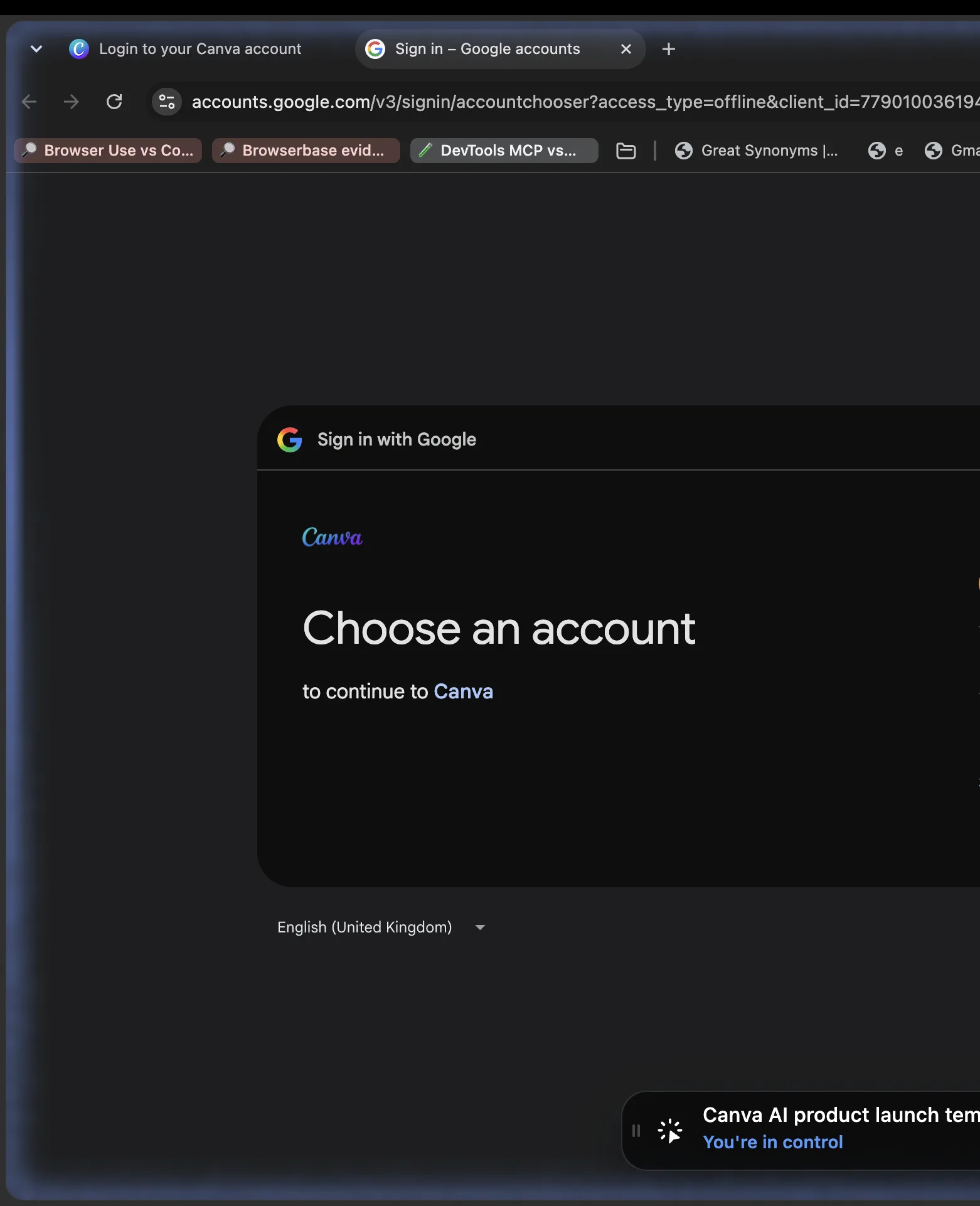
OAuth adds one twist: the session is not minted on the site the agent wants to use. The flow redirects to an authorization server, where a consent decision is made, and returns with a code that the application exchanges for access. The specification in RFC 6749 is explicit that the authorization server authenticates the resource owner; the consent screen is a human decision about a third party, not a step for an automated client to approve on its own behalf. The security guidance in the OAuth security best current practice goes further and recommends that clients avoid handling the resource owner's credentials at all.
In practice, the agent drives to the identity provider and stops. The human finishes the Google step, the redirect returns to the application, and the agent resumes with the resulting session.
If the flow includes a second factor, the same rule applies with higher stakes, and the OWASP guidance on multifactor authentication is clear that the factor exists to prove a person is present. Automating around it defeats the control the account owner relies on, and the authentication cheat sheet lists the same principle among its core recommendations.
A handoff implementation that resumes correctly
The implementation has two pieces: the agent's side, which detects and waits, and the human's side, which is just the browser. The agent's obligation is to name the boundary, wait for an observable change, verify, and continue, with a deadline around the wait.
async function runWithHandoff(context, page, task) {
  await page.goto("https://app.example.com/invoices");

  const wallDetected = page.url().includes("/login");
  if (wallDetected) {
    console.log("Login required. Complete sign-in in the open window.");
    // Hand control to the human; the same context keeps the session.
    await page.waitForURL("**/invoices", { timeout: 120000 });
  }

  const probe = await context.request.get(
    "https://app.example.com/api/session",
    { failOnStatusCode: false },
  );
  if (probe.status() !== 200) throw new Error("handoff not completed");

  return task(); // the agent resumes exactly where it stopped
}
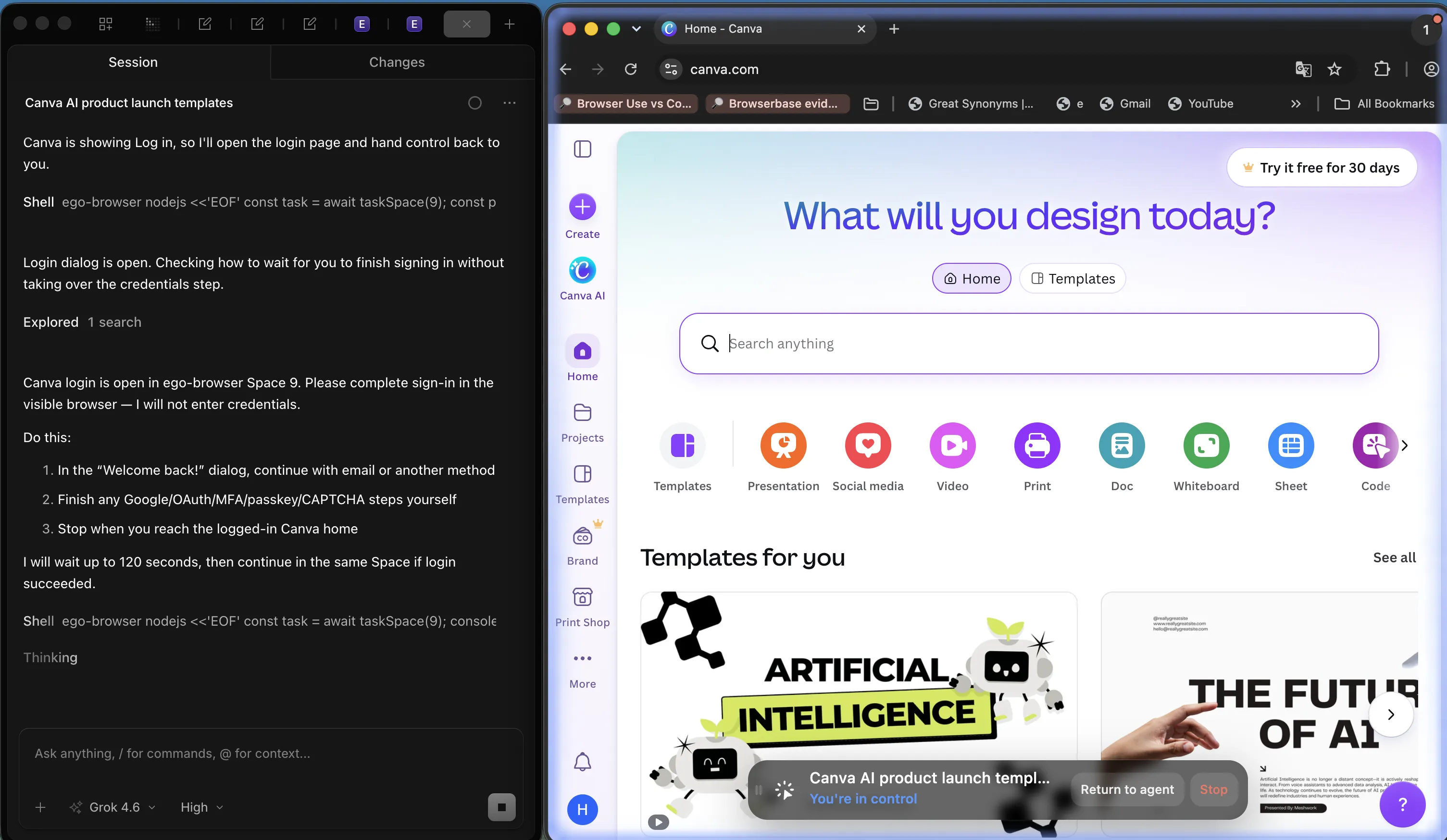
In the Canva run, the wait was the real version of that code. After the person finished the email code, the coding agent recorded Login succeeded, took control again, and searched the same Space for AI product launch presentation templates. The wait used an observable signed-in state rather than a fixed delay, which is why the search continued in the authenticated session instead of bouncing back to Log in.
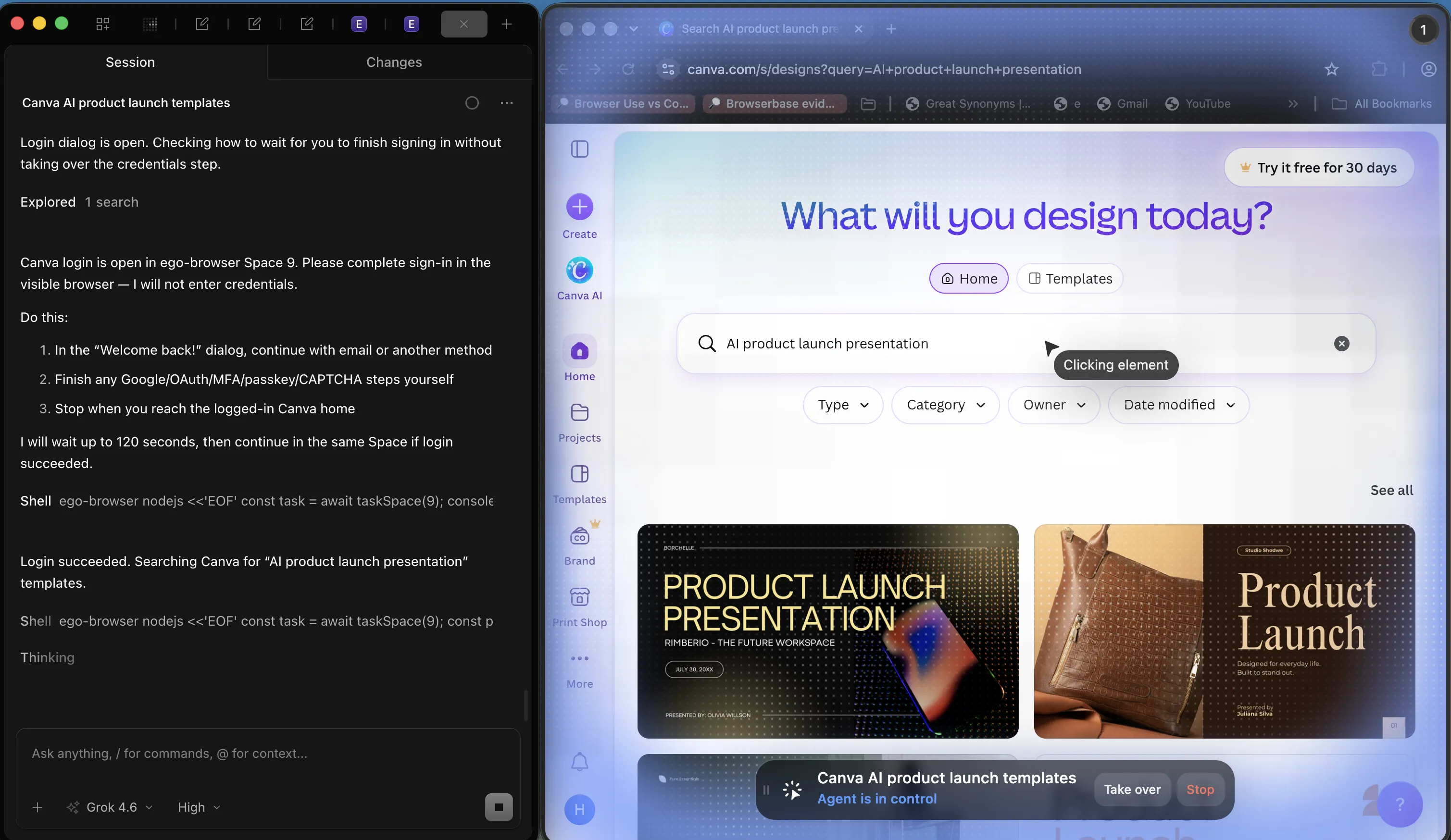
The same session then opened a template preview and returned a list of five launch-presentation results. Nothing was created, edited, or purchased. That is the payoff of keeping the context: the human step is a one-time cost per session lifetime, not per page view.
When nobody takes over
A handoff without a deadline is a hang. The failure path matters as much as the success path, because the difference between "waiting for you" and "stuck forever" is a decision the code has to make on its own. A local fixture encoded that contract: wait a short deadline, see no human, and exit with an error that names the missing state instead of pretending the page arrived. The live Canva screenshots in this article are the success path. The timeout run has no published frame; it is a fixture failure, not a second Canva capture.
Three properties make a timeout useful rather than merely safe. The error names the boundary that was waiting, so a human reading the log knows which step stalled. The browser is left open for inspection, so the next attempt can see the state. And the task is marked failed rather than partially complete, because a resumed workflow that skipped its authentication step will produce wrong results, not just fewer of them.
Security and UX tradeoffs
The handoff is a security control, so the design decisions are about what the agent is allowed to do without a person, and how visible it all is. Three tradeoffs come up in practice.
Breadth versus containment: letting an agent reuse a fully logged-in profile is convenient but gives it access to everything that profile touches. Scoping each task to the accounts it needs, and stating read-only or confirm-before-submit boundaries up front, keeps the blast radius small. Visibility versus interruption: a handoff should surface what the agent is doing and why it stopped, without stealing focus or silently taking over the active window. Reversibility: the safest workflows are the ones where the agent's actions can be reviewed afterwards, which means keeping tabs and state around rather than closing everything on completion.
When the browser already holds the login
The handoff is a boundary, not a product feature. If the agent can already see a signed-in page, the human step is only the wall: consent, a second factor, a payment confirm. ego(lite) is useful here because the person and the agent share one visible browser. The person can take over without exporting cookies, and the agent can resume in the same tab after the wall clears.
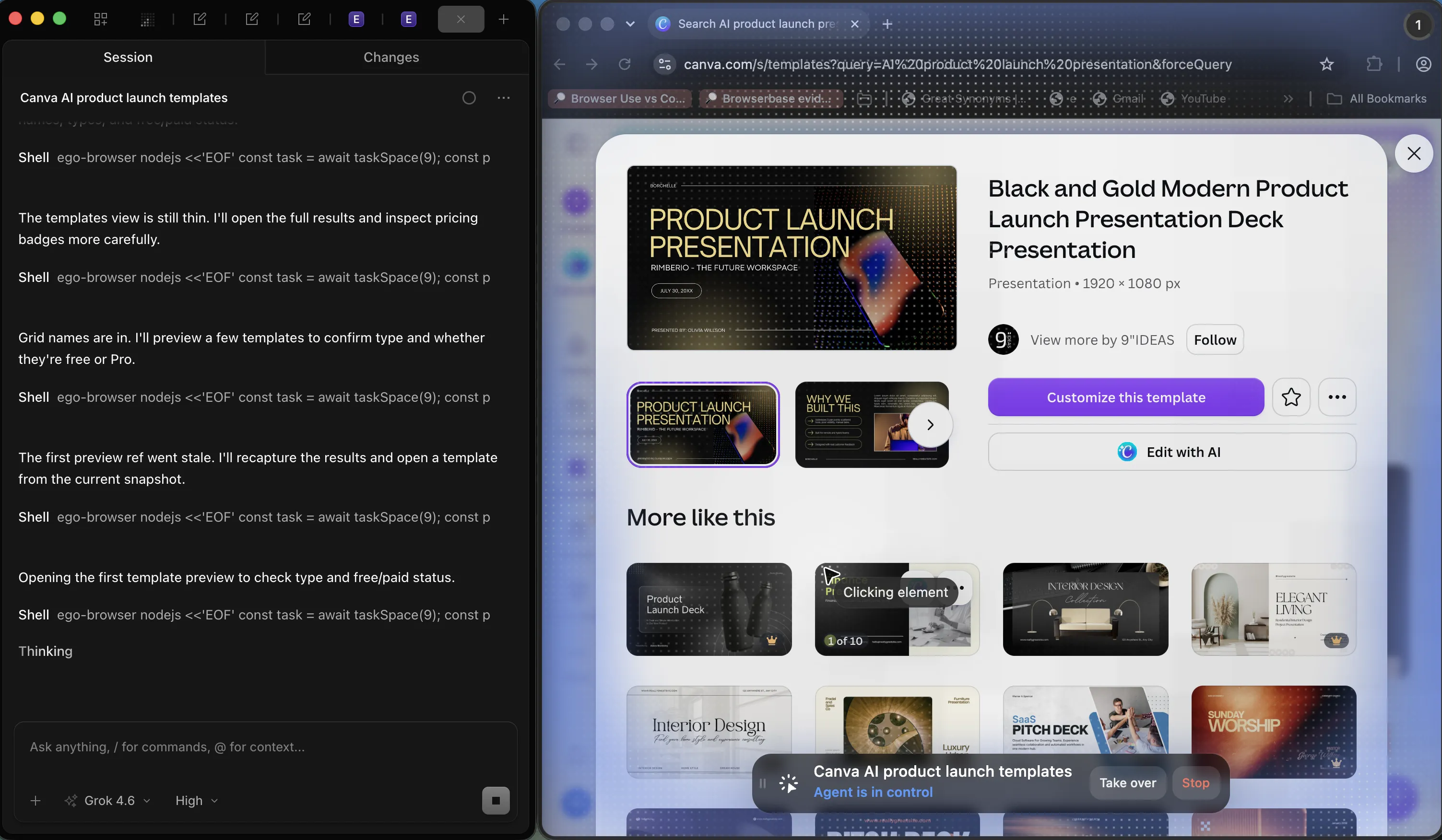
Write the stop list before the run starts. SMS codes, QR logins, hardware keys, payments, publishing, deletes, and third-party OAuth grants stay with the person. Read-only and confirm-before-submit are valid pre-declared limits. The privacy model is local and task-scoped: credentials are not collected. Version 0.5.0.32 is in the changelog (2026-09-12). Recheck that page, the Space docs, the quick start, and GitHub before quoting a newer build.
The boundary cuts both ways. If the task runs against a test account with tokens you own, or the site offers an API, skip the browser entirely. ego(lite) is not an automation framework and does not replace a test runner; it is the browser the account owner is already signed into. The handoff pattern is for the case in between: real accounts, real sessions, and a person who should stay the only one who approves a second factor. The Playwright authentication docs cover the test-account side, including saved sessions and expiry handling.
FAQ
What is the login handoff pattern in browser automation?
The login handoff pattern is a pause at an authentication boundary: the agent stops, a person finishes OAuth or MFA, and the agent resumes in the same authenticated context. Credentials and second factors stay out of automation.
When should an agent not attempt a login at all?
When the account belongs to a person, when a second factor is present, when third-party consent is required, or when the action would create a financial or irreversible commitment. In each case the correct behavior is to stop and ask, not to find a technical workaround.
How do I detect a login wall programmatically?
Combine three signals: the final URL after navigation (a login path or a next parameter), the status of an authenticated API probe (401 or a redirect), and the presence of a login-only element such as a password field. Any signal alone can misfire; together they are reliable.
Should an agent ever handle OAuth consent?
Handling the navigation, yes. Approving the grant, no. The consent screen exists so the account owner can decide whether a third party gets access. The agent can drive to that screen and wait; the decision is the human's, which is also what the OAuth specification and its security guidance describe.
How should the agent wait during a handoff?
On an observable condition with a deadline: a URL change, an authenticated element appearing, or a probe returning 200. Fixed delays either waste time or expire early, and a wait with no deadline turns a stall into a hang.
What happens if the human never completes the step?
The run should fail with a specific error naming the boundary, leave the browser open for inspection, and mark the task incomplete. A partially completed workflow that skipped authentication will produce wrong results rather than no results, which is worse.
Can the saved session be reused after a handoff?
Yes, and it should be, within the session's lifetime. Save cookies and localStorage from the same context, prune pre-authentication artifacts such as pending-flow markers, treat the file as a credential, and reprobe before relying on it. A browser that already holds the login, such as ego(lite), skips most of this by keeping the session in place.
How do multi-factor codes fit into a handoff?
They are the clearest handoff trigger. The person supplies the code in the visible browser; the agent never stores it, logs it, or reads it from a message. Any design that automates the second factor removes the property the factor was added for.
Does the handoff break unattended automation?
Only for the workflows that genuinely require a person. Unattended jobs should use test accounts, API tokens, or pre-authorized sessions where no human step exists. Choosing the handoff pattern for an overnight job is a design error, not a limitation of the pattern.
What is the difference between a handoff and a takeover?
A handoff is cooperative and pre-declared: the agent reaches a boundary and asks. A takeover is reactive: a person interrupts while the agent is working, does something, and returns control. Both are useful, and a good workflow supports both so the operator can intervene without killing the run.
Should the agent close the browser after a handoff?
Not immediately. Leaving the session and the visited pages in place lets the person audit what happened and lets a follow-up run continue from a known state. Clean up with an explicit retention rule rather than by defaulting to closed windows.
Can a handoff work with a remote or cloud browser?
Only when you can see and control that browser interactively. A step that requires a person is meaningless if the human cannot reach the page. For local, visible work the browser is already in front of the operator; for cloud sessions, check whether interactive access exists before designing the handoff.