Web scraping with Playwright: wait for rendered cards, extract fields, and validate the rows


A JavaScript-rendered page can return a successful response and still leave your scraper with zero rows. The HTML has loaded, but the cards a user sees in the browser may not exist in the DOM yet. With ego(lite), that gap is visible. Your task runs inside a watched Chromium Space, so you can see whether the page is still rendering, the selector is not matching, or the data you need never appeared at all.
Playwright turns that confirmed behavior into a stable, repeatable scraping workflow. It can wait for the target cards to render, extract fields from the live DOM, and validate that the result contains the data you expected. Once the selector and wait condition are known, Playwright is a natural way to encode them into a reliable script. When the task still requires visual inspection, an existing signed-in browser session, or a human to take over at a specific step, ego(lite) keeps the browser state visible and interactive, so a script that exits successfully cannot hide the fact that it actually scraped nothing.
What is web scraping with Playwright?
Web scraping with Playwright means driving a real browser so JavaScript can paint the page, then reading the rendered nodes. The browser is the scraper. The HTML response is only the shell until scripts run.
Playwright launches Chromium, Firefox, or WebKit, opens a context, and gives you page.goto, waits, locators, and page.evaluate. Those APIs exist for tests. They work for extraction too, because both jobs need the same thing: a DOM that matches what a person sees.
The adjacent jobs stay off this page.
Choosing fetch versus a browser in JavaScript is covered in web scraping with JavaScript. Reusing a signed-in session across runs is covered in persistent browser sessions. Login walls on X and LinkedIn are covered in AI scraping behind login walls. Numbered pages, Load More, and infinite scroll wait until this single page already returns the right rows.
When should you scrape with Playwright instead of HTTP?
Use Playwright when a GET of the URL does not contain the nodes you want to scrape. Use HTTP when the values are already in the response body, or when the page already exposes a documented JSON endpoint.
quotes.toscrape.com/js is built that way on purpose. A GET of the URL returns HTML with no class="quote" nodes. The quotes sit in an inline var data array, then jQuery paints the cards. A CSS parser pointed at .quote against the raw response saves nothing and looks like a selector bug.
We tested that split on 2026-09-18 from OpenCode. A GET of quotes.toscrape.com/js returned HTTP 200 and 0 .quote cards in the raw HTML, while the headed Chromium window on the right already showed the painted list.
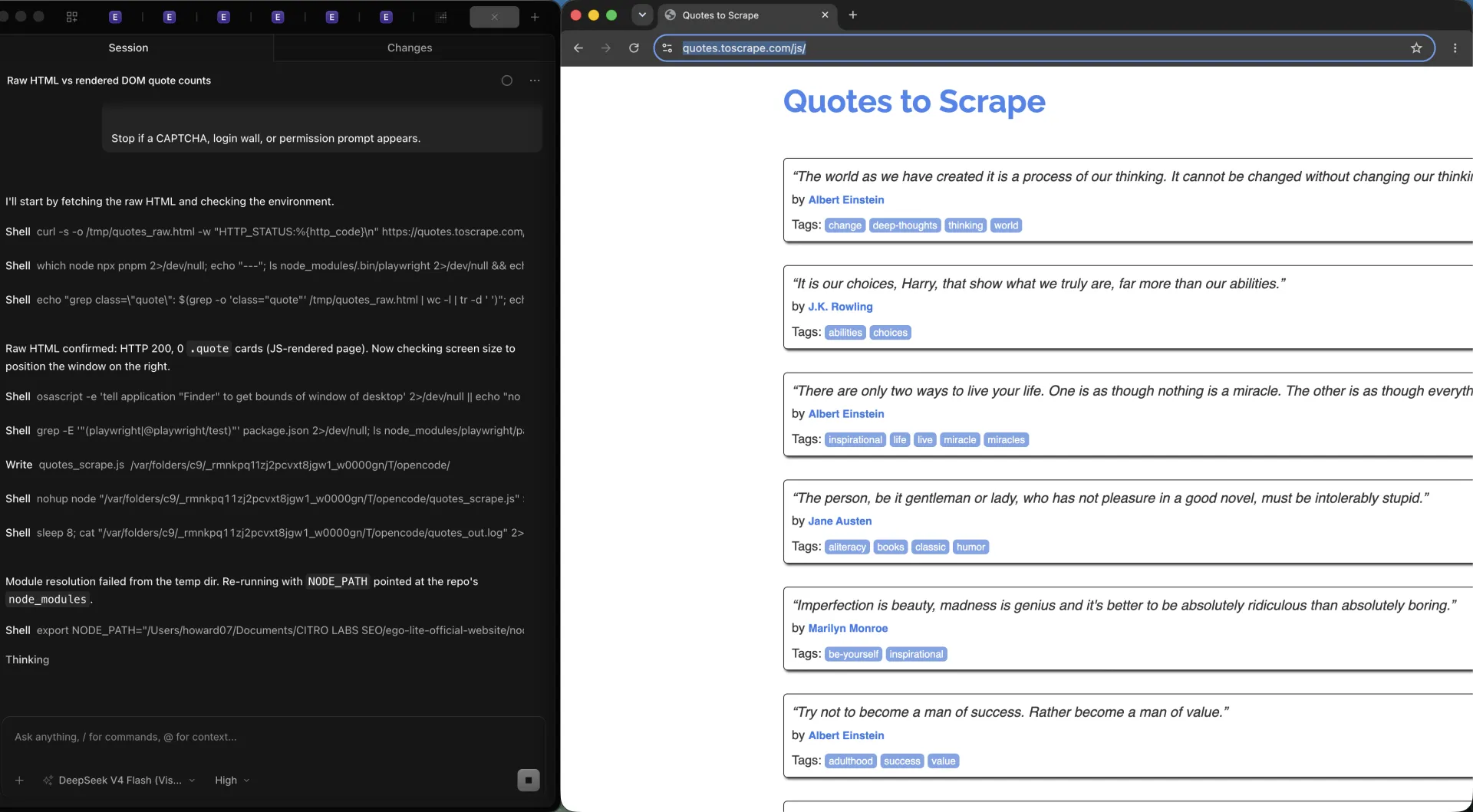
Look at the split this way.
| Route | What it can do | What it cannot do |
|---|---|---|
| HTTP GET + HTML parser | Read the bytes the server sent. Cheap, fast, and enough when the cards are already in the markup. | Run page scripts or wait for nodes that appear later. Against quotes.toscrape.com/js it sees no .quote cards in the raw HTML. |
| Parse the inline payload | On quotes.toscrape.com/js, a regex plus JSON.parse of var data can recover the quotes from the same HTML, with no browser. | Survive a redesign that stops embedding the array. Internal payloads are not an API contract. |
| Playwright rendered DOM | Execute the page JavaScript, wait for .quote, and extract the cards a person sees. | Stay cheap. Each context costs memory, and a fleet of them is the wrong tool for static HTML. |
The honest extra on this demo: Playwright is not required if var data is parsed directly. Most JS sites will not leave a named array in the first response. Playwright is the route that still works when they do not.
How do you launch, navigate, and wait for content?
The minimum Playwright scrape is launch, new context, goto, wait for the card selector, extract, then close. Skipping the wait is how you get a successful empty file.
Playwright's page.goto can stop at commit, domcontentloaded, load, or networkidle. waitForSelector is the check that the thing you came for actually exists. On quotes.toscrape.com/js, goto({ waitUntil: 'domcontentloaded' }) can already be enough because the inline script runs in that HTML. That is luck, not a rule.
import { chromium } from "playwright";

const browser = await chromium.launch();
const context = await browser.newContext();
const page = await context.newPage();

try {
  await page.goto("https://quotes.toscrape.com/js/", {
    waitUntil: "domcontentloaded",
  });
  await page.waitForSelector(".quote");
  const rows = await page.evaluate(() =>
    [...document.querySelectorAll(".quote")].map((el) => ({
      text: el.querySelector(".text")?.textContent?.trim() ?? "",
      author: el.querySelector(".author")?.textContent?.trim() ?? "",
      tags: [...el.querySelectorAll(".tag")].map((tag) =>
        tag.textContent?.trim(),
      ),
    })),
  );
  console.log(rows.length);
} finally {
  await context.close();
  await browser.close();
}
To see the empty scrape, extract at commit before the cards exist, or delay the script that paints them. That early extract returns 0 rows. After waitForSelector('.quote'), the same page returns the rendered cards. Nothing throws in the empty case.
| Wait | What it proves | How it fails |
|---|---|---|
| commit only | The navigation started. Useful as a negative test. | Scripts may not have run. An extract at commit, before the painter runs, returns 0 quotes. |
| domcontentloaded | The initial HTML is parsed. Enough on this fixture because var data runs in that HTML. | Late XHR cards can still be missing. Do not treat it as 'content is ready'. |
| waitForSelector('.quote') | At least one card exists in the DOM. That is the wait that turns this demo into scrapable rows. | A stale class can match the previous list. Wait on a field that changes with the data, not on a wrapper that never leaves. |
Close the context in finally. Contexts hold the memory. A scrape that throws mid-extract still has to let go of Chromium.
How do you extract fields from a rendered page?
Extract inside the page with page.evaluate, or with locators when you need one control rather than a list. Both read the rendered DOM. Neither reads the original HTML snapshot from goto.
Map each .quote to text, author, and tags. The public demo paints ten cards. Required fields are text and author. The unique key is the quote text, not the author, because Einstein appears more than once.
We tested that extract in the same OpenCode session. After waitForSelector('.quote'), the headed run printed 10 rows, 10 unique texts, and 0 missing authors. Raw HTML still had 0 cards.
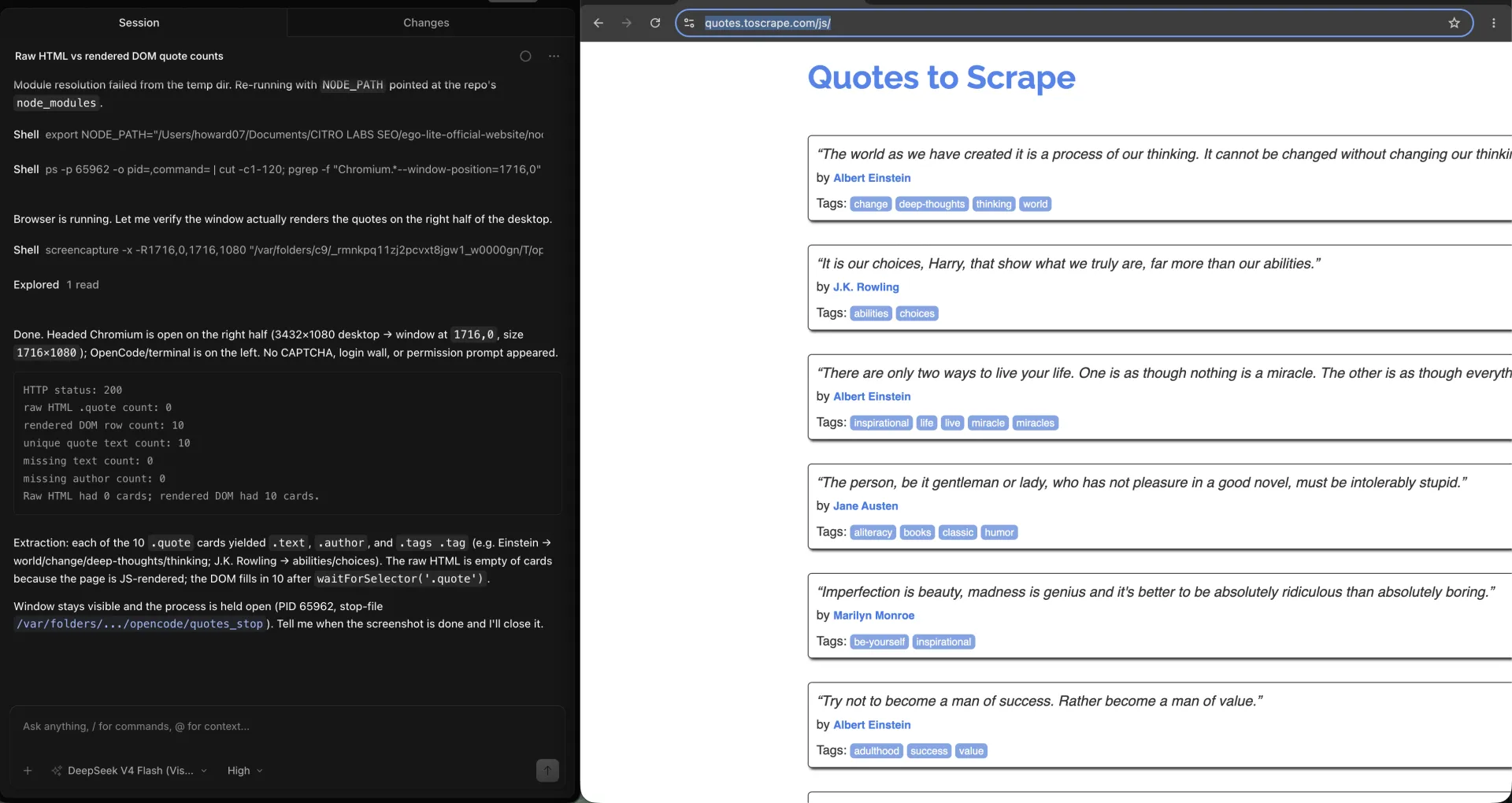
Locators are the cleaner path for a single field. Playwright locators re-query before each action, which is why they survive a re-render that breaks a stored element handle.
const title = await page.locator(".quote .text").first().innerText();
const author = await page.locator(".quote .author").first().innerText();
page.evaluate is the better list extract. It runs in the page and returns JSON. Keep the mapper small. Pull text, author, tags, and a unique key. Leave screenshots and PDFs out of the scrape loop.
CSS-hidden text still sits in the DOM. innerText follows layout. textContent does not. If a site truncates a title with CSS, textContent will still give you the full string. Decide which one you are collecting before you write the validator.
How do you intercept the page's own data?
Interception is useful when the page already fetches JSON that can be saved instead of parsed from cards. On quotes.toscrape.com/js that request never fires, and that is the point.
The quotes on that demo are not coming from an API. They are embedded as var data in the HTML, then painted into .quote nodes by jQuery. A response listener looking for JSON will see nothing useful.
Playwright's network docs show page.route and response listeners. Use them. Then record what the page actually sent, including nothing.
const jsonResponses = [];
page.on("response", async (response) => {
  const type = response.headers()["content-type"] || "";
  if (type.includes("json")) {
    jsonResponses.push({
      url: response.url(),
      status: response.status(),
    });
  }
});
await page.goto(url, { waitUntil: "domcontentloaded" });
await page.waitForSelector(".quote");
console.log(jsonResponses.length);
When there is no JSON body, fall back to the rendered cards or parse the inline script you already downloaded. Do not invent an endpoint because tutorials always show one. Oxylabs, BrowserStack, and ScraperAPI all demonstrate intercept. They do not tell you what happens when the site never fires the request.
How do you validate fields, duplicates, and counts?
A scrape is not done when the script exits 0. It is done when the file has the expected count, every required field is present, and the unique key does not collapse two rows into one.
A passing extract on this demo writes ten rows with unique texts and no missing authors. An extract before the cards exist writes 0 rows with the same happy logger unless count is checked.
function validate(rows, expectedCount) {
  const missing = rows.filter((row) => !row.text || !row.author);
  const unique = new Set(rows.map((row) => row.text));
  if (rows.length !== expectedCount) {
    throw new Error(`expected ${expectedCount}, got ${rows.length}`);
  }
  if (missing.length) {
    throw new Error(`${missing.length} rows missing text or author`);
  }
  if (unique.size !== rows.length) {
    throw new Error("duplicate texts");
  }
}
Use a small checklist and fail loud.
| Check | Pass | Fail mode to keep |
|---|---|---|
| Expected count | Ten cards after waitForSelector('.quote') | 0 rows if the extract runs before the painter |
| Required fields | text and author on every row | A selector that matches the card but misses .author |
| Unique key | Unique quote texts, not unique authors | Dedupe on author, which would collapse Einstein |
Keep the empty extract. The 0-row result is the evidence that the wait matters. Deleting it makes a later full extract look like a default.
What breaks a Playwright scrape?
The failures that matter here are empty renders, stale selectors, and rate limits. None of them look like a red stack trace if you only log row length after a catch that swallows errors.
Empty render: the navigation succeeded, the selector never matched, you saved []. Fix the wait. Do not retry the same extract against the same unfinished DOM.
Stale selector: .quote still exists, but the text moved. The run returns 10 rows of yesterday. Wait on a field that changes with the content, then diff the unique keys against the previous file.
Rate limit: a 429 is a stop sign. Read Retry-After when it is present, back off, and cap the retries. Hammering the same URL is how an IP ends up blocked, and this guide does not cover bypass.
async function gotoWithRetry(page, url, attempt = 0) {
  const response = await page.goto(url, { waitUntil: "domcontentloaded" });
  const status = response?.status() ?? 0;
  if (status === 429 || status >= 500) {
    if (attempt >= 3) throw new Error(`giving up on ${url}: ${status}`);
    const retryAfter = Number(response?.headers()["retry-after"]);
    const waitMs = Number.isFinite(retryAfter)
      ? retryAfter * 1000
      : 2 ** attempt * 1000;
    await page.waitForTimeout(waitMs);
    return gotoWithRetry(page, url, attempt + 1);
  }
  if (status && status >= 400) throw new Error(`${status} for ${url}`);
  return response;
}When is a visible browser agent the better path?
A visible browser agent is the better path when the wait is wrong, the selector moved, or a person has to look at the page and take over. It is not a replacement for a frozen Playwright loop you already trust in CI.
That is the complement, not the competitor. Playwright encodes the wait that is already understood. ego(lite) 0.5.0.32 keeps the task in a watched Chromium Space so the cards can be seen as they appear, the agent can be stopped, or a person can take over when the wait is lying. It reuses a real profile when the next scrape needs a login that already exists. It does not make a static HTML page cheaper, and it does not bypass a block. Changelog for that version is dated 2026-09-12 on the ego(lite) changelog.
We tested that isolation in ego(lite) from OpenCode. The Spaces overview kept the quotes scrape in its own running Space, with other work in a separate Space instead of sharing one headed Chromium window.
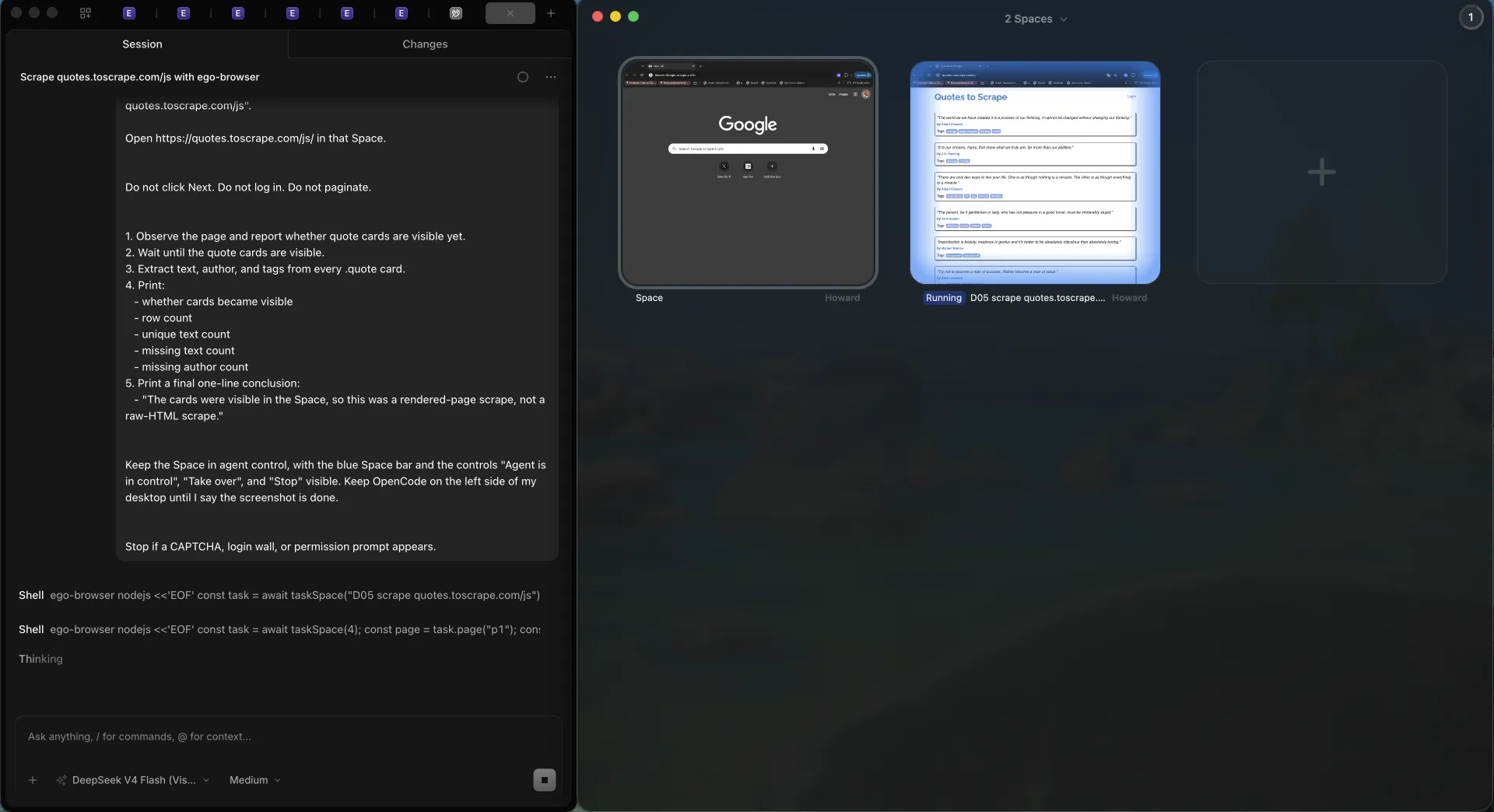
We tested the same public URL inside one of those Spaces. Space 4 stayed in agent control on quotes.toscrape.com/js, with Take over and Stop visible, and printed 10 unique cards.
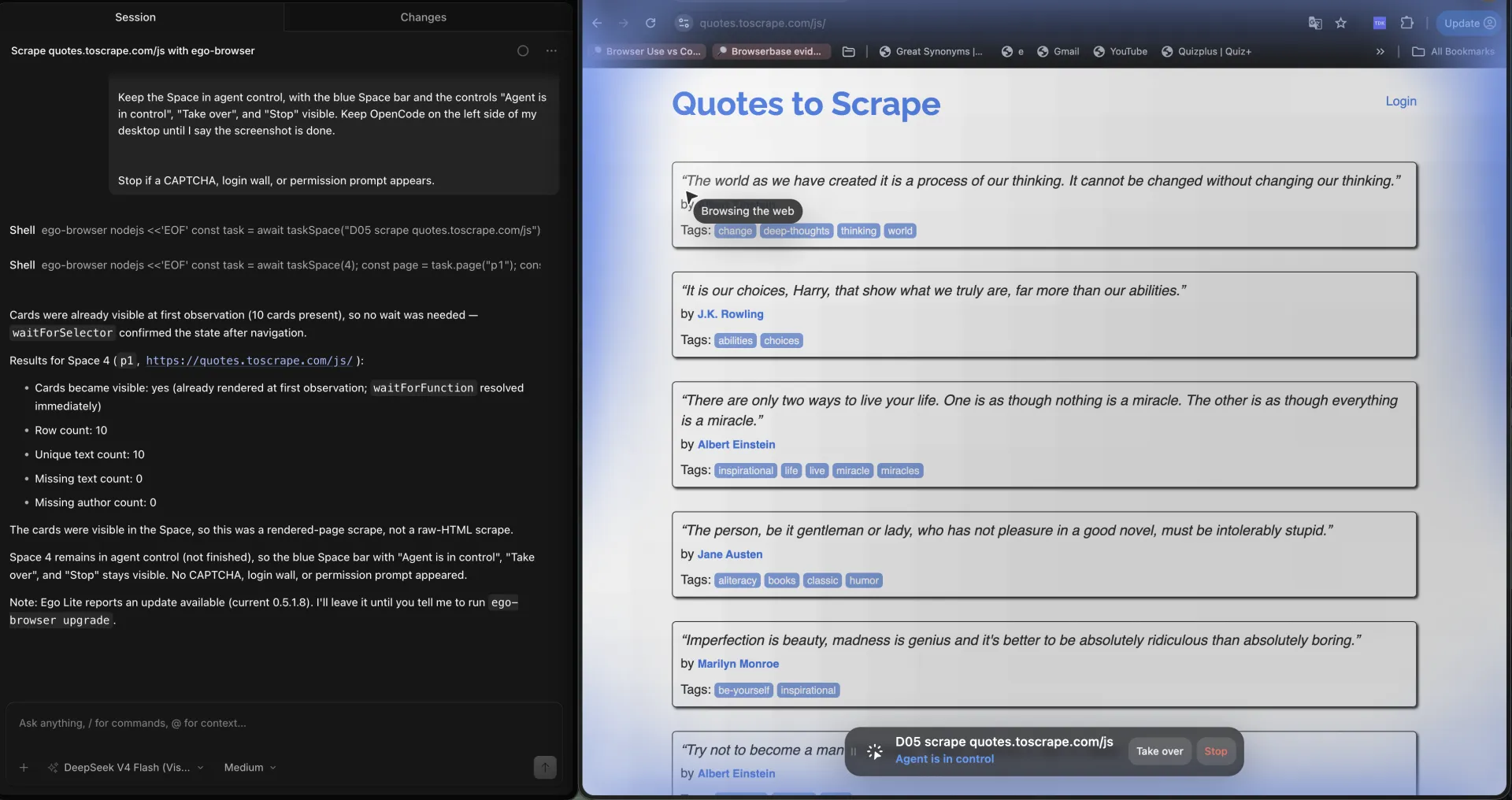
Headless versus headed trade-offs are covered in headless browser vs real browser for AI agents. Library choice is covered in Playwright vs Puppeteer for scraping. Product-level contrast lives on ego(lite) vs Playwright.
What are the challenges and limitations?
Playwright scraping fails in quieter ways than HTTP scraping, because the browser can look fine while the file is wrong.
The first limit is cost. One Chromium context is not one GET. If the cards are already in the HTML, you are paying for a browser you do not need.
The second is honesty about intercept. Tutorials treat XHR capture as the advanced move. On this demo the advanced move is admitting the payload is inline.
The third is pagination, and it stays a one-line limit here. Once one rendered page validates, numbered pages, Load More, and infinite scroll become their own job. Mixing those loops into this wait-and-extract page would hide the empty-DOM failure.
The fourth is permission. robots rules, terms, and personal data law still apply. A headed browser does not create a right to collect.
If the scrape is empty and the page looks full, wait for the card, then count rows. A headed window is not proof. On this fixture the intercept also found no JSON XHR; the quotes were already inline as var data.
FAQ
Is Playwright good for web scraping?
Playwright is good for scraping when the visible cards are missing from the raw HTML and the scraper can wait for them in a real browser. quotes.toscrape.com/js is the public example: a GET returns no .quote nodes, and a wait for .quote reads the painted cards. It is the wrong default for static HTML or a documented API.
When should I use HTTP instead of Playwright?
Use HTTP when the values are already in the response body. The JavaScript demo still contains var data with the quotes, even though it contains no .quote cards. If a parser of that payload is stable, skip the browser.
Why did my Playwright scrape return zero rows?
Zero rows usually means the extract ran before the cards existed. Reading the DOM at commit, before the painter runs, returns 0 quotes on this demo, then the rendered cards after waitForSelector('.quote'), with no exception in the empty case.
Should I wait for networkidle?
Wait for the selector that represents the data, not for a quiet network. networkidle can hang on analytics beacons. The passing wait on this demo is .quote, not networkidle.
How do I intercept JSON with Playwright?
Listen for responses whose content-type includes json, or route the URL the page already calls. On quotes.toscrape.com/js the quotes are inline, so there is no JSON XHR to capture. Intercept is optional. The DOM wait still works.
How do I scrape paginated lists with Playwright?
Finish one rendered page first: wait, extract, validate count. Numbered pages, Load More, and infinite scroll are a separate job. This page does not implement those loops.
How do I reuse a login in a Playwright scrape?
Save storage state after a login you are allowed to use, then load it in a later context. Treat the file as a secret and expect it to expire.
What should I do with a 429?
Stop, honor Retry-After when it is present, back off, and fail after a small retry cap. A 429 is a rate signal, not a selector problem.
Do I need ego(lite) for Playwright scraping?
No. Use Playwright when the wait and selector are already known. Use ego(lite) when the scrape needs a watched Space, a real signed-in profile, or a human takeover. On 2026-09-18 both paths extracted 10 unique cards from quotes.toscrape.com/js; the Space kept Take over and Stop visible.
Is scraping with a real browser legal?
It depends on the site, the data, the jurisdiction, and what you do with the file. Robots rules and terms still apply in a headed browser. This is not legal advice.
Playwright or Puppeteer for scraping?
Both can render the same page. The library choice is locators, waiting, and language bindings. The HTTP-versus-browser decision on this page comes first.
If the next scrape needs a watched browser rather than another encoded wait, ego(lite) is free to download. The price scraper walkthrough is one concrete job in that Space.