ego (lite)는 그저 브라우저일 뿐이고, ego는 여러 기기를 넘나드는 나만의 에이전트입니다.
대기자 명단 등록
ego lite vs Claude Chrome 확장 프로그램

최고의 Claude Chrome 확장 프로그램 대안

Claude Chrome extension is the plugin that lets Claude control Chrome: clicking, filling forms, navigating your signed-in browser. It only works when you run Claude Code's desktop app; run Claude Code from a terminal and there's nowhere to install it. ego lite doesn't care how you run your agent: /ego-browser works the same from a terminal or a desktop app, giving Claude its own Space in a separate browser with your real logins.

다음 소속 개발자들이 신뢰합니다
GoogleAmazonShopifyTikTokHarvardStanfordUSCUCLA

ego lite가 Claude Chrome 확장 프로그램보다 나은 이유

If you're running Claude Code from the terminal and searched for a way to give it Chrome, the honest answer is that Anthropic's plugin isn't reachable that way. It only installs through Claude Code's desktop app. ego lite is: run /ego-browser inside Claude Code, terminal or desktop, and the agent gets a browser of its own.

The agent never fights you for your browser again

Because every task gets its own Space (a separate workspace inside the same browser), you can watch it, stop it, or step in, and the agent never touches the tab you're using. Several tasks can run in parallel, all visible at once.

Claude Chrome extension works differently: it acts inside the Chrome window you're already using, in your live session, one task at a time, so that window isn't really yours again until the task finishes. Because the agent is acting inside your live, logged-in session, Anthropic's own testing found prompt-injection attacks succeeded up to 23.6% of the time without extra safety mitigations.

Faster on both tasks, measured against Claude Chrome extension

Claude Chrome extension works through one tool call at a time (one click, one keystroke, one read), and the model has to reason between each step. On two real tasks, that adds up: ranking OpenAI's X posts took Claude Chrome extension 5 minutes 30 seconds, and the Expedia flight-booking task took about 8 minutes.

ego lite reads the page as a compressed Snapshot and batches several actions into a few lines of JavaScript in a single turn, instead of one tool call at a time. On the same two tasks, ego lite finished in 87 seconds and 166 seconds: 3.79x faster and roughly 2.9x faster.

Time to finish the same tasks, shorter is better
Task 1: Rank OpenAI's X posts from the last 7 days
87 sego (lite)
330 sClaude Chrome extension
Task 2: Expedia: search, filter, and fill a flight booking
166 sego (lite)
480 sClaude Chrome extension

Run several tasks at once, in any agent you pick

Claude Chrome extension needs a paid Claude plan, and it can only handle one task at a time, in the window you're using.

ego lite is free, runs several tasks at once in separate Spaces, and works with Claude Code, Codex, Cursor, Gemini CLI, or any code-writing CLI agent, so switching agents doesn't mean changing your browser setup.

Works from Claude Code's terminal: the plugin doesn't

Claude Chrome extension only works when Claude Code runs as a desktop app. If you run Claude Code from a terminal instead, there's no menu, setting, or install path that reaches it. Browser control simply isn't available that way.

ego lite works the same either way: run /ego-browser inside Claude Code, whether it's running in a terminal or as a desktop app, and the agent gets a real browser of its own.

ego lite Chrome profile import: the same setup whether Claude Code runs in a terminal or as a desktop app

ego lite vs Claude Chrome 확장 프로그램

Feature comparison between ego lite and Claude Chrome extension.
기능ego liteClaude Chrome extension
에이전트가 일하는 곳In its own Space: a separate workspace, never your tabs지금 사용 중인 Chrome 창과 탭에서
실행 중에도 내 작업 계속Yes: agents run in parallel Spaces, you browse in yoursNot really: it's acting in the browser you're in, one task at a time
지원 에이전트Claude Code, Codex, Cursor, Gemini CLI 등 코드를 작성하는 모든 CLI 에이전트Claude 전용
로그인이 필요한 사이트 (SSO, 2FA)Yes: one-click Chrome profile import brings cookies and sessionsYes: it runs inside your already-signed-in Chrome
프롬프트 인젝션 노출에이전트는 지켜보거나 중단할 수 있는 별도의 헤드풀 Space에서 동작에이전트가 실사용 세션에서 동작. Anthropic의 분류기가 공격 성공률을 낮추지만, 완벽하지 않다고 스스로 경고
Extension reliabilityN/A: no extension to crash or disconnectReal user reports of Chrome crashing on use; Anthropic's own docs note responses are probabilistic and may misinterpret instructions
에이전트가 페이지에서 동작하는 방식Snapshot input plus batched JavaScript: several actions per turn확장 프로그램을 통해 사용자처럼 클릭하고 입력, 한 단계씩
Speed on a real task87s vs Claude's 5:30 on the same X-research task; 166s vs Claude's ~8 min on the same Expedia flight taskReasons and calls a tool for every click and keystroke: slower on both real tasks tested
재사용 가능한 스킬 (출시 예정)성공한 실행을 재사용 가능한 스킬로 압축하며, 에이전트가 이를 반복할수록 복잡한 작업에서 최대 5배 빠름 (제한적 베타)내장된 대응 기능 없음
가격무료, 구독 없음Beta on paid Claude plans, desktop app required
Works from Claude Code's terminalYes: /ego-browser works the same in a terminal or a desktop appNo: only installs and runs inside Claude Code's desktop app
지원 플랫폼macOS (Chromium 기반 브라우저)모든 데스크톱 OS의 Chrome
마지막 업데이트 2026년 8월 04일

매끄럽게 전환해 보세요

You don't have to uninstall anything. If what you want is Claude doing browser work (not just chatting about the page), the switch takes minutes.

  1. ego (lite) 다운로드

    ego lite를 다운로드하고 Chrome 프로필을 원클릭으로 가져오세요. 로그인, 쿠키, 확장 프로그램까지 함께 넘어오므로 에이전트가 SSO나 캡차에서 막히지 않습니다.

  2. /ego-browser로 첫 작업을 실행해보세요
    에이전트에 붙여넣기

    /ego-browser Open ego.app and join the waitlist

    Claude Code 안에서 /ego-browser를 실행하세요. 확장 프로그램 설치도, MCP 서버도, 설정 파일도 필요 없습니다.

  3. 작동하는 모습을 확인하세요
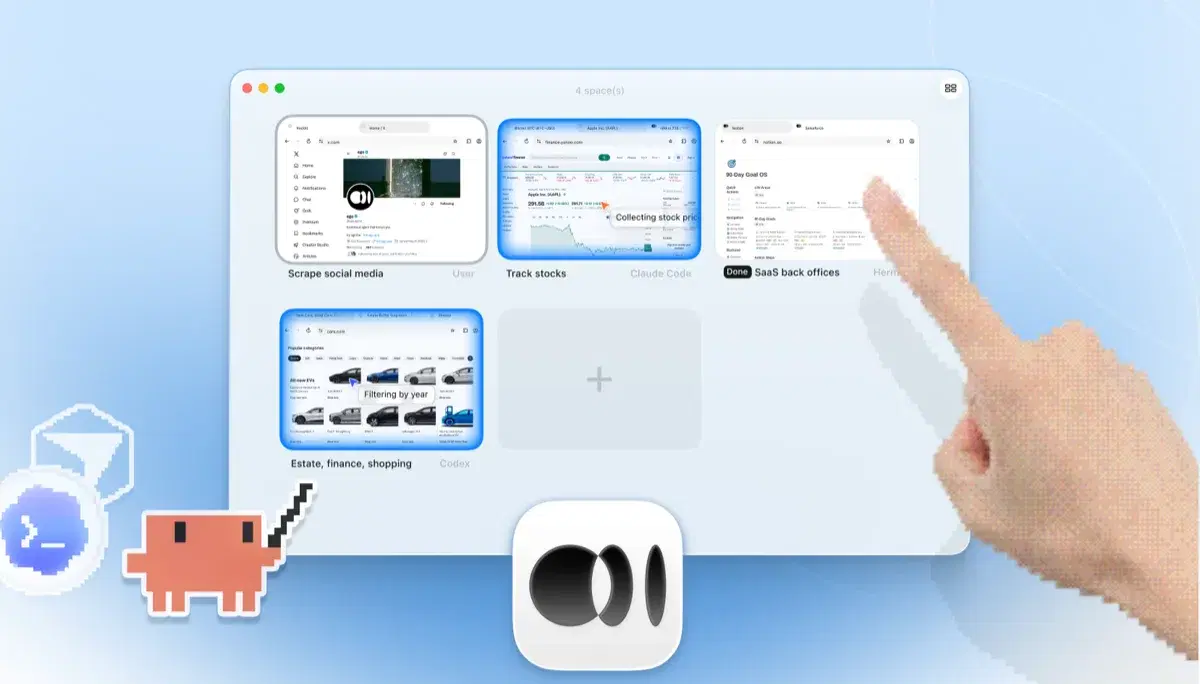
    네 개의 브라우저 작업이 나란히 실행되는 ego lite Spaces 개요: Yahoo Finance에서 Apple 주가를 추적하는 Claude Code, cars.com에서 연식별로 차량을 필터링하는 Codex, SaaS 백오피스 작업을 마무리하는 Hermes, X를 스크래핑하는 사용자, 그리고 손가락으로 +를 눌러 새 Space를 여는 모습

    Give Claude a real multi-step task (the kind you'd hesitate to run in your own tabs) and watch it work in its own Space while you keep browsing.

Keep the Claude Chrome extension if you like it for summarizing and Q&A on the page you're reading. ego lite replaces the take-actions-in-my-browser part, not the chat.

각 도구를 언제 사용해야 할까요

ego (lite)를 선택해야 할 때

  • You run Claude Code from a terminal, where the plugin has no install path at all. Run /ego-browser and the agent gets a browser regardless.
  • 작업이 다단계이고 로그인이 필요하며, 세션이 진행 중인 탭보다는 별도의 Space에서 돌아가길 원할 때.
  • You want several tasks in parallel Spaces while you keep browsing. The extension works one task at a time in your window.
  • 무료에 에이전트 불문이길 원할 때: 브라우저 쪽에는 유료 Claude 플랜이 필요 없고, 에이전트를 바꿔도 같은 설정이 그대로 동작합니다.

이럴 때 Claude Chrome 확장 프로그램을 선택하세요

  • You're already running Claude Code's desktop app, and its built-in Chrome plugin is right there, with no extra install.
  • You're a claude.ai user who wants light automation (a form filled, a page acted on) without installing any dev tooling.
  • You don't use a CLI coding agent at all. ego lite assumes one; the extension only needs Claude's desktop app and a paid plan.
  • 공개된 프롬프트 인젝션 완화 장치가 내장된, Anthropic의 공식적이고 안전성 검증을 거친 경로를 원할 때.

AI 에이전트에게 진짜 브라우저를 선사하세요

무료이며 Mac에서 실행되고, 클릭 한 번으로 Chrome 프로필을 가져옵니다. Claude Code, Codex, Cursor 등 코드를 작성하는 모든 CLI 에이전트와 함께 사용할 수 있습니다.

Still weighing your options? See how Claude Chrome extension compares with the other tools in the same space.

자주 묻는 질문

Claude Chrome extension is Anthropic's official way to give Claude control of Chrome (clicking, filling forms, navigating) using your signed-in browser. It's built into Claude Code's desktop app: enable it there and Claude reaches Chrome directly as part of a session. The terminal (CLI) version of Claude Code has no equivalent install path; the plugin simply isn't available from there. It launched as a research preview in August 2025, and Anthropic's public safety work on it has been unusually serious. If you're already running Claude Code's desktop app, it's a well-built way to hand off browser tasks.

As of mid-2026 it's in beta on paid Claude plans. For Claude Code specifically, it only works inside the desktop app; there's no way to reach it from a terminal session. It started in August 2025 as a research preview limited to 1,000 Max-plan users while Anthropic worked on prompt-injection defenses, then rolled out more broadly. There's no free tier.

No. It only works inside Claude Code's desktop app. If you run Claude Code from a terminal, there's no menu or install path to reach it: browser control for Claude Code is a desktop-only feature. ego lite doesn't make that distinction: install ego lite and run /ego-browser inside Claude Code, terminal or desktop app, and the agent gets Snapshot access to pages and executes JavaScript in the browser directly. No extension or MCP configuration involved.

If your goal is an agent that does browser work (research, form filling, testing, back-office tasks), yes. ego lite runs those tasks in parallel Spaces with your real logins, works with Claude Code (terminal or desktop) and other agents, and is free. If your goal is chatting with the page you're currently reading inside claude.ai's experience, the extension is built for that and ego lite isn't trying to replace it.

어떤 AI 에이전트 브라우저도 면역이 아니며, 아니라고 주장하는 페이지는 의심해야 합니다. Anthropic이 공개한 브라우저 사용 테스트가 이것이 왜 중요한지 보여 줬습니다. 페이지에 숨겨진 지시문이 에이전트를 조종할 수 있고, 완화 조치는 위험을 줄일 뿐 없애지 못합니다. ego lite의 구조적 차이는 에이전트가 지금 활발히 쓰는 탭과 세션이 아니라 자체 Space에서 동작한다는 점, 모든 것이 헤드풀이라는 점, 그리고 언제든 지켜보거나 직접 개입할 수 있다는 점입니다.

ego lite itself is free with no subscription. You bring your own agent, so Claude Code still needs whatever plan or API access you already use it with. The browser side never charges you.

Yes. One-click Chrome profile import brings your real logins, cookies, sessions, and extensions into ego lite, so agents don't get stuck on captcha, 2FA, or SSO. That's the same signed-in advantage the extension gets from running in your Chrome, just without the agent operating in your active window.