ego (lite)는 그저 브라우저일 뿐이고, ego는 여러 기기를 넘나드는 나만의 에이전트입니다.
대기자 명단 등록
ego lite vs Codex Chrome 확장 프로그램

최고의 Codex Chrome 확장 프로그램 대안

OpenAI's Codex Chrome extension lets Codex take over tabs in the signed-in Chrome you're using, one browser shared between you and the agent. ego lite gives Codex its own Spaces in a separate browser that inherited your logins, so it works in parallel while your tabs stay yours.

다음 소속 개발자들이 신뢰합니다
GoogleAmazonShopifyTikTokHarvardStanfordUSCUCLA

ego lite가 Codex Chrome 확장 프로그램보다 나은 이유

Both exist for the same reason: Codex needs logged-in browser context to be useful on real sites. The extension borrows yours. ego lite imports your Chrome profile once and gives Codex a browser of its own. Run /ego-browser inside Codex and it's connected.

The agent never fights you for your browser again

Because every task gets its own Space (a separate workspace inside one browser), Codex can run several tasks in parallel without ever touching the tabs you're using, and there's no permission prompt each time it opens a new site.

The Codex Chrome extension works differently: it takes over your existing Chrome tabs and acts inside the session you're already using, one task at a time. Because the agent is acting inside your live, logged-in browser, OpenAI has Codex ask for approval before touching each new website, so real tasks pause for permission clicks.

6.48x faster, and it finished the task the extension couldn't

Codex Chrome extension acts one click, one keystroke, one tool call at a time, and on real tasks that adds up: ranking OpenAI's X posts took it 9 minutes 24 seconds. On the Expedia flight-booking task, it never finished at all. A safety review blocked it after 15 minutes.

ego lite reads the page as a compressed Snapshot and batches several actions into a few lines of JavaScript per turn. Same two tasks: 87 seconds, and 166 seconds to completion. That's 6.48x faster on the first, and the only one of the two that finished.

Time to finish the same tasks, shorter is better
Task 1: Rank OpenAI's X posts from the last 7 days
87 sego (lite)
564 sCodex Chrome extension
Task 2: Expedia: search, filter, and fill a flight booking
166 sego (lite)
BlockedCodex Chrome extension, after 900 s

Works with Codex, and with everything else, in parallel

The extension only works with Codex, only in official Chrome (not Arc, Brave, or Edge), and it needs the Codex desktop app running and paired before anything works at all.

ego lite works with any code-writing CLI agent (Codex, Claude Code, Cursor, Gemini CLI) and runs several of their tasks in parallel. Switch agents later, and the browser side stays exactly the same.

Works from Codex's terminal: the plugin doesn't

The Codex Chrome extension only works through the Codex desktop app. OpenAI's own GitHub issues confirm that a terminal-only Codex CLI session can't reach the extension at all. The request fails immediately with the error "Browser is not available: extension."

ego lite works the same whether Codex is running in a terminal or as a desktop app: run /ego-browser, and the agent gets a real browser of its own either way.

ego lite Chrome profile import: the same setup whether Codex runs in a terminal or as a desktop app

ego lite vs Codex Chrome 확장 프로그램

Feature comparison between ego lite and Codex Chrome extension.
기능ego liteCodex Chrome extension
에이전트가 일하는 곳In its own Space: never the tabs you're using로그인된 내 Chrome에서 기존 탭을 가져가며
실행 중에도 내 작업 계속Yes: parallel Spaces, you browse in yoursNot really: it's driving the browser you're in
지원 에이전트Codex, Claude Code, Cursor, Gemini CLI 등 코드를 작성하는 모든 CLI 에이전트Codex 전용
필요한 브라우저None: ego lite is the browser (Chromium, macOS)공식 Chrome 전용. Arc, Brave, Edge 미지원
설정앱 설치 후 Codex 안에서 /ego-browser 실행Codex 데스크톱 앱 설치 후 Plugins 메뉴에서 확장 프로그램 설치
로그인이 필요한 사이트 (SSO, 2FA)Yes: one-click Chrome profile importYes: it acts in your already-signed-in Chrome
권한 모델프로필 가져오기로 로그인 상태를 한 번 허용. 어느 Space든 지켜보거나 넘겨받기 가능웹사이트별 승인 프롬프트, 도메인 허용/차단 목록
Extension reliabilityN/A: no native-messaging pairing between an extension and a desktop appOpenAI's own GitHub issues show a recurring pattern of the extension and desktop app disagreeing on connection state, plus native-host registration and handshake timeouts on Windows
에이전트가 페이지에서 동작하는 방식Snapshot input plus batched JavaScript: several actions per turn내 탭에서 단계별 브라우저 동작
Speed on a real task87s vs Codex's 9:24 on the same X-research task; 166s on the same Expedia flight task9:24 on the X-research task; blocked by a safety review after 15 minutes on the Expedia flight task, never finished
가격무료, 구독 없음Included with Codex: requires a ChatGPT plan with Codex access
Works from Codex's terminalYes: /ego-browser works the same in a terminal or a desktop appNo: the CLI can't reach the extension backend at all ("Browser is not available: extension")
마지막 업데이트 2026년 8월 04일

매끄럽게 전환해 보세요

Already running the Codex Chrome extension? You keep Codex and change what it drives. The switch is a few minutes, and nothing has to be uninstalled.

  1. ego (lite) 다운로드

    Download ego lite and import your Chrome profile in one click. The signed-in context the extension borrows from Chrome becomes real profile state in a browser Codex can call its own.

  2. /ego-browser로 첫 작업을 실행해보세요

    에이전트에 붙여넣기

    /ego-browser Open ego.app and join the waitlist

    Codex 안에서 /ego-browser를 실행하세요. 데스크톱 앱 플러그인도, 확장 프로그램 페어링도 없습니다.

  3. 작동하는 모습을 확인하세요
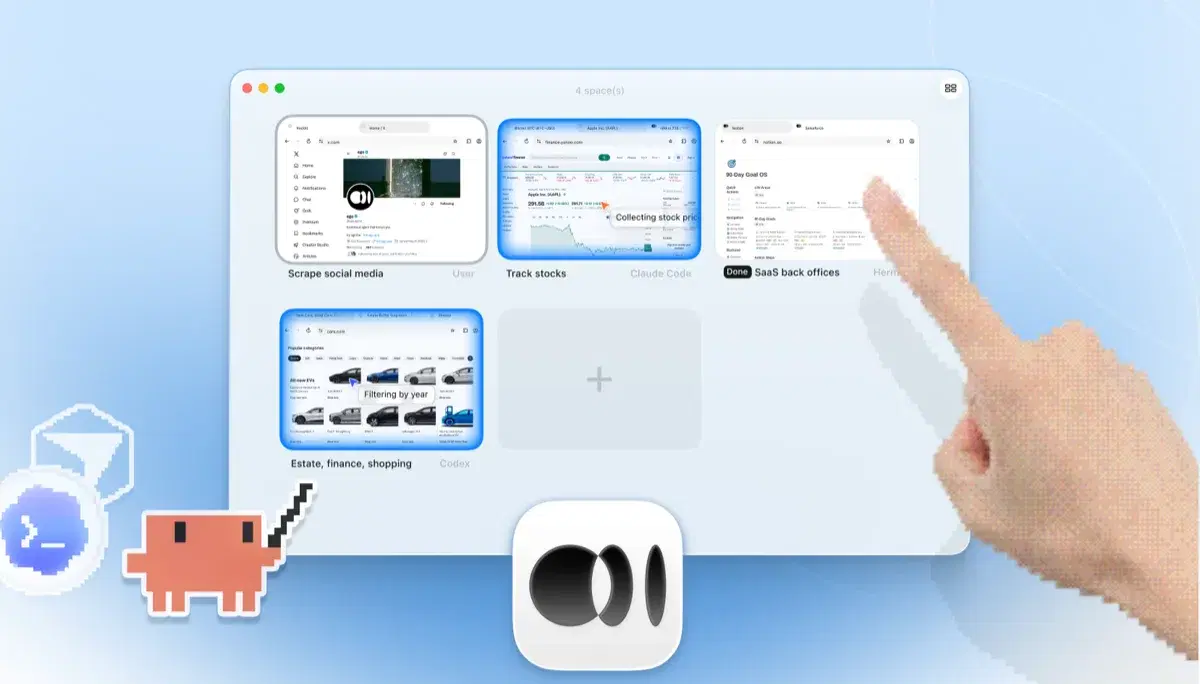
    네 개의 브라우저 작업이 나란히 실행되는 ego lite Spaces 개요: Yahoo Finance에서 Apple 주가를 추적하는 Claude Code, cars.com에서 연식별로 차량을 필터링하는 Codex, SaaS 백오피스 작업을 마무리하는 Hermes, X를 스크래핑하는 사용자, 그리고 손가락으로 +를 눌러 새 Space를 여는 모습

    Re-run a task you'd normally hand the extension (a dashboard read, a form workflow, a multi-tab test) and keep using your own browser while it executes in its Space.

일부 워크플로가 확장 프로그램에 얽혀 있다면 그대로 두세요. ego lite는 Chrome과 나란히 실행되므로 비교하는 동안 아무것도 깨지지 않습니다.
각 도구를 언제 사용해야 할까요

ego (lite)를 선택해야 할 때

  • You run Codex from a terminal, where the extension's backend isn't reachable from CLI sessions at all. Run /ego-browser and the agent gets a browser regardless.
  • You want Codex running longer, multi-step tasks in its own Spaces, in parallel, while your tabs stay yours.
  • 작업 도중 웹사이트별 승인 프롬프트를 일일이 클릭하기보다, 프로필 가져오기로 로그인 상태를 한 번에 허용하고 싶을 때.
  • You use other agents too: the same /ego-browser setup works with Claude Code, Cursor, and Gemini CLI, not just Codex.

이럴 때 Codex Chrome 확장 프로그램을 선택하세요

  • You're already running the Codex desktop app, and the extension is right there in its Plugins menu, with no extra install.
  • You want a quick action on a page you already have open: handing Codex your live Chrome session is the shortest path.
  • 모든 동작을 웹사이트별 승인 프롬프트와 도메인 허용 목록으로 감싼 OpenAI의 공식 가드레일이 중요할 때.

AI 에이전트에게 진짜 브라우저를 선사하세요

무료이며 Mac에서 실행되고, 클릭 한 번으로 Chrome 프로필을 가져옵니다. Claude Code, Codex, Cursor 등 코드를 작성하는 모든 CLI 에이전트와 함께 사용할 수 있습니다.

Still weighing your options? See how Codex Chrome extension compares with the other tools in the same space.

자주 묻는 질문

The Codex Chrome extension is OpenAI's official way to give Codex a browser, launched in May 2026 and installed through the Codex desktop app's Plugins menu. It lets Codex act in your signed-in Chrome for tasks that need logged-in context (reading dashboards, filling forms, testing sites across tabs) with a genuinely careful permission model: Codex asks before touching each new website, and you manage domain allowlists and blocklists. If you're all-in on Codex and official Chrome, it's a polished, well-scoped tool.

네. OpenAI가 2026년 5월 Codex 데스크톱 앱의 플러그인 시스템 일부로 출시했고, 2026년 6월에는 EEA, 영국, 스위스로 확대되었습니다. 로그인 컨텍스트가 필요한 작업을 로그인된 Chrome 안에서 Codex가 수행하게 하며, 사이트별 권한 프롬프트가 붙습니다.

사용 중인 브라우저를 점거하지 않으면서 Codex가 브라우저 작업을 해내길 원한다면, 그렇습니다. ego lite는 가져온 로그인과 함께 Codex에게 자체 Spaces를 주고, 작업을 병렬로 실행하며, 무료입니다. OpenAI의 승인 프롬프트 가드레일이 붙은 Chrome 안 공식 단일 벤더 경로를 특별히 원한다면 확장 프로그램이 낫습니다.

Install ego lite, import your Chrome profile, then run /ego-browser inside Codex. The agent reads pages as compressed Snapshots and executes batched JavaScript in the browser. No extension, no MCP server, no plugin configuration.

No. As of mid-2026 it supports official Chrome only. ego lite sidesteps the question: it is its own Chromium-based browser on macOS, and your existing Chrome profile imports into it in one click.

No. It's bound to the Codex desktop app. OpenAI's own GitHub issues confirm a terminal-only Codex CLI session can't acquire the extension backend at all, failing with "Browser is not available: extension." ego lite doesn't make that distinction: install ego lite and run /ego-browser inside Codex, terminal or desktop app, and the agent gets a real browser either way.

You're not alone. OpenAI's own GitHub issue tracker has a recurring thread of reports where the extension and the Codex desktop app disagree on whether they're connected, plus native-host registration and handshake timeouts, mostly on Windows. That's the tradeoff of pairing a browser extension to a separate desktop app over native messaging. ego lite doesn't have that pairing step: it is the browser Codex drives directly.

Yes. They don't conflict: the extension lives in Chrome, ego lite is a separate browser. A common split: the extension for quick actions in a page you already have open, ego lite for longer parallel tasks you don't want running in your active window.