ego (lite)는 그저 브라우저일 뿐이고, ego는 여러 기기를 넘나드는 나만의 에이전트입니다.
대기자 명단 등록
ego lite vs Codex browser

최고의 Codex browser 대안

Codex browser is @Browser in the ChatGPT desktop app: a local Chromium panel Codex can drive, with its own state separate from your Chrome. The Codex CLI has no browser at all.

Run /ego-browser and Codex controls ego lite, the browser you already use, in the CLI and on desktop. Import your Chrome profile and finish whole tasks 3 to 4x faster than Codex browser.

다음 소속 개발자들이 신뢰합니다
GoogleAmazonShopifyTikTokHarvardStanfordUSCUCLA

ego lite가 Codex browser보다 나은 이유

You keep Codex. ego lite is which browser it reaches for: your imported Chrome profile with sessions already in place, not a second Chromium you sign into site by site. It works from the CLI where @Browser cannot run, and it beats @Browser on speed, parallelism, tokens, and logins where it can.

실제 작업에서 3~4배 빠름

In the Codex CLI there is no browser at all: the skill may appear, then report unavailable, and you verify changes yourself. On desktop, @Browser re-reads the page through domSnapshot() at every step, and the panel sits idle while Codex thinks.

Run /ego-browser and Codex controls ego lite directly. Every page arrives as a Snapshot: a compressed accessibility tree with stable @N refs Codex can act on instantly. Codex spends its time on the task, not waiting on snapshots or handoffs, finishing whole tasks 3 to 4x faster than Codex browser.

Time to finish a task, shorter is better
81.8 sego lite
282.9 sagent browser
Data source - Task: scrape the main posts from the X account from the last 7 days

병렬 멀티태스킹으로 더 빠르게 실행

The CLI cannot run browser tasks in parallel because it has no browser. On desktop, @Browser is one panel on one task, and browser work draws from the same usage allowance as your coding work.

In ego lite there's no cap on how many Spaces you open inside the same browser: each one runs its own task at the same time, controlled by Codex or another coding agent via /ego-browser on its own imported Chrome profile. None of them ever steals the tab you're using, and you can watch or take over any Space anytime.

불필요한 왕복 없이 토큰 비용은 더 적게

On desktop, every @Browser action is its own round trip through the model: domSnapshot(), click, domSnapshot() again. Each result comes back before the next move is chosen, and that spend comes out of the same allowance as your coding work. In the CLI there is no @Browser, so you never get this loop built in.

Run /ego-browser and Codex batches several actions in a few lines of JavaScript per turn to control ego lite. Stacked with Snapshot input, the same task completes on far fewer tokens overall.

Claude Code · ego lite
>/ego-browser Add the first product to the cart, then check checkout loads
Bash(
ego-browser nodejs <<'EOF' await openOrReuseTab('localhost:3000') await click('.product-card') await click('.add-to-cart') await click('a[href="/checkout"]') cliLog('checkout loaded') EOF
)
Output:
[t=4480ms] checkout loaded
Done. Both steps work.
─── 1 tool call · 1.1k tokens ───
Codex · @Browser
>Add the first product to the cart, then check checkout loads
browser.tabs.new() (@Browser)
Tab
Tab created (about:blank)
1.6k tokens sent so far
Approve localhost for this site, then navigate.
tab.goto (@Browser)("http://localhost:3000")
Result
Navigated to http://localhost:3000
2.8k tokens sent so far
Page is up. Reading the DOM before choosing a target.
tab.playwright.domSnapshot() (@Browser)
DOM snapshot
… +187 lines (ctrl+o to expand)
4.6k tokens sent so far
First product card is .product-card. Clicking it.
tab.playwright.locator(".product-card").click() (@Browser)
Result
Clicked .product-card
6.3k tokens sent so far
Product page rendered. Snapshot again: prior refs are stale.
tab.playwright.domSnapshot() (@Browser)
DOM snapshot
… +203 lines (ctrl+o to expand)
8.4k tokens sent so far
Add to cart is .add-to-cart.
tab.playwright.locator(".add-to-cart").click() (@Browser)
Result
Clicked .add-to-cart
10.2k tokens sent so far
Added. Opening checkout, then confirming the form with a snapshot.
tab.playwright.locator("a[href='/checkout']").click() (@Browser)
Result
Clicked a[href='/checkout']
tab.playwright.domSnapshot() → payment form present
13.6k tokens sent so far
─── 7 tool calls · 13.6k tokens ───
같은 작업, 같은 모델. 왼쪽: ego lite의 배치 JavaScript 호출 한 번, 총 1.1k 토큰. 오른쪽: Codex 내장 브라우저, 왕복 7번, 토큰 13.6k까지 상승.

같은 Chrome, 에이전트 네이티브

In the CLI, Codex never sees your Chrome logins because there is no browser. On desktop, @Browser uses separate state: OpenAI's help center says it does not use your Chrome profile, cookies, tabs, or extensions. You sign into a second browser by hand, one site at a time.

Built on Chromium, ego lite imports your entire Chrome setup in one click. When Codex runs /ego-browser, it controls ego lite with your real sessions already in place, including the 2FA trust you already have, so it doesn't stall on login walls you passed months ago.

ego lite Chrome 프로필 가져오기: 로그인 정보까지 클릭 한 번으로 설정 완료

ego lite vs Codex browser

ego lite와 Codex browser의 기능 비교.
기능ego liteCodex browser
Codex CLI에서 동작Yes. Run /ego-browser and the coding agent controls ego liteNo. Only the desktop app has @Browser
실제 Chrome 로그인 정보를 그대로 재사용Yes, one-click Chrome profile importNo. Separate browser state, signed in by hand per site
크로스 오리진 iframe과 패스키Snapshot reaches into cross-origin iframes and shadow DOMOpen issues: cross-origin iframe input unsupported; passkeys incomplete
에이전트가 페이지에서 동작하는 방식Coding agent batches multiple actions in JavaScript per turn via /ego-browserOne tool call per action, result read back each time
작업당 토큰 비용Lower: Snapshot plus batched actions, measured per task더 높음: 매 단계가 컨텍스트를 모델로 되돌림
작업이 청구되는 대상추가 없음. 브라우저는 무료이고 로컬The same coding allowance as the rest of your Codex work (5-hour window plus a weekly cap)
병렬 작업 분리Unlimited Spaces in one browser, bounded by your machine세션당 내장 브라우저 패널 하나
일상적으로 쓰는 브라우저 역할도 겸함네. 사용자는 자신의 Space에서 브라우징하고, 에이전트는 각자의 Space에서 작업해요No. A separate panel with separate state
실제 계정과의 격리No. The coding agent controls ego lite inside your loginsYes, by design: separate state, no path to personal accounts
재사용 가능한 스킬 (출시 예정)성공한 실행을 재사용 가능한 스킬로 압축하며, 에이전트가 이를 반복할수록 복잡한 작업에서 최대 5배 빠름 (제한적 베타)브라우저 작업용 내장 동등 기능 없음
가격과 가용성Free, no subscription. macOS, Chromium onlyIncluded with ChatGPT plans; Computer Use is region-limited
마지막 업데이트 2026년 7월 30일

매끄럽게 전환해 보세요

You are not switching away from Codex. Run /ego-browser so Codex controls ego lite, a Chromium browser that already holds your sessions, from the CLI or alongside @Browser on desktop.

  1. ego (lite) 다운로드

    ego lite를 다운로드하고 클릭 한 번으로 Chrome 프로필을 가져오세요. 로그인 정보, 쿠키, 확장 프로그램까지 그대로 따라옵니다.

  2. /ego-browser로 첫 작업을 실행해보세요

    에이전트에 붙여넣기

    /ego-browser ego.app에 접속해 대기 명단에 등록하세요

    Run /ego-browser in Codex and paste one sentence. Works in the CLI; no MCP config, no per-site approval step first.

  3. 작동하는 모습을 확인하세요
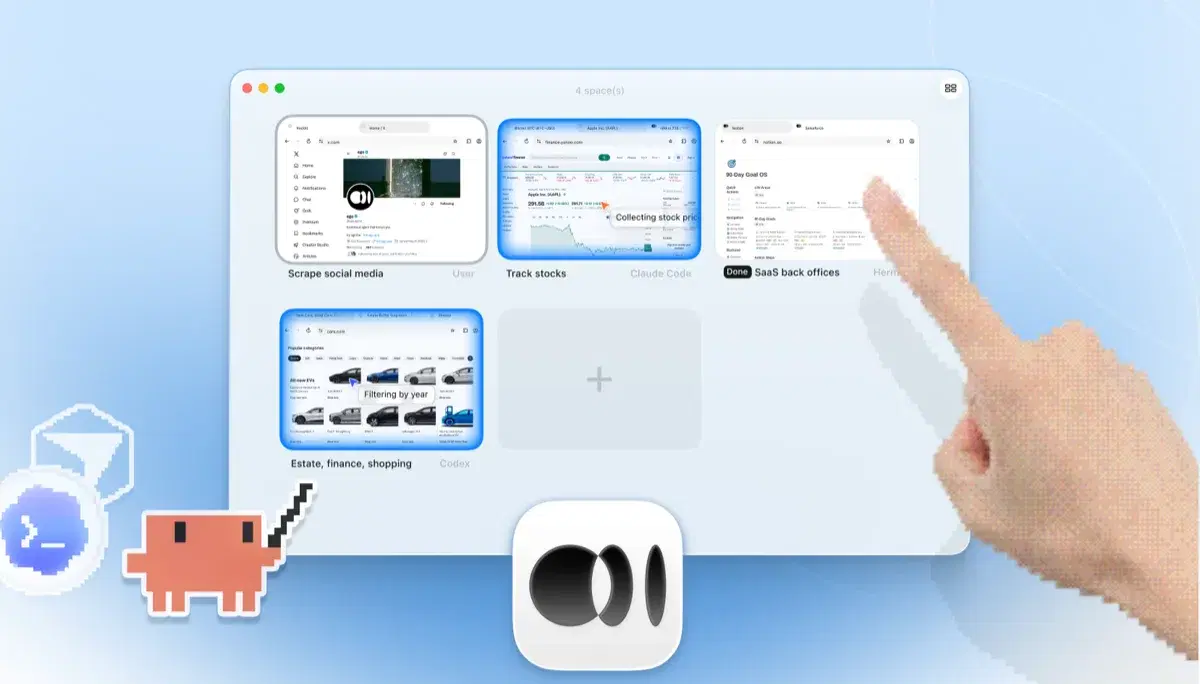
    네 개의 브라우저 작업이 나란히 실행되는 ego lite Spaces 개요: Yahoo Finance에서 Apple 주가를 추적하는 Claude Code, cars.com에서 연식별로 차량을 필터링하는 Codex, SaaS 백오피스 작업을 마무리하는 Hermes, X를 스크래핑하는 사용자, 그리고 손가락으로 +를 눌러 새 Space를 여는 모습

    The task runs in its own Space, so your tabs stay untouched. Take over anytime. Results land back in the Codex CLI.

Keep @Browser on desktop for localhost previews and the annotation loop: select an element, comment, fix exactly that.

각 도구를 언제 사용해야 할까요

ego (lite)를 선택해야 할 때

  • You want browser work from the Codex CLI, where @Browser does not run.
  • Logged-in tasks should start in your real Chrome, not a second browser you authenticate site by site.
  • Even on desktop, whole tasks behind SSO feel slow in @Browser's one-panel, one-action loop.
  • You want parallel Spaces without spending Codex allowance on routine @Browser clicking.

Codex browser를 선택해야 할 때

  • You want zero setup: @Browser is already in a ChatGPT plan you pay for.
  • You're debugging your own frontend on localhost and want CDP access from inside the agent.
  • You want the annotation loop: select an element, comment, fix exactly that.
  • You want the agent to have no path to your real accounts. Separate state is a deliberate safety tradeoff.

AI 에이전트에게 진짜 브라우저를 선사하세요

무료이며 Mac에서 실행되고, 클릭 한 번으로 Chrome 프로필을 가져옵니다. Claude Code, Codex, Cursor 등 코드를 작성하는 모든 CLI 에이전트와 함께 사용할 수 있습니다.

아직 저울질 중이신가요? Codex browser가 같은 분야의 다른 도구와 어떻게 다른지 보세요.
자주 묻는 질문

Codex browser is OpenAI's built-in browser for Codex, reached with @Browser in the ChatGPT desktop app. It is a local Chromium panel you can watch and take over, with DOM and accessibility-tree reading plus CDP access in Developer mode. For localhost frontend work it is genuinely good, and it is included in ChatGPT plans. It does not use your Chrome profile, and it is not available in the Codex CLI. The Codex Chrome extension is a separate surface covered on its own compare page.

Yes, for both surfaces. In the Codex CLI, ego lite is the Chromium browser Codex lacks. On desktop, it beats @Browser on speed, parallelism, tokens, and logins because Codex controls ego lite with batched JavaScript instead of one domSnapshot round trip per click. Keep @Browser for localhost previews and the annotation loop.

Codex browser use is OpenAI's @Browser feature in the ChatGPT desktop app: Codex can open pages, click, and inspect them in a local Chromium panel. The Codex CLI has no browser. Run /ego-browser and Codex controls ego lite, a Chromium browser with your imported Chrome profile, from the CLI and beats @Browser on whole logged-in tasks.

OpenAI Codex browser is the built-in Chromium panel reached with @Browser in the ChatGPT desktop app. It is local, not cloud, and separate from your Chrome profile. ego lite is not a replacement for Codex itself. It is the Chromium browser Codex controls when you run /ego-browser from the CLI or want your real Chrome sessions on desktop.

In the ChatGPT desktop app, yes, via @Browser for codex web browser tasks. In the Codex CLI, no: only web search snippets, no page control. Codex cloud blocks internet by default in the agent phase. Run /ego-browser so Codex controls ego lite, a Chromium browser, from the CLI.

No. The browser skill may still appear, then report unavailable. Run /ego-browser so Codex controls ego lite, a Chromium browser on your Mac, from the same terminal. On desktop, @Browser exists but uses separate state and a slower one-action loop; ego lite still wins for logged-in whole tasks.

On desktop, invoke @Browser and Codex drives its built-in panel one action at a time: tab.goto, domSnapshot, locator click. From the CLI, install ego lite, import your Chrome profile, and run /ego-browser so Codex controls ego lite against your real sessions with batched JavaScript instead of seven round trips per task.

Yes, into its own browser state, not your Chrome profile. OpenAI's help center points to the Codex Chrome extension when you need existing cookies or sessions. ego lite imports your profile once, so Codex starts inside the logins and 2FA trust you already have.

No. @Browser is an embedded Chromium panel in the desktop app on your machine. ChatGPT's separate cloud browser is a different surface. ego lite is also a local Chromium browser on your Mac: free, no subscription.

Yes. @Browser draws on the same coding allowance as the rest of your Codex work. ego lite adds no meter of its own; you only pay model tokens your agent already spends, and batched JavaScript keeps per-task totals lower than @Browser's one-action loop.

Playwright MCP works in the CLI but needs MCP config and one tool call per action against a blank profile. ego lite needs no MCP: run /ego-browser against your real Chrome profile from Codex, Claude Code, or Cursor. See ego lite vs Playwright MCP.