Hermes Agent GitHub 儲存庫與瀏覽器設定:搭配 ego(lite) 使用


搜尋「Hermes Agent GitHub」通常代表兩件事:找到專案原始碼,以及弄清楚它的 Agent 如何在真實網站上操作。Hermes Agent 是執行環境;ego (lite) 則是瀏覽器層,讓有人在旁監督的網頁工作全程看得見。本文會附上上游專案的連結、說明目前的安裝方式,並把 Hermes 本身的瀏覽器選項,和 ego (lite) 實際額外帶來的能力區分開來。
Hermes Agent 的 GitHub 儲存庫在哪裡?
Hermes Agent 的官方儲存庫是 GitHub 上的 NousResearch/hermes-agent。這是 Nous Research 以 MIT 授權釋出的開源專案,提供 CLI、訊息閘道、排程任務、技能、記憶、終端機後端和瀏覽器整合。版本發布與實作細節請以儲存庫為準;安裝與設定可能隨版本改變,請以官方文件為準。
Hermes 不是 ego (lite) 的外掛程式,也不是 ego 官方推出的擴充功能。 Hermes 負責提供 Agent 迴圈,並選擇要使用的瀏覽器後端。ego (lite) 提供的是一款以 Chromium 為基礎的瀏覽器,專為人和 Agent 透過 Space 共用而設計。你可以把 Agent 接上 ego-browser,但這只是一種整合方式,並不代表 ego (lite) 是 Hermes 儲存庫的一部分。把兩者的職責分清楚,進行疑難排解和安全決策時都會清楚得多。
如何安裝 Hermes Agent
請使用 Nous Research 文件中提供的安裝腳本,先完成基本設定,再加入瀏覽器自動化:
# macOS, Linux, WSL2, or Termux
curl -fsSL https://hermes-agent.nousresearch.com/install.sh | bash

# Windows PowerShell
iex (irm https://hermes-agent.nousresearch.com/install.ps1)

# First-run configuration
hermes setup
hermes model
安裝完成後,先進行一次一般對話,確認所選的模型供應商有正常回應。Hermes 支援多家模型供應商,因此不需要事先綁定特定模型或 API 廠商。使用 hermes tools 啟用瀏覽器自動化;相依套件或後端無法正常運作時,則執行 hermes doctor。官方快速入門也說明了 hermes gateway,可用來串接 Telegram、Discord、Slack、WhatsApp、Signal 等介面。
如需查看權威的指令清單,請參閱 Hermes Agent 快速入門 和 上游專案的 README;指令和支援的平台都可能變動,請避免照抄過時的第三方安裝腳本。
Hermes 使用哪種瀏覽器?
Hermes 並沒有單一的瀏覽器實作。它的官方瀏覽器自動化文件列出了 Browser Use 雲端服務、Browserbase、Firecrawl、Camofox、Lightpanda、透過 CDP 連線的本機 Chromium,以及本機 agent-browser。在 Browser Use 模式下,Hermes 可以透過 Browser Use CLI 3.0 執行由模型撰寫的 Python 程式碼,這條路徑需要終端機存取權限。雲端工作階段會產生供應商費用並受其限制,本機模式則取決於你的電腦和瀏覽器設定。
Hermes 也能在終端機 CLI 中連線到已開啟的 Chrome、Brave、Chromium 或 Edge 執行個體,方法是使用 /browser connect 或 CDP 端點。這是互動式 CLI 指令,不是能透過 Telegram 或 WhatsApp 傳送的訊息。Chrome 136 以上版本在開啟遠端偵錯連接埠時,必須使用專用的非預設使用者資料目錄,因此請依照上游的 CDP 說明操作,不要讓自動化直接指向你日常使用的瀏覽器設定檔目錄。
Hermes 的文件也說明了使用真實瀏覽器設定檔進行瀏覽的功能。設定 browser.use_real_profile: true 後,它會把目前使用中的 Chromium 瀏覽器設定檔複製到 ~/.hermes/browser-profile/<browser>/,再操控這份快照;它不會直接開啟正在使用的原始設定檔。這項功能預設為關閉,只是一項需經你明確同意才會啟用的便利功能,而不是安全邊界。在該工作階段中造訪的頁面,能憑藉複製過來的登入狀態執行操作,因此只應用在你願意全程監督的任務上。
一個真實瀏覽器,帶著你完整的登入狀態
多數瀏覽器 Agent 都是無頭的,一律從一片空白開始:沒有 cookie、沒有登入狀態、沒有擴充功能。這對測試和一次性展示還算夠用,但不是你真正使用網路的方式。
你真正的工作,發生在你已經登入的瀏覽器裡。你的 X 時間軸是私人的,YouTube 記得你看過什麼,Gmail、Notion、CRM、儀表板、管理後台和內部系統,全都藏在你的登入狀態、權限和累積的設定背後。ego (lite) 給了 Agent 同樣的真實瀏覽器。這是一款真正為你和你的 AI Agent 共同打造的 Chromium 瀏覽器,帶著你的 cookie、登入狀態、擴充功能和書籤,讓 Agent 能完成你原本得手動處理的瀏覽、閱讀、整理和送出。整個過程保持可見,你隨時能接手,它也能在關鍵操作前徵求你的確認。
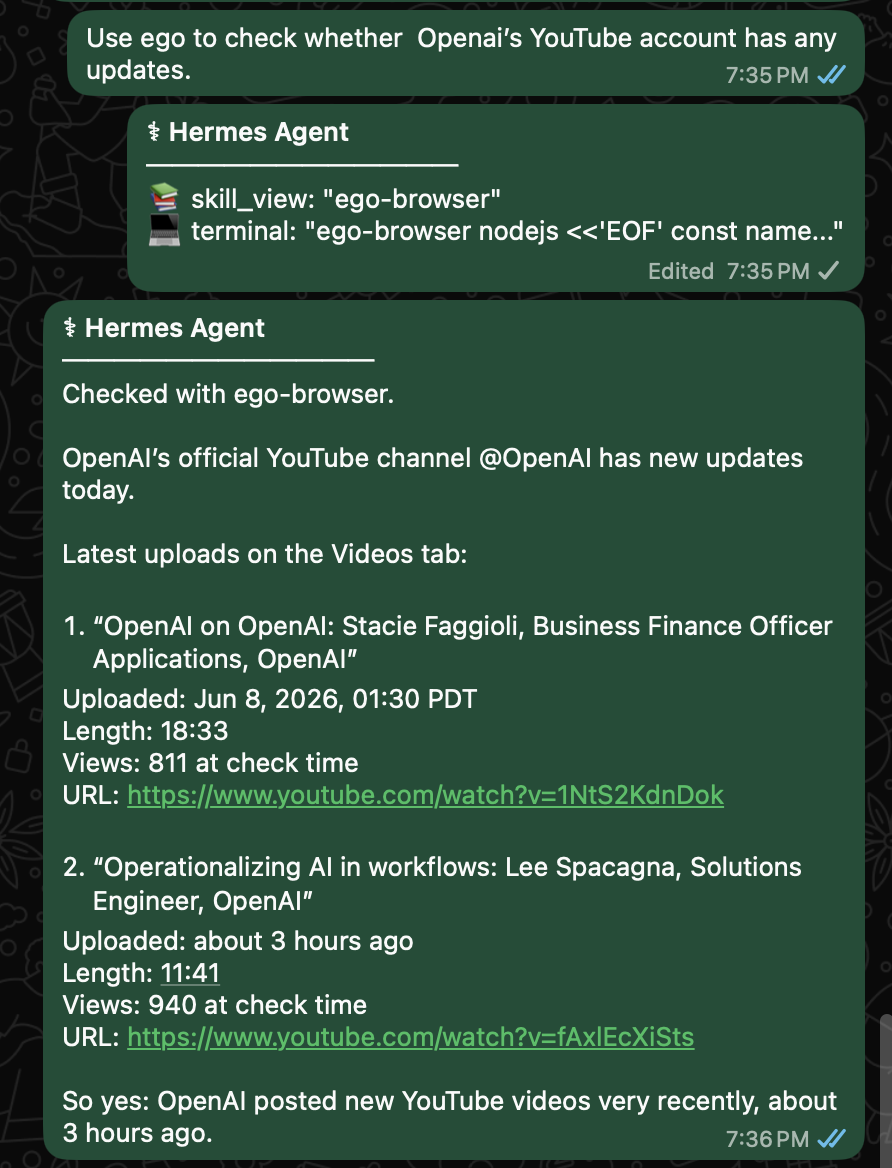
這對 Hermes 來說很重要。當你透過 WhatsApp 請 Hermes 查詢 OpenAI 的 YouTube 帳號有沒有更新,它就能用 ego (lite) 打開真實的網頁、檢視頻道、讀取最新影片,並回報標題、上傳時間、影片長度、觀看次數和連結。
這不是 Hermes 表現得像個外部爬蟲,而是 Hermes 在一個真實瀏覽器中,幫你做原本得自己動手的瀏覽器工作,而且不用讓你切換情境。
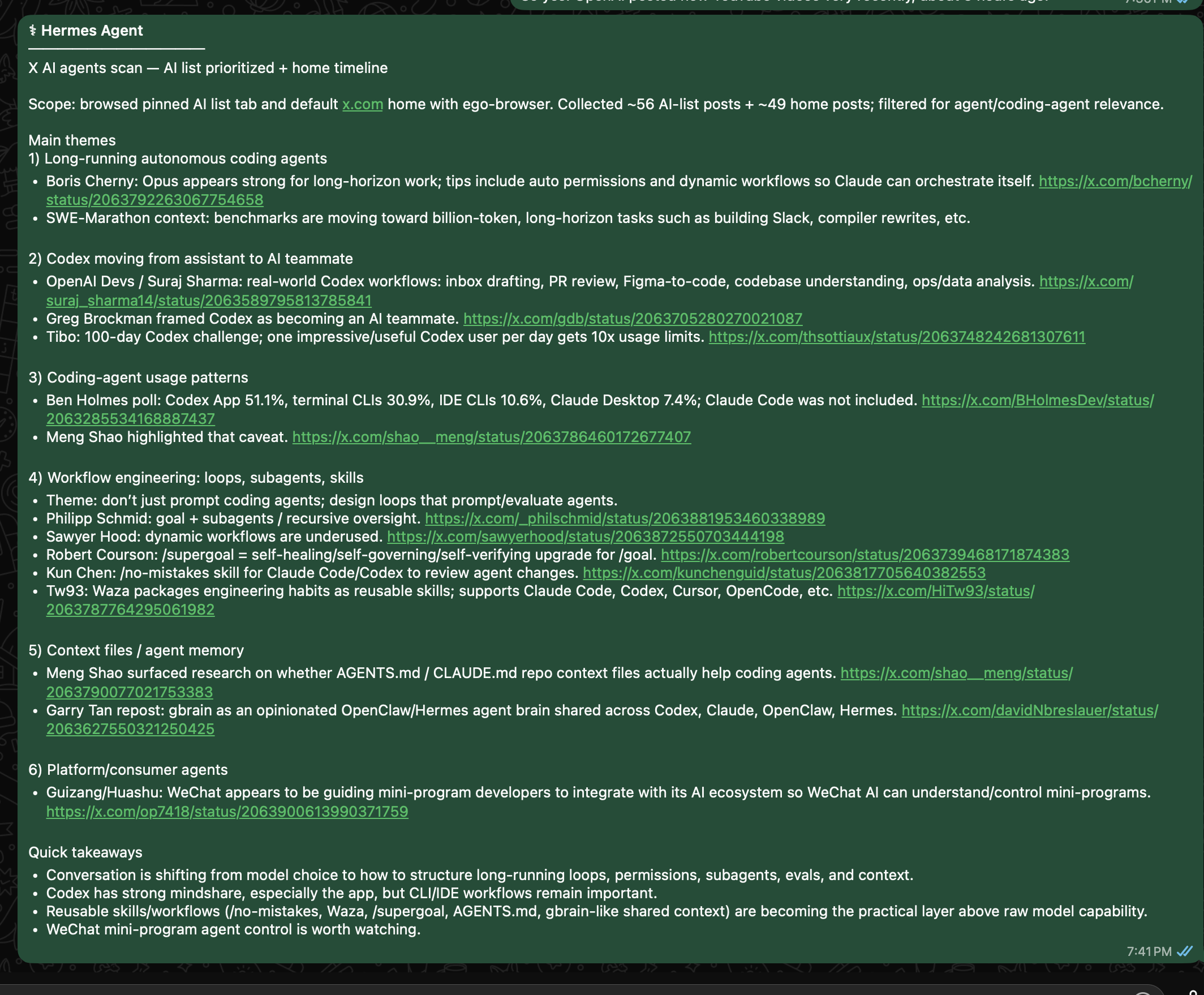
X 也是同樣的道理。如果你請 Hermes Desktop 瀏覽 X 尋找 AI Agent 相關更新,你的 AI 清單和首頁時間軸並不是通用的公開搜尋結果,而是你已登入視角下的世界。有了 ego (lite),Hermes 就能從那個真實視角出發,使用你每天都在用的帳號狀態、清單、追蹤名單和情境資訊。
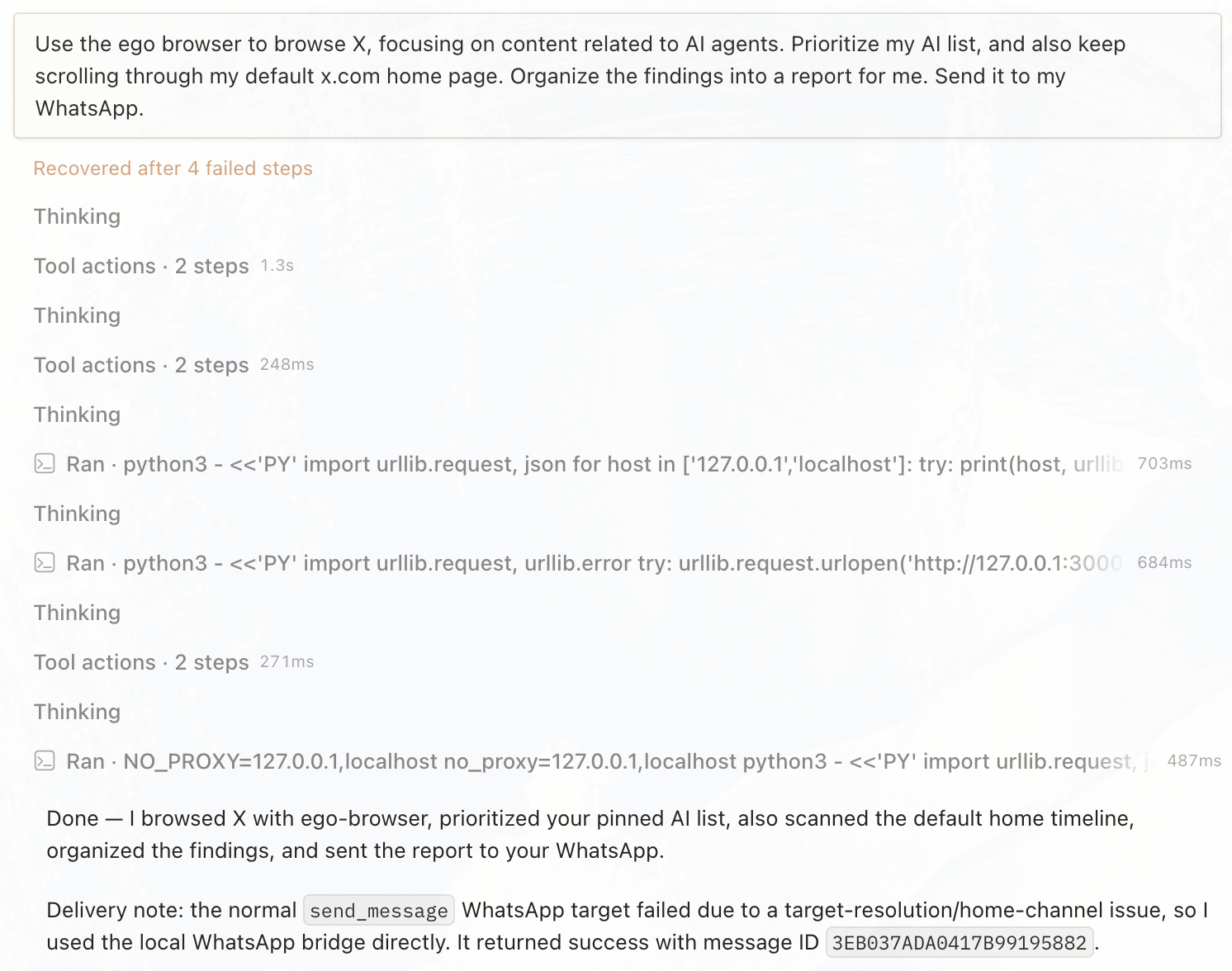
Hermes 把這一句指令變成一套重複執行的網頁工作流程:它用你自己已登入的 X 情境運作,整理出有意義的訊號,再透過你選擇的管道把摘要送回來。
人類與 Agent 共用一個瀏覽器
重點不是把一個黑盒子瀏覽器丟給 Hermes 然後祈禱它乖乖聽話。重點是平衡:一個同時服務你和 Agent 的真實瀏覽器環境,並透過 Space 做出清楚的區隔。
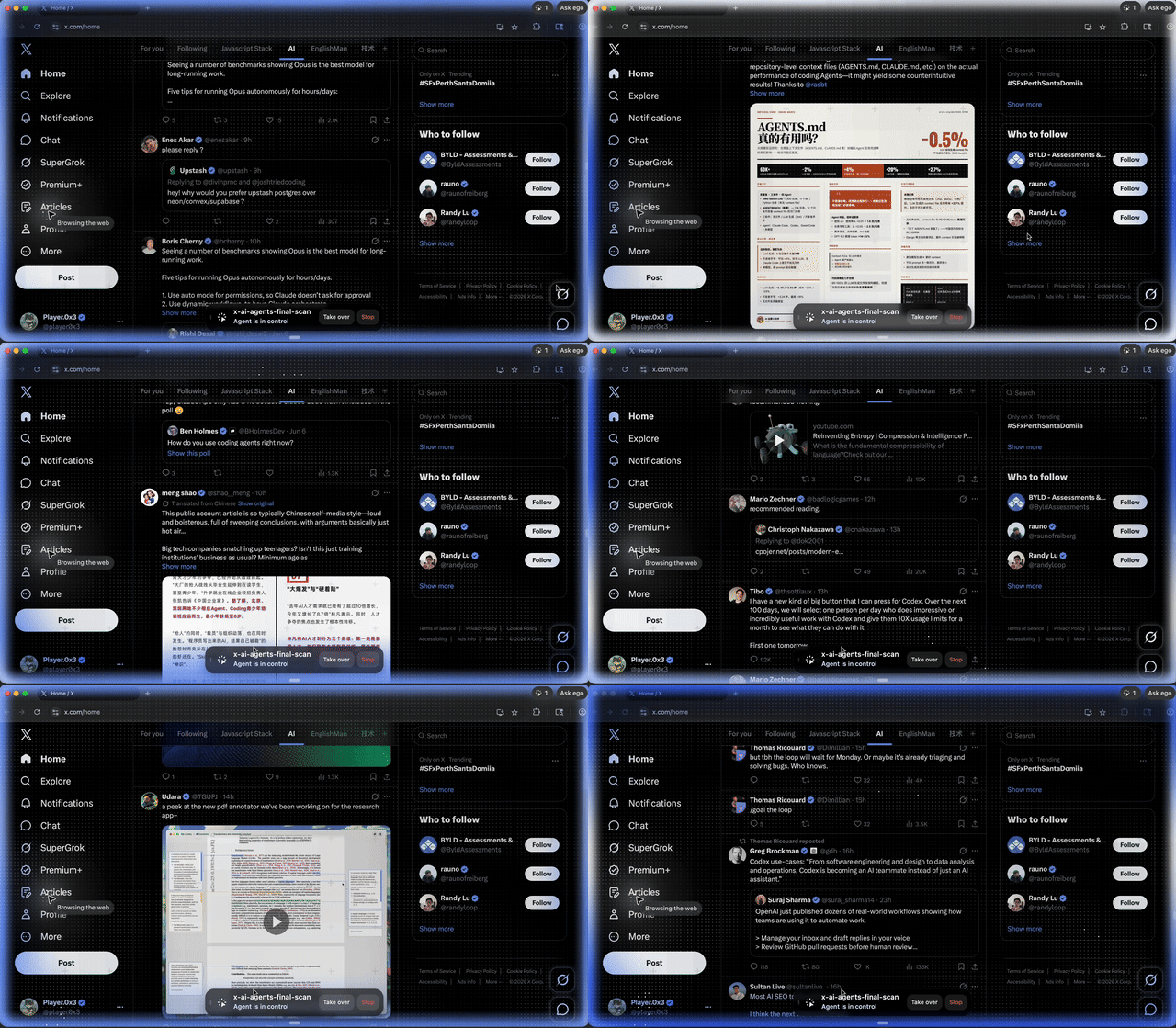
Hermes 在自己的 Space 中工作,你則繼續使用自己的分頁。需要的時候,你隨時能跳進那個 Space,看看它在做什麼,並在登入、確認或任何關鍵操作時接手。它不會消失進一個看不見的無頭工作階段,而是在一個你能檢視、也能隨時中斷的真實瀏覽器中執行。
會進化的 Agent,遇上經驗老到的瀏覽器
Hermes 從來就不只是一個聊天工具。它是一個具備任務執行、技能成長和記憶能力的進化型 Agent。有價值的工作不必在一次任務結束後就消失,而是能成為 Hermes 持續累積下去的一部分。
ego-browser 也不是用完即丟的瀏覽器腳本。它會累積網頁操作經驗:怎麼讀取 X 的時間軸、擷取 Google 搜尋結果,或整理 GitHub 議題,都能變成可重複使用的瀏覽器 skill。
所以 Hermes + ego (lite) 真正的價值,不只是「一個連上瀏覽器的 Agent」。Hermes 是一個能透過 WhatsApp、Hermes Desktop 等對話介面召喚的進化型 Agent,ego (lite) 補上了缺的那一塊:一個能跟人類共用的真實瀏覽器身軀。一邊持續進化技能與記憶,另一邊則累積操作網頁的方法。這正是 Hermes + ego (lite) 有趣的地方:一個懂你的 Agent,遇上了一個懂網路的瀏覽器。