ego (lite) 只是一個瀏覽器,ego 則是你跨裝置的個人 Agent。
加入候補名單
ego lite 對比 Codex Chrome 擴充功能

最佳 Codex Chrome 擴充功能替代方案

OpenAI's Codex Chrome extension lets Codex take over tabs in the signed-in Chrome you're using, one browser shared between you and the agent. ego lite gives Codex its own Spaces in a separate browser that inherited your logins, so it works in parallel while your tabs stay yours.

獲得來自以下單位開發者的信賴
GoogleAmazonShopifyTikTokHarvardStanfordUSCUCLA

為什麼 ego lite 比 Codex Chrome 擴充功能更好

Both exist for the same reason: Codex needs logged-in browser context to be useful on real sites. The extension borrows yours. ego lite imports your Chrome profile once and gives Codex a browser of its own. Run /ego-browser inside Codex and it's connected.

The agent never fights you for your browser again

Because every task gets its own Space (a separate workspace inside one browser), Codex can run several tasks in parallel without ever touching the tabs you're using, and there's no permission prompt each time it opens a new site.

The Codex Chrome extension works differently: it takes over your existing Chrome tabs and acts inside the session you're already using, one task at a time. Because the agent is acting inside your live, logged-in browser, OpenAI has Codex ask for approval before touching each new website, so real tasks pause for permission clicks.

6.48x faster, and it finished the task the extension couldn't

Codex Chrome extension acts one click, one keystroke, one tool call at a time, and on real tasks that adds up: ranking OpenAI's X posts took it 9 minutes 24 seconds. On the Expedia flight-booking task, it never finished at all. A safety review blocked it after 15 minutes.

ego lite reads the page as a compressed Snapshot and batches several actions into a few lines of JavaScript per turn. Same two tasks: 87 seconds, and 166 seconds to completion. That's 6.48x faster on the first, and the only one of the two that finished.

Time to finish the same tasks, shorter is better
Task 1: Rank OpenAI's X posts from the last 7 days
87 sego (lite)
564 sCodex Chrome extension
Task 2: Expedia: search, filter, and fill a flight booking
166 sego (lite)
BlockedCodex Chrome extension, after 900 s

Works with Codex, and with everything else, in parallel

The extension only works with Codex, only in official Chrome (not Arc, Brave, or Edge), and it needs the Codex desktop app running and paired before anything works at all.

ego lite works with any code-writing CLI agent (Codex, Claude Code, Cursor, Gemini CLI) and runs several of their tasks in parallel. Switch agents later, and the browser side stays exactly the same.

Works from Codex's terminal: the plugin doesn't

The Codex Chrome extension only works through the Codex desktop app. OpenAI's own GitHub issues confirm that a terminal-only Codex CLI session can't reach the extension at all. The request fails immediately with the error "Browser is not available: extension."

ego lite works the same whether Codex is running in a terminal or as a desktop app: run /ego-browser, and the agent gets a real browser of its own either way.

ego lite Chrome profile import: the same setup whether Codex runs in a terminal or as a desktop app

ego lite 對比 Codex Chrome 擴充功能

Feature comparison between ego lite and Codex Chrome extension.
功能ego liteCodex Chrome extension
Agent 在哪裡工作In its own Space: never the tabs you're using在你已登入的 Chrome 裡,接管現有分頁
任務執行時你能繼續工作嗎Yes: parallel Spaces, you browse in yoursNot really: it's driving the browser you're in
支援的 AgentCodex、Claude Code、Cursor、Gemini CLI,以及任何會寫程式碼的 CLI Agent僅限 Codex
需要的瀏覽器None: ego lite is the browser (Chromium, macOS)僅限官方 Chrome;不支援 Arc、Brave 或 Edge
安裝設定安裝應用程式,在 Codex 裡執行 /ego-browser先裝 Codex 桌面應用程式,再從其 Plugins 選單安裝擴充功能
已登入的網站(SSO、2FA)Yes: one-click Chrome profile importYes: it acts in your already-signed-in Chrome
權限模型透過匯入設定檔一次授予登入狀態;隨時檢視或接手任何 Space逐網站核准提示,網域允許清單/封鎖清單
Extension reliabilityN/A: no native-messaging pairing between an extension and a desktop appOpenAI's own GitHub issues show a recurring pattern of the extension and desktop app disagreeing on connection state, plus native-host registration and handshake timeouts on Windows
Agent 如何操作頁面Snapshot input plus batched JavaScript: several actions per turn在你的分頁裡一步一步執行瀏覽器動作
Speed on a real task87s vs Codex's 9:24 on the same X-research task; 166s on the same Expedia flight task9:24 on the X-research task; blocked by a safety review after 15 minutes on the Expedia flight task, never finished
價格免費,無需訂閱Included with Codex: requires a ChatGPT plan with Codex access
Works from Codex's terminalYes: /ego-browser works the same in a terminal or a desktop appNo: the CLI can't reach the extension backend at all ("Browser is not available: extension")
最後更新 2026年8月04日

讓轉換無縫接軌

Already running the Codex Chrome extension? You keep Codex and change what it drives. The switch is a few minutes, and nothing has to be uninstalled.

  1. 下載 ego (lite)

    Download ego lite and import your Chrome profile in one click. The signed-in context the extension borrows from Chrome becomes real profile state in a browser Codex can call its own.

  2. 用 /ego-browser 執行你的第一個任務

    貼到你的 Agent 裡

    /ego-browser Open ego.app and join the waitlist

    在 Codex 裡執行 /ego-browser。不用桌面應用程式外掛,也不用配對擴充功能。

  3. 看它實際運作
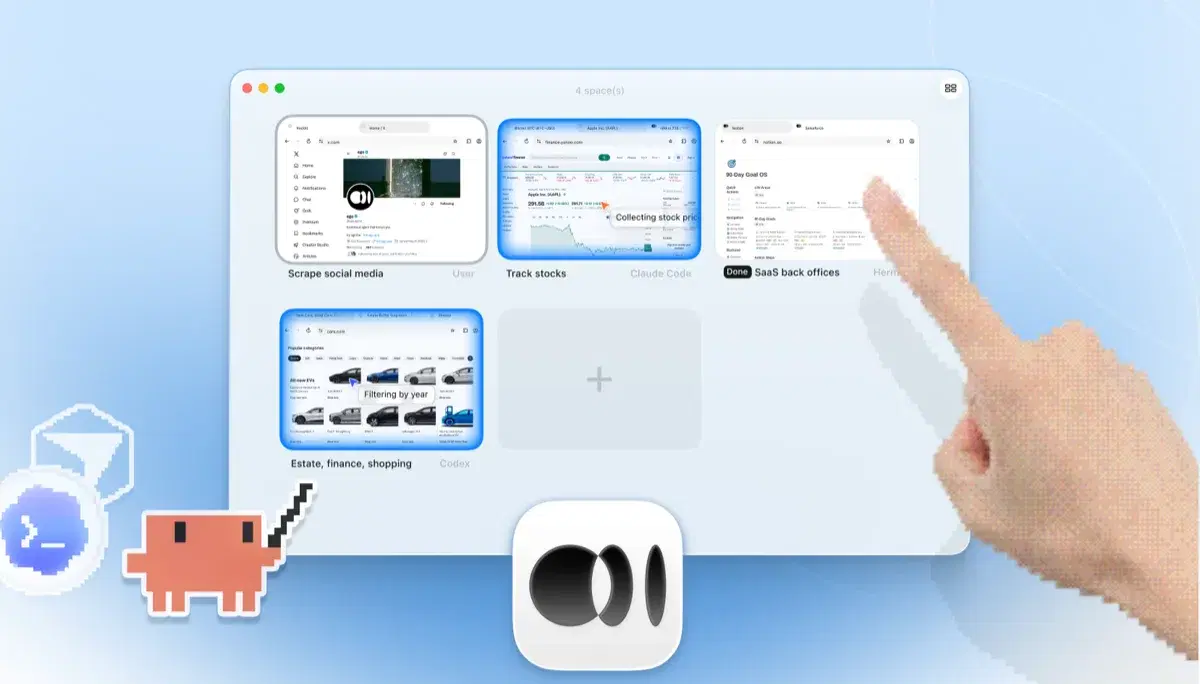
    ego lite 的 Space 總覽,四項瀏覽器任務並排執行:Claude Code 在 Yahoo Finance 追蹤蘋果股價、Codex 在 cars.com 依年份篩選車款、Hermes 完成一項 SaaS 後台任務、一位使用者在擷取 X 上的資料,還有一隻手正點擊 + 開啟另一個 Space

    Re-run a task you'd normally hand the extension (a dashboard read, a form workflow, a multi-tab test) and keep using your own browser while it executes in its Space.

如果有些工作流程已經綁在擴充功能上,就先留著它;ego lite 和 Chrome 並行運作,比較期間什麼都不會壞。

何時該用哪個工具

適合選擇 ego (lite) 的情況

  • You run Codex from a terminal, where the extension's backend isn't reachable from CLI sessions at all. Run /ego-browser and the agent gets a browser regardless.
  • You want Codex running longer, multi-step tasks in its own Spaces, in parallel, while your tabs stay yours.
  • 你寧願透過匯入設定檔一次授予登入狀態,也不想在任務中途逐一點按各網站的核准提示。
  • You use other agents too: the same /ego-browser setup works with Claude Code, Cursor, and Gemini CLI, not just Codex.

適合選擇 Codex Chrome 擴充功能的情況

  • You're already running the Codex desktop app, and the extension is right there in its Plugins menu, with no extra install.
  • You want a quick action on a page you already have open: handing Codex your live Chrome session is the shortest path.
  • 你看重 OpenAI 的官方護欄:每個動作都包著逐網站核准提示和網域允許清單。

給你的 AI Agent 一個真實瀏覽器

免費,在你的 Mac 上執行,一鍵匯入你的 Chrome 個人設定檔。適用於 Claude Code、Codex、Cursor,以及任何會寫程式碼的 CLI AI Agent。

Still weighing your options? See how Codex Chrome extension compares with the other tools in the same space.

FAQ

The Codex Chrome extension is OpenAI's official way to give Codex a browser, launched in May 2026 and installed through the Codex desktop app's Plugins menu. It lets Codex act in your signed-in Chrome for tasks that need logged-in context (reading dashboards, filling forms, testing sites across tabs) with a genuinely careful permission model: Codex asks before touching each new website, and you manage domain allowlists and blocklists. If you're all-in on Codex and official Chrome, it's a polished, well-scoped tool.

有。OpenAI 於 2026 年 5 月把它作為 Codex 桌面應用程式外掛系統的一部分推出,並於 2026 年 6 月開放歐洲經濟區、英國和瑞士。它讓 Codex 在你已登入的 Chrome 裡處理需要登入情境的任務,並附帶逐網站的權限提示。

如果你想讓 Codex 做瀏覽器工作、又不佔用你正在使用的瀏覽器,是的。ego lite 給 Codex 自己的 Spaces,帶著你匯入的登入狀態,任務平行執行,而且免費。如果你就是想要官方、單一廠商、在 Chrome 裡運作、帶著 OpenAI 核准提示護欄的路線,擴充功能勝出。

Install ego lite, import your Chrome profile, then run /ego-browser inside Codex. The agent reads pages as compressed Snapshots and executes batched JavaScript in the browser. No extension, no MCP server, no plugin configuration.

No. As of mid-2026 it supports official Chrome only. ego lite sidesteps the question: it is its own Chromium-based browser on macOS, and your existing Chrome profile imports into it in one click.

No. It's bound to the Codex desktop app. OpenAI's own GitHub issues confirm a terminal-only Codex CLI session can't acquire the extension backend at all, failing with "Browser is not available: extension." ego lite doesn't make that distinction: install ego lite and run /ego-browser inside Codex, terminal or desktop app, and the agent gets a real browser either way.

You're not alone. OpenAI's own GitHub issue tracker has a recurring thread of reports where the extension and the Codex desktop app disagree on whether they're connected, plus native-host registration and handshake timeouts, mostly on Windows. That's the tradeoff of pairing a browser extension to a separate desktop app over native messaging. ego lite doesn't have that pairing step: it is the browser Codex drives directly.

Yes. They don't conflict: the extension lives in Chrome, ego lite is a separate browser. A common split: the extension for quick actions in a page you already have open, ego lite for longer parallel tasks you don't want running in your active window.