ego (lite) 只是一個瀏覽器,ego 則是你跨裝置的個人 Agent。
加入候補名單
ego lite 對比 Kimi Chrome 擴充功能

最佳 Kimi Chrome 擴充功能替代方案

Kimi's Chrome extensions bring the agent to the browser you already have open. WebBridge lets CLI agents operate your live Chrome window. ego lite is a browser built for agents: they work in their own Spaces, in parallel, with your logins imported, while your tabs stay yours.

獲得來自以下單位開發者的信賴
GoogleAmazonShopifyTikTokHarvardStanfordUSCUCLA

為什麼 ego lite 比 Kimi Chrome 擴充功能更好

Moonshot's WebBridge and ego lite agree on the important things: agents should run locally, work with your real logged-in sessions, and not be locked to one vendor's agent. The disagreement is architectural: whether the agent shares the window you're using, or gets a workspace of its own.

The agent never fights you for your browser again

Because every task gets its own Space (a separate workspace inside the same browser), agents can run in parallel without ever touching the tabs you're using, and everything stays visible while it works.

WebBridge works the opposite way: the agent operates inside the same Chrome or Edge window you already have open (the very window you're trying to use), so you and the agent end up sharing one browser.

Faster on both tasks, measured against Kimi WebBridge

WebBridge's agent (even running Kimi's own K3 model at high reasoning effort) works through Chrome DevTools Protocol tool calls: one click, one read, one keystroke at a time. On two real tasks, ranking OpenAI's X posts took WebBridge 4 minutes 57 seconds, and the Expedia flight-booking task took 15 minutes 26 seconds.

ego lite reads the page as a compressed Snapshot and batches several actions into a few lines of JavaScript per turn. On the same two tasks, ego lite finished in 87 seconds and 166 seconds: 3.41x faster and roughly 5.6x faster.

Time to finish the same tasks, shorter is better
Task 1: Rank OpenAI's X posts from the last 7 days
87 sego (lite)
297 sKimi WebBridge (K3 high)
Task 2: Expedia: search, filter, and fill a flight booking
166 sego (lite)
926 sKimi WebBridge (K3 high)

Both keep things local and open: ego lite adds parallel tasks

Credit where it's due: WebBridge is free, keeps everything running locally, and works with agents beyond Kimi's own, including Claude Code, Cursor, and Codex. But it's still one browser window shared between you and the agent, one task at a time.

ego lite keeps that same local, open approach and adds parallel Spaces on top, so several tasks can run at once, using whatever agent you already have.

One app instead of a three-piece bridge that can fall out of sync

WebBridge really is a bridge: Chrome, the WebBridge extension, and the Kimi desktop app's local service all have to be running and correctly paired before an agent can control a page. Moonshot's own FAQ documents this as a common problem: the extension shows as disconnected if the local service isn't running yet, and actions like snapshot or click can fail if another extension conflicts with WebBridge.

ego lite collapses all of that into a single install, because ego lite is the browser. Import your Chrome profile, run /ego-browser, and there's no separate service to pair and nothing else that can conflict with it.

ego lite Chrome profile import: one install, no pairing step, nothing to fall out of sync

ego lite 對比 Kimi Chrome 擴充功能

Feature comparison between ego lite and Kimi Chrome extension.
功能ego liteKimi Chrome extension
它是什麼為你和你的 Agent 打造的 Chromium 瀏覽器裝在你現有 Chrome 上的擴充功能
Agent 在哪裡工作In its own Space: never the tabs you're using在你當下的 Chrome/Edge 視窗和連線階段裡
平行任務Yes: multiple Spaces run side by side你和 Agent 共用同一個視窗
安裝設定安裝一個應用程式,在你的 Agent 裡執行 /ego-browserChrome + WebBridge 擴充功能 + Kimi 桌面應用程式,需配對
支援的 AgentClaude Code、Codex、Cursor、Gemini CLI,以及任何會寫程式碼的 CLI AgentKimi Code CLI, Claude Code, Cursor, Codex, also agent-agnostic
Agent 如何讀取和操作頁面帶 @N ref 的壓縮 Snapshot;每輪打包執行 JavaScript透過 CDP 開放瀏覽器動作;Agent 一步一步呼叫
已登入的網站(SSO、2FA)Yes: one-click Chrome profile importYes: it drives your already-signed-in browser
ReliabilityOne install, no pairing step, nothing else to conflict withMoonshot's own FAQ documents disconnects when the local service isn't running and action failures from conflicts with other extensions
Speed on a real task87s vs WebBridge's 4:57 on the same X-research task; 166s vs WebBridge's 15:26 on the same Expedia flight taskReasons and calls a tool for every click and keystroke: slower on both real tasks tested
資料存放位置Local: data stored on your machineLocal: execution and page content stay on device
價格免費,無需訂閱擴充功能免費;Kimi 自家 Agent 另有定價
最後更新 2026年8月04日

讓轉換無縫接軌

If WebBridge already connects your CLI agent to a browser, you know the workflow. ego lite keeps it and removes the sharing and the pairing.

  1. 下載 ego (lite)

    Download ego lite and import your Chrome profile in one click. The logged-in sessions WebBridge borrows from your window come along as real profile state.

  2. 用 /ego-browser 執行你的第一個任務

    貼到你的 Agent 裡

    /ego-browser Open ego.app and join the waitlist

    在 Claude Code、Codex、Cursor,或你原本指向 WebBridge 的那個 CLI Agent 裡執行 /ego-browser。不用擴充功能,也不用配對桌面應用程式。

  3. 看它實際運作
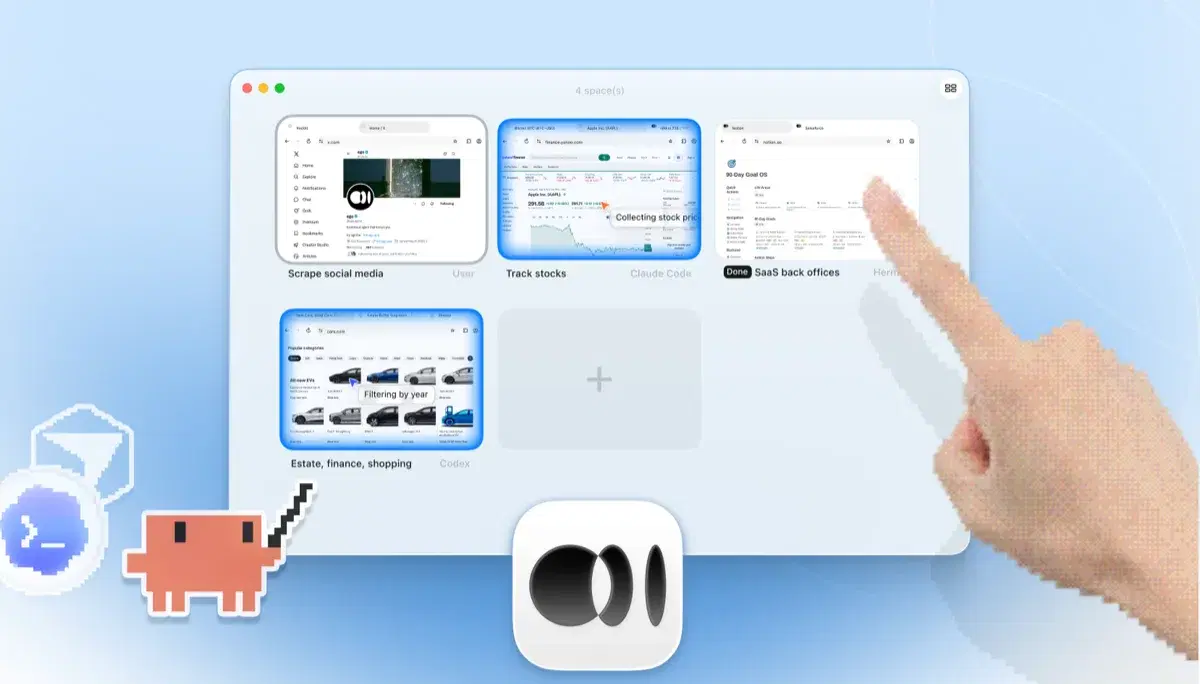
    ego lite 的 Space 總覽,四項瀏覽器任務並排執行:Claude Code 在 Yahoo Finance 追蹤蘋果股價、Codex 在 cars.com 依年份篩選車款、Hermes 完成一項 SaaS 後台任務、一位使用者在擷取 X 上的資料,還有一隻手正點擊 + 開啟另一個 Space

    Re-run your last WebBridge task and keep using your own browser while it executes: the agent works in its Space, you work in yours.

如果你喜歡 Kimi Explorer 摘要加問答的閱讀流程,大可留著它;ego lite 取代的是「Agent 操作瀏覽器」這一層,不是頁面助手。

何時該用哪個工具

適合選擇 ego (lite) 的情況

  • 你想讓 Agent 在自己的 Spaces 裡平行執行任務,你正在用的分頁還是你的。
  • You want one install instead of three pieces: no extension, no desktop-app pairing to fall out of sync. Import your profile and run /ego-browser.
  • You care about per-task speed: compressed Snapshots plus batched multi-action JavaScript beat WebBridge's step-by-step CDP tool calls: 87s vs 4:57 on the same X-research task, 166s vs 15:26 on the same Expedia flight task.
  • 你的登入狀態很重要,應該是一次匯入的真實設定檔狀態,而不是從哪個剛好開著的視窗借來的。

適合選擇 Kimi Chrome 擴充功能的情況

  • You're already in the Kimi ecosystem (Kimi Code CLI and the desktop app), and WebBridge is the native fit.
  • 你就是想讓 Agent 操作你已經開著的那個 Chrome 或 Edge,原封不動,帶著當下的連線階段。
  • You want to stay in your current browser entirely: no new browser to install or switch to, just an extension in the one you use.

給你的 AI Agent 一個真實瀏覽器

免費,在你的 Mac 上執行,一鍵匯入你的 Chrome 個人設定檔。適用於 Claude Code、Codex、Cursor,以及任何會寫程式碼的 CLI AI Agent。

Still weighing your options? See how Kimi Chrome extension compares with the other tools in the same space.

FAQ

Moonshot AI ships two Chrome extensions under the Kimi name. Kimi Explorer is a reading assistant: summarize the page you're on, ask questions about it, get writing help without switching tabs. Kimi WebBridge, released in May 2026, is the agent one; it pairs with the Kimi desktop app to let CLI agents (Kimi Code CLI, Claude Code, Cursor, Codex) operate your existing Chrome or Edge window locally, with cookies and logins intact and page content staying on your device. WebBridge's local-first, agent-agnostic design is genuinely good, and philosophically the closest thing to ego lite in the extension world.

Kimi Explorer is a page assistant: summarize the article you're reading, ask questions about it, draft text. Kimi WebBridge is agent infrastructure: paired with the Kimi desktop app, it lets CLI agents operate your Chrome or Edge window locally. If you're comparing against ego lite, WebBridge is the relevant one.

Yes, if you want the same local, agent-agnostic approach without sharing your window or the three-piece pairing. ego lite runs agents in their own Spaces in parallel, imports your Chrome profile so logins persist, and needs one app instead of an extension-plus-desktop-app pair. WebBridge wins if you specifically want agents driving the exact browser you already have installed, unchanged.

Moonshot's own help center documents two common failure modes worth knowing before you rely on it: the extension shows disconnected when the local Kimi service isn't running yet, and actions like snapshot or click can fail when another installed extension (scraping tools, AI assistants) conflicts with WebBridge, which the FAQ suggests troubleshooting by disabling other extensions one at a time. ego lite has no local service to keep running and no extension it can conflict with, since it is the browser.

Any CLI agent that writes code can plug in through the open-source, MIT-licensed ego-browser shell. That includes custom agents. Claude Code, Codex, Cursor, Gemini CLI, and Opencode are the documented entry points; a code-writing CLI agent like Kimi's connects the same way.

In ego lite, yes: agents run tasks in their own Spaces and never take the tabs you're using, and you can watch or take over any Space. With WebBridge, the agent operates the window you have open, so an active task and active browsing compete for the same session.

Yes: free, no subscription, data stored locally, and the ego-browser shell is MIT-licensed open source. You bring your own agent and pay only whatever that agent already costs you.