































The best Claude in Chrome alternative

Use Claude in Chrome when the current Chrome task and its supported Claude integration fit. Use ego(lite) when your own local Agents need a separate task browser.

ego(lite) vs Claude in Chrome

Feature comparison between ego(lite) and Claude in Chrome.
功能ego(lite)Claude in Chrome
Agent connectionego-browser Skill plus local command executionAnthropic's supported Chrome integration, including documented Claude Code connection
Browser being controlledego(lite), a separate local Chromium browserThe Chrome environment connected to the extension
Existing account stateSupported import or direct sign-in in egoAuthorized state in the connected browser environment
Different coding AgentsCompatible local Agents can use the runtimeUse the clients currently supported by the integration
Task pagesSeparate Spaces per taskTabs and permissions managed by the extension integration
Human interventionHand over the Space, then resume the same taskUse the supported takeover or confirmation behavior
Local filesBrowser Page APIs operate on the runtime computerCheck the integration's current file and access capabilities
New comparative performance claimNone from the local fixture testsNo fresh extension comparison was run in this update

最後更新 2026年11月9日

獲得來自以下單位開發者的信賴

  • Vercel
  • OpenAI
  • Anthropic
  • SpaceX
  • Google
  • Microsoft
  • DJI
  • DeepSeek
  • Kimi
  • TikTok
  • MiniMax
  • SAP
  • ZARA
  • eBay
  • Cisco
  • Trip.com
  • LINE
  • NHN
  • Hyundai Motor

Why ego(lite) is better than Claude in Chrome

The useful distinction is the execution environment. Claude's extension connects its supported integration to Chrome. ego-browser lets compatible local coding Agents operate ego(lite), with separate task pages and explicit control handoff.

Keep the current tab or use a separate task browser

An extension is a direct choice when the selected Chrome tab is the task and the supported integration meets your needs. It avoids migrating that task to another browser.ego(lite) is a separate local browser. Import supported state or sign in there, then let the Agent work in its own Space. It does not directly take over the source Chrome tab.
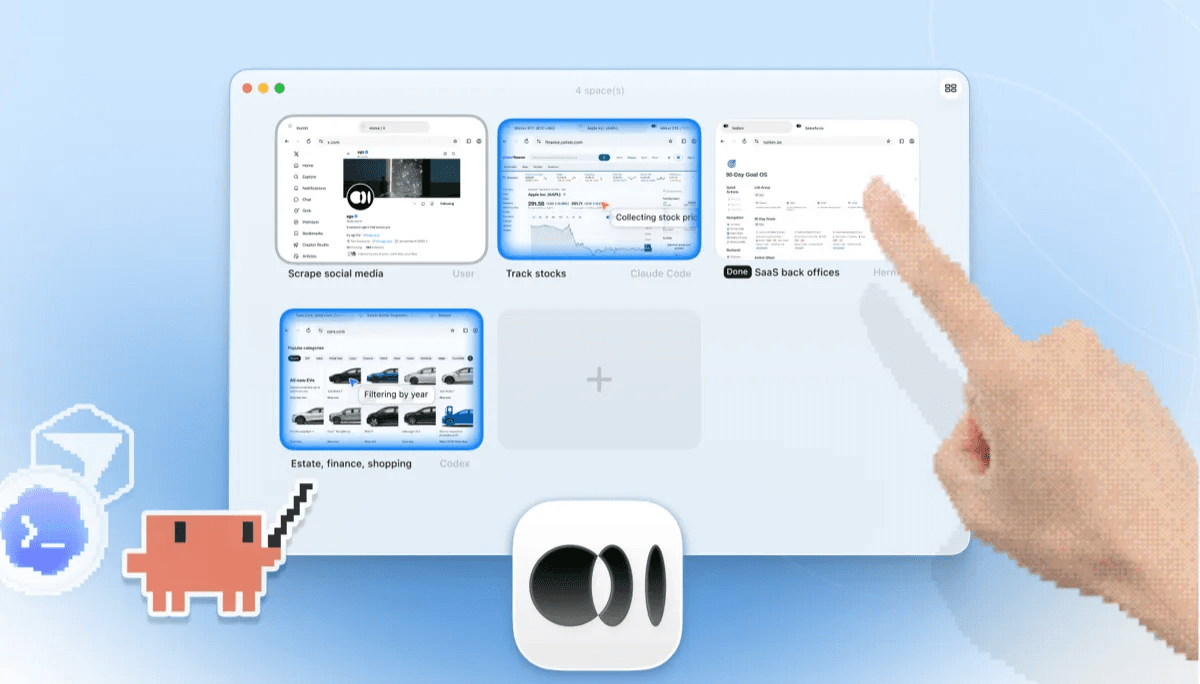

Use the local Agent you already work with

ego-browser uses a Skill and local commands, so a compatible Claude Code, Codex, or other coding Agent can use the same browser runtime. Each needs permission to run on that computer.A web conversation does not automatically discover local Skill files. Remote containers, WSL, and local desktop sessions are different execution environments and need their own connection checks.

Check task pages separately from account state

Two independent ego-browser invocations returned different records from separate Spaces in our November 9 local test. A separate test also observed a synthetic account change across Spaces.That supports task-page organization, not independent website permissions. Verify the visible account and organization before a private task. Neither a Space name nor a familiar website URL is sufficient.

Use a result you can inspect

Our current ego tests checked a cross-origin iframe, an open shadow control, file selection, and the downloaded report. They used a local synthetic fixture on macOS with ego(lite) 0.6.3.6.This was not a fresh Claude in Chrome comparison or a new Windows execution. Use the official integration instructions and a small read-only task to verify the environment you intend to use.

讓轉換無縫接軌

Try the browser environment that matches the task instead of changing a working setup by default.

1

下載 ego(lite)

Install ego(lite) and finish setup. Confirm any imported or newly signed-in website account.

2

用 /ego-browser 執行你的第一個任務

Load the installed ego-browser Skill in a local coding Agent and run ego-browser skill.

貼到你的 Agent 裡

/ego-browser Open https://example.com and return the actual page title and URL

3

看它實際運作

Open a public page and return its actual title and URL.

An ego(lite) Space running an agent task while you keep browsing

Run the authorized task, verify the result, and choose which result pages to retain.

何時該用哪個工具

適合選擇 ego(lite) 的情況

  • You want several compatible local coding Agents to use a separate browser environment.
  • The task combines authorized websites with local project files.
  • You want task pages organized in Spaces with user control handoff.

Choose Claude in Chrome when

  • The current Chrome tab is the task.
  • Your supported Claude integration and account already meet the requirement.
  • You prefer to keep that task in the existing extension workflow.

將 ego(lite) 與其他瀏覽器自動化工具比較

與 Puppeteer、Playwright MCP、Browser Harness、Browserbase,以及另外 7 款工具的逐項比較。

FAQ

What is Claude in Chrome?

Claude in Chrome is Anthropic's Chrome integration. Its official documentation includes the Claude Code connection through claude --chrome and the conditions for using the extension. Check that documentation for current platform and account requirements rather than assuming every Claude interface has the same browser connection.

How does Claude Code connect to Chrome?

Anthropic's official Chrome documentation describes claude --chrome and the extension setup. Check its current platform and account requirements.

Does ego require an MCP server?

No. A compatible local Agent reads the installed Skill and runs ego-browser commands. An MCP-only client cannot use that route without a separate integration.

Can ego control my current Chrome tab?

ego is a separate browser. Supported state can be imported, or you can sign in there. That is different from directly operating the source Chrome tab.

Can Codex use the same ego browser?

A compatible local Codex environment can use the installed Skill and command runtime. Verify its actual execution environment and a browser result before a private task.

Does this page prove one approach never steals focus?

No. A short macOS runtime observation and separate task pages do not establish every action, permission prompt, platform, or keyboard-focus condition.

Was the extension benchmarked in the November 9 fixture?

No. The new fixtures verify ego runtime operations and do not claim a comparative extension speed, cost, or success rate.

給你的 AI Agent 一個真實瀏覽器

免費,在你的電腦上執行,一鍵匯入你的 Chrome 個人設定檔。適用於 Claude Code、Codex、Cursor,以及任何會寫程式碼的 CLI AI Agent。