
The short answer, before anything else: the Playwright CLI does the same browser work as Playwright MCP for roughly 4x fewer tokens. Microsoft's own figures put a test run at 114K tokens over MCP against 27K over the CLI, and an independent 8-step test measured the same shape at about 89K vs 24K.
ego (lite) extends that pattern through the ego-browser skill: the same low-token approach, but in a real browser that shares your logged-in state with AI agents like Claude Code and Codex, free. That covers the one gap the CLI leaves open, tasks that sit behind your logins.
A Reddit user summed up the Playwright MCP experience in one line: after just one or two browser tests, Claude Code's chat gets compacted because the context is full.
That's not an exaggeration. It's how the tool works. Playwright MCP is a protocol server that returns a structured accessibility snapshot of the page after each action, and on real pages those snapshots are big.
How big is the token gap, actually?
Playwright MCP and the Playwright CLI drive the same browser engine, so the difference isn't capability. It's how much of the page travels back through the model's context after every step.
Two independent sets of numbers exist, and they agree. When Microsoft shipped the official Playwright CLI in late 2025, the figures circulated with the launch were 114K tokens for a test run over MCP against 27K for the same run over the CLI.
A test engineer on Medium then ran his own side-by-side on an 8-step task (log in to a staging app, open an analytics dashboard, verify three KPI cards, click into a report, screenshot) and landed at about 89K tokens over MCP vs 24K over the CLI.
Tokens per browser task: MCP vs CLI
Two published measurements, same 4x shape
Roughly 4x, twice, on different tasks. That consistency matters more than either single number.
Where do MCP tokens actually go?
The 8-step measurement is useful because it itemizes the bill. Three line items dominate, and none of them are the agent's reasoning.
First, the fixed cost: Playwright MCP registers 26+ tools, and their JSON schemas (~4,200 tokens in that measurement) enter the context before the agent does anything at all. The CLI equivalent was 68 tokens, one --help read.
Second, the per-step cost: every navigation and click returns the page's accessibility tree. A login form cost ~3,800 tokens, a data dashboard ~12,000, and the author notes enterprise apps where a single snapshot reaches 50K.
We measured this ourselves today, on a different MCP server built on the same accessibility-snapshot pattern (Chrome DevTools MCP, not Playwright MCP, since that's the one we had a live harness for), to see the actual byte cost of a single snapshot call with our own eyes. One take_snapshot call on a moderately simple page, Hacker News's front page, came back at 38,285 characters, roughly 9-10K tokens, for one snapshot:
import asyncio
from mcp import ClientSession, StdioServerParameters
from mcp.client.stdio import stdio_client

async def main():
    params = StdioServerParameters(
        command="npx",
        args=["--yes", "chrome-devtools-mcp@latest", "--headless", "--isolated"],
    )
    async with stdio_client(params) as (read, write):
        async with ClientSession(read, write) as session:
            await session.initialize()
            nav = await session.call_tool("navigate_page", {"url": "https://news.ycombinator.com/"})
            print("navigate_page chars:", len("".join(c.text for c in nav.content if hasattr(c, "text"))))

            snap = await session.call_tool("take_snapshot", {})
            snap_text = "".join(c.text for c in snap.content if hasattr(c, "text"))
            print("take_snapshot chars:", len(snap_text))
            print(snap_text[:700])

asyncio.run(main())
navigate_page chars: 123
take_snapshot chars: 38285
## Latest page snapshot
uid=1_0 RootWebArea "Hacker News" url="https://news.ycombinator.com/"
uid=1_1 link url="https://news.ycombinator.com/"
uid=1_2 link "Hacker News" url="https://news.ycombinator.com/news"
uid=1_3 StaticText "Hacker News"
uid=1_4 link "new" url="https://news.ycombinator.com/newest"
uid=1_5 StaticText "new"
uid=1_6 StaticText " | "
uid=1_7 link "past" url="https://news.ycombinator.com/front"
uid=1_8 StaticText "past"
uid=1_9 StaticText " | "
uid=1_10 link "comments" url="https://news.ycombinator.com/newcomments"
uid=1_11 StaticText "comments"
uid=1_12 StaticText " | "
uid=1_13 link "ask" url="https://news.ycombinator.com/ask"
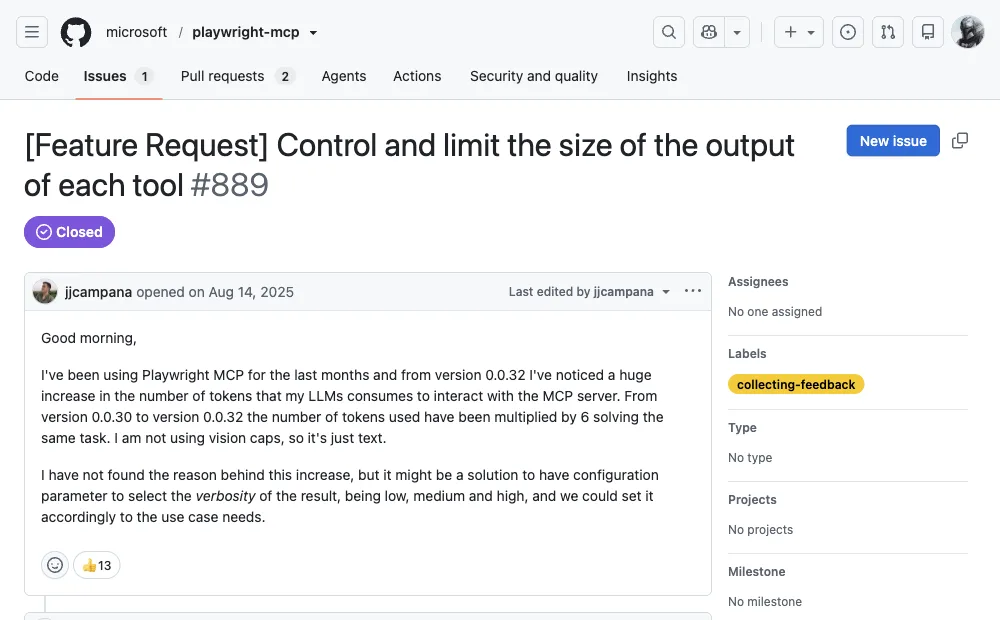
...This isn't a bug and the maintainers don't hide it. Issue #889 on the microsoft/playwright-mcp repo reports token usage multiplying 6x between two minor versions for the same task, and asks for a verbosity setting. The snapshot is the product: it's what lets a model act on a page without vision. You pay for it every step.
The meter runs on every click.
Why does the gap grow with every step?
Single-step tasks barely show the difference. Open a page, read a heading, done: MCP costs one snapshot, the CLI costs one command. The gap opens on multi-step tasks, because MCP snapshots accumulate in the conversation while CLI output doesn't have to.
In the measured session, the agent carried 60-90K tokens of page state by step 12-15, much of it stale. At that point it started referencing a login-page element that no longer existed on screen. The CLI session wrote snapshots to files on disk and read back only what it needed, so step 50 cost about the same as step 5.
How context tokens pile up across a multi-step task
MCP re-sends a page snapshot every step; the CLI writes them to disk and reads back only what it needs
That workaround is worth pausing on. When users independently converge on "make the agent write code instead of calling MCP tools," they're reinventing the CLI route by hand.
When is Playwright MCP still the right choice?
A fair comparison has to state what MCP does better, because there are real cases where it's the correct pick despite the token bill.
| Situation | Better route | Why |
|---|---|---|
| Agent has no shell or filesystem access (Claude Desktop, sandboxed clients) | MCP | The CLI can't run without a shell. MCP works over the protocol alone. |
| Short exploratory session, under ~10 steps | MCP | Zero-code setup, and full page structure in context helps the model reason about unfamiliar pages. |
| Agent that can't write code (pure conversational agent) | MCP | Tool calls are the only interface it has. CLI assumes code. |
| Long tasks, 15+ steps, or browser work mixed with coding | CLI | Snapshot accumulation is what kills long MCP sessions. CLI cost stays flat. |
| Cost-sensitive workloads at scale | CLI | A 4x token cut is a 4x API-cost cut on the browser portion. |
| Tasks behind logins on your own accounts | Neither, cleanly | Both start fresh browser profiles by default. See the last section. |
MCP's honest pitch is convenience and compatibility: one config line, and any MCP-capable client can use it, code skills or not. That's worth something. It's just not worth 90K tokens per task once your workflows get long.
What does the CLI route require?
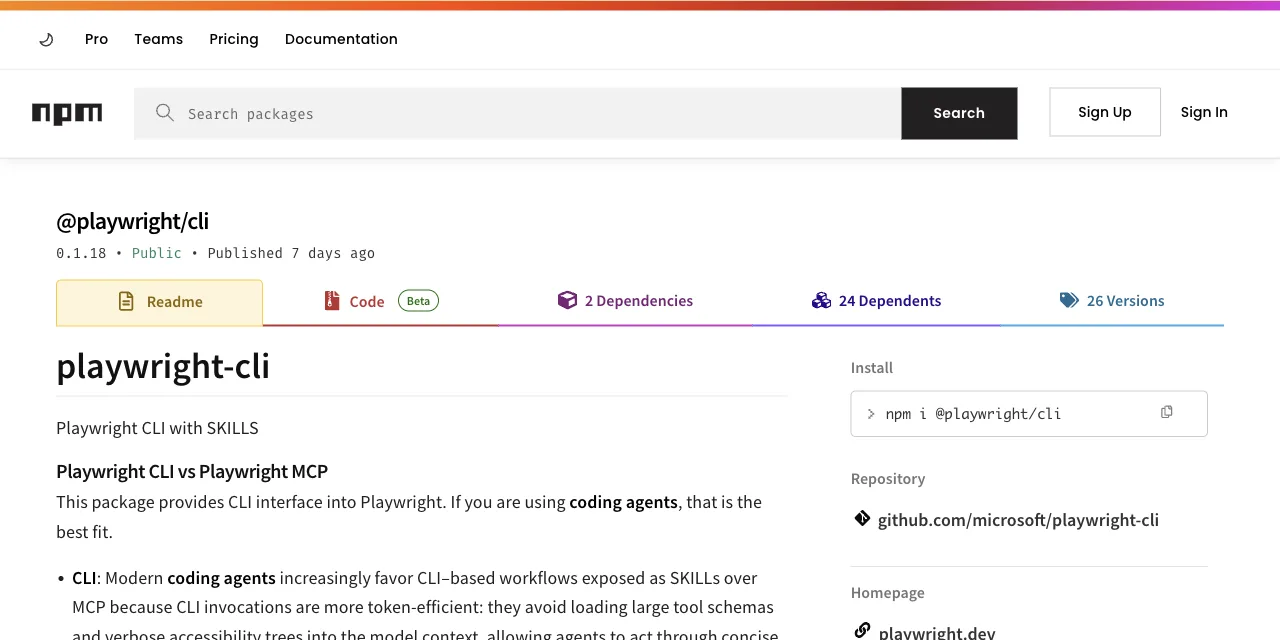
The official CLI is @playwright/cli, shipped by the Playwright team for exactly this problem. Setup is two commands:
npm install -g @playwright/cli@latest
playwright-cli install --skills   # installs agent skills for Claude Code / Copilot

playwright-cli open https://example.com
playwright-cli snapshot           # refs like e15, saved to disk
playwright-cli click e15
The catch, and it's the one gate that matters: your agent has to be a coding agent. It needs to run shell commands, read files, and compose commands into scripts. Claude Code, Codex, Cursor, and Copilot qualify. A chat-only agent doesn't, and for it the MCP route remains the only door.
There's a second gap the CLI doesn't close: it still launches its own browser. Fresh profile, no cookies, no sessions. The moment your task sits behind a login wall, you're scripting credentials or copying auth state around.
What if the CLI drove your real, logged-in browser?
This is the slot ego (lite) occupies. It's a free browser built for sharing your logged-in browser state with AI agents like Claude Code and Codex. Any agent that can run a shell command can drive it through the ego-browser skill, and the agent works in its own Space, an isolated workspace with its own tabs, so it never grabs the window you're using.
The token model goes one step past the Playwright CLI. Instead of one shell command per action, the agent writes a short JavaScript program and pipes it in as a heredoc. The whole multi-step workflow (open, wait, extract, loop) executes outside the model, in one round, and only the final result comes back into context:
ego-browser nodejs <<'EOF'
const task = await useOrCreateTaskSpace('check pricing table')
await openOrReuseTab('https://app.example.com/billing', { wait: true })
// runs in your logged-in session, so no login scripting
const rows = await js(`[...document.querySelectorAll('.plan-row')]
  .map(r => r.innerText)`)
cliLog(rows.join('\n'))
EOF
That's the pattern illustrated; here's a real run of it. We pointed the same kind of targeted-extraction task at a live page today and got this back, four lines of JSON, no accessibility-tree dump:
ego-browser nodejs <<'EOF'
const task = await egoBrowser.newTaskSpace('evidence-egobrowser-hn')
console.log({ taskSpaceId: task.id })

await task.page.goto('https://news.ycombinator.com/', { waitUntil: 'load', timeout: 20000 })
const title = await task.page.title()
const topStory = await task.page.locator('.athing .titleline > a').first().innerText()
const points = await task.page.locator('.subtext .score').first().innerText().catch(() => null)
console.log({ title, url: task.page.url(), topStory, points })
EOF
{
"taskSpaceId": 13
}
{
"title": "Hacker News",
"url": "https://news.ycombinator.com/",
"topStory": "Qwen 3.8 27B",
"points": "412 points"
}Because sites you've already signed into stay signed in, the agent inherits that state instead of hitting the login wall. In our published heredoc-vs-REPL benchmark, batching work this way finished the same tasks in 44% fewer execution rounds with 35.5% fewer tool calls at 21.6% lower cost, and on complex tasks ego (lite) finishes up to 3.45x faster than agent-browser, on fewer tokens.
Being fair the other way: ego (lite) is a desktop browser. It won't run in a headless CI container, and it isn't a test framework, so assertion-heavy regression suites still belong to Playwright proper. It's built for the daily tasks that need your accounts.
Pick by task shape, not by hype: the full ego (lite) vs Playwright MCP comparison walks through it dimension by dimension, or download ego (lite) for Mac and run one real task, it's free.
FAQ
Is the Playwright CLI faster than Playwright MCP?
On token cost, yes, by about 4x on the published measurements (114K vs 27K, and ~89K vs ~24K on an independent 8-step test). Wall-clock speed depends mostly on how many model round trips your task needs, and the CLI usually needs fewer of those too.
Why does Playwright MCP use so many tokens?
Two reasons: 26+ tool schemas (~4,200 tokens) load at session start, and every action returns a full accessibility snapshot of the page, from ~3,800 tokens for a login form to 12,000+ for a dashboard. Those snapshots pile up in context across steps.
Can I use the Playwright CLI with any AI agent?
Only with coding agents that can run shell commands, like Claude Code, Codex, Cursor, or Copilot. Chat-only agents without shell access still need the MCP route.
Does either route work on sites behind a login?
Both launch fresh browser profiles by default, so logins are your problem to script. That's the gap ego (lite) covers: an agent browser for browser automation where every site you've signed into stays signed in, and your agent drives it through the ego-browser skill with the same low-token pattern.